

Word Search Challenge PRO
- 6.00
- 4.8
- Installs
- 10.00K
- Price
- $0.49
Screenshots
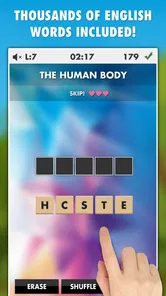

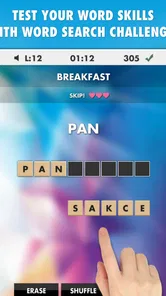
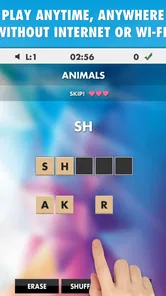
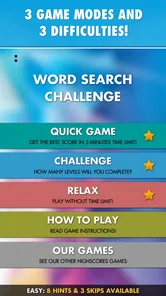
Analysis by Reviewed
I enjoy word games most when they are easy to start and difficult enough to keep my attention for a few minutes. Word Search Challenge PRO takes that simple idea and keeps it focused: find hidden words, exercise your visual attention, and play without needing an internet connection. I found its appeal less about spectacle and more about having a quiet puzzle ready whenever I wanted a short mental break.
This is a word game from LittleBigPlay - Word, Educational & Puzzle Games, aimed at people who like traditional word searches rather than fast action or complicated progression systems. Its store summary highlights offline play without ads, which is important here because the game fits naturally into moments when I do not want interruptions. The title also makes its purpose clear: the challenge is in scanning the letter grid carefully and spotting the answer before my attention drifts.
How the game feels in everyday use
The first thing I noticed is how quickly this kind of game can become part of a routine. I can imagine opening it while waiting for an appointment, during a quiet commute without a connection, or before bed when I want something more active than scrolling but less demanding than a full strategy game. A word search does not ask me to remember a long story, manage resources, or learn a complicated control scheme. I can start concentrating almost immediately.
That simplicity is also the main design trade-off. Players who want a large adventure, character development, competitive events, or a constant stream of new mechanics may find the experience restrained. This is a focused puzzle title, not an all-purpose entertainment package. Its value depends on whether finding words in letter arrangements is satisfying enough to hold your attention over repeated sessions.
The game belongs firmly in the word puzzle space, but it is useful to distinguish it from spelling games that ask you to build words from a rotating set of letters. Here, the mental task is visual search. I am looking across rows, columns, and likely directions, checking whether a familiar sequence is concealed among distracting letters. That makes it a good fit for someone who enjoys observation and patience more than rapid vocabulary production.
Why the offline format matters
Offline access changes when I would use this game. A connection-free puzzle is practical in places where signal is unreliable, such as underground travel, flights, waiting rooms, or areas with limited mobile coverage. It also means I can treat it as a small standalone activity rather than an app that needs to stay connected before it becomes useful.
The ad-free aspect is equally significant for this particular genre. Word searches depend on visual concentration. An interruption in the middle of scanning a dense grid is more disruptive than it would be in a casual game where the action naturally pauses between rounds. Playing without ads gives the experience a calmer rhythm and makes short sessions feel more complete.
More From Our News Desk

 Gmail
GmailGmail in a Busy Inbox: Who Benefits Most?
From first account to crowded workday, Gmail earns its place through dependable search and flexible sorting—but its best fit depends on how much inbox maintenance you can tolerate.

 Prime Video
Switching to Prime Video: What Changes in Your Viewing Routine
Prime Video can make a compelling second home for streaming, but switching means learning a different catalog, rental layer, and route from browsing to playback.

 Universal TV Remote Control
Universal TV Remote Control Works Best as a Reliable Backup
A phone remote earns its place through quick setup and reliable habits. Here is how to get more from Universal TV Remote Control—and where its limits show.

 Weather - By Xiaomi
Weather by Xiaomi Review: Clear at a Glance, Less Clear Up Close
Xiaomi’s weather app makes everyday forecasts quick to scan, but its calm surface can leave useful details and recovery paths harder to find than they should be.

 X
XX Under Pressure: Can It Recover When Posting Goes Wrong?
A resilience-focused review of X, examining setup, mistaken posts, interruptions, weak connections, and the gaps that matter when recovery needs to be dependable.

 Clash of Clans
Clash of Clans Is Won Between the Battles
Its raids are quick; its community is a long-term project of coordination, teaching, rivalry, and shared responsibility—with all the friction that entails.
Latest News



There is a practical habit that helps me get more from it: I use a short, deliberate session rather than opening it with the expectation of endless entertainment. I choose a quiet moment, focus on the grid, and stop when the activity begins to feel repetitive. That approach suits the game better than treating it like a large content-driven title.
Speed expectations on older phones
The listed minimum operating-system requirement is Android 2.3, an unusually broad level of compatibility by modern standards. I would not interpret that as a promise that every old handset will feel equally comfortable, but it does suggest that the game is designed for a wide range of Android devices rather than only recent hardware. For a lightweight word-search format, that is encouraging.
In practical terms, I would expect the basic interaction to feel direct on a suitable device: open the game, inspect the puzzle, and draw attention toward the words without waiting for a large online service or a demanding visual scene. The format itself does not call for intensive graphics. Still, perceived speed is not only about processing power. A small or dim display can make scanning feel slower because I need more time to distinguish letters and trace a word accurately.
My advice is to judge the experience by the screen as much as by the processor. On a compact phone, zooming into a puzzle is not necessarily available or convenient, so clear eyesight and comfortable brightness matter. A larger display may make the same puzzle feel easier because I can compare more of the grid at once. That is a user-experience advantage, even when the game is technically running perfectly.
What happens during longer or heavier sessions
The most demanding moment for me is not a dramatic loading sequence; it is sustained visual concentration. After several puzzles, I can start scanning carelessly, missing obvious words because the letters have blurred into one pattern. This is where the game’s simplicity becomes a test of attention. Taking a brief pause is more useful than rushing, especially when I am playing on a small screen.
Repeated use also exposes the limits of a narrow puzzle concept. If I want a game that constantly introduces new rules, a word search may eventually feel familiar. That does not make it poor at its job, but it does mean the best audience is someone who enjoys the core activity itself. I would recommend it for short breaks and relaxed practice, while a player seeking deep long-term progression should compare it with a larger puzzle collection.
One useful way to make sessions less tiring is to change the way I search. Instead of sweeping randomly across every row, I first look for unusual letter combinations or the first letter of a target word, then check likely directions. This reduces wasted eye movement. It is a small technique, but it makes a difference when the grid feels crowded and helps turn the game from passive scanning into a repeatable method.
Another practical tip is to avoid playing with the phone held too close to my face. A comfortable viewing distance makes it easier to recognize patterns and reduces the temptation to tap or drag hurriedly. If a word seems impossible to find, I stop and reset my gaze rather than assuming the puzzle is unfair. Often the problem is simply that I have been staring at the same region for too long.
Reliability and recovery between sessions
For a game centered on self-contained word puzzles, reliability means being ready when I need it and not making a short session feel dependent on outside services. The offline design supports that use case well. I can approach it as a dependable pocket puzzle rather than something tied to a live connection.
Recovery matters too. If I leave the game to answer a message or switch to another app, I want to return without losing the purpose of the session. A simple title has an advantage here because there are fewer systems competing for attention. I can come back and continue thinking about the current grid instead of reconstructing a complicated game state.
I would still keep expectations sensible. No app should be judged as completely immune to interruptions, and older Android devices can behave differently depending on available memory and what else is running. The game’s modest format should reduce the chance of it feeling demanding, but I would close other heavy apps first if my phone is already struggling. That is a general device-care step rather than a claim about a specific fault.
The ad-free offline approach also improves recovery from a practical point of view. There is no need to wait for an advertisement to finish before returning to the puzzle’s mental flow. For me, that makes it easier to use the game in small fragments: a few minutes now, another short session later, without feeling that the surrounding interface is taking over.
Compatibility, cost, and who should install it
Word Search Challenge PRO is listed for Everyone, so its concept is approachable for a broad audience. I can see it working for adults who want a quiet distraction, older players who prefer familiar word activities, and younger users who already enjoy finding patterns. The age classification does not mean every puzzle will be equally easy, but the basic interaction is accessible because it relies on recognizing and locating words rather than mastering complex controls.
The listed price is $0.49. That makes the purchase decision relatively simple for someone specifically looking for an ad-free offline word search. I would think of it as paying a small amount for a focused utility-like game rather than buying a large entertainment system. The value is strongest when I know I will actually use this format during offline breaks.
The game has reached more than ten thousand installs and carries an average rating of 4.8 from roughly ninety ratings. Those figures suggest a positive reception among the people who chose to rate it, while the relatively small rating pool means I would not treat the score as a universal guarantee. I see it as a helpful signal that the basic proposition works for its intended audience, not as proof that every player will want the same level of variety.
Its compatibility is particularly interesting for owners of older Android phones. A minimum requirement reaching Android 2.3 gives the title a much wider potential device range than many current games. If I were installing it on an old handset, I would make sure the display remains readable and that the phone has enough free space for normal operation. The game may be technically compatible while still being less comfortable on a tiny, low-resolution screen.
People who should skip it are easy to identify. If I want online competition, social features, animated worlds, daily events, or a large progression system, this is probably too narrow. I would also choose a different word game if my main goal were learning definitions, improving spelling through feedback, or building words from clues. A conventional crossword or vocabulary trainer may offer more depth in those areas.
How it compares with familiar alternatives
Compared with a paper word-search book, this game is more convenient because it travels with the phone and does not require a pen. The trade-off is that paper can feel more tactile and may offer a larger collection in one place. I prefer the app when I want something immediately available and quiet; I prefer paper when I want to disconnect from screens completely.
Compared with ad-supported free word-search apps, the paid model has a clear advantage for concentration. I do not have to trade attention for access during a puzzle. The disadvantage is that I am choosing a more contained product rather than a free app that may offer a wider stream of content or more visible progression. For me, the right choice depends on whether interruption-free play is worth more than a larger feature set.
Compared with crossword games, the mental demand is different. Crosswords ask me to retrieve information from clues and deal with uncertainty in spelling or meaning. This title is more visual and immediate: I am hunting for patterns already represented in the grid. When I am tired, that can be more relaxing. When I want to stretch vocabulary or general knowledge, a crossword is likely the better tool.
Compared with word-building games, the pace is gentler. There is less pressure to invent words quickly, but also less opportunity to experiment with language. That makes this game suitable for a calm break, while a timed word-building alternative may be more exciting for someone who enjoys competition and rapid decisions.
Small habits that improve the experience
I get better results when I hold the phone steadily and use a consistent visual route through the puzzle. I might inspect horizontal lines first, then vertical ones, and finally diagonals. This approach prevents me from repeatedly checking the same area and gives the session a structure. It is especially useful when I am playing without sound or other distractions and want the task to feel meditative rather than frustrating.
I also avoid assuming that the longest-looking word is the hardest target. Short words can hide more effectively because they occur in many places and blend into surrounding letters. Searching for distinctive letter pairs before scanning for lengthier targets is often a better strategy. This is the kind of small observation that makes repeated play more satisfying: I am improving my method, not merely waiting to notice an answer.
For families, I would use it as a shared observation activity rather than present it as a formal study tool. One person can call out a target while another searches, then they can switch roles. Because the game is simple and suitable for Everyone, it can support a relaxed joint activity, although I would not confuse that with a structured educational curriculum.
For travel, I would open it before entering a place where connectivity may disappear, simply to make sure the game is ready. The offline design is most valuable when planned around real interruptions: a delayed train, a waiting room, or a quiet evening away from reliable service. In those situations, the game feels more useful than an app that only becomes functional after loading online content.
Where the experience may fall short
The biggest limitation is the same feature that makes the game approachable: the central idea stays narrow. If I play for long stretches every day, I may want more variation than a focused word-search title can provide. Without a broader puzzle ecosystem, the experience depends heavily on how much I enjoy repeating the search process.
Visual comfort can also become a real issue. A dense grid on a small screen asks my eyes to do more work than a printed page or a tablet-sized display. Players with eyesight difficulties may prefer a larger device or a different word game with more adjustable presentation. I would not buy it solely because it runs on an old phone; compatibility and comfort are separate questions.
The low price removes much of the financial hesitation, but it also means I should buy with the right expectations. I am not paying for a broad suite of learning tools or a constantly changing online service. I am paying for a compact, ad-free way to play word searches offline. That is a fair proposition, but only if the core puzzle is genuinely my kind of relaxation.
My performance verdict
After considering how the game fits into real use, I see Word Search Challenge PRO as a deliberately modest title with a clear purpose. Its lightweight word-search format should suit short sessions, older Android hardware, and offline situations better than visually demanding alternatives. The absence of ads is particularly valuable because it protects the concentration that this puzzle depends on.
I would recommend it to someone who wants a straightforward offline word game that can be opened without a complicated setup and enjoyed in small pieces. It is a sensible choice for travel, waiting, quiet breaks, and players who prefer visual searching to clues or timed word construction. The positive average rating of 4.8 and its established install base provide encouraging context, while the limited number of ratings means I would still base the final decision on personal taste.
I would skip it if I need social competition, extensive progression, lessons, or a constantly changing set of mechanics. In that case, a fuller puzzle collection or a vocabulary-focused alternative would offer more reasons to return. But for its intended role, the game is easy to understand and pleasantly focused. My recommendation is to choose it for calm, interruption-free word searching, not for a feature-heavy gaming experience.
Released on July 7, 2020, it has the kind of straightforward identity that does not need a modern presentation to explain itself. The developer, LittleBigPlay - Word, Educational & Puzzle Games, has positioned it as a compact word challenge, and that remains the fairest way to judge it. If finding hidden words is already an activity I enjoy, the low-cost offline format makes sense; if I need novelty above all else, I would look elsewhere.
Word Search Challenge PRO Frequently Asked Questions
What is Word Search Challenge PRO?
Word Search Challenge PRO is a word puzzle game focused on finding hidden words in letter grids. After installing it, players can scan each board horizontally, vertically, and diagonally to locate the required words. It is designed for casual play, vocabulary practice, and brain-training sessions, with progressively more challenging puzzles that can be enjoyed in short sessions or longer play periods.
How does the gameplay work in Word Search Challenge PRO?
Each puzzle presents a grid filled with letters and a list of words to find. You select a word by dragging across its letters, and correctly identified words are marked on the board. The puzzles generally become more demanding as you progress, using larger grids, more words, or less obvious placements. Careful observation and familiarity with common word patterns are helpful.
Does Word Search Challenge PRO work offline?
Word Search Challenge PRO may be suitable for playing without a continuous internet connection, which is convenient for travel, commuting, or areas with limited coverage. However, certain features can depend on the version installed and may require connectivity, including advertisements, updates, analytics, or external services. It is best to open the game once online after installation and test the specific functions you intend to use.
Is Word Search Challenge PRO free to download and play?
The availability and pricing of Word Search Challenge PRO can vary between Android and iOS, as well as by region and store listing. A free download does not always mean that every feature is completely free, since some versions may include advertising, optional purchases, or premium content. Before installing, review the official store page for current pricing, permissions, subscriptions, and in-app purchase details.
Who would enjoy Word Search Challenge PRO?
Word Search Challenge PRO is a good choice for players who enjoy relaxed puzzle games, word discovery, and simple touch controls. It can appeal to both beginners and experienced word-search fans because the basic rules are easy to understand while later puzzles can require more concentration. It may also be useful for short mental breaks, vocabulary practice, or screen time that is less action-oriented.
Pros
- Works offline
- making it convenient for travel or areas with limited connectivity.
- Simple controls make it accessible for casual players of most ages.
- Short puzzles are ideal for quick gaming sessions during spare moments.
- Multiple word-search boards help keep the gameplay varied over time.
- The PRO version offers a cleaner experience with fewer interruptions.
Cons
- Some puzzles may feel repetitive after extended play sessions.
- Difficulty progression can be uneven between individual boards.
- Small letters may be harder to read on compact phone screens.
- The game offers limited variety beyond traditional word-search puzzles.
- Players seeking competitive multiplayer features may find it too basic.











