

Word Relax: Word Puzzle Games
- 1.17K
- 4.8
- Installs
- 100.00K
- Price
- Free

Screenshots
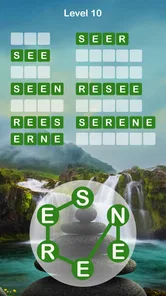
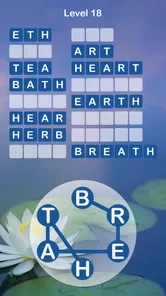
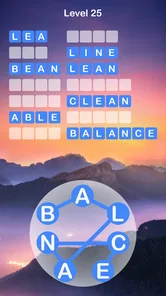
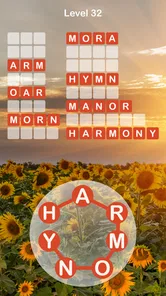
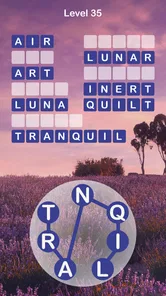
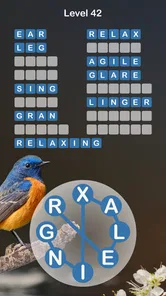
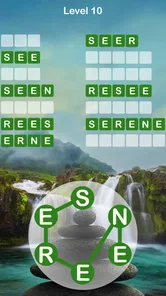
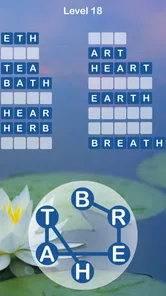
Analysis by Reviewed
I usually know within the first few minutes whether a word game is going to become a useful little habit or disappear from my phone. Word Relax: Word Puzzle Games made a good first impression because it keeps the basic idea familiar: connect letters, scramble possibilities in your head, and look for a word that fits. It is a free word game from MASTERMIND WORD GAMES, aimed at Everyone, and its appeal is less about pressure than about giving your attention somewhere calm to land.
That does not mean every player will find it equally satisfying. If you want a competitive word ladder, a strict daily challenge, or a large social component, this may feel too gentle. I see it more as a casual puzzle companion for short breaks, quiet evenings, and those moments when I want to exercise vocabulary without opening a demanding strategy game. The average rating is 4.8 from around 7 thousand ratings, while the game has passed 100 thousand installs, so there is clearly a sizeable audience for this relaxed approach.
What the first few minutes feel like
My advice to a first-time player is to begin without trying to solve everything instantly. The opening experience is easiest when you treat each puzzle as a small exploration rather than a test of intelligence. Look at the available letters, form the obvious short words first, and let those successes reveal how the puzzle wants you to think. The satisfaction comes from gradually seeing the board more clearly, not from racing through it.
The “relax” part of the design is important to understand. This is not the same experience as a timed anagram contest where every second feels expensive. The slower rhythm gives me room to try a word, reconsider a letter, and notice a less obvious combination. That makes it suitable for a coffee break or a few minutes before bed, especially when I want something more active than scrolling but less intense than a competitive game.
At the same time, familiar word-game mechanics can create a false expectation. Players coming from crossword apps may expect clues. Players coming from classic word searches may expect a fixed grid filled with hidden answers. Players coming from competitive anagram games may expect rankings or a countdown. Word Relax sits closer to the connect-and-scramble side of the word-puzzle family, so the main challenge is recognizing possible combinations and deciding where to focus next.
I found that distinction useful because it changes how I judge a session. A successful round is not necessarily one where I discover every possibility immediately. It can simply be the moment when a difficult arrangement suddenly becomes readable. That small mental shift is the strongest reason to keep playing: the game turns a few spare minutes into a compact vocabulary exercise without asking me to prepare or learn complicated controls.
Starting without overthinking the interface
The best first action is wonderfully simple: inspect the letters, then connect or arrange the ones that suggest an obvious word. I would not begin by hunting for an obscure answer. Start with common words and short combinations, because they help you understand the relationship between the letters and the puzzle’s expected input. Once that pattern feels natural, longer or less familiar answers become easier to approach.
More From Our News Desk

 Gmail
GmailGmail in a Busy Inbox: Who Benefits Most?
From first account to crowded workday, Gmail earns its place through dependable search and flexible sorting—but its best fit depends on how much inbox maintenance you can tolerate.

 Prime Video
Switching to Prime Video: What Changes in Your Viewing Routine
Prime Video can make a compelling second home for streaming, but switching means learning a different catalog, rental layer, and route from browsing to playback.

 Universal TV Remote Control
Universal TV Remote Control Works Best as a Reliable Backup
A phone remote earns its place through quick setup and reliable habits. Here is how to get more from Universal TV Remote Control—and where its limits show.

 Weather - By Xiaomi
Weather by Xiaomi Review: Clear at a Glance, Less Clear Up Close
Xiaomi’s weather app makes everyday forecasts quick to scan, but its calm surface can leave useful details and recovery paths harder to find than they should be.

 X
XX Under Pressure: Can It Recover When Posting Goes Wrong?
A resilience-focused review of X, examining setup, mistaken posts, interruptions, weak connections, and the gaps that matter when recovery needs to be dependable.

 Clash of Clans
Clash of Clans Is Won Between the Battles
Its raids are quick; its community is a long-term project of coordination, teaching, rivalry, and shared responsibility—with all the friction that entails.
Latest News



One useful habit is to separate recognition from guessing. First, scan for familiar beginnings and endings. Then test whether the remaining letters can form a complete word. This prevents the common mistake of repeatedly tapping random combinations and assuming the puzzle is being unhelpful. When I slow down and group letters mentally, I make fewer wasted attempts and notice patterns that are easy to miss during a hurried search.
Another practical tip is to read the available letters in more than one order. My first scan is usually left to right, but a second scan focused on common word endings often reveals a different route. Letters that look unpromising at the start can become useful once I imagine them at the end of a word. This is a small technique, but it makes the game feel more like deliberate solving and less like blindly mixing tiles.
What counts as a meaningful first success
For a new player, the first meaningful success is not simply completing a word. It is understanding why the word works. Once I recognize that the available letters can be rearranged or connected in a particular way, I can apply the same reasoning to the next puzzle. That is the point where Word Relax stops feeling like a collection of taps and starts feeling like a repeatable mental routine.
If you get stuck early, do not assume you have missed a complicated rule. Recheck the letters, try a different order, and consider ordinary words before unusual vocabulary. The game’s relaxed character works best when I allow myself a pause. A few seconds away from the screen can be surprisingly helpful because I return with a less fixed idea of what the answer “should” be.
This is also where the game can work well for families. The Everyone age rating makes it approachable for a broad audience, and the basic word-solving idea is easy to explain without a long tutorial. A parent and child can look at the same puzzle and suggest different possibilities, while a solo player can use the same process as a quiet vocabulary warm-up. I would still choose another title for children who need a highly guided learning program, but for informal word play, the low barrier is a strength.
How to build a comfortable playing routine
After the first few successful answers, I recommend setting a small personal goal instead of trying to turn the game into a marathon. I might play until I solve one puzzle that initially looked awkward, then stop. That approach preserves the relaxing quality and gives each session a clear finish. It also works better for people who want a short break rather than another endless feed competing for attention.
A realistic everyday use case is a commute or waiting room. I can open the game, solve a few word puzzles, and put the phone away without needing to remember a complicated story or manage a team. The same quality is useful during an afternoon slump: the puzzles require enough concentration to interrupt passive browsing, but the familiar word format does not demand the full attention of a strategy or action game.
There is a subtle trade-off here. A calm pace is welcoming, but players who enjoy pressure may eventually want more urgency. If your favorite word games are built around beating a clock, climbing a leaderboard, or competing directly with friends, Word Relax may not provide the tension you are looking for. I would choose a competitive alternative in that situation. This game is better when the reward is the act of noticing and solving, not proving that you are faster than someone else.
The game’s free price makes trying it straightforward, although in-app purchases range from $0.99 to $49.99 per item. I would approach those purchases carefully and decide first whether the basic loop genuinely fits my routine. A free download is useful for testing the experience, but the presence of optional spending means it is worth keeping an eye on purchase prompts, particularly if the device is shared with younger players.
Where new players can become confused
The most likely confusion is assuming that every possible word will be equally important. In a word puzzle, I naturally want to enter every word I can see, but the game’s intended progress may depend on finding particular solutions rather than exhausting the language. When an obvious word does not seem to move things forward, I stop repeating it and search for another arrangement instead.
Another source of friction is vocabulary confidence. A word can look wrong simply because I have not used it recently, while a familiar-looking combination may fail because its letters do not fit the puzzle’s expected answer. I find it helpful to treat each failed attempt as information about the structure, not as a personal mistake. That mindset keeps the relaxing tone intact and makes experimentation more productive.
Touch controls can also make a correct idea feel incorrect if my gesture is rushed. I get better results when I make deliberate connections and check the full sequence before releasing. If a word does not register, I first repeat the action slowly rather than immediately deciding that the answer is invalid. This is a small but important first-use lesson: the game rewards calm input as much as calm thinking.
Players may also wonder whether the title is suitable for serious vocabulary training. My answer is qualified. It can encourage pattern recognition, spelling awareness, and flexible thinking, but I would not treat it as a structured language course. Someone learning a new language may enjoy the word practice, yet they should use a dedicated study app for pronunciation, grammar, and systematic vocabulary review. Word Relax is a puzzle first, and its educational value comes naturally from solving.
Small techniques that make difficult puzzles friendlier
When I reach a stubborn arrangement, I use a three-pass method. On the first pass, I search for the most familiar short words. On the second, I look for common prefixes, suffixes, and repeated letter patterns. On the third, I stop staring at the whole group and focus on one unusual letter, asking where it could plausibly sit. This is more reliable than shuffling everything mentally at once.
A second technique is to change the length of my guesses. If I keep searching only for long words, I can miss a short answer that unlocks the next useful direction. If I focus only on tiny words, I may never notice the larger combination the puzzle is encouraging. Alternating between lengths keeps my attention flexible and helps prevent one unproductive theory from taking over the round.
I also recommend using the game as a reset rather than a reward that must be earned. Ten quiet minutes can be enough to break a cycle of distracted phone use. Because the central activity is visual and linguistic, it gives the mind a defined problem to hold. That is a more specific benefit than simply calling the game “relaxing”: it offers a gentle task with a clear boundary, which is why I find it useful between demanding activities.
Who should play it and who should skip it
I would recommend Word Relax to someone who likes anagrams, casual word searches, and low-pressure puzzle sessions. It is particularly suitable if you want a game that can be understood quickly and played in short bursts. The developer, MASTERMIND WORD GAMES, has positioned it as a straightforward word experience, and the current version, 2.2.4, keeps that identity clear rather than trying to turn the game into a broad entertainment platform.
It is also a good fit for players who enjoy solving alone. You do not need to coordinate with a group or learn a complicated competitive system before the basic activity becomes enjoyable. A person who likes quietly testing vocabulary, spotting patterns, and improving their own solving habits will probably get more from it than someone who needs constant novelty or social interaction.
I would skip it if your priority is a full crossword experience with detailed clues, a language-learning curriculum, or a head-to-head challenge. Those alternatives are better when the surrounding structure matters as much as the word itself. I would also be cautious about recommending it to anyone who dislikes repetition in casual puzzle games. The core loop is intentionally focused, and that focus can feel comforting to one player but limited to another.
Device compatibility is broad enough for many older phones, since it requires Android 7.0 or later. That is helpful if you are installing it on a device that is not running the newest operating system. Still, I would judge the experience on your particular phone rather than assuming an older device will feel identical to a newer one. Word games are generally light in concept, but responsiveness and screen comfort still affect how pleasant repeated letter connections feel.
How it compares with familiar alternatives
Compared with crossword apps, this game asks me to work from letters and combinations rather than interpret layered clues. That makes it quicker to enter and easier to pick up during a short pause, but it offers less of the rich general-knowledge satisfaction that a well-made crossword can provide. Compared with a traditional word search, it feels more active because I am constructing possibilities instead of simply scanning a fixed block for hidden terms.
Compared with competitive anagram games, Word Relax trades urgency for accessibility. I do not choose it when I want adrenaline or a visible contest. I choose it when I want the same satisfying vocabulary spark without the feeling that a mistake has ruined the session. That trade-off is the heart of the product, and understanding it will tell you quickly whether it belongs on your phone.
One advantage over more elaborate puzzle games is that the learning curve stays close to the activity itself. I do not have to memorize a large set of special rules before I can enjoy a round. The disadvantage is that players who need a strong sense of progression may find the experience less motivating than a title with elaborate stages, collections, or competitive rewards. Neither approach is automatically better; they serve different moods.
My final take after settling into the routine
Word Relax: Word Puzzle Games succeeds when I use it for what it is: a calm, focused word game that turns spare minutes into small acts of discovery. Its free entry point, Everyone rating, familiar controls, and gentle solving rhythm make the first session reassuring. I can begin with an obvious word, learn the puzzle’s logic through a few attempts, and gradually develop better scanning habits without feeling pushed into a race.
The limitations are just as clear. The central loop may not be enough for players who want social competition, demanding clues, formal language lessons, or constant mechanical variety. In-app purchases also mean I would not hand the phone to a child without considering purchase controls first. Those points do not ruin the experience, but they matter when deciding whether this is the right kind of word game for your household and playing style.
My practical recommendation is to install it for a short, intentional test. Play a few puzzles slowly, use the three-pass search method when you get stuck, and notice whether the process leaves you refreshed or restless. If you enjoy the quiet moment when scattered letters suddenly form a clear answer, you will probably understand the appeal quickly. The best reason to keep it is not endless content or competition, but the dependable little pause it creates in an otherwise busy day.
Word Relax: Word Puzzle Games Frequently Asked Questions
Who developed Word Relax: Word Puzzle Games?
Word Relax: Word Puzzle Games is a word game from MASTERMIND WORD GAMES. Its focus is on classic word puzzles, with a relaxed style built around connecting and unscrambling letters. If you enjoy casual games that let you work through vocabulary challenges at your own pace, its straightforward concept may be a good fit. The game is free to download, with optional in-app purchases available.
What age group is Word Relax: Word Puzzle Games intended for?
Word Relax: Word Puzzle Games has an Everyone content rating, so its store age classification is intended to be broadly accessible. In practice, children will still need enough reading and spelling ability to enjoy word puzzles, and difficulty can vary from one challenge to another. Parents may also want to check the game’s purchase settings before handing over a device, especially if a child can access in-app purchases.
What is Word Relax: Word Puzzle Games?
Word Relax: Word Puzzle Games is a casual word game designed for players who enjoy solving anagrams, finding hidden words, and completing relaxing vocabulary challenges. The game generally presents a group of letters that must be combined into valid words, with levels gradually becoming more demanding. Its simple controls and short rounds make it suitable for quick sessions, whether you want to play during a break or spend longer improving your word skills.
How do you play Word Relax: Word Puzzle Games?
Gameplay is based on discovering words from the letters shown on the screen. Depending on the level, you may need to connect, swipe, or tap letters in the correct order to complete a crossword-style layout or solve a word challenge. Correct answers unlock progress, while bonus words can often provide additional rewards. If you get stuck, the available hint options may help, although some assistance can be limited by in-game resources or advertisements.
Is Word Relax: Word Puzzle Games free to download and play?
Word Relax: Word Puzzle Games can generally be downloaded and played without an upfront purchase, making it accessible to casual players. However, free gameplay may include advertising, optional purchases, or both. These extras can provide hints, remove advertisements, or speed up progression, but they are not necessarily required to enjoy the basic puzzles. The game is free, and its optional in-app purchases range from $0.99 to $49.99 per item.
Pros
- Relaxing gameplay suitable for short breaks
- Simple controls make it easy for beginners to start
- Helpful hints can prevent frustrating dead ends
- Offline play is convenient when traveling
- Gentle pace makes it suitable for casual players
Cons
- Some levels may feel repetitive after extended play
- Hints and extra help may be limited without rewards or purchases
- Difficulty can vary noticeably between puzzle sets
- Ads may interrupt the experience between rounds
- Players seeking competitive features may find it too basic











