

Word Puzzle - Crossword Games
- 128.00
- 4.5
- Installs
- 100.00K
- Price
- Free
Screenshots
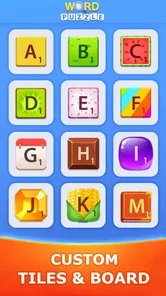
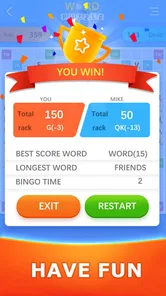
Analysis by Reviewed
I spent time with Word Puzzle - Crossword Games as a casual word game rather than treating it like a quick time-filler, and that distinction matters. Its appeal is straightforward: it gives me crossword-style challenges that I can approach at my own pace, whether I want a quiet solo session or a small word workout with friends. The game comes from People Lovin Games, is free to start, and is aimed at Everyone, so it is easy to imagine it on a family tablet, a commuter’s phone, or a device shared around the house.
What makes it worth considering is the combination of familiar crossword thinking and offline play. I do not need to plan a session around a connection, which makes it useful when travelling, waiting somewhere, or trying to reduce distractions. At the same time, it is not a full replacement for every crossword app. Players who want elaborate themed puzzles, a deep learning system, or a highly customizable interface may find its simpler approach limiting. My overall impression is positive, especially for people who want accessible word practice without turning it into a demanding daily commitment.
How the game feels to read, navigate, and play
I look at the reading and navigation experience as part of the puzzle, not just the packaging around it: clear clue-following and deliberate cell selection can make a short session feel relaxed, while a cramped screen can make the same task tiring. In the next section, I’ll focus on how a simple routine—starting with the answers I know and letting crossings guide the rest—can keep play manageable.
A familiar word-game layout
The crossword format gives the game an immediate advantage: I already understand the basic relationship between clues, letter spaces, and crossing answers. That reduces the amount of time spent learning menus or complicated rules. Instead of asking me to master a new game system, it lets the vocabulary itself provide the challenge. For a casual player, that is a sensible design choice.
Navigation feels most comfortable when I treat each puzzle as a short sequence of decisions. I read a clue, select the relevant space, enter a possible answer, and use crossing letters to test whether my guess makes sense. This creates a natural rhythm that works well on a phone. I can make progress in small bursts rather than needing a long uninterrupted session.
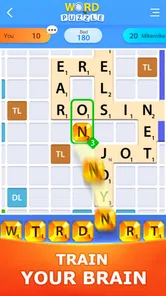
The visual demands are still important. Crossword play depends on seeing the grid, distinguishing selected spaces, and reading clues without losing track of where I am. On a compact screen, that can become more tiring than it would be on a tablet. I found that the game is best suited to a display where I can hold the device comfortably and avoid rushing through the clues.
Readability is part of the challenge
A crossword should make me think about words, not fight the interface. With this type of game, readability affects the experience in several ways: clue text must be clear, letters must remain easy to distinguish, and the active cell needs to stand out from the rest of the grid. When those elements are comfortable, the game feels calm and focused. When they are cramped, even a simple clue can feel unnecessarily frustrating.
More From Our News Desk

 Gmail
GmailGmail in a Busy Inbox: Who Benefits Most?
From first account to crowded workday, Gmail earns its place through dependable search and flexible sorting—but its best fit depends on how much inbox maintenance you can tolerate.

 Prime Video
Switching to Prime Video: What Changes in Your Viewing Routine
Prime Video can make a compelling second home for streaming, but switching means learning a different catalog, rental layer, and route from browsing to playback.

 Universal TV Remote Control
Universal TV Remote Control Works Best as a Reliable Backup
A phone remote earns its place through quick setup and reliable habits. Here is how to get more from Universal TV Remote Control—and where its limits show.

 Weather - By Xiaomi
Weather by Xiaomi Review: Clear at a Glance, Less Clear Up Close
Xiaomi’s weather app makes everyday forecasts quick to scan, but its calm surface can leave useful details and recovery paths harder to find than they should be.

 X
XX Under Pressure: Can It Recover When Posting Goes Wrong?
A resilience-focused review of X, examining setup, mistaken posts, interruptions, weak connections, and the gaps that matter when recovery needs to be dependable.

 Clash of Clans
Clash of Clans Is Won Between the Battles
Its raids are quick; its community is a long-term project of coordination, teaching, rivalry, and shared responsibility—with all the friction that entails.
Latest News



I would recommend trying it on the device you plan to use most often before deciding whether it is a good fit. A larger phone or tablet can make the grid easier to inspect, particularly for players who prefer bigger text or who tire quickly during close-up reading. The Everyone age rating makes it suitable for a broad audience, but an age label does not automatically mean every screen will be equally comfortable for every person.
One useful habit is to avoid filling answers as quickly as possible. I get more value when I scan the whole puzzle first, enter the clues I know, and then return to the uncertain spaces. The crossing letters gradually narrow the choices, which reduces visual backtracking and makes the puzzle easier to organize mentally. This is a small workflow change, but it makes the game feel less scattered.
Offline play changes where it fits
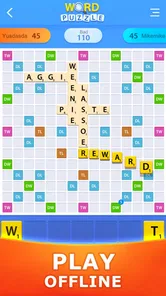
The offline element is one of the most practical parts of the experience. I can use a crossword game in places where online alternatives may be inconvenient, such as during a flight, in an area with unreliable reception, or while conserving mobile data. It also makes the game feel less dependent on notifications, live events, or a constant stream of new content.
That strength comes with a trade-off. Offline play is excellent for self-contained sessions, but it does not automatically provide the social energy of a live word game. If what I want is a competitive match with immediate reactions, rankings, or a large online community, I would look elsewhere. Here, the emphasis is on the puzzle itself and on sharing the activity with friends in a more informal way.
Playing with friends without making it complicated
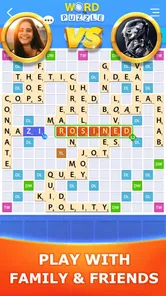
The game is presented as something that can be played with friends, which gives the crossword format a useful second role. Instead of measuring the experience only by personal speed, I can use a puzzle as a cooperative conversation starter or a friendly challenge. This works particularly well when one person is strong at vocabulary and another is better at spotting patterns.
A realistic use case would be a family sitting together after dinner with one phone or tablet available. One person reads a clue aloud, another suggests an answer, and someone else checks how the crossing letters fit. That arrangement can make the game more inclusive than a strictly individual timed contest because players can contribute in different ways. A person who does not enjoy entering letters may still be excellent at solving clues verbally.
For a more focused group session, I would suggest agreeing in advance on whether people are solving together or taking turns. Crossword play can become awkward when several people tap the same screen or call out answers at once. The game supports the social idea, but the group still needs to create its own structure.
Useful habits for getting unstuck
The most effective approach I found is to separate knowledge from uncertainty. I start with short, familiar clues, then use the resulting letters to revisit longer or less obvious entries. This prevents one difficult answer from dominating the entire session. It also gives players with different vocabulary levels a way to participate without feeling that they must solve the hardest clue immediately.
Another practical tip is to treat a wrong guess as information rather than failure. If a word does not agree with several crossings, I remove it and keep the confirmed letters in mind. That is especially helpful for players who become discouraged by repeated corrections. The game is more enjoyable when I use the grid as a reasoning tool instead of relying on instant recall.
Players who are practising English vocabulary may also benefit from pausing after a puzzle to review unfamiliar words. The game itself is not a complete language course, but crossword clues naturally expose me to spelling, synonyms, and word relationships. I would keep a short note of words that were new to me, then look them up separately when I had time. That turns a casual round into a modest learning routine without pretending the app replaces structured study.
Motor and sensory considerations
From a motor perspective, crossword interaction is relatively simple compared with games that demand rapid swipes, repeated tapping, or precise movement. The main physical tasks are selecting cells and entering letters. That makes the format potentially comfortable for players who prefer slower, deliberate interaction. It is also easier to pause between actions than in a real-time game.
However, simple controls do not remove every motor barrier. Small grid cells can be difficult to select accurately, especially when the device is held in one hand or when finger movement is less precise. I found that supporting the device with both hands, using a stable surface, and solving at a slower pace can make the experience less tiring. Players who experience discomfort from repeated tapping should treat short sessions as a sensible limit rather than forcing a long puzzle.
The sensory side is similarly mixed. Word games are quieter and less visually aggressive than many action titles, which can make them appealing to people who prefer a calmer screen. The concentration is directed toward text and spatial arrangement instead of rapid animation. Still, anyone sensitive to dense visual patterns may find a crossword grid demanding, particularly when many filled and empty spaces compete for attention.
For players with reading difficulties, the game may be easier when approached collaboratively. A friend can read clues aloud while the player concentrates on choosing letters, or the player can solve verbally while someone else handles the screen. This is one of the strongest inclusive possibilities in the format because it divides the task without taking away the central word-solving experience.
Different abilities, different ways to participate
I would not describe the game as universally accessible, because comfort depends heavily on the player’s vision, motor control, reading preferences, and tolerance for screen-based text. What I can say is that its basic concept allows more than one style of participation. A person can solve independently, think aloud with friends, contribute only to selected clues, or use the game as a relaxed vocabulary exercise.
That flexibility is more meaningful than simply calling the game easy. A beginner can focus on obvious clues and let crossings guide them. An experienced solver can work strategically, looking for patterns and checking how answers interact. A group can share the cognitive load. These options do not require a separate mode or a special rule set; they come from the nature of crossword solving itself.
There is also a useful distinction between access and challenge. A puzzle may be readable and easy to operate while still containing clues that are culturally unfamiliar, linguistically advanced, or simply outside a player’s interests. When I play with someone else, I try to treat those moments as opportunities to discuss the clue rather than as evidence that one person is “bad” at the game. That attitude makes the experience friendlier for mixed-ability groups.
Where the experience can become frustrating
The largest potential barrier is the dependence on text. Players who struggle with small print, dense grids, or clue-heavy interfaces may need a larger display or another person’s help. Crossword games also rely on spelling accuracy, so a player may know the answer but still find entry difficult if letter selection is awkward. That can turn a vocabulary challenge into a coordination problem.
Another limitation is that the game’s simplicity may not satisfy people who need stronger guidance. I prefer discovering answers through crossings, but some players want detailed explanations, hints, progress coaching, or a structured lesson after every mistake. If those features are central to your reason for downloading a word game, a dedicated educational app may be a better choice.
There is also a difference between offline convenience and long-term variety. Offline access makes individual use dependable, but players who expect a constantly changing online service, competitive events, or a large social layer may find the experience quieter than expected. The game is strongest when I want a contained puzzle session, not when I want a constantly evolving multiplayer platform.
The free price makes trying it low-risk, although optional in-app purchases range from ninety-nine cents to one dollar and ninety-nine cents per item. I would decide in advance whether I am comfortable with optional spending, especially if children use the device. The Everyone rating is reassuring for broad household use, but families should still apply their own rules about purchases and shared devices.
How it compares with familiar alternatives
Compared with a newspaper crossword, this game is more portable and easier to pick up in a short break. I do not need a pen, a printed page, or a flat surface. The digital format also makes it more natural to share around a phone or tablet. The paper version still has advantages for people who enjoy writing by hand, marking possibilities in the margins, or taking a break from screens.
Compared with large online word-game platforms, this title feels more focused. I would choose it when I want offline access and a straightforward crossword routine. I would choose a bigger online alternative when I wanted extensive communities, competitive systems, frequent social interaction, or a wider range of game types. Neither approach is automatically better; they serve different moods.
Compared with language-learning apps, the game offers less structured teaching but more freedom. It can reinforce spelling and vocabulary through repeated exposure, yet it does not replace pronunciation practice, grammar lessons, or a planned curriculum. For a learner, I see it as a useful supplement during downtime rather than the main study tool.
Performance, device choice, and everyday practicality
The current version is 2.7, and the game supports devices running Android 7.1 or later. That gives it a practical place on many older Android phones and tablets, although the actual comfort of play will depend more on screen size and touch accuracy than on the operating system alone. A device that technically runs the game may still be a poor choice if its display makes the grid difficult to read.
I would install it on a phone for short sessions and consider a tablet for regular family use. On a phone, the benefit is immediate availability: I can solve a few clues while waiting for an appointment. On a tablet, the larger workspace is better for group solving and for anyone who finds small letters tiring. This is a clear example of situational access: the same game can feel very different depending on where and how it is used.
Because it is free, the initial decision is easy. I can test the basic experience without committing money, then decide whether the optional purchases add enough value for my habits. Its audience is already substantial, with over one hundred thousand installs and an average rating of four point five from around one thousand one hundred ratings. Those figures suggest that the concept has found a receptive audience, but they do not replace personal testing, especially for players with specific readability or motor needs.
Who should choose it, and who should skip it
I would recommend Word Puzzle - Crossword Games to someone who wants a calm, familiar word activity that works offline and can also become a small group pastime. It is a good match for casual solvers, families, vocabulary enthusiasts, and players who prefer thinking time over quick reflexes. It also suits people who want to turn spare minutes into something more mentally engaging than passive scrolling.
I would be more cautious about recommending it to someone who needs large, highly adjustable text, strong accessibility controls, detailed explanations, or a full language-learning path. I would also point competitive online players toward a different category of word game if live rankings and constant social interaction are essential. The crossword format can be shared with friends, but it should not be mistaken for a feature-rich online competition.
For the best experience, I would use a comfortable screen, solve in short sessions, begin with the clues I know, and invite another person to read or enter answers when the interface becomes physically tiring. Those habits make the game more adaptable without changing what it is. They also help separate a genuine vocabulary challenge from avoidable strain caused by posture, screen size, or hurried tapping.
My inclusive verdict
After using it as both a solo puzzle and a shared activity, I see this game as a modest but useful option in the word category. Its strongest qualities are its familiar crossword structure, offline practicality, low entry cost, and ability to support cooperative solving in an informal way. It does not try to be everything, and that restraint is part of its appeal.
Its inclusive potential comes mainly from flexible participation rather than a long list of specialized controls. I can solve independently, ask someone to read clues, contribute answers verbally, or use a larger device to reduce visual and motor effort. Those possibilities make it friendlier than a fast-paced word game, but they do not eliminate the barriers created by text-heavy screens and small touch targets.
My recommendation is simple: choose it if you want an offline crossword companion that can fit into quiet personal moments or relaxed group play. Try a different option if your priority is advanced accessibility customization, formal vocabulary instruction, or a busy competitive community. For everyone in between, the free download makes experimentation reasonable, and the game earns its place by making word practice feel easy to start without making it completely mindless.
People Lovin Games has kept the idea approachable, and that is why I can imagine returning to it when I want a short mental reset. It is not a groundbreaking word platform, but it does not need to be. As a focused crossword game for Android users on supported devices, Word Puzzle - Crossword Games works best when I accept its boundaries and use its simple format intentionally.
Word Puzzle - Crossword Games Frequently Asked Questions
Who develops Word Puzzle - Crossword Games, and what should I know before installing it?
Word Puzzle - Crossword Games is a word game developed by People Lovin Games. It is free to download, has an Everyone age rating, and supports devices running iOS 7.1 or later. The game has a 4.5 average rating from around 1,100 ratings, giving prospective players a quick sense of its reception before they decide whether it suits them.
What is Word Puzzle - Crossword Games?
Word Puzzle - Crossword Games is a casual vocabulary game built around crossword-style challenges. Players complete grids by connecting or arranging letters to discover hidden words. The app usually starts with simple levels and gradually introduces larger boards, trickier clues, and less common words. It is designed for short play sessions, making it suitable for relaxing at home, during travel, or whenever you want a quick mental workout.
How do you play Word Puzzle - Crossword Games?
Gameplay is straightforward: review the available letters, identify possible words, and enter them into the crossword grid by tapping or swiping across the board. Correct answers reveal parts of the puzzle and help unlock the remaining spaces. When you are stuck, hint options may reveal a letter or assist with the solution. The main challenge is combining vocabulary, spelling, and observation rather than reacting quickly.
Is Word Puzzle - Crossword Games free to download and play?
The game is free to download, and it offers in-app purchases priced from $0.99 to $1.99 per item. Free versions commonly include optional advertisements, hint systems, or in-app purchases for additional coins and other advantages. Before downloading, check the store listing for current pricing, advertising details, and purchase information, especially if children may use the device.
Does Word Puzzle - Crossword Games require an internet connection?
The game is presented as an offline crossword puzzle that you can play with friends, making it convenient for flights, commutes, or areas with unreliable service. However, an internet connection may still be required for advertisements, cloud synchronization, updates, events, or restoring purchases. Offline availability can vary between versions, so it is worth testing the game before relying on it during travel.
Pros
- Relaxing gameplay suitable for short breaks or longer sessions.
- Large variety of crossword puzzles helps prevent repetition.
- Simple controls make it accessible for most players.
- Hints can help when you get stuck on a difficult clue.
- Improves vocabulary while keeping the experience entertaining.
Cons
- Some puzzles may feel too easy for experienced crossword players.
- Hints or extra content may be limited without watching ads.
- A stable internet connection may be needed for certain features.
- Repeated clue styles can make later levels feel predictable.
- Small text may be uncomfortable on phones with compact screens.











