

Word Games: CrossWord & Search
- 20.00
- 4.9
- Installs
- 10.00K
- Price
- Free
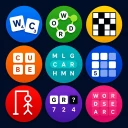
Screenshots
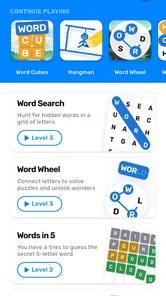
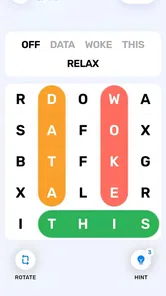
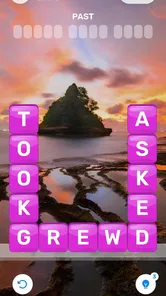
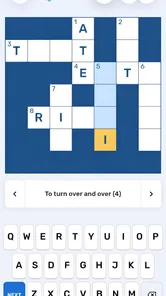
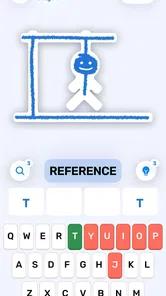
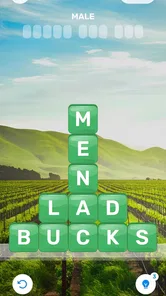
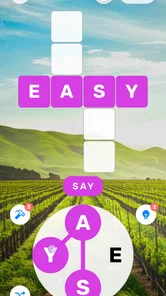
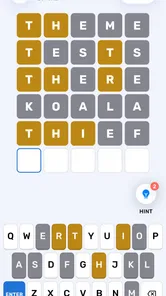
Analysis by Reviewed
I spent time with Word Games: CrossWord & Search as a casual word-game collection, paying particular attention to how comfortably it works for different people and in different situations. It comes from Underwater Games OU, is free to start, and is aimed at Everyone. The basic idea is appealing: instead of committing to one puzzle format, I can move between crossword-style play and word-search challenges when my attention, energy, or available time changes.
That variety is the main reason I would suggest trying it. A crossword can give me a more deliberate session, while a search puzzle feels easier to pick up when I only want a few quiet minutes. The game is available for Android devices running version 7.0 or later, and the current release is 1.75. It has reached over 10 thousand installs and holds a 4.9 average from more than 200 ratings, which suggests that its straightforward approach is resonating with the people who have tried it.
How clearly the game presents its word puzzles
I’ll focus on how the game’s two puzzle styles shape its overall experience, rather than treating variety as a benefit by itself. That distinction matters because switching formats can make a short session easier to sustain, but it also changes what players need from the screen and from their own attention.
Readability and navigation
My first impression was that the collection makes sense as a casual word-game app rather than trying to turn itself into a complicated platform. That matters for players who do not want to learn several layers of menus before reaching a puzzle. The title points clearly toward the two central activities, so I can understand the purpose of the app before spending much time inside it.
For a new player, the most useful habit is to explore each available puzzle style briefly instead of deciding immediately that one format is the whole experience. Crossword play usually rewards patience and clue interpretation, while word searches depend more on visual scanning and pattern recognition. Switching between them gives the app a natural rhythm, especially when one type starts to feel tiring.
I also found that the collection format can reduce the pressure that comes with a single-mode game. If I get stuck on a clue, I can change activities rather than abandoning the session. That is a small design advantage, but it makes a difference for casual players, older family members, or anyone who enjoys words without wanting every play session to feel like a test.
The strongest navigation choice is therefore not a flashy feature but the separation between different kinds of mental work. A person who prefers deduction can spend more time with crosswords. Someone who enjoys finding visual patterns can lean toward searches. The app gives both groups a reason to stay, although the experience will still depend on how clearly the individual puzzle screens present letters and clues on a particular phone.
More From Our News Desk

 Gmail
GmailGmail in a Busy Inbox: Who Benefits Most?
From first account to crowded workday, Gmail earns its place through dependable search and flexible sorting—but its best fit depends on how much inbox maintenance you can tolerate.

 Prime Video
Switching to Prime Video: What Changes in Your Viewing Routine
Prime Video can make a compelling second home for streaming, but switching means learning a different catalog, rental layer, and route from browsing to playback.

 Universal TV Remote Control
Universal TV Remote Control Works Best as a Reliable Backup
A phone remote earns its place through quick setup and reliable habits. Here is how to get more from Universal TV Remote Control—and where its limits show.

 Weather - By Xiaomi
Weather by Xiaomi Review: Clear at a Glance, Less Clear Up Close
Xiaomi’s weather app makes everyday forecasts quick to scan, but its calm surface can leave useful details and recovery paths harder to find than they should be.

 X
XX Under Pressure: Can It Recover When Posting Goes Wrong?
A resilience-focused review of X, examining setup, mistaken posts, interruptions, weak connections, and the gaps that matter when recovery needs to be dependable.

 Clash of Clans
Clash of Clans Is Won Between the Battles
Its raids are quick; its community is a long-term project of coordination, teaching, rivalry, and shared responsibility—with all the friction that entails.
Latest News



Making the screen easier to follow
Readability is especially important in word games because the entire task depends on distinguishing small symbols quickly. I recommend starting with the phone’s own display settings before judging the game. Increasing system text size, using a brighter environment, or adjusting screen contrast can make a longer session more comfortable, though the exact result will vary by device and by how the game lays out its board.
Crossword puzzles can be easier to follow for players who prefer a structured grid and a clue-by-clue approach. Word searches may be more demanding for people who find dense letter arrangements tiring, because the eye has to scan in several directions and keep track of a selected word. That difference is worth considering when choosing a mode for a child, a family member with reduced visual stamina, or a player using a smaller screen.
A practical approach is to hold the phone at a stable distance and avoid playing in glare. I also found it sensible to pause after a few puzzles rather than treating the app like a long reading session. Short breaks help prevent the grid from becoming a blur, and they make mistakes easier to distinguish from genuine uncertainty about a clue.
The game’s free entry is helpful here because I can test those conditions without committing money first. However, free access does not mean every player will find the same level of comfort. Someone who needs very large lettering, strong customization, or highly specialized visual controls should test the actual puzzle screens on their own device before deciding whether it meets their needs.
Motor and sensory considerations
Word games are often less physically demanding than action games, and that is one of this collection’s natural strengths. There is no need for rapid movement or constant reaction timing. I can work through a clue or search for letters at my own pace, which makes the experience suitable for relaxed play and for people who find fast games uncomfortable.
Even so, slower games are not automatically effortless. Selecting letters, moving around a grid, or entering an answer still requires repeated touch interaction. Players with limited finger movement may prefer using one hand, resting the phone on a surface, or playing in short bursts. Those adjustments are simple, but they can prevent the small repeated actions from becoming tiring.
The two puzzle families also create different kinds of sensory demand. A crossword puts more weight on reading clues and remembering possible answers. A word search asks the eyes to inspect a busy field and follow a path across letters. If I am mentally tired, I generally find it easier to choose the format that matches the kind of attention I still have available rather than forcing myself through the same mode.
Sound is not central to the appeal of this app. That can be useful for people who prefer quiet play or who are using a phone in a shared space. It also means the visual puzzle itself carries most of the responsibility for communicating progress. Players who rely heavily on audio feedback may find a word-game collection less comfortable than an app designed around spoken guidance.
For children, the Everyone age rating makes the concept approachable, but I would still introduce it with a short shared session. A parent can see whether the clues feel suitable for the child’s reading level and whether the screen is comfortable to use. The game can support vocabulary practice in an informal way, but I would treat it as entertainment rather than a replacement for structured learning tools.
Situational access in everyday use
This is the kind of game I can imagine using while waiting for an appointment, taking a quiet break, or winding down before bed. A crossword can occupy a longer stretch of attention, while a word search is easier to approach when I do not know exactly how much time I have. That flexibility makes the collection more useful than a single-format title for irregular schedules.
A realistic example is a short commute on public transport. If I have a seat and stable lighting, I can open a puzzle and play without needing sound or a large amount of space. If the vehicle becomes crowded or the lighting changes, I can stop without losing the whole purpose of the session. This is a better fit for fragmented free time than a game that expects continuous concentration.
It can also work well in a shared household. Two people with different preferences can take turns choosing a mode: one may enjoy solving clues, while the other prefers scanning for hidden words. Because the activity is quiet and turn-based in spirit, it is less disruptive than a competitive action game. I would still avoid assuming that every puzzle is equally suitable for every player; reading ability, visual comfort, and patience matter a lot.
Travel brings a more important question: whether the game works in the exact circumstances where I want to use it. I would test it before relying on it for a flight, a trip, or a long period away from home. A player should also check how comfortable the screen is under dim light and whether the phone’s battery situation makes extended play practical. These are everyday considerations, not faults unique to this title, but they affect whether a free game becomes genuinely useful.
The app’s price makes experimentation easy, while optional purchases range from $1.99 to $8.49 per item. I would begin with the free experience and only spend after deciding that the puzzle variety and comfort are worth it. That is particularly important for families, because a low entry cost can still become less simple if several people want different extras.
What may still create barriers
The biggest limitation is that a collection of word puzzles cannot remove the basic demands of word puzzles. Players who struggle with reading clues, spelling, visual scanning, or maintaining attention may still find parts of the experience difficult. The choice between crosswords and searches offers flexibility, but it does not turn either format into a fully adaptable activity for every ability.
I would also be cautious about recommending it to someone who needs explicit accessibility controls as a deciding factor. The game may be comfortable on one phone and less comfortable on another because screen size, display scaling, touch sensitivity, and brightness differ. Anyone who depends on very specific text enlargement, alternative input methods, or strong nonvisual support should test the app directly rather than relying on the general appeal of its category.
Another trade-off is the balance between simplicity and depth. The store summary describes a broad collection of word games, but players looking for a highly specialized crossword tool, a competitive ranking system, or detailed learning analytics may prefer an app built around that single purpose. This title’s appeal is its accessible starting point and variety, not necessarily a deep training program for expert solvers.
In-app purchases are another reason to keep expectations clear. The game is free to start, but optional items cost money. I prefer to decide in advance whether I am comfortable making purchases and to keep the first session focused on judging the core experience. For a child’s device, using the phone’s purchase controls is a sensible precaution, especially when the app is being shared casually within a family.
There is also a social limitation worth mentioning. The collection suits individual play and quiet comparison, but it is not the first choice for someone seeking a loud, multiplayer party experience. If the goal is direct competition with friends, live interaction, or a strong community layer, a different word-game category may fit better. Here, the pleasure comes from solving at a personal pace.
Useful ways to get more from the collection
My first tip is to match the mode to the type of fatigue you are experiencing. When reading clues feels manageable but visual searching feels exhausting, choose a crossword. When you want a more concrete scanning task and do not want to hold several possible answers in your head, try a word search. This simple choice makes the app feel more accommodating without requiring complicated settings.
My second tip is to use a deliberate stopping point. Instead of playing until every puzzle feels difficult, stop when you notice yourself rereading the same clue or losing your place in the grid. Word games can become frustrating when tiredness is mistaken for lack of ability. Returning later often gives a clearer sense of whether a puzzle is genuinely challenging.
My third tip is to treat the app as a vocabulary routine only if you actively review mistakes. Solving a clue and immediately moving on is enjoyable, but pausing to think about unfamiliar words can add learning value. I would keep that process informal: note a word, say it aloud, or use it in a sentence later. The game provides the prompt, while the player supplies the deeper practice.
A fourth useful approach is to test the interface with the phone positioned the way you normally play. Someone using a compact handset, a tablet, or a device with enlarged system text may experience the grid differently. Try both puzzle styles, rotate the device only if the app responds comfortably, and check whether your usual grip makes repeated selections awkward. This short trial is more informative than a general accessibility label.
Finally, I would avoid measuring enjoyment only by speed. The collection works better as a calm mental break than as a race. Taking time with a clue, scanning a search in an organized direction, and switching modes when concentration drops are all valid ways to play. That approach is especially useful for players who want a low-pressure activity rather than another source of performance anxiety.
How it compares with familiar alternatives
Compared with a dedicated crossword app, this game is more appealing if I want variety and less appealing if I want one carefully specialized crossword experience. A single-format crossword title may offer a more focused routine for someone who solves clues every day. This collection is better suited to a player who enjoys crosswords but does not want to be limited to them.
Compared with a dedicated word-search app, the same trade-off appears in reverse. A specialist search game may feel more satisfying to someone who wants to concentrate on visual pattern finding. Here, I gain the ability to change activities when that particular scanning style becomes repetitive. The broader selection is the reason to choose this app, not a promise that every mode will suit every player equally.
Compared with language-learning software, the game is lighter and more recreational. It can encourage spelling awareness and expose me to words, but it does not replace lessons, pronunciation work, or a structured study path. Compared with action-based mobile games, it is calmer and easier to pause, though it may feel too quiet for players who need constant novelty or social competition.
That positioning helps explain its strong appeal. It is not trying to be a classroom, a tournament, or an elaborate puzzle laboratory. It is a free word-game collection for people who want a choice of low-pressure activities. The right comparison is therefore not “Is this the deepest crossword tool?” but “Would I rather have two kinds of word play in one place?” For me, the answer is yes, provided I accept the limits around customization and specialist features.
Who should try it, and who should skip it
I would recommend it to casual players, families looking for quiet shared entertainment, and anyone who likes alternating between clue solving and visual searches. It also makes sense for people who want a game that can be paused easily and played without relying on fast reactions or constant sound. The Everyone rating supports its broad positioning, although individual reading ability and screen comfort still need to be considered.
I would be more selective for expert crossword fans who want a highly focused daily practice, players who require extensive accessibility controls, and people seeking live multiplayer competition. Those users may be happier with a specialist alternative designed around their particular need. The same applies to students wanting measurable language instruction rather than casual vocabulary exposure.
For most other players, the best test is quick and practical: install it, try both central puzzle styles, and see which one remains comfortable after the novelty fades. Pay attention to whether the letters are easy to distinguish, whether touch selections feel manageable, and whether the free experience gives you enough variety to justify continuing. The high average rating is encouraging, but personal fit matters more than a number.
My inclusive verdict
I came away viewing this as a thoughtfully simple word-game option rather than an all-purpose solution for every player. Its greatest strength is the choice between different kinds of concentration. That choice supports varied ages, energy levels, and everyday contexts, and it lets me adapt the session without leaving the app.
Its weaknesses are equally clear: word puzzles still depend on reading and visual interaction, the experience may not satisfy specialist players, and optional purchases mean the free starting point deserves a careful look before spending. Those are meaningful considerations, especially for people with specific access requirements or families sharing one device.
Overall, I would recommend giving it a try if you want a calm, flexible word game that can fill five minutes or a longer quiet break. Underwater Games OU has chosen a practical concept, and version 1.75 presents that concept in a way that feels approachable. The best reason to choose it is its adaptable pace, not simply the promise of many puzzles. If your preferred way to play depends on large customized text, nonvisual guidance, or competitive social features, look elsewhere; if you want accessible-in-spirit casual word play with room to switch formats, this is an easy one to keep on the phone.
Word Games: CrossWord & Search Frequently Asked Questions
Who developed Word Games: CrossWord & Search, and what devices can run it?
Word Games: CrossWord & Search is a word game developed by Underwater Games OU. It is available for Android devices running Android 7.0 or later, making it worth checking your device’s software version before downloading. The game is free to download, though optional in-app purchases are available. Its simple word-puzzle focus makes it a straightforward choice for players looking for a casual game.
What is Word Games: CrossWord & Search?
Word Games: CrossWord & Search is a casual word-puzzle app that combines crossword-style challenges with word-search gameplay. After trying its different puzzle formats, I found it suitable for short sessions as well as longer play periods. The objective is generally to discover hidden words, complete clues, and improve vocabulary while progressing through increasingly challenging levels.
Is Word Games: CrossWord & Search free to download and play?
The app is free to download, allowing users to access its word-game experience without an upfront purchase. It also offers optional in-app purchases, with items ranging from $1.99 to $8.49. These purchases may suit players who want extra options while playing, but you can begin without paying. Check purchase settings before handing the device to a child or another player.
Does Word Games: CrossWord & Search work offline?
Many of the available puzzles can usually be played without a continuous internet connection, which makes the app convenient for travel, commuting, or areas with limited coverage. An internet connection may still be required for advertisements, updates, cloud synchronization, rewards, or certain online features. It is best to open the app online first and confirm which content remains accessible offline.
Is Word Games: CrossWord & Search suitable for beginners and children?
The app is generally approachable for beginners because word-search puzzles and early crossword levels provide a gradual introduction to the gameplay. Difficulty can increase as you advance, so younger players may need help with unfamiliar vocabulary or clues. The game has an Everyone content rating, but parents should still review its purchase options and supervise children’s use where appropriate.
Pros
- Combines crossword puzzles and word searches in one app.
- Simple controls make it easy to play with one hand.
- Short levels are convenient for quick gaming sessions.
- Helpful hints can prevent players from getting stuck.
- Suitable for casual players and different age groups.
Cons
- Some puzzles may feel repetitive after extended play.
- Hints can reduce the challenge for experienced word-game fans.
- Ads may interrupt gameplay between puzzles.
- Difficulty progression may not satisfy advanced players.
- Requires attention to spelling and word placement details.











