

Word Connect - Train Brain
- 4.38K
- 4.7
- Installs
- 1.00M
- Price
- Free
Screenshots
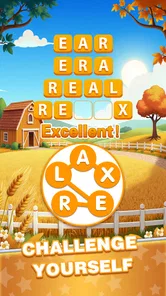



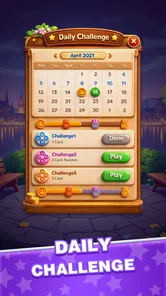
Analysis by Reviewed
When I want a quick word puzzle rather than a long gaming session, I like being able to pick up a letter challenge and stop when I’m ready. Word Connect - Train Brain is a free word game from Solitaire Card Studio, built around swiping letters into words. Its straightforward idea makes it easy to try during a quiet break, though the simple format also means it won’t suit everyone.
Where this letter puzzle fits in a normal day
I’d reach for this game when I have a few minutes to fill but don’t want to commit to a story, a match, or a long chain of instructions. A realistic example is waiting for an appointment: I can open a puzzle, work on a few combinations, and put the phone away when my turn is called. The letter-swiping idea makes it easy to resume mentally, too; I don’t need to remember a plot or a multi-step strategy.
It’s also a reasonable choice for someone who likes word searches but finds a full crossword too demanding in a short window. Here, the challenge is to inspect a set of letters and test possible words, not to solve a clue that depends on a particular subject or bit of trivia. That narrower focus is both the appeal and the limitation. It gives me a simple task to settle into, but it won’t offer the range of a collection of different puzzle types.
Engaging Gameplay Mechanics
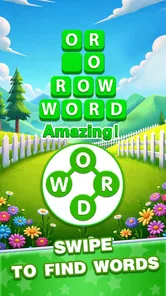
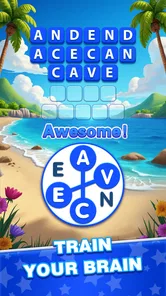
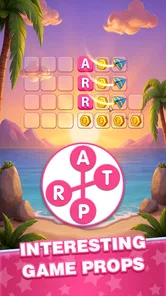
At the heart of Word Connect - Train Brain lies its simple yet addictive gameplay. You start with a set of letters, and your goal is to swipe them into words. Sounds easy, right? Trust me, it’s more challenging than it seems! It’s like a puzzle that teases your brain, urging you to find the hidden words cleverly tucked away in the grid. The game rewards you with coins for each correct word, and these can be used for hints when you’re really stuck. It’s a fantastic way to keep your brain sharp and engaged, all while having a blast.
A good fit for short, low-pressure sessions
I find this kind of letter puzzle most useful when I have a few spare minutes: waiting for a kettle, sitting on a bus, or taking a screen break between tasks. You can focus on finding one word at a time rather than learning a complicated control scheme. If a board stalls, I’d first try rearranging my attention: look for a short word, then use its letters to spot a less obvious combination. Saving a hint for a genuine dead end makes the coin reward more useful than spending it as soon as the puzzle feels difficult.
One small habit can make the search feel less random: scan the available letters in more than one order before using a hint. I try looking for likely beginnings and endings, then check whether a shorter word might reveal a pattern I missed. This is useful because the first obvious answer can narrow my attention too much. If I’m still stuck after a couple of deliberate passes, a hint can help me move on without turning the session into a frustrating guessing exercise.
The game’s appeal is strongest if you enjoy vocabulary puzzles and a calm pace. It can also work as a casual way to notice unfamiliar word combinations, although I wouldn’t treat it as a structured language course. If you want action, a story to follow, or a deep strategic system, this may feel repetitive. Compared with a crossword, it asks less from you in terms of clues and general knowledge; compared with a competitive word game, the emphasis here is on solving the letter arrangement rather than outplaying an opponent.
More From Our News Desk

 Gmail
GmailGmail in a Busy Inbox: Who Benefits Most?
From first account to crowded workday, Gmail earns its place through dependable search and flexible sorting—but its best fit depends on how much inbox maintenance you can tolerate.

 Prime Video
Switching to Prime Video: What Changes in Your Viewing Routine
Prime Video can make a compelling second home for streaming, but switching means learning a different catalog, rental layer, and route from browsing to playback.

 Universal TV Remote Control
Universal TV Remote Control Works Best as a Reliable Backup
A phone remote earns its place through quick setup and reliable habits. Here is how to get more from Universal TV Remote Control—and where its limits show.

 Weather - By Xiaomi
Weather by Xiaomi Review: Clear at a Glance, Less Clear Up Close
Xiaomi’s weather app makes everyday forecasts quick to scan, but its calm surface can leave useful details and recovery paths harder to find than they should be.

 X
XX Under Pressure: Can It Recover When Posting Goes Wrong?
A resilience-focused review of X, examining setup, mistaken posts, interruptions, weak connections, and the gaps that matter when recovery needs to be dependable.

 Clash of Clans
Clash of Clans Is Won Between the Battles
Its raids are quick; its community is a long-term project of coordination, teaching, rivalry, and shared responsibility—with all the friction that entails.
Latest News



What the simple format does—and does not—teach
The puzzle can nudge me to consider spellings and combinations I might not use every day, but recognizing a word in a game is not the same as learning its meaning or using it confidently. I’d treat it as a light vocabulary prompt, not a substitute for reading, a dictionary, or lessons with explanations. If I encounter an unfamiliar combination, pausing to look it up elsewhere is a more useful learning step than simply clearing the board and moving on.
That distinction matters particularly for someone choosing the game for a child or for language practice. The Everyone age rating makes it suitable for a broad audience, but it doesn’t turn the game into a guided learning tool. I’d be happy to offer it as a casual puzzle, while choosing a dedicated educational app if progress, definitions, pronunciation, or a structured curriculum is the main goal.
Visually Pleasing Interface
The app’s design is nothing short of delightful. The background is clean, and the letters are easy to read, which makes for a smooth gaming experience. The colors are bright but not overwhelming, creating a relaxing atmosphere that invites you to keep playing "just one more round." This thoughtful design contributes significantly to the app’s charm, making it not only fun but also visually appealing.
That uncluttered presentation matters in a game built around scanning letters. I can concentrate on possible words instead of decoding a busy screen, which is especially welcome during a short session. Still, a clean look cannot make every puzzle equally satisfying: when I’m stuck, the experience depends on whether I enjoy searching for combinations, not on visual polish alone. This is a pleasant fit for relaxed play, but players who need frequent changes in pace may prefer a word game with clues, varied modes, or a stronger narrative structure.
Choosing it over other word games
Among casual word games, this one is best understood as a focused letter-combination puzzle. A crossword is a better pick when I want clue-solving and broader subject knowledge; a word-search game is better when I want to scan a fixed grid for visible spellings. A head-to-head word game suits me more when I want another person’s moves to shape the challenge. This app’s simpler loop is an advantage when I want to play alone at my own pace, but a drawback if variety or interaction is what keeps me interested.
It is also worth thinking about how you like to use hints. The coins earned for correct words give the hint system a clear role: they can help me past a sticking point, but spending them too quickly may reduce the satisfaction of solving a board myself. I’d save them for a puzzle where I’ve genuinely run out of ideas rather than treating each difficult moment as a reason to tap for help. That approach keeps the challenge intact and makes assistance feel purposeful.
Community and Competition
One of the things that I love about Word Connect is the sense of community it fosters. You can connect with friends, compare your scores, and even engage in friendly competitions. There’s something incredibly satisfying about beating your own high score, but it’s even better when you can show off a little to your friends. It adds a social element that’s often missing in single-player games, making it a more enriching experience.
For those who thrive on competition, the app offers daily challenges and leaderboards. This feature adds a layer of excitement and keeps you coming back for more. Whether you’re playing against others or just trying to beat your personal best, there’s always a reason to keep swiping those letters.
I’d approach those competitive elements as a bonus rather than the main reason to install it. If you mostly want a solo puzzle, you can still enjoy the core letter-searching loop without making every session about comparison. If your preferred word games are built around direct multiplayer turns, however, this format may not provide the same back-and-forth. For a practical routine, I’d use a daily challenge as a small mental break and leave longer play for when I’m in the mood to work through puzzles at my own pace.
What the current version means for players
The game was released on December 10, 2022, and its current version is 1.0.38. That gives returning players a concrete version to check when deciding whether their installed copy is current; it doesn’t, on its own, tell me what individual changes were made between releases. The useful point is that the app has a defined current build, while any expectation of future levels or features should remain just that: an expectation, not a promise.
For an existing player, the version number is most useful as a practical check when troubleshooting or comparing an installed copy with the current one. It should not be read as evidence of a particular new mechanic or a schedule of upcoming content. I’d keep expectations grounded in the puzzle available now: if the basic letter search is already enjoyable, returning to it makes sense; if I’m waiting for a major change to the way play works, I wouldn’t assume that a version label guarantees one.
It has a 4.7 average from around 68,000 ratings, with over 1 million installs, which suggests that many players have tried it and that the general reception is favorable. The game is rated Everyone and is free to start, with optional in-app purchases ranging from $0.99 to $49.99 per item. I’d be comfortable recommending it to someone looking for a free casual puzzle, but I’d keep purchases in mind if a child will be using the device. The minimum operating system is Android 7.0, so it’s worth checking compatibility before downloading.
Free to start, with purchases to keep in mind
Because the game is free to download but offers optional purchases, I’d decide in advance whether I’m comfortable spending money in a casual puzzle. The listed purchase range runs from $0.99 to $49.99 per item, so the sensible approach is to treat buying as optional rather than necessary to enjoy the basic word-searching loop. If a child uses the device, I’d review the purchase settings and make sure they understand that an in-game prompt can involve real money.
For adults, the key question is whether hints and other purchase options add enough value for their own habits. I prefer to try the free experience first and see whether the pace feels satisfying without paying. A player who enjoys working through puzzles independently may have little reason to spend; someone who wants frequent help should decide whether that convenience is worth the cost before making repeated purchases.
Frequent Updates and New Levels
If there’s one thing that keeps an app fresh and exciting, it’s regular updates. The developers behind Word Connect are incredibly active, consistently rolling out new levels and features. This means there’s always something new to explore, keeping the game from becoming stale. It’s reassuring to know that the app is well-maintained and continuously improved, which is a testament to the dedication of its creators.
For me, the sensible way to judge whether it remains enjoyable is to focus on the play in front of me, rather than assume that a particular update guarantees a certain kind of content. The letter-swiping format is easy to return to, but repetition is a real possibility if you prefer each session to introduce a different mechanic. If you already enjoy this style, the familiar controls can be a strength; if you tire quickly of searching the same way, a clue-based puzzle or a word game with more varied rounds is likely a better match.
Who will enjoy it, and when I would skip it
I’d recommend giving it a try if you like solo word puzzles, want something that is easy to understand, and are content to focus on one kind of challenge. It suits a short commute, a quiet pause at home, or a small daily routine built around solving a few letter combinations. Its approachable premise also makes it easy to share with someone who doesn’t want to learn complicated controls before playing.
I’d steer away from it if you need a sustained story, strategic depth, frequent changes of activity, or meaningful live competition. Players who want clues that teach facts, direct matches against friends, or a broad set of puzzle formats will likely get more from another kind of word game. The choice comes down to whether repeating the letter-searching loop feels pleasantly absorbing or simply samey to you.
In conclusion, Word Connect - Train Brain is more than just a word game. It’s a mental workout, a community, and a visual delight all rolled into one. Whether you’re looking to unwind after a busy day or challenge yourself to think outside the box, this app has something for everyone. So why not give it a try and see for yourself? You might just find yourself hooked!
Word Connect - Train Brain Frequently Asked Questions
Does Word Connect - Train Brain have a simple format for quick play sessions?
Word Connect - Train Brain is a word puzzle game built around connecting letters to form words. That straightforward format makes it easy to understand the basic task before you begin, while the puzzles offer opportunities to pause and think through possible answers. It may suit players looking for a word-focused game they can pick up when they have time for a challenge.
How popular is Word Connect - Train Brain?
Word Connect - Train Brain has over 1 million installs and a 4.7 average rating from around 68,000 ratings. Those figures suggest that many players have tried the game and that its audience has responded positively overall. Experiences can still differ from player to player, so the rating is best treated as a useful overview rather than a promise that every puzzle will suit your preferences.
Is Word Connect - Train Brain free to download, and are there optional purchases?
Word Connect - Train Brain is free to download, so you can try its word puzzles without paying upfront. Optional in-app purchases are available, priced from $0.99 to $49.99 per item. The game can still be played without buying anything; consider your preferences and device purchase settings before choosing to make an in-game purchase.
Who developed Word Connect - Train Brain, and what should I know before installing it?
Word Connect - Train Brain is a word game developed by Solitaire Card Studio. It is rated for Everyone, making it suitable for a broad audience. The game is available on Android devices running version 7.0 or later, and its current version is 1.0.38. Check that your device meets the minimum operating-system requirement before downloading.
What is Word Connect - Train Brain?
Word Connect - Train Brain is a word puzzle game designed to enhance vocabulary and cognitive skills. Players are tasked with connecting letters to form words, which helps in improving their spelling and language abilities. The game offers various levels of difficulty, ensuring that both beginners and word experts can enjoy and benefit from the challenges it presents.
Pros
- Engaging word puzzles boost vocabulary.
- Simple UI makes navigation easy.
- Daily challenges enhance cognitive skills.
- Offline play available for convenience.
- Frequent updates introduce new words.
Cons
- Ads can be intrusive during gameplay.
- Limited hints without in-app purchases.
- Repetitive levels may bore some users.
- Requires internet for some features.
- No multiplayer mode for social play.













