Word Carnival - All in One
- 1.35K
- 4.6
- Installs
- 500.00K
- Price
- Free
Screenshots

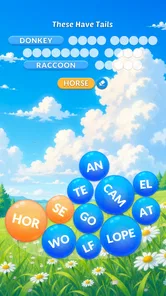
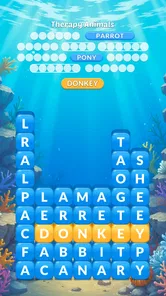
Analysis by Reviewed
If this is your first time trying Word Carnival - All in One, I’d go in expecting a bundle of different word activities rather than a single puzzle with a long learning curve. The useful first goal is modest: open a mode that feels familiar, complete a small round, and see whether you want to try another. That makes the collection easier to approach than browsing every option before you have played anything.
Make the first download feel low-pressure
Before installing, check that your device meets the game’s Android 7.0 minimum requirement. It is free to download, but optional in-app purchases range from $0.99 to $99.99 per item, so the word “free” does not mean every possible purchase is free. If a child will be playing, I’d review the device’s purchase settings first and make sure prompts cannot lead to an unexpected checkout.
There is no need to make a plan for a long session. I’d open the game when I have a few spare minutes, choose a mode I already understand, and treat the first round as a test of the controls and pace. If I enjoy it, I can explore further later; if not, switching to a different style is more useful than assuming the whole collection plays like that first puzzle.
Choose a mode before browsing too long
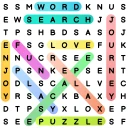
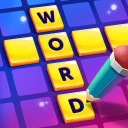
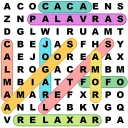
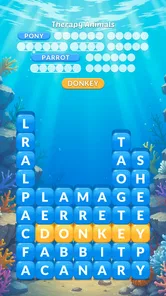
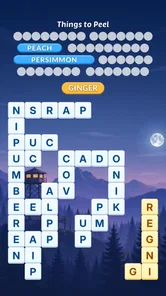
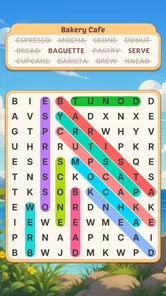
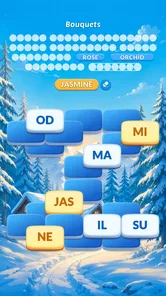
A collection can create a small but real decision problem: more choice is helpful only when it gets you to a suitable activity. I’d use my mood as the shortcut. If I want to scan and spot, I’d choose a word-search-style activity; if I want to build words from letters, Word Connect is an approachable starting point; if I feel like solving clues, I’d try a crossword. This is a more practical first step than trying to judge every mode from its name or icon.
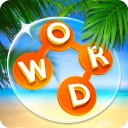
For a first meaningful success, I’d start with a short word in Word Connect and then look for a longer combination. The point is not to chase a perfect result immediately; it is to learn the swipe-and-form rhythm and decide whether it feels satisfying. If I get stuck, I’d pause rather than repeatedly making random moves. A brief reset and a fresh look at the available letters can be more useful than turning a casual game into a test.
What variety gives you—and what it costs
The collection is best understood as a convenient menu, not a guarantee that every activity will suit every player equally. Word-search fans may gravitate to spotting, while people who enjoy clues may prefer crosswords, and someone who likes a playful format may choose Word Bingo. That variety is a genuine strength when I want to change pace without installing another game, but it can also mean I spend time deciding what to play.
If I already know that I only want crosswords, a dedicated crossword app may be a better everyday choice: it keeps the experience centered on that one format. If I switch between word searches, letter-building, and other puzzles, this collection makes more sense. The right comparison is not “which app has the most options?” but “will I actually use more than one kind of puzzle?” That question helps avoid downloading a variety game only to use one corner of it.
More From Our News Desk

 Gmail
Gmail in a Busy Inbox: Who Benefits Most?
From first account to crowded workday, Gmail earns its place through dependable search and flexible sorting—but its best fit depends on how much inbox maintenance you can tolerate.

 Prime Video
Switching to Prime Video: What Changes in Your Viewing Routine
Prime Video can make a compelling second home for streaming, but switching means learning a different catalog, rental layer, and route from browsing to playback.

 Universal TV Remote Control
 Works Best as a Reliable Backup
A phone remote earns its place through quick setup and reliable habits. Here is how to get more from Universal TV Remote Control—and where its limits show.

 Weather - By Xiaomi
Weather by Xiaomi Review: Clear at a Glance, Less Clear Up Close
Xiaomi’s weather app makes everyday forecasts quick to scan, but its calm surface can leave useful details and recovery paths harder to find than they should be.

 X
X Under Pressure: Can It Recover When Posting Goes Wrong?
A resilience-focused review of X, examining setup, mistaken posts, interruptions, weak connections, and the gaps that matter when recovery needs to be dependable.

 Clash of Clans
 Is Won Between the Battles
Its raids are quick; its community is a long-term project of coordination, teaching, rivalry, and shared responsibility—with all the friction that entails.
Latest News



I find a collection of word puzzles most useful when I can choose a different kind of challenge without leaving the game, and that is the appeal of Word Carnival - All in One. It is a free word game from HI STUDIO LIMITED, presented as a single place to dip into different word activities. The carnival framing makes the idea easy to grasp: open it when you want a quick puzzle, then pick the sort of word play that suits your mood.
What to expect when you open it
This is a better fit for people who enjoy variety than for someone looking for one deep, narrowly focused puzzle format. Its 4.6 average rating across around 22,000 ratings suggests it has found an audience, and it has passed 500,000 installs. The game is rated for Everyone, so it can suit a shared family device, although players may still prefer different puzzle types or difficulty levels.
One practical trade-off with an all-in-one collection is that variety can make the experience feel less focused than a dedicated crossword or word-search app. If you already know exactly which format you want, a specialist game may get you to it more directly. If you often tire of repeating the same kind of puzzle, having several options together is the stronger reason to try this one.
Finding a comfortable first session
I would start by browsing the available games rather than trying to master the whole collection at once. Choose a familiar format first, then switch only if it stops holding your attention. That small approach keeps the first visit relaxed and makes it easier to notice which activities actually suit you, instead of treating the app as a checklist to finish.
A useful everyday moment for it is a short wait—say, while you are waiting for someone to arrive. A word puzzle gives that spare time a little structure without asking you to plan a long gaming session. For a calmer routine, I would also avoid jumping between every mode in one sitting; settling on one puzzle gives you a clearer sense of whether you enjoy its pace.
How it compares and where it may not fit
Compared with separate word-search and crossword apps, the main draw here is the mix, not a claim that one mode is necessarily deeper than a dedicated alternative. That makes it handy for households or casual players who like to switch formats. On the other hand, if you want a very specific puzzle style, a specialist app may feel simpler and more tailored.
The game is free to download, with in-app purchases ranging from $0.99 to $99.99 per item. I would check purchase prompts carefully, especially if a child will use the device, and decide in advance whether spending is something you want to allow. The current version is 7.0.3 and requires Android 7.0 or later, which is worth checking before installing on an older device.
Step Right Up to the Word Carnival
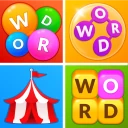
When I first downloaded Word Carnival - All in One, I wasn't sure what to expect. Would it be just another run-of-the-mill word game? Boy, was I wrong! The app greets you with a vibrant, carnival-themed interface that immediately draws you in. It's like stepping into a virtual fairground, with each game acting as a different ride waiting for you to hop on.
A Variety of Games to Keep You Hooked
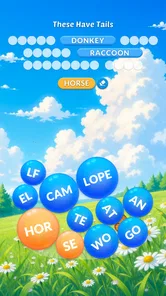
One of the best things about this app is its diversity. From classic word searches to crosswords and even some unique games I've never seen before, there's something here for everyone. I personally got hooked on the "Word Connect" game, where you swipe letters to form words. It's simple but oh-so-addictive!
Another favorite of mine is the "Word Bingo", which puts a fun twist on the traditional bingo game by incorporating word puzzles. It's perfect for those who love a bit of competition and want to test their vocabulary skills. Honestly, it's hard to decide which game to play first, and that's a good problem to have!
Why You'll Love This App
What sets this app apart from others is its ability to cater to all types of players. Whether you're a word game novice or a seasoned pro, you'll find something here to challenge you. The games are designed to be progressively harder, ensuring that you're always learning and improving.
Plus, the app offers a seamless user experience. Navigating through the different games is a breeze, and the graphics are pleasing to the eye. It's clear that a lot of thought has gone into the design and functionality of the app, making it enjoyable and easy to use.
Picking a game that suits your mood
For a first success, I would choose Word Connect and look for short words before trying longer combinations. It is an approachable way to get familiar with swiping letters, and it gives you an immediate feel for whether you enjoy the game’s central rhythm. When I want something more deliberate, a crossword is a better change of pace; Word Bingo is the choice I would make when I want a more playful puzzle session.
One small tip is to treat the different modes as alternatives, not as a task list. If a puzzle feels like work, switch to another format instead of forcing a streak of play. The benefit of a collection is choice, but that same choice can make it harder to settle in if you keep browsing without starting. Picking one mode for a few minutes is usually the quickest way to learn what the app does well for you.
Who should give it a try
I would recommend it to casual players, word-game newcomers, and families who want a light puzzle option with several styles in one download. It can also work for someone who already enjoys word games but wants a convenient way to alternate between letter-building, searching, and puzzle-solving. The game was released on April 13, 2022, and its continuing version updates are reflected in version 7.0.3.
I would skip it if you strongly prefer one specific format and want the more focused feel of an app built around that single activity. It is also not the right pick if you dislike in-app purchase options or want a game whose appeal comes from a story or competitive depth. Its strongest case is simple: an accessible assortment for a spare moment, rather than a substitute for every specialist word puzzle.
Making it part of an ordinary day
I’d use the game differently depending on how much attention I can give it. During a short break, one quick activity is enough; at home, I might try Word Connect first and then move to a crossword when I want to concentrate for longer. That makes the app a flexible option for interruptions and changing moods, rather than something that requires a fixed daily routine.
For a shared device, it helps to let each person pick the mode they like instead of expecting everyone to agree on one favorite. A child might enjoy the playful presentation while an adult prefers a clue-based puzzle, but the Everyone rating does not mean every mode or purchase choice will suit every household. I’d keep spending controls in mind and make the first session about trying the free play experience, not exploring checkout options.
Small habits that make the collection easier to use
One useful habit is to remember the activity you enjoyed rather than trying to sample everything at once. When you return, go straight to that mode; on a later visit, try one alternative. This creates a simple personal shortlist and reduces the browsing that can make a multi-game app feel scattered. If you find that you consistently return to only one puzzle type, that is a good sign a dedicated alternative might serve you better.
Another trade-off is that switching formats can refresh a session but also interrupt concentration. I would avoid changing modes midway through a puzzle simply because another option is visible. Finish the round if it still feels enjoyable, then switch on the next visit. This gives each game a fair chance and helps you work out whether variety is adding value or just keeping you from settling into a favorite.
Final Thoughts
In a world where we're constantly bombarded with apps vying for our attention, Word Carnival - All in One manages to stand out. It's not just a game; it's a learning tool wrapped in a fun, engaging package. Whether you're looking to kill some time or enhance your vocabulary, this app delivers on all fronts.
So, if you're ready to take your brain on a fun-filled journey, give Word Carnival - All in One a spin. Trust me; you won't be disappointed!
Word Carnival - All in One Frequently Asked Questions
Is Word Carnival - All in One a good choice for someone who enjoys word puzzles?
Word Carnival - All in One is a word game built around bringing multiple word games together in one download. That makes it worth considering if you like word-based challenges and want to explore more than one kind of word-game experience in a single app. The store summary highlights fun, addictive word games, so the appeal is focused on players who enjoy this genre.
Who develops Word Carnival - All in One, and when was it released?
Word Carnival - All in One is developed by HI STUDIO LIMITED. It was released on April 13, 2022, and its current version is 7.0.3. Those details can help you identify the game and check that you are viewing the intended app before downloading. It is categorized as a word game, with a simple focus on enjoying word-based play.
Is Word Carnival - All in One suitable for children and family play?
Word Carnival - All in One is a word game rated for Everyone, making it a broadly accessible choice for family play. Its puzzle-based format can appeal to players who enjoy testing their vocabulary and solving word challenges at their own pace. As with any game that offers optional purchases, parents may wish to review their device’s purchase settings before children play.
Who makes Word Carnival - All in One, and is it a widely played game?
Word Carnival - All in One is developed by HI STUDIO LIMITED. It has reached over 500,000 installs, with an average rating of 4.6 from around 22,000 ratings and about 1,300 written reviews. Those figures suggest that many players have tried it and shared feedback, though individual experiences can vary depending on personal preferences and the kinds of word puzzles they enjoy.
What is Word Carnival - All in One and what does it offer?
Word Carnival - All in One is a comprehensive word puzzle game that combines various types of word games into one app. It offers a wide range of puzzles, including word searches, crosswords, anagrams, and more. The app is designed to challenge your vocabulary skills and keep your mind sharp with its diverse and engaging gameplay. Ideal for both casual players and word enthusiasts, it provides hours of entertainment with different difficulty levels to suit all ages.
Pros
- Comprehensive word puzzle collection.
- User-friendly interface and easy navigation.
- Regular updates with new challenges.
- Variety of difficulty levels for all ages.
- Offline play available
- no internet needed.
Cons
- In-app ads can be intrusive.
- Limited free content; many features locked.
- Occasional app crashes reported.
- Some puzzles repeat frequently.
- No multiplayer or social features.