

Word Card: Word Connect
- 65.00
- 4.9
- Installs
- 10.00K
- Price
- Free
Screenshots
Analysis by Reviewed
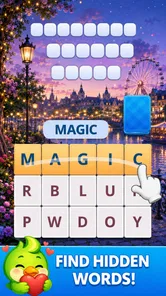
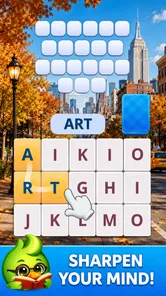
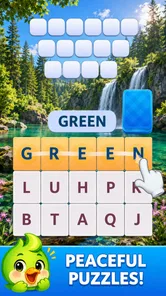
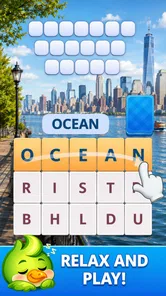
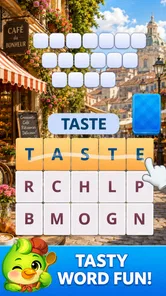
I picked up Word Card: Word Connect when I wanted something calmer than a competitive game and more engaging than simply scrolling. After spending time with it, I found a straightforward word-puzzle experience built around connecting cards, spotting words, and giving my brain a light workout. It is the kind of game I can open for a short break without first learning a complicated system.
That simplicity is also the main reason I would recommend it to some people and not others. The game works best when you want a quiet, focused activity that can fit around ordinary household life. It is less convincing if you are looking for a deep campaign, a strong social layer, or a word game with lots of strategic variety. My experience with it was positive overall, but the appeal depends heavily on what you expect from a free puzzle game.
How it fits into a shared household
I find a shared-device routine works best when it stays simple: decide whose turn it is, then let each person enjoy the puzzle in their own way. If someone wants to help, I’d offer a thought or question rather than take over the screen; that keeps the word discovery personal while still making a short session feel companionable.
A useful five-minute break
The most natural use case is a small pause during the day. I can imagine playing while waiting for dinner, sitting beside someone watching television, or taking a short break between chores. The card-based presentation makes the game feel more deliberate than a rapid-fire arcade title, while the word focus gives me something to think about without demanding complete concentration for a long session.
That makes it suitable for a shared device in a household, provided everyone understands that progress and preferences may belong to the person using the game. I would not treat a single installation as a fully coordinated family activity. Instead, I would see it as a game that different people can try in turn, with each player taking responsibility for their own choices and session.
For example, one person might play a few puzzles in the morning, leave the device available, and let another household member use it later. The important practical habit is to avoid assuming that a puzzle session is interchangeable between players. If the game presents a personal progression path, changing the way someone else plays could affect the experience for the original user. I would agree on simple turn-taking before handing over the phone or tablet.
Why the card format matters
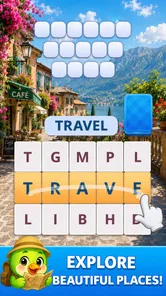
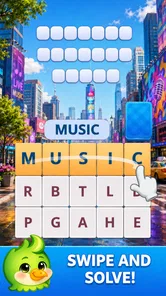
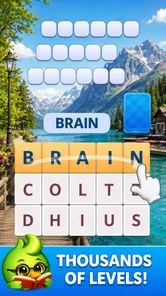
The card idea gives the word challenges a more tactile feel than a plain list of clues. I found myself looking at the available elements, testing possible connections, and checking whether a word I had in mind actually fit the puzzle. That small act of arranging thoughts is what separates this from casually opening a dictionary or doing a basic spelling exercise.
More From Our News Desk

 Gmail
GmailGmail in a Busy Inbox: Who Benefits Most?
From first account to crowded workday, Gmail earns its place through dependable search and flexible sorting—but its best fit depends on how much inbox maintenance you can tolerate.

 Prime Video
Switching to Prime Video: What Changes in Your Viewing Routine
Prime Video can make a compelling second home for streaming, but switching means learning a different catalog, rental layer, and route from browsing to playback.

 Universal TV Remote Control
Universal TV Remote Control Works Best as a Reliable Backup
A phone remote earns its place through quick setup and reliable habits. Here is how to get more from Universal TV Remote Control—and where its limits show.

 Weather - By Xiaomi
Weather by Xiaomi Review: Clear at a Glance, Less Clear Up Close
Xiaomi’s weather app makes everyday forecasts quick to scan, but its calm surface can leave useful details and recovery paths harder to find than they should be.

 X
XX Under Pressure: Can It Recover When Posting Goes Wrong?
A resilience-focused review of X, examining setup, mistaken posts, interruptions, weak connections, and the gaps that matter when recovery needs to be dependable.

 Clash of Clans
Clash of Clans Is Won Between the Battles
Its raids are quick; its community is a long-term project of coordination, teaching, rivalry, and shared responsibility—with all the friction that entails.
Latest News



It also creates a useful middle ground for mixed-age households. A younger player can approach it as a discovery game, while an adult may treat the same session as a gentle vocabulary exercise. I would not describe it as a formal learning tool, but it can encourage attention to spelling, word patterns, and flexible thinking without making the session feel like homework.
The limitation is that the same visual simplicity may feel repetitive to players who need constant novelty. If you prefer games with characters, dramatic goals, or a large world to explore, the card presentation will probably feel too restrained. I enjoyed the lack of clutter, but I can also see myself wanting a different game after a longer stretch.
What I would tell another family member
If I were recommending it to a friend at home, I would describe it as a quiet word game for short, low-pressure sessions. I would not promise a shared multiplayer experience or suggest that it replaces a traditional board game played around a table. Its strength is individual concentration, even when the device itself is shared.
I would also mention that the game is free to start, which lowers the barrier for trying it. At the same time, free access does not mean every household decision is automatically simple. Because the game includes in-app purchases ranging from $1.99 to $99.99 per item, I would keep purchase decisions separate from casual handoffs, especially when children or guests may use the same device.
Keeping household use uncomplicated
My practical approach would be to establish three small rules: ask before making a purchase, do not reset or alter another person’s progress, and return the device when the agreed session ends. These are not special game features; they are sensible boundaries for any shared phone or tablet. They matter here because a relaxing puzzle can quickly become frustrating if someone feels their personal play space has been changed.
I would also avoid presenting the game as a competition between family members unless everyone genuinely enjoys that arrangement. The experience is better suited to comparing interesting words or helping each other through a difficult moment than to keeping score. A parent and child could discuss a possible answer together, for instance, but I would let the player decide whether they want assistance rather than turning every puzzle into a group exercise.
Setup, boundaries, and everyday trust
Before I hand the device to someone else, I’d make the practical boundaries clear: ask before any purchase, avoid changing another player’s progress, and check that the device meets the game’s requirements. I also like to try the puzzles myself first if a younger player will be using it, so I can judge whether the words and controls suit them and explain what to expect.
What to check before handing over the device
The game is listed for Everyone, which makes it approachable for a broad audience. That label is useful, but I would still make a personal judgment based on the child, the device, and the household rules. An age category does not tell me whether a particular player will enjoy the vocabulary level, stay focused, or understand purchase boundaries.
Before sharing it with a child, I would open the game myself and see how the puzzles feel. That gives me a better sense of whether the words are comfortable for that player and whether the interface is easy enough to navigate without help. It also lets me explain the basic idea in plain language rather than handing over the device with no context.
The minimum operating-system requirement is Android 7.0, so compatibility should be checked before anyone plans a household installation. This is especially relevant with an older spare phone or tablet. A game can be appealing in theory but unhelpful if the device cannot run the required software smoothly. I would test the actual household device rather than assuming that every older Android model will behave the same way.
Account boundaries deserve attention
I would keep expectations modest around account separation. The safest assumption for a shared device is that people should not treat one installation as a set of clearly isolated personal profiles unless the game visibly provides that option. I would not ask a child to manage account details independently, and I would not let a guest make changes that could affect another player’s session.
This is less about suspicion and more about clarity. When several people use one screen, small misunderstandings are common: someone may think they are starting a fresh puzzle, while another person expects to continue their own run. A quick conversation about who is playing and when is often more useful than trying to turn a casual word game into a complicated household system.
For adults sharing a device, I would recommend using the game as a personal activity rather than a communal record. If two people want to play, they can take separate turns and talk about their results, but they should not assume that the game will organize that arrangement for them. This keeps the experience friendly and avoids blaming the app for a boundary that the household never established.
Purchase awareness on a free game
The free entry point is convenient, particularly when I am deciding whether the word mechanics suit me. However, the listed purchase range means I would not leave purchase decisions entirely to chance on a shared device. A child may understand the puzzles perfectly and still not understand the real-world consequence of tapping a purchase option.
My advice is simple: the adult who owns the device should handle purchases, and everyone else should ask first. I would also avoid describing paid items as necessary for enjoying the game unless I had personally decided that they were worth it. A free game should first be judged by its basic play, not by the most expensive optional path associated with it.
This is one area where a single-player word app with no purchase layer might be easier for a tightly managed family device. If absolute simplicity is the priority, another alternative may suit you better. If you are comfortable setting household rules and want a free puzzle to try, the purchase range is manageable as long as it is treated deliberately.
Age context and trust
The Everyone rating makes the game easier to consider for general household use, but trust still matters more than a label. I would be comfortable introducing it as a supervised or openly discussed activity for a younger player. I would be less comfortable handing over a shared device without explaining who owns the progress and how purchases are handled.
For older children and adults, the game can work as a quiet independent pastime. It does not need to become an educational assignment, and I would avoid correcting every unfamiliar word unless the player asks. One of the pleasures of this format is discovering words naturally. Too much supervision can turn a relaxing puzzle into a test.
Coordination without making it feel like a chore
The best household arrangement I found is lightweight coordination. One person plays when the device is free, another waits, and difficult puzzles can become conversation starters rather than disputes. I would not create a formal schedule unless the device is in unusually high demand. The game is too casual to justify a complex system in most homes.
If a child wants help, I would offer a hint rather than immediately supplying the answer. That preserves the discovery element and lets the player build confidence. With adults, I might compare different possible words and discuss why one connection seems more natural. These small interactions make the game more social without pretending that it has a built-in family mode.
What makes it different from familiar alternatives
Compared with a crossword, this game feels more immediate because I am working with visible cards and connections rather than a large grid of clues. Compared with a traditional word-search puzzle, it asks for more active construction instead of simply scanning for hidden terms. Compared with competitive word games, it is better suited to a calm solo mood because I am not worrying about another player’s timer or score.
Those comparisons also reveal the trade-off. Crossword fans may miss layered clues and broad general knowledge. Word-search fans may prefer the satisfaction of finding a word that is already hidden in a dense field. Competitive players may find the lack of pressure less exciting. I would choose this game when I want the act of forming and discovering words, not when I want the fullest possible vocabulary challenge.
The card approach is particularly useful for someone who finds large puzzle boards tiring. The visual field feels easier to approach, and I can focus on a smaller decision at a time. On the other hand, players who enjoy complex planning may find that the format does not offer enough room for long-term strategy. That is not a flaw in every context; it simply defines the kind of attention the game rewards.
How I would use it with different people
With a child, I would use it as a short shared activity and let them lead whenever possible. I might ask what word they see or why they chose a particular connection, keeping the conversation curious rather than evaluative. With an older relative, I would offer it as an easy-to-start alternative to a more demanding puzzle, while staying nearby if the interface or vocabulary creates friction.
With a friend who already enjoys word games, I would recommend trying it between longer sessions of a crossword or a more competitive title. It can serve as a reset when the other game becomes mentally heavy. With someone who dislikes spelling-based activities, I would not push it simply because it is rated for everyone. The central mechanic is still word discovery, and no age label can change that basic preference.
Performance expectations and version context
The current version is 2.0.1, and the game comes from Superaid Games. I find it useful to know the version when troubleshooting or discussing the experience with another player, but I would not treat a version number as a guarantee of how every device will perform. Older hardware, screen size, and the condition of the operating system can all affect comfort.
For a shared tablet, I would pay particular attention to readability and touch accuracy during the first session. A layout that feels comfortable on a phone may feel different on a larger display, and a child may tap more broadly than an adult. If the interaction feels awkward, I would not assume the player is at fault; the device may simply not be the ideal place to use a card-focused puzzle.
Who should skip it
I would skip this game if I wanted a substantial story, persistent characters, or a strong sense of world progression. I would also look elsewhere if I needed a clearly organized family system with separate identities and carefully defined shared controls. The game is better understood as a personal word pastime that happens to work on a device other people may also use.
Players who dislike optional purchase systems may prefer a paid word game with a simpler financial model. Likewise, anyone seeking advanced vocabulary training should compare it with a dedicated learning app or a more demanding puzzle collection. This game can exercise attention and word recognition, but I would not use it as a substitute for structured study.
Finally, I would skip it during moments when I need a genuinely social activity. Passing the device around can be pleasant, but the core experience remains individual. A physical word board game or a multiplayer title will do a better job if the main goal is conversation, shared rules, and a common outcome.
My household verdict
After trying it, I see Word Card: Word Connect as a friendly, low-pressure choice for people who enjoy forming words and prefer a clean card-based presentation. Its free price makes experimentation easy, its Everyone rating broadens its household appeal, and its modest style works well for short sessions. The average rating of 4.8 from over 400 ratings suggests that many players have responded warmly to the experience, while more than 10K installs show that it has found an audience without needing to feel enormous or intimidating.
My recommendation comes with clear boundaries. I would install it on a shared device only after deciding who may play, how turns work, and who handles purchases. I would let children try it with age-appropriate guidance, but I would not confuse a general age rating with built-in family management. I would also keep expectations realistic: this is a word puzzle for focused breaks, not a complete household entertainment hub.
For me, the strongest reason to keep it around is its role between activities. It is more involving than passive screen time, less demanding than a full crossword session, and easier to introduce than a competitive word game. When the household understands that it is a personal puzzle experience rather than a shared account space, the arrangement feels natural.
My final advice is to treat it as a calm, individual game that can be enjoyed together, not necessarily played together. If that distinction matches what you want, Superaid Games has made a pleasant option for everyday word practice and small moments of discovery. If your priority is deep strategy, formal learning, or carefully separated family profiles, another category of app will likely serve you better.
Word Card: Word Connect Frequently Asked Questions
Who developed Word Card: Word Connect, and what kind of game is it?
Word Card: Word Connect is a word puzzle game developed by Superaid Games. Its central idea is to relax with puzzles, connect cards, discover words, and give your brain a workout. The format is easy to understand: you look at a group of letters and find words that fit the board, making it a natural choice for players who enjoy vocabulary challenges.
What is Word Card: Word Connect?
Word Card: Word Connect is a casual word puzzle game built around forming words from a set of available letters. You connect letters to complete crossword-style boards, discover bonus words, and progress through increasingly challenging levels. Its card-themed presentation gives the familiar word-search format a slightly different visual style, making it suitable for short sessions or relaxed daily play.
How do you play Word Card: Word Connect?
Each level provides a group of letters that you swipe or connect in different combinations to create valid words. Correct answers fill spaces on the puzzle board, while additional words may count as bonus discoveries. If you get stuck, the game usually offers hints or other assistance, although these features may be limited by the resources available in your account or by optional advertisements.
Is Word Card: Word Connect free to download and play?
Word Card: Word Connect is free to download, so you can start playing without an upfront purchase. It also offers optional in-app purchases, with prices ranging from $1.99 to $99.99 per item. These purchases may provide hints, coins, extra tools, or other conveniences. Check the purchase details in the store before buying, and keep in mind that optional spending is separate from the free download.
Can Word Card: Word Connect be played offline?
Many of the basic puzzles in Word Card: Word Connect may be playable without a continuous internet connection, which is useful during travel or when mobile data is unavailable. Nevertheless, online access can still be required for advertisements, rewards, synchronization, updates, or in-app purchases. Availability may also vary by device and version, so it is best to test offline play after the initial installation.
Pros
- Simple swipe controls make word building easy to learn.
- Short levels are convenient for quick play sessions.
- Daily puzzles offer a reason to return regularly.
- Offline play is useful when you have no internet access.
- Helpful boosters can assist when a puzzle becomes difficult.
Cons
- Some levels rely on obscure or uncommon words.
- Hints and extra tools may be limited without watching ads.
- Difficulty can feel uneven between consecutive puzzles.
- Repeated word patterns may make later stages feel predictable.
- Frequent advertisements can interrupt the gameplay flow.











