

Wheel of Fortune Official Game
- 120.32K
- 4.6
- Installs
- 10.00M
- Price
- Free
Screenshots
Analysis by Reviewed
Before I download a word game, I ask myself whether I want a quiet puzzle or a little performance around it. Wheel of Fortune: TV Game is for the second mood: each turn has the familiar show-style combination of a spin, a letter choice, and a phrase to work out. That makes it more engaging than a plain word-search when I want some suspense, but less suitable when I’m after uninterrupted solving where every move is under my control.
What I’d consider before downloading
Scopely’s game is free to start, rated Everyone 10+, and has a 4.5 average from around 422,000 ratings. It has passed 10 million installs, which makes it an established option rather than an obscure experiment. Those figures don’t tell me whether every player will enjoy its pace, though; the main question is whether the wheel-and-category format is the kind of word play I want to return to.
I’d also think about how I usually play on my phone. If I tend to open a game for a few minutes between errands, a self-contained puzzle round is a natural fit. If I prefer a long, carefully planned challenge that rewards skill alone, the wheel can feel like an unnecessary middle step. The key trade-off is simple: this game makes guessing feel like a small event, but the random spin means the puzzle isn’t the only thing determining how a turn goes.
Spin That Wheel!
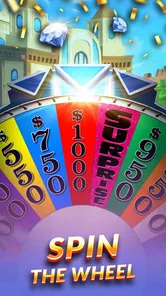
The core of Wheel of Fortune: TV Game is exactly what you’d expect from its namesake—spinning the iconic wheel. The app stays true to the TV show’s format, which is a huge thumbs up for any fan. You start by spinning the wheel, hoping for those high-value slots while avoiding the dreaded "Bankrupt" and "Lose a Turn". Just like on TV, the anticipation is palpable, and honestly, it might just get you hooked before you know it.
That mix of chance and deduction is the main reason I’d choose this over a more clinical word puzzle. A good guess can feel satisfying, but the suspense between spinning and choosing a letter adds a different kind of tension. It also means I wouldn’t judge a session only by whether I solved every board: sometimes the enjoyment is in seeing how a partial pattern changes after a reveal, even if a turn goes badly.
Puzzle Time
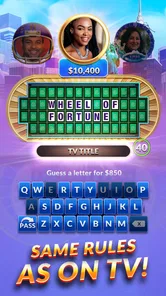
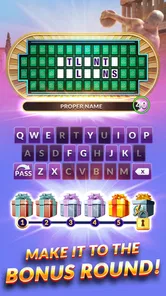
Once you’ve spun the wheel, it’s time to put your thinking cap on and solve puzzles. This is where the app shines with its vast array of categories and puzzles. From "Food & Drink" to "Phrase", the variety keeps each game fresh and engaging. And trust me, nothing beats the satisfaction of guessing the right letter and seeing the board light up!
A useful way to play is to treat each round as a small exercise in narrowing possibilities rather than guessing the first word that comes to mind. I look at the category, note the visible letter pattern, and consider common endings or phrases before spending a turn. It makes the puzzle feel more like deduction and less like luck, especially when the board has only a few letters revealed.
More From Our News Desk

 Gmail
GmailGmail in a Busy Inbox: Who Benefits Most?
From first account to crowded workday, Gmail earns its place through dependable search and flexible sorting—but its best fit depends on how much inbox maintenance you can tolerate.

 Prime Video
Switching to Prime Video: What Changes in Your Viewing Routine
Prime Video can make a compelling second home for streaming, but switching means learning a different catalog, rental layer, and route from browsing to playback.

 Universal TV Remote Control
Universal TV Remote Control Works Best as a Reliable Backup
A phone remote earns its place through quick setup and reliable habits. Here is how to get more from Universal TV Remote Control—and where its limits show.

 Weather - By Xiaomi
Weather by Xiaomi Review: Clear at a Glance, Less Clear Up Close
Xiaomi’s weather app makes everyday forecasts quick to scan, but its calm surface can leave useful details and recovery paths harder to find than they should be.

 X
XX Under Pressure: Can It Recover When Posting Goes Wrong?
A resilience-focused review of X, examining setup, mistaken posts, interruptions, weak connections, and the gaps that matter when recovery needs to be dependable.

 Clash of Clans
Clash of Clans Is Won Between the Battles
Its raids are quick; its community is a long-term project of coordination, teaching, rivalry, and shared responsibility—with all the friction that entails.
Latest News



I also try not to lock onto one answer too early. A category can point toward several plausible phrases, and the visible blanks may support more than one of them. Keeping a couple of candidate answers in mind helps me choose a letter that can distinguish between them, rather than spending a turn on a guess that merely confirms what I already suspect. That small habit makes the reasoning more satisfying without removing the wheel’s chance element.
This format works well in short gaps: I can play a round while waiting for an appointment or winding down after dinner without needing to set aside time for a long campaign. For a family game night, passing the phone around and debating possible answers can make the puzzle more social, even when only one person is controlling the game. The trade-off is that the wheel’s chance element can frustrate players who want every result to come from skill.
For a realistic everyday use, I’d open it during a short break when I want something more active than scrolling but don’t have time to settle into a book or a longer game. I can work through a puzzle at my own pace, then put the phone away when the break ends. It’s also an easy choice for a shared wait—such as sitting together before an appointment—because people can call out possible letters and phrases. I’d avoid starting when I have only a few seconds, though; the turn-by-turn presentation is more enjoyable when I can follow the reveal instead of rushing through it.
The app cleverly integrates the social element, allowing you to challenge friends and family. It’s a great way to add some friendly competition into the mix and maybe even prove who the real word wizard is in your group.
I’d use the friend-and-family angle when everyone is happy to take turns and talk through guesses, rather than expecting a deep team mode or a formal head-to-head strategy game. If I’m playing alone, the familiar puzzle loop still has appeal; with others, the fun often comes from comparing guesses before the board reveals the answer. It is best suited to casual company, not players looking for a serious competitive word ladder or a shared long-form puzzle.
When I’m playing with someone else, I’d agree on a simple turn-taking rhythm before starting: one person can suggest a letter, while the other keeps track of likely phrases, then swap roles. That avoids one player taking over every decision and makes the discussion part of the game. It works best with people who enjoy talking through guesses; if everyone wants to play silently and independently, a set of separate puzzles will be a better fit.
Graphics and Interface
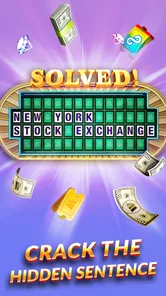
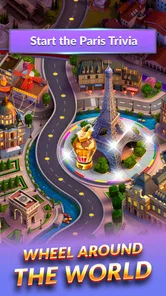
Visually, the game is a treat. It captures the essence and excitement of the TV show with vibrant colors and slick animations. The user interface is intuitive, making navigation a breeze even for those who might not be tech-savvy. From the animated wheel spins to the celebratory confetti when you solve a puzzle, it’s clear the developers put a lot of thought into making the experience as immersive as possible.
The presentation is part of the appeal, but it also shapes the pace: animations and reveals give each turn a little ceremony, while someone who simply wants a fast list of puzzles may find that show-like framing less direct. I’d pick this over a bare-bones crossword app when I want a lively, familiar format; I’d pick a traditional crossword or a word-search instead when I want to work at my own speed without a wheel deciding the turn’s outcome.
That comparison is useful because word games serve different moods. A crossword is generally the stronger choice when I want a sustained grid and a challenge built around filling it in. A word-search suits a more relaxed hunt through letters. This game sits between those experiences: I still need to reason about words and phrases, but I also get the wheel’s suspense and the presentation associated with the TV format. I’d choose it for a playful session, not as a substitute for every kind of word puzzle.
For a practical routine, I’d keep it as a light, occasional game rather than assuming it will replace every kind of word practice. The category clues can help me think flexibly about phrases, but this is entertainment first, not a structured vocabulary course. The game is also a weaker fit if I dislike chance-based mechanics, prefer lengthy solo challenges, or want a word game with no interruptions.
One small strategy is to use the category as a constraint, not as an answer. I first ask what kinds of words belong there, then compare those possibilities with the spaces on the board. That prevents me from treating a broad clue as if it had only one obvious solution. It’s a useful way to enjoy the puzzle even when I don’t know the phrase immediately, and it keeps the experience about reasoning rather than simply taking guesses until something works.
Monetization and Ads
Now, let’s talk about the slightly less glamorous side—monetization. The app is free to download, which is fantastic, but like many free apps, it does have its share of ads. While they’re not overly intrusive, they can occasionally disrupt the flow of the game. There are in-app purchases available if you’re looking to enhance your experience or just want to skip those ads altogether. It’s something to consider if you find yourself playing regularly.
Purchases range from $0.99 to $99.99 per item, so I’d check the cost shown in the game before buying anything and decide what, if anything, is worth paying for. I wouldn’t spend just because a puzzle gets frustrating: the wheel already introduces uncertainty, and paying doesn’t change whether I enjoy that central mechanic. If ads bother me, I’d first try a few sessions to see how often they break my own rhythm before considering a purchase.
My practical advice is to treat the free version as a trial of the experience, not as a commitment to spend. A handful of sessions should tell me whether I enjoy the wheel-and-letter loop enough to make it part of my routine and whether the ads interrupt me often enough to matter. If I only play now and then, I may not mind the interruptions; if I reach for it frequently, I’ll want to weigh the purchase options carefully rather than assuming a paid item is essential.
The game was released on July 21, 2015, and its current version is 3.99.2; it requires Android 5.1 or later. That makes compatibility worth checking before downloading on an older device. The app is free to install, but free access should not be confused with a promise of an ad-free experience.
There is little switching effort if I’m moving from another casual word game: I can simply try this when I want a more show-like round, then return to a crossword or word-search when I want a different pace. The bigger adjustment is mental. Here, I have to accept that a clever answer may not be enough if the spin doesn’t go my way. Players who see that as part of the fun are likely to settle in; players who see it as wasted effort should stay with games where every move is fully chosen.
Who I’d recommend it to
I’d recommend it to fans who enjoy the familiar TV-show format, casual players who like solving phrases in brief sessions, and families or friends who want an easy puzzle to discuss together. I’d steer dedicated crossword solvers toward a crossword app, and players who dislike ads or luck-driven turns toward a more straightforward word puzzle. The choice comes down to whether the spinning-wheel presentation adds fun for you or gets between you and the puzzle.
I’d also say it’s a good fit for someone who likes word games but finds a blank crossword grid a little demanding after a long day. The category and letter pattern give me a clear starting point, while the wheel adds a little drama without asking me to learn a complicated system. On the other hand, someone looking for lessons, extensive vocabulary practice, or a long solo progression should look elsewhere; this is best approached as a casual game built around recognizable puzzle-show rhythms.
For younger players, the Everyone 10+ rating is a useful age guide for families deciding whether it suits their household. I’d still consider the way a child handles in-app purchases and ads, as well as whether the chance-based turns feel fun rather than frustrating. For adults playing together, the simplest way to make a session enjoyable is to keep expectations light and treat the answers as a shared guessing game, not a test of who knows the most words.
Overall, Wheel of Fortune: TV Game offers a fantastic way to unwind and have some fun. It’s perfect for fans of the show or anyone who loves word games. Whether you’re killing time or looking to sharpen your puzzle-solving skills, this app is worth a spin. So, grab your virtual wheel, get ready to solve some puzzles, and may the spins be ever in your favor!
Wheel of Fortune Official Game Frequently Asked Questions
What devices and operating systems can run Wheel of Fortune: TV Game?
Wheel of Fortune: TV Game is available for Android and iOS devices, so players can look for it in the relevant app store for their phone or tablet. On Android, it requires version 5.1 or later. Checking your device’s operating system before downloading can help you avoid compatibility issues and make sure you can install the game.
How much storage space or internet access does Wheel of Fortune: TV Game require?
A stable internet connection is useful when downloading Wheel of Fortune: TV Game and accessing its online features. Before installing, it is sensible to make sure your device has enough available storage for the app and any updates. If you plan to play while away from Wi-Fi, check your mobile data settings, since downloading or connecting to online services may use data.
Does Wheel of Fortune: TV Game have a good player rating?
Wheel of Fortune: TV Game has an average rating of 4.5 from around 422,000 ratings, giving prospective players a broad snapshot of how it has been received. Ratings are only one part of deciding whether a game suits you, though: the main draw here is familiar word-puzzle play inspired by the TV show, which is likely to appeal most to fans of guessing games.
Is Wheel of Fortune: TV Game suitable for younger players?
Wheel of Fortune: TV Game has an Everyone 10+ content rating, so it is intended for a broad audience while being rated for players aged ten and up. Its word-puzzle format makes it a choice for people who enjoy solving clues, and families can consider that age guidance when deciding whether it is suitable for a younger player.
Who develops Wheel of Fortune: TV Game, and what kind of game is it?
Wheel of Fortune: TV Game is developed by Scopely and is a word game based on the familiar Wheel of Fortune concept. Its central appeal is solving word puzzles, making it a natural fit for players who enjoy guessing letters and uncovering phrases. The game is free to download, with optional in-app purchases available.
Pros
- Authentic TV show experience
- Wide variety of puzzles
- Engaging multiplayer mode
- Frequent updates with new content
- User-friendly interface
Cons
- In-app purchases can be pricey
- Ads can be intrusive
- Limited offline functionality
- Some puzzles are too easy
- Occasional technical glitches













