Spades For Seniors: Card Game
- 1.42K
- 4.5
- Installs
- 100.00K
- Price
- Free

Screenshots
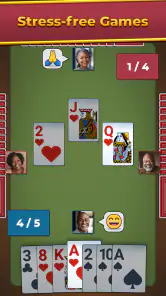

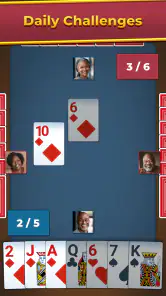
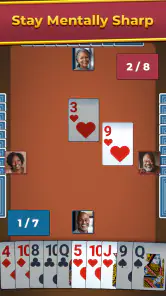
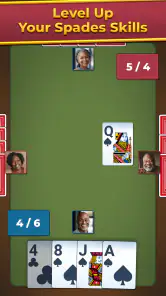
Analysis by Reviewed
I approached Spades For Seniors: Card Game as the kind of game you open when you want a familiar card table without having to learn a complicated interface. It is a free card game from WildCard Games, aimed at Everyone, and its focus is clear: a straightforward version of Spades designed to feel comfortable for older players and anyone who prefers readability over visual clutter.
That focus matters more than it may sound. Many card games try to add tournaments, collectibles, constant rewards, or several modes competing for attention. This one presents itself as a more relaxed choice. In my experience, that makes it easier to recommend to a parent, grandparent, or friend who enjoys traditional card play but does not want a busy mobile gaming environment. It is also a sensible option for casual players who want something familiar during a short break.
The game was released on May 9, 2024, and its current version is 1.28.0. It requires Android 8.0 or later, so it is not aimed only at brand-new phones. With a 4.5 average from around 4.9 thousand ratings and more than 100 thousand installs, it has already attracted a noticeable audience without feeling like an obscure experiment.
How the game feels during an ordinary session
A gentle pace that suits short card-game sessions
The first thing I look for in a mobile card game is whether it respects the rhythm of the original game. Spades is naturally turn-based, so speed is not about rapid animation or frantic tapping. It is about whether I can understand the table quickly, choose a card without hesitation, and continue without unnecessary interruptions. This title is best judged by that standard rather than by the expectations of an action game.
For me, the appeal is the ability to settle into a predictable loop: read the cards, consider the bid and the current trick, then make a decision. That makes it a good companion for a quiet evening or a few minutes while waiting. It does not demand the constant attention of a competitive real-time game, and that lower pressure is especially useful for players who find fast interfaces tiring.
There is also a practical benefit to a slower card-game structure. If I look away briefly, I am not immediately punished by a missed moment or a rapidly changing battlefield. I can return to the table and think through the position. That makes the game more approachable for people who are still becoming comfortable with digital card controls.
However, anyone expecting a highly animated or aggressively paced experience may find it restrained. The game’s identity is built around traditional Spades, not spectacle. I would not choose it when I want a dense challenge full of rapid decisions, dramatic presentation, or a broad selection of unrelated card games.
Why the senior-focused presentation is useful beyond age
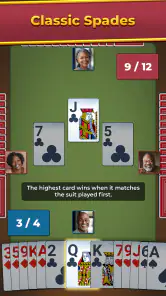
The “for seniors” positioning should not be read as a limitation to older users. I found the idea useful for anyone who values clear card recognition and a less crowded screen. Players with tired eyes, people using a smaller phone, and newcomers who dislike tiny controls can all benefit from an interface designed around the cards themselves.
A useful habit is to play the first few hands without worrying about winning. I use that time to learn where the important information sits and how the card selection feels. In a traditional trick-taking game, a small interface misunderstanding can lead to an accidental play, so taking a moment to become familiar with the table is more valuable than immediately chasing a perfect result.
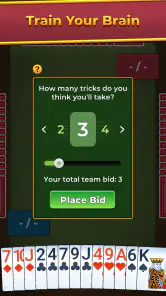
Another practical tip is to avoid playing while distracted during the bidding phase. Even though the game is relaxed, bidding is where a casual hand can go wrong before the first trick begins. If I am answering messages or watching television, I am more likely to make a careless estimate of my hand. The game works best when I give it enough attention to make deliberate choices, even if the overall session remains easygoing.
The learning curve for new Spades players
Spades is familiar to many card players, but not everyone knows how bidding, tricks, and the trump suit work together. This game is most comfortable for someone who already understands the basic idea or is willing to learn through repeated hands. A complete beginner may need patience at the start, especially when deciding how many tricks a hand can realistically take.
I would introduce it to a new player by explaining one decision at a time. First, understand that the bid is a prediction. Then watch how the spade suit changes the value of cards once spades become relevant. Finally, pay attention to whether the team is trying to meet its combined target or prevent the opponents from doing so. Thinking in that order makes the game feel much less mysterious.
One of the more useful insights is that a strong-looking hand is not automatically a good high bid. A hand with several high cards may still be awkward if it lacks control over later tricks, while a modest hand can sometimes contribute safely through a low bid. That strategic distinction gives the game more depth than its calm presentation initially suggests.
What happens when the phone is under heavier use
The moments most likely to test a card game are not individual taps but longer sessions. I think of a heavy-use situation as playing several hands in a row, switching away and returning, or using the game while other apps have recently been active. Those are the situations in which a casual title either remains comfortable or begins to feel like work.
For this game, the turn-based format is naturally forgiving. A hand does not require constant rapid input, so the player has time to recover attention after a notification or a brief interruption. That is a real strength for a game aimed at relaxed use. It also means the app does not need to feel powerful or demanding to remain enjoyable.
Still, long sessions can expose a different kind of fatigue: decision fatigue. Even an uncomplicated game can become repetitive if I play without changing my approach. I get more from it when I set a small goal for a session, such as improving my bidding discipline or avoiding unnecessary trump cards. That keeps the familiar structure from turning into mindless tapping.
For someone sharing a device with other demanding apps, I would treat this as a lighter choice rather than a guaranteed background companion. The verified requirements are modest, but requirements alone do not describe every phone’s real-world behavior. Older hardware, limited free storage, or a crowded system can affect any mobile game. My practical advice is to close unnecessary apps if the phone already feels sluggish, then judge the game under normal conditions rather than assuming the card title itself is the only factor.
Reliability and the value of a simple design
Simple games have a reliability advantage because there are fewer systems competing for attention. A card table has a narrow purpose, and that makes it easier for me to notice whether the experience is behaving as expected. I am not moving between a shop, a social feed, a collection screen, and several event menus before I can play a hand.
That simplicity also improves recovery after an interruption. If I pause to answer a call or move to another task, the mental context is easier to rebuild than it would be in a fast multiplayer match. I can look at the current trick, review the cards already played, and continue thinking. For a senior player or anyone who prefers a measured pace, that is more important than flashy presentation.
There is a trade-off, though. A focused card game may feel less rewarding to players who expect frequent progression systems or a large amount of content around the core rules. If your idea of reliability includes a constant stream of new challenges, social competition, or elaborate customization, this is probably not the right type of game to begin with.
I also would not confuse a clean concept with unlimited flexibility. Spades remains a specific card game. If you want a quick round of solitaire, a collection of casino games, or a multiplayer table with friends, a broader card-game app may fit better. This title makes more sense when the goal is specifically to play Spades in a calm, accessible format.
Device constraints and who should think twice
The minimum operating-system requirement is Android 8.0, which keeps the game accessible to a wide range of Android devices. That is helpful if you are installing it on an older phone belonging to a family member. It also makes the game a reasonable candidate for a secondary device that is not running the newest software.
Even so, the operating-system requirement should not be treated as a promise that every compatible phone will feel identical. Screen size, touch sensitivity, display brightness, and general system condition all influence a card game’s comfort. A small display can make card recognition harder, while a worn touchscreen can create uncertainty about whether a tap registered. Those are device-level concerns, but they matter greatly for this particular audience.
If I were setting it up for someone else, I would first make sure the phone’s text and display settings are comfortable, then play a few hands together. The goal is not simply to confirm that the game opens. It is to check whether the player can identify the cards, follow the current trick, and select the intended card without strain. That short test is more useful than relying on the phone’s age alone.
The game is free, which removes the biggest barrier to trying it. I can recommend downloading it for a cautious test rather than asking someone to commit money before knowing whether the presentation suits them. Free access is particularly useful when introducing Spades to a relative who may need a few sessions to decide whether digital card play feels natural.
Everyday use cases where it makes sense
My favorite realistic use case is a quiet waiting period. Suppose I have an appointment and want something more engaging than scrolling through short videos. A few hands give me a clear activity with a beginning and an end, and the turn-based design lets me stop when my name is called. I do not need to coordinate with another person or prepare a long campaign.
It also works well as a family handoff. A younger relative can help install the game, explain the basic rules, and then leave the senior player with an activity that does not require constant assistance. The important part is to teach the meaning of the decisions, not merely which button to press. Once the player understands bidding and trick-taking, the game becomes much more independent.
Another use is gentle mental practice. I would not describe it as a medical tool or make claims about health benefits, but Spades naturally asks players to remember played cards, estimate risk, and adjust plans. Those small decisions can make a quiet game feel more involving than a purely passive pastime.
It is less suitable for a group that wants a shared social table. If the main reason you enjoy Spades is conversation with friends, physical cards or an app built around direct multiplayer interaction may be a better choice. This game’s strongest case is individual, low-pressure play, not replacing the atmosphere of sitting around a real table.
How it compares with familiar alternatives
Compared with physical Spades, the clear advantage is convenience. The game handles the dealing and keeps the session ready whenever I have the phone nearby. That removes setup time and avoids the need to find three other players. The cost is the loss of physical cards, face-to-face conversation, and the tactile rhythm that many people associate with the game.
Compared with broad card-game collections, this title is easier to approach because its purpose is narrower. A larger collection may offer more variety, but it can also bury the desired game beneath menus and unrelated modes. I would pick this one for a person who repeatedly asks for Spades rather than someone who wants to sample every traditional card game.
Compared with fast competitive mobile games, the difference is even more pronounced. There is less pressure to react instantly, and the game fits better into a relaxed routine. The trade-off is that players seeking constant excitement may interpret that calmness as a lack of energy. Neither approach is universally better; it depends on whether the player wants thoughtful turns or rapid stimulation.
The strongest comparison point is accessibility. A senior-oriented card game can be more welcoming than a general-purpose title if its presentation makes the table easier to read and the choices easier to understand. That is why I see this as a recommendation based on comfort, not merely on the Spades rules themselves.
What I would improve in my own playing routine
I would keep sessions short at first, especially when introducing the game to someone unfamiliar with digital cards. A few hands are enough to identify whether the controls feel natural. If the player enjoys it, longer sessions can follow, but there is no advantage in turning the first attempt into a test of endurance.
I would also review the previous hand before starting another one. Instead of judging only the result, I ask whether the bid matched the actual strength of the cards and whether a trump card was used too early. This turns the game into a small learning exercise and helps prevent luck from becoming the only measure of success.
For experienced Spades players, I would recommend treating the app as a convenient practice table rather than assuming it will replace every preferred way to play. It is useful when a physical deck is unavailable or when I want a quiet solo session. It is not the best substitute for a lively group game with house rules and conversation.
For a senior user, I would pair the first session with a simple explanation of the table rather than a long rules lecture. Let the player see what happens, pause before important decisions, and point out why a card was chosen. That approach makes the game feel less like a technical task and more like the familiar card activity it is trying to recreate.
My performance verdict after weighing comfort and limitations
Spades For Seniors: Card Game succeeds because it keeps its purpose easy to understand. It is a free Android card game from WildCard Games, rated for Everyone, with a current version of 1.28.0 and support beginning at Android 8.0. Those details make it approachable for families looking for a low-cost game that can run on a range of devices.
Its perceived performance is best described as calm and manageable rather than demanding. The turn-based nature of Spades reduces pressure during ordinary play, and the senior-focused presentation points toward clarity over visual excess. That combination makes it a good fit for short breaks, quiet evenings, older players, and newcomers who want to learn at their own pace.
The limitations are equally clear. It will not satisfy someone looking for a large variety of card games, a highly social table, or an intense competitive atmosphere. Device comfort still depends on the phone’s screen and touch response, and repeated sessions may feel routine if I play without setting a strategic goal.
My recommendation is simple: choose it when readable, unhurried Spades matters more than variety or spectacle. I would happily suggest it to a friend who wants a familiar card game that is easy to pick up and forgiving when attention is interrupted. I would steer a multiplayer-focused player or a variety seeker toward a different option, but for its intended audience, this is a focused and sensible choice.
Pros
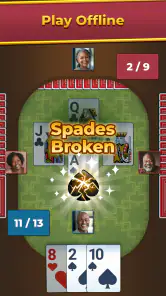
- Large cards and clear visuals make suits easy to identify.
- Simple controls are comfortable for players with limited dexterity.
- Relaxed pace makes it suitable for casual
- stress-free sessions.
- Offline play is useful when traveling or away from Wi-Fi.
- Helpful hints can support beginners learning Spades strategy.
Cons
- Computer opponents may feel predictable after extended play.
- Some features or content may require in-app purchases.
- Advertising can interrupt the flow between hands.
- Limited multiplayer options may disappoint competitive players.
- The game may use noticeable battery during longer sessions.

- Category
- Card
- Version
- 1.28.0