Spades by Staple Games
- 1.45K
- 4.5
- Installs
- 500.00K
- Price
- Free

Screenshots

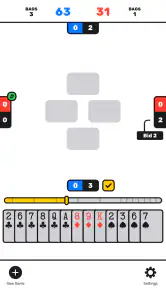
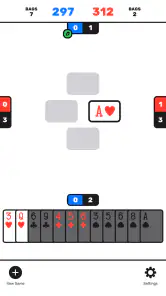
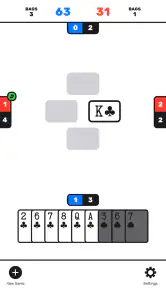

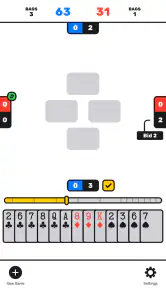
Analysis by Reviewed
Spades by Staple Games is the kind of card game I can open for a few minutes without needing to prepare for a long session. Its appeal is simple: it puts the familiar trick-taking game of Spades on a phone and keeps the focus on deciding which cards to play, when to protect a bid, and when to take a calculated risk. I found that narrow focus more useful than a crowded mobile card app that tries to include every possible game mode.
The game is free, rated for Everyone, and belongs to the card-game category. It was released on April 20, 2023, and the current version is 2.07, with Android 7.0 or later required. Those details make it accessible to people using older Android phones as well as newer devices. Staple Games has also built a sizeable audience around it, with over 500 thousand installs, an average rating of 4.5 from around 39 thousand ratings, and about 1.4 thousand written reviews.
What matters more to me than those figures is whether the game works well in the small gaps of an ordinary day. In that respect, Spades is strongest as a quick, focused card-table substitute. It is not trying to become a social network, a collection of casino games, or a complicated strategy package. That restraint is both its main strength and the reason some players may eventually want something more elaborate.
Why the single-game focus matters
The central capability here is straightforward digital Spades play. You are not learning a new ruleset invented for a mobile screen; you are applying the familiar logic of bidding and tricks through a compact interface. That makes the first few hands easier to understand, especially if you already know the physical card game or have played it with friends.
In my experience, the best part of this design is how quickly it gets me to the meaningful decision. A hand is not interesting because I tapped a card. It is interesting because I had to judge whether my strong suits could support my bid, whether a high card should be saved, or whether taking an extra trick was worth the possible consequence. A good mobile version should keep those decisions visible instead of burying them under decorative menus, and this one benefits from keeping the game itself at the center.
That focus also makes it a practical choice for someone who wants to practice the rhythm of Spades without gathering a group around a table. You can use it to refresh your memory before playing in person, to keep your card-reading instincts active, or simply to occupy a short break. I would not describe it as a replacement for the conversation and unpredictability of playing with people you know, but it does cover the basic solo-phone use case neatly.
The game is especially approachable for players who prefer familiar rules over a tutorial-heavy experience. The category label says “Card,” but the actual experience is more specific: this is for someone who wants Spades rather than a broad toolbox of unrelated card formats. That specificity helps the app feel direct. If you install it because you want Spades, you are not spending your first session searching through a large catalog to find the one table you came for.
Reading a hand instead of rushing every tap
The practical skill this game encourages is hand evaluation. Before playing, I like to pause and think about the likely shape of the round rather than treating every high card as an automatic winner. A strong suit can take tricks, but it can also be useful to control when another suit is led. Spades themselves change the calculation, so blindly spending them early can leave fewer options later.
That is where the app can be more useful than a purely casual time-killer. Even a short session gives me a reason to compare my prediction with the result. If I bid too aggressively, I can ask whether I overvalued one suit. If I fall short, I can consider whether I protected my bid too cautiously. This kind of self-review is easy to skip in a physical game because the table moves on, while a phone game makes it convenient to replay the decision in my head immediately.
One tip I found valuable is to separate “cards that can win now” from “cards that help me control the end of the hand.” A high card may look attractive, but using it at the wrong moment can give away control. Conversely, holding a useful card too long can be just as costly. The small screen does not teach that lesson for you; it simply gives you repeated hands in which the trade-off becomes easier to notice.
I also recommend treating the bid as a plan rather than a target you forget after making it. Once the round begins, I keep a rough mental count of the tricks I still need and the safe opportunities available. That habit makes the game feel less random and more like a sequence of manageable choices. It is a particularly good approach for new players who understand the rules but struggle to connect their opening hand with their later plays.
A realistic use during a short break
Imagine having a few minutes before an appointment or while waiting for a friend. A large multiplayer game may ask you to commit to a lobby, communicate with other players, or remain available for a full match. A physical deck is not practical in that moment. This is where I would choose Spades: I can use the spare time for a hand or two, focus on the decisions, and put the phone away without turning the break into a major event.
That scenario also explains why the game works for people who do not want constant social interaction. Some players enjoy card strategy but do not want usernames, chat, invitations, or competitive pressure every time they open an app. A focused single-game experience can be calmer. It gives me room to concentrate on the cards rather than on maintaining an online presence.
There is a trade-off, though. If your favorite part of Spades is joking with partners, reading the table talk, or building a regular group, a phone opponent cannot reproduce that atmosphere. The app is better for convenient practice and casual solo play than for recreating a lively evening around a real table. I would pick a dedicated multiplayer platform when the social side is the main reason I play.
For a beginner, the same short-break scenario can work as a low-pressure learning loop. I would start by making conservative bids, watching how many tricks the hand actually supports, and only then trying more ambitious predictions. The useful lesson is not simply whether I won a round. It is learning how the opening cards, the order of play, and the remaining spades interact.
Where the interface helps and where it cannot
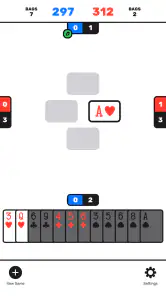
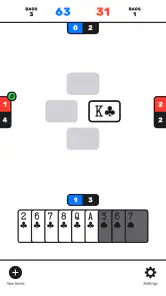
A mobile card game succeeds when the interface makes the legal choice obvious without making the strategy feel automatic. Spades benefits from the fact that the action is naturally compact: look at the hand, choose a card, follow the trick, and reassess. That flow suits a touchscreen better than games that require a large board or many simultaneous controls.
Still, a compact interface can make mistakes feel more abrupt. On a physical table, I can spread cards out, point to a card, and discuss a questionable play. On a phone, a tap is final in a way that encourages me to slow down before committing. My practical advice is to avoid playing while distracted, especially when a hand has several plausible choices. The game may be easy to open, but the best decisions still need attention.
Another useful habit is to use the pause between tricks to update the plan. I do not need to calculate every possibility, but I do want to notice which suits have been exhausted and whether the remaining cards have changed the value of my original bid. This is the difference between merely reacting to the next playable card and actually managing the hand.
That distinction is important for expectations. The app can provide repeated practice, but it cannot instantly turn a new player into an expert. It gives you a convenient environment for seeing patterns; the improvement comes from noticing why a play worked or failed. Players who want an automatic, no-thought distraction may find the strategic demand slightly more than they expected from a simple card title.
The main trade-offs before installing
The biggest advantage is clarity of purpose. Staple Games has made a game for people who specifically want Spades, and that makes it easier to recommend than a general card collection when this is the one format you enjoy. The free price also lowers the barrier to trying it, while the Everyone rating makes it suitable for a broad household audience.
The limitation is the same narrow scope. If you want several card games in one installation, a richer alternative may serve you better. A general card suite can be more efficient for a family member who switches between solitaire, hearts, rummy, and other formats. Choosing this app means accepting that its value depends almost entirely on how much you enjoy Spades itself.
I would also be careful about comparing it with a real-world deck. The app is more convenient, but a physical game offers flexibility that software cannot: you can change house rules, teach at your own pace, and make the experience as social or competitive as the group wants. The phone version wins on availability and repetition, not on atmosphere.
Compared with a multiplayer-focused alternative, the choice depends on what you want from each session. A social platform may be better if you need live opponents, conversation, or a persistent community. This game makes more sense when I want a direct card experience without arranging a table first. That is not a weakness for every player; it is simply a clear boundary around the app’s purpose.
There is also a learning trade-off. Repeated play against a predictable style can help me understand the mechanics and improve my basic decisions, but it may not prepare me for every unusual human strategy. When I play with friends, opponents can make surprising bids or deliberately change their rhythm. I would use the app to sharpen fundamentals, then play with people when I want the full challenge of adapting to personalities.
Who gets the most from this version of Spades
I would recommend it first to casual players who already like Spades and want an immediately available way to play. It is also a good fit for someone returning to the game after a long break, because repeated hands make it easy to rebuild familiarity with bidding and trick order. The free entry point means there is little reason not to test whether its focused format matches your habits.
It can also suit families looking for a simple card game that does not require advanced reading or complicated setup. The Everyone content rating is reassuring for a shared device, although younger players may still need someone to explain the rules and the idea of bidding. The game is accessible as software; understanding Spades still takes a little guidance.
More experienced players may appreciate it as a practice tool, especially when they want to examine their own choices without organizing a full group. My advice for that audience is to use each hand deliberately: predict the likely result, track the tricks you need, and review the point where the plan changed. Without that discipline, even a strategic card game can become repetitive tapping.
I would skip it if your priority is a deep online community, extensive customization, or a broad library of card games. I would also look elsewhere if you only enjoy Spades when it is tied to face-to-face conversation. The app can make the game available, but it cannot supply the personal history and table banter that make a regular group special.
For everyone else, the most convincing reason to try it is its balance between convenience and decision-making. It is small enough to fit into an ordinary break, yet thoughtful enough to reward paying attention to the hand rather than playing randomly. The version available now keeps the identity of the game clear: a free Spades experience from Staple Games for Android users on version 7.0 or later.
My final view is positive, with a specific recommendation rather than a blanket one. If you want a focused way to play Spades on your phone, this is an easy choice to consider. I like it most when I use it as a short practice table: make a measured bid, watch how the tricks develop, and learn from the decisions that did not work. If you need social competition or a large card-game collection, choose a different kind of app. If you want the familiar game itself, available whenever a spare moment appears, this focused approach is exactly its strongest feature.
Pros
- Simple rules make it easy for new players to start quickly.
- Short rounds fit well into quick gaming sessions.
- Clean interface keeps cards and scores easy to follow.
- Playable offline
- making it useful without an internet connection.
- Multiple difficulty options provide a challenge for different skill levels.
Cons
- Computer opponents can feel predictable after extended play.
- Limited customization may disappoint players wanting more table options.
- Ads can interrupt the experience
- especially in the free version.
- No strong social features for playing with friends remotely.
- Scoring and bidding may feel basic for experienced Spades players.

- Category
- Card
- Version
- 2.07