Solitaire Pro
- 307.00
- 4.7
- Installs
- 50.00K
- Price
- $4.99
Screenshots
Analysis by Reviewed
I’d approach this as a paid, focused take on a familiar card game rather than a free app built around constant rewards or online competition. Solitaire Pro is a Klondike game from AI Factory Limited, and its appeal is the option to choose a difficulty and draw style, then settle into a game at your own pace. That makes it an easy fit for a short break, though it is not the best match if you want a steady stream of new modes or social features.
What the purchase means in practice
The game costs $4.99, so I’d decide based on whether I want a straightforward solitaire experience I can return to, not on promises of ongoing content. It has a 4.7 average from around 1,700 ratings, with over 10,000 installs; those figures offer useful context, but they can’t tell you whether its presentation or challenge suits your taste. Its Teen age rating is also worth noting if you’re choosing games for a younger player.
It was released in 2013 and is currently at version 1.51, with Android 4.4 as the minimum operating system. That makes the basic compatibility question simple for an Android user: check your device’s software before buying. The purchase is a clearer proposition than a free solitaire game that may rely on ads or optional spending, but I wouldn’t assume anything about its update plans or purchase policies beyond the price itself.
Getting Started with Solitaire Pro
First things first, downloading and installing Solitaire Pro is a breeze. Available on both Android and iOS, you can find it on your respective app store, and before you know it, you'll be swiping through cards like a pro. The interface is sleek and user-friendly, making it easy for both beginners and seasoned players to navigate through the game without a hitch.
Choosing a pace that suits you
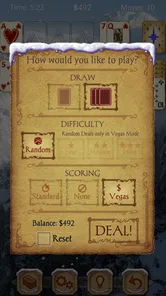
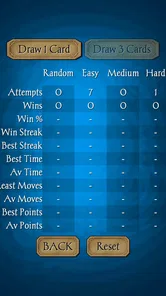
Its three difficulty levels and choice of drawing one card or three give you a practical way to tune the game without changing what Klondike is. I’d begin with one-card draw if I wanted a calmer session or was getting comfortable with the rules, then switch to three-card draw when I wanted to plan further ahead. The tougher option isn’t automatically more enjoyable: if I’m playing to unwind, a run of awkward deals can make a gentler setting the better choice.
A useful habit is to pause before moving a card just because it can be moved. In Klondike, a move that exposes a hidden card or preserves a useful sequence can matter more than an immediate match. I’d use the hint system as a nudge when I’m genuinely stuck, then try to work out why that move helps; tapping hints after every pause can turn a thinking game into a sequence of instructions.
Gameplay and Features
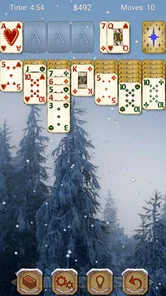
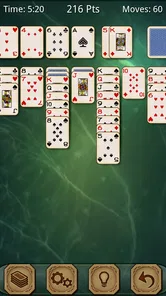
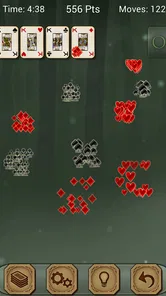
Jumping into the game, you'll immediately notice the smooth graphics and fluid animations. It feels like you're playing a high-quality, well-thought-out card game, not just some run-of-the-mill app. The real star here is the gameplay. With various card layouts and difficulty levels, Solitaire Pro keeps things fresh and challenging. Whether you're looking to relax with a simple game or test your wits against a more complex setup, this app has got you covered.
More From Our News Desk

 Gmail
GmailGmail in a Busy Inbox: Who Benefits Most?
From first account to crowded workday, Gmail earns its place through dependable search and flexible sorting—but its best fit depends on how much inbox maintenance you can tolerate.

 Prime Video
Switching to Prime Video: What Changes in Your Viewing Routine
Prime Video can make a compelling second home for streaming, but switching means learning a different catalog, rental layer, and route from browsing to playback.

 Universal TV Remote Control
Universal TV Remote Control Works Best as a Reliable Backup
A phone remote earns its place through quick setup and reliable habits. Here is how to get more from Universal TV Remote Control—and where its limits show.

 Weather - By Xiaomi
Weather by Xiaomi Review: Clear at a Glance, Less Clear Up Close
Xiaomi’s weather app makes everyday forecasts quick to scan, but its calm surface can leave useful details and recovery paths harder to find than they should be.

 X
XX Under Pressure: Can It Recover When Posting Goes Wrong?
A resilience-focused review of X, examining setup, mistaken posts, interruptions, weak connections, and the gaps that matter when recovery needs to be dependable.

 Clash of Clans
Clash of Clans Is Won Between the Battles
Its raids are quick; its community is a long-term project of coordination, teaching, rivalry, and shared responsibility—with all the friction that entails.
Latest News



One of the standout features is the hint system, which can be a lifesaver when you're stuck. It's like having a little helper right there with you, gently nudging you in the right direction. And if you're the competitive type, you'll love the leaderboard feature, which lets you see how you stack up against other players worldwide. Climbing up the ranks adds an extra layer of excitement to the game!
A good fit for small pockets of time
For an everyday example, I can see myself opening it during a quiet part of a commute or while waiting for an appointment: a single deal has a clear beginning and end, and I don’t need to follow a story or coordinate with anyone. Offline play is especially handy when a connection is unreliable. I’d still avoid starting a game when I only have a few seconds, since a deal can take longer than expected if I’m carefully weighing moves.
Compared with a free solitaire app, the upfront price is a trade-off: you pay before playing, while free alternatives may be easier to sample but can come with interruptions or other monetization. Compared with a physical deck, this is more convenient when I’m alone and want the game to handle the layout, but it lacks the tactile feel of moving real cards. If I mainly want multiplayer rivalry, frequent new content, or a collection of different card games, I’d look elsewhere rather than expect this focused Klondike game to provide those things.
Personal touches and practical limits
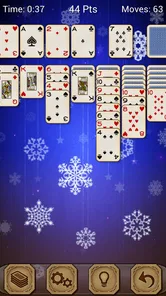
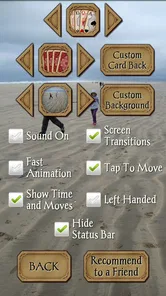
If you're a fan of customization, Solitaire Pro doesn't disappoint. You can personalize your card backs and tables to suit your style, making each game feel uniquely yours. Plus, the app runs smoothly without any annoying ads popping up every few seconds, which is a huge plus in my book.
Those options are more than decoration if you play often: a table and card-back combination that is easy for you to read can make longer sessions more comfortable. I’d try a few looks before settling on one, especially if a busy design makes suits harder to distinguish at a glance. Customization changes the presentation, though, not the underlying decisions, so it won’t make the game feel substantially different to someone who is already tired of Klondike.
The main limitation is that the game’s appeal depends on enjoying repeated deals of the same classic format. Three difficulty levels and two draw styles offer useful variation, but they are not a substitute for other card games or a changing campaign. The leaderboard may add motivation for competitive players, yet anyone who prefers private, unhurried play can simply focus on their own decisions instead of treating rank as the point of every session.
Why You'll Love It
Another thing worth mentioning is the offline mode, which allows you to play without an internet connection. This is perfect for those long commutes or when you're in a place with spotty Wi-Fi. It's just you and your deck of cards, battling it out wherever you are.
If you’re deciding whether the offline option is enough for your routine, think about where you usually play: it suits travel and waiting rooms, while someone who wants to compare scores or play socially may prefer a game designed around those connections. The purchase price is the clear cost to weigh; details such as a refund, privacy policy, or future support aren’t something I can establish from the app facts here, so I’d check the relevant platform information if those points affect your decision.
Fairness, progress, and the leaderboard
The game’s progression is personal rather than campaign-based: the meaningful changes come from choosing a tougher setting, changing the draw method, or trying to improve how you handle a deal. That suits me when I want a small challenge I can pick up and put down without keeping track of a long-term objective. If you need unlocks, missions, or a visible sequence of milestones to stay interested, this is likely to feel too modest.
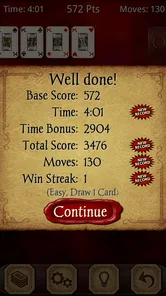
The leaderboard offers a reason to compare play, but I’d treat it as a side feature rather than proof that every player faces identical conditions. A fair comparison depends on details such as how scores are calculated and whether people are playing comparable deals. Those mechanics aren’t established here, so I wouldn’t use a rank as a precise measure of skill. For a casual player, the more reliable benchmark is whether you make better decisions than you did in your own previous games.
That distinction also helps with pressure. I can enjoy a close attempt at clearing a deal without feeling that I have to keep playing to protect a position or chase a reward. If competitive rankings are what motivate you, check how the leaderboard works in the game before making it your reason to buy. If you’d rather play privately, the basic Klondike loop still makes sense without leaning on comparison.
Small habits that make a deal more satisfying
When I’m stuck, I’d first scan the face-down columns and ask which move could reveal a card, instead of immediately sending every available card to a foundation. That simple check gives the tableau a purpose: sometimes a lower card is more valuable where it can help uncover a column than where it makes a foundation pile look tidier. It’s a useful way to learn from a hint rather than merely follow it.
I’d also choose the draw style to match the kind of attention I have available. One-card draw is easier to dip into when I’m tired or distracted; three-card draw asks me to keep more of the sequence in mind and can make a short session feel more deliberate. Switching between them is a practical way to adjust the mental load without looking for a different game.
For a longer session, readable card and table choices matter more than novelty. I’d avoid a decorative combination if similar suits are hard to tell apart quickly, even if it looks attractive in the menu. That is a small, individual trade-off: the customization can make the table feel more personal, but clarity is what keeps play comfortable when I’m scanning several columns.
Who should choose it—and who should pass
I’d recommend it to someone who already knows Klondike, wants a tidy way to play alone, and would rather pay once than start with a free app whose business model may involve ads or optional purchases. It also makes sense for a beginner who is happy to learn through ordinary deals and use hints sparingly, rather than expecting a guided course. The adjustable draw styles give both groups a straightforward place to start.
I’d pass if I were shopping for a broad card-game collection, live multiplayer, or a stream of fresh goals. I’d also think twice if I strongly prefer free games and want to test a solitaire app before spending; a free alternative may be a better first step, provided its ads and purchase options are acceptable to you. And if the appeal of cards is mostly handling a real deck with other people, no screen-based Klondike game is going to replace that social, tactile experience.
On Android, the minimum software requirement gives a practical compatibility check before purchase. The game is also listed for iOS, but I’d verify availability and device compatibility in the relevant store rather than assume that the Android requirement applies there. That small check matters more than the game’s age: an older release can still suit a simple use case, but the current version number alone doesn’t tell me what support or future updates will look like.
Final Thoughts
All in all, Solitaire Pro is a delightful app that brings the classic card game experience to your fingertips. It's engaging, challenging, and offers plenty of customization options to keep things interesting. Whether you're a solitaire veteran or a curious newbie, this app is definitely worth checking out. So why not give it a try and see how high you can score? Happy gaming!
My recommendation is conditional but simple: choose it if you want paid, self-paced Klondike with adjustable challenge and a way to play offline; skip it if you need variety beyond solitaire or want competition to be the core experience. The verified purchase facts support a clear upfront price, but they don’t establish whether leaderboards involve any purchase advantage, so I wouldn’t claim the competition is either pay-to-win or fully balanced. For a player who values a quiet deal over a larger game ecosystem, that focused scope is the point.
Solitaire Pro Frequently Asked Questions
Does Solitaire Pro work on my phone or tablet?
Solitaire Pro is a card game for Android devices running Android 4.4 or later. Its current version is 1.51, so checking your device’s operating-system version before downloading can help you avoid compatibility issues. The game is rated Teen. If you meet the minimum system requirement, you can consider whether its Klondike format and customization options suit the way you like to play.
What features does Solitaire Pro offer compared to other solitaire apps?
Solitaire Pro is a customizable Klondike challenge with three levels and a choice of one-card or three-card draw. It also has an intuitive user interface, smart hints, and an auto-complete feature to enhance the gaming experience. Additionally, Solitaire Pro supports offline play, making it ideal for users on the go. Its focus is on Klondike rather than a range of solitaire variations.
Is Solitaire Pro free to download and play?
Solitaire Pro is a paid download priced at $4.99, rather than a free game with optional purchases. Once you have downloaded it, you can play its Klondike challenges, choose between three levels, and select one-card or three-card draw. The price is worth considering before installing, especially if you are comparing it with free solitaire games.
Can I play Solitaire Pro offline?
Yes, one of the key features of Solitaire Pro is its offline functionality. This means that users can enjoy their favorite solitaire games without the need for an active internet connection. This is particularly useful for those who travel frequently or have limited data plans, ensuring continuous gameplay.
What kind of customer support is available for Solitaire Pro users?
Solitaire Pro offers comprehensive customer support, including an in-app help section with FAQs and troubleshooting tips. Users can also contact the support team via email for any specific issues or feedback. The developers are known for their quick response times and regular updates to fix any bugs or improve app features.
Pros
- User-friendly interface
- easy to navigate.
- Various game modes for different skill levels.
- No ads in the premium version.
- Smooth performance without lags.
- Customizable themes enhance user experience.
Cons
- Limited features in the free version.
- Occasional crashes on older devices.
- In-app purchases can be pricey.
- Requires internet for some features.
- No multiplayer option available.