Chess Pro
- 1.73K
- 4.8
- Installs
- 100.00K
- Price
- $4.99

Screenshots
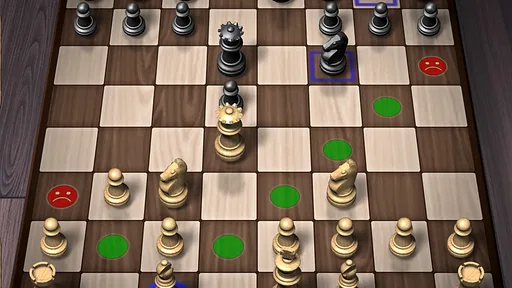
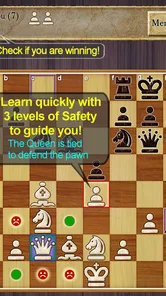
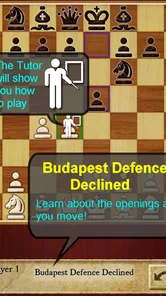
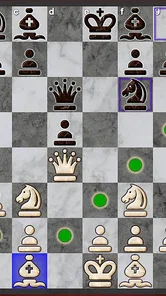
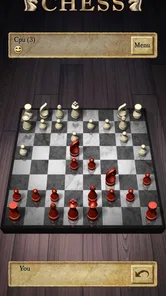
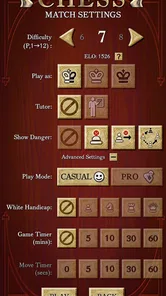
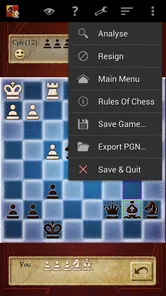
Analysis by Reviewed
I tend to judge a chess app less by how many options it advertises and more by whether it helps me make sense of a position after a careless move. Chess Pro is a paid board game from AI Factory Limited, and its appeal is the idea of having both a place to play and a way to learn. It costs $4.99, is rated for Everyone, and has an average rating of 4.7 from around 21,000 ratings, with over 100,000 installs. That gives it a substantial audience, though the numbers alone can’t tell you whether its approach suits your playing habits.
What the current version is best suited to
The current version is 3.84, and the game has been available since August 27, 2010. That history makes it a long-running chess option rather than a brand-new experiment. It runs on Android 4.4 or later, which is useful if you’re keeping an older compatible device in service. I’d think of it as a focused chess companion: best for someone who wants to practise, play against the computer, and review decisions without turning every session into a tournament.
A practical routine is to play one short game during a break, then revisit the moment where your plan stopped working. Instead of immediately starting another match, I’d first ask what the opponent threatened and whether I had a safer response. That small pause makes analysis more useful than treating it as a quick verdict on whether I played well. If you’re new to chess, this kind of repeatable habit is more valuable than trying to memorise openings before you can spot a hanging piece.
How to get more from a practice session
For a more deliberate session, I’d choose one goal before starting: protect my king, avoid moving the same piece repeatedly, or check for captures before committing to a plan. After the game, the analysis tool can help direct attention back to decisions worth examining. The useful trade-off is that reviewing your own reasoning takes effort; an analysis screen cannot automatically make you understand why a move mattered. I’d use it as a prompt to think, not as a substitute for thinking.
The computer opponent is a sensible alternative when no human opponent is available or when you want to try a position at your own pace. Playing a friend, by contrast, can be more enjoyable when the point is conversation and shared competition rather than structured practice. Compared with a physical board, the app is easier to carry and can provide a more guided solo session; compared with chess services built around finding opponents, its strongest reason to choose it is the mix of play and learning. If live competition and a large opponent pool are your priority, a multiplayer-focused alternative may suit you better.
Things I’d check before committing
The game’s Everyone rating makes it appropriate for a broad audience, but the best fit still depends on what you want from chess. A casual player can use it to fill a spare few minutes, while a learner may prefer longer sessions that leave time to review mistakes. Strong club players who need deep opening preparation, detailed tournament tools, or a specific training curriculum should compare it with dedicated chess study options before paying. The price is a one-time purchase, so I’d weigh it against how often I realistically expect to use the practice and analysis features.
One small but useful habit is to change the board or piece appearance only if it improves readability for you; attractive styling matters less than spotting a defender or an exposed king quickly. Another is to keep a mental note of one recurring mistake after each review rather than trying to fix everything at once. That makes progress easier to notice, even if a single game goes badly. The game’s 1.7 thousand reviews suggest plenty of players have shared feedback, but I’d still judge its value by whether its learning flow matches the way you like to practise.
More From Our News Desk

 Gmail
GmailGmail in a Busy Inbox: Who Benefits Most?
From first account to crowded workday, Gmail earns its place through dependable search and flexible sorting—but its best fit depends on how much inbox maintenance you can tolerate.

 Prime Video
Switching to Prime Video: What Changes in Your Viewing Routine
Prime Video can make a compelling second home for streaming, but switching means learning a different catalog, rental layer, and route from browsing to playback.

 Universal TV Remote Control
Universal TV Remote Control Works Best as a Reliable Backup
A phone remote earns its place through quick setup and reliable habits. Here is how to get more from Universal TV Remote Control—and where its limits show.

 Weather - By Xiaomi
Weather by Xiaomi Review: Clear at a Glance, Less Clear Up Close
Xiaomi’s weather app makes everyday forecasts quick to scan, but its calm surface can leave useful details and recovery paths harder to find than they should be.

 X
XX Under Pressure: Can It Recover When Posting Goes Wrong?
A resilience-focused review of X, examining setup, mistaken posts, interruptions, weak connections, and the gaps that matter when recovery needs to be dependable.

 Clash of Clans
Clash of Clans Is Won Between the Battles
Its raids are quick; its community is a long-term project of coordination, teaching, rivalry, and shared responsibility—with all the friction that entails.
Latest News



There is also a difference between a tool that makes chess accessible and one that replaces a coach. This app can give you a convenient setting for games and post-match reflection, but improvement depends on patience and honest review. If you mainly want a social chess night, invite a friend; if you want to build a regular solo routine, the computer and analysis combination is more compelling. The best choice comes down to whether you want guided practice alongside ordinary games, rather than simply another place to move pieces.
The First Move: Setting Up
Right off the bat, Chess Pro impresses with its sleek and intuitive interface. Setting up was a breeze, and I was quickly thrust into the world of chess without the hassle of complicated menus. The app caters to both beginners and seasoned players, offering tutorials for newbies and advanced puzzles for the pros. It’s like having a chess mentor in your pocket!
The Gameplay Experience
What caught my attention was the sheer variety of modes available. Whether you’re in the mood for a quick match or a deep dive into a marathon game, Chess Pro has got you covered. The AI opponent is quite formidable, offering a challenge that scales with your skill level. Trust me, you’ll never get bored!
Oh, and for those who love to compete with friends, the multiplayer feature is a gem. You can easily connect with buddies or even play with strangers worldwide. The app ensures a seamless connection, making your chess duels smooth and exciting.
Features That Stand Out
One of the standout features has to be the analysis tool. After each match, you can review your game, check out where you went wrong, and learn from your mistakes. It’s like having a personal chess coach guiding you through your blunders and victories. The app also keeps track of your progress, allowing you to see how you’ve improved over time.
Another cool aspect is the customization options. From choosing different board themes to adjusting piece styles, you can tailor the game to suit your aesthetic preferences. It's the little touches like these that make Chess Pro feel unique and personal.
Making practice fit real life
The most useful way I’d fit this into an ordinary day is not to expect a full lesson every time I open it. A game during a commute break or while waiting for an appointment can be enough to practise one decision-making habit. Later, when I have a quieter stretch, I can return to a game and spend more time considering the turning point. That split between quick play and slower review keeps chess from feeling like homework, while still giving the session a purpose.
For a beginner, I’d keep the goal concrete and modest: before every move, check whether the opponent has a direct threat and whether the piece I’m moving is protected. The point is not to win every game against the computer; it is to build a reliable pause into the decision process. Someone who already knows the rules can use the same approach to address a recurring weakness, such as overlooking checks or trading without considering the resulting position. The game is most useful when I bring a question to a session rather than expecting it to choose a study plan for me.
Useful choices during a game
When I’m short on time, I’d avoid starting a game that I’m likely to abandon halfway through. Chess rewards attention, and rushing the final moves can turn a potentially helpful practice session into a string of impulsive decisions. A better short-session option is to review an earlier game or practise a specific position if that is the kind of session I’m in the mood for. That distinction matters: the app can support different rhythms, but I still need to match the activity to the time and focus I have available.
Customization can also serve a practical purpose beyond personal taste. If a board theme makes the squares or pieces harder to distinguish on your screen, switch to a clearer presentation before blaming yourself for missing a tactic. I’d treat readability as part of the setup, especially during longer games when visual fatigue can make it harder to track pieces. At the same time, changing the appearance won’t make a weak move stronger; the benefit is simply a board that lets you concentrate on the position.
Where it sits among chess options
For solo play, a physical board remains a good choice when I want to think without a screen, and it works especially well when another person is beside me. The app has the advantage of being ready for a computer game and of giving me a digital way to revisit play. A multiplayer-first chess service is a more natural choice for someone whose main goal is finding opponents and playing rated or social games regularly. A dedicated course or coaching tool is likely to be better for structured study, while this game makes more sense when I want a practical blend of playing and reflection.
That difference is worth thinking about before paying. If I usually play with the same friend, I may get more enjoyment from a real board and a regular opponent than from a solo-focused routine. If I’m building confidence before playing people, computer games can give me room to pause and experiment without worrying about keeping another person waiting. And if my main frustration is not knowing what to study next, a clearly organised course may offer more direction than a general chess app. I’d choose based on the habit I want to create, not on the assumption that one product must replace every way of playing.
How to judge progress without chasing wins
Chess results can be noisy: one good game does not prove I’ve improved, and one blunder-filled game does not erase what I’ve learned. I’d use the progress tracking as a reason to look for patterns, then judge progress by whether I notice familiar dangers sooner. After a review, I might write down a brief reminder in my own words, such as “check the back rank before trading.” That turns analysis into something I can carry into the next game instead of leaving the lesson on the screen.
There is a trade-off here for stronger players. Reviewing individual decisions can be helpful, but it is not the same as preparing a complete opening repertoire, studying annotated master games, or working through a tailored training plan. If those are the specific tasks I need, I would pair this kind of play-and-review tool with more specialised material or choose a product built around that depth. For a casual improver, though, repeatedly noticing one tactical or positional mistake can be a more realistic route than trying to absorb advanced theory all at once.
What to expect from the long-running version
The release history gives me reason to see this as an established product, but longevity alone does not prove that every part will match a particular player’s expectations. Version 3.84 is the current point of reference, and I’d approach its core appeal as a familiar chess experience rather than assume that its age guarantees a particular roadmap. Existing users who already enjoy the way it handles games and review have a clear reason to keep it in their routine; anyone considering a purchase should focus on whether those basics fit their needs now.
That also shapes what I would watch for in future changes: not simply a longer feature list, but improvements that make it easier to understand a mistake, return to a useful position, or practise at an appropriate level. Those are the kinds of changes that would matter to me as a learner. Until then, I would not buy it on the promise of features that may arrive later. I’d make the decision based on the game as it stands and on whether I’ll actually use its computer play and review tools.
Wrapping It Up
All in all, Chess Pro is more than just a chess app; it’s a comprehensive platform for chess enthusiasts. Whether you’re a casual player looking to pass the time or a serious competitor aiming to sharpen your skills, this app has something to offer. With its user-friendly interface, challenging AI, and robust feature set, it’s a must-have for anyone passionate about chess.
So, if you're ready to make your move, download Chess Pro and dive into the world of strategic battles. Who knows, maybe you’ll become the next grandmaster!
Chess Pro Frequently Asked Questions
Is Chess Pro a good choice if I want to learn chess at my own pace?
Chess Pro is presented as a fast way to learn and improve at chess, so it may suit players who want a game with a learning focus. You can approach chess at your own pace and use the game as a place to practise. It is a board game centered on chess, making it relevant both to people beginning to learn and to those refreshing familiar skills.
Will Chess Pro work on my Android device?
Chess Pro requires Android 4.4 or later, so check your device’s operating-system version before downloading. If your device meets that requirement, it is within the stated minimum compatibility range. The game is listed for Android, and its current version is 3.84. Checking compatibility first can help you avoid downloading a game your device cannot run.
Is Chess Pro suitable for casual players as well as serious chess fans?
Chess Pro is a board game for anyone interested in playing or improving at chess. Its focus on learning and practice makes it a natural option for newcomers, while the familiar chess format also suits players who already know the rules. The game is rated for Everyone, so it can be considered by a broad range of players.
How much does Chess Pro cost, and what should I know before downloading it?
Chess Pro costs $4.99. It is developed by AI Factory Limited and has a 4.7 average rating from around 21,000 ratings, with about 1,700 written reviews and over 100,000 installs. Before downloading, check that your device meets the minimum operating-system requirement of Android 4.4, as compatibility can affect whether the game will run.
What platforms is Chess Pro available on?
Chess Pro is available for both Android and iOS devices. Users can download it from the Google Play Store for Android or the Apple App Store for iOS. This cross-platform availability ensures that users can enjoy Chess Pro regardless of their device preference, making it accessible to a wide audience of chess enthusiasts.
Pros
- Advanced AI opponents
- Offline play available
- No ads for distraction-free gaming
- Multiple difficulty levels
- Comprehensive training mode
Cons
- Limited board customization
- No live multiplayer option
- Requires in-app purchases for full features
- Occasional UI glitches
- Lacks real-time player stats