Solitaire Classic
- 5.55K
- 4.7
- Installs
- 5.00M
- Price
- Free
Screenshots

Analysis by Reviewed
I like solitaire on a phone best when it asks little of me: a quick look at the cards, a move or two, and an easy point to stop. That is the appeal of Solitaire Classic by Mint Games. It brings familiar solo card play to a mobile screen without making the game feel like a complicated project, so it suits a short pause as well as a longer, unhurried session.
One familiar game, with room to settle in
Solitaire is an especially handy choice when I want a game that does not require a team, a fast reaction time, or a long explanation before I can begin. The play itself gives me something to focus on, but the pace remains mine: I can think through a move, pause, or stop when my break is over. That makes this a different kind of phone game from one built around rapid rounds or constant prompts.
I would choose it for a quiet coffee break, a few minutes at home, or a stretch of waiting when it is comfortable to look at a screen. It is less suitable when I need to stay alert to my surroundings, keep both hands free, or avoid looking down. Solitaire can make “just one more move” feel harmless, so I find it useful to decide beforehand whether I have time for a full game or only a quick check-in.
The game is free to download, though in-app purchases range from $2.99 to $9.99 per item. If I am trying to keep spending predictable, I would treat purchases as optional and pay attention to any purchase prompt rather than tapping through automatically. Its Everyone age rating makes it broadly suitable by content, but that does not mean its screen and controls will suit every player equally well.
Bringing Back the Classics
What I absolutely adore about Solitaire Classic is its simplicity. In a world where games are becoming increasingly complex, sometimes all you need is a straightforward card game to relax. The app stays true to the original mechanics of solitaire, which is fantastic for those of us who appreciate a good throwback.
Readability and navigation
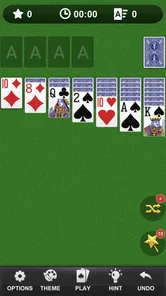
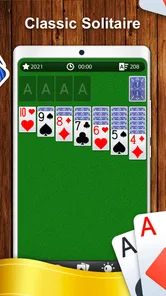
The user interface is clean and intuitive. From the moment you launch the app, you’re greeted with a visually pleasing layout. The cards are easy to read, and the touch controls are responsive, making it super easy to move cards around with just a swipe of your finger. It’s perfect for both newbies and solitaire veterans alike.
Readability matters particularly in a card game because every move depends on spotting suits and ranks quickly. I’d still suggest trying a short session on your own screen before settling in for a long one: comfort can vary with display size, brightness, and eyesight. If the cards feel too small for you, a game built around larger interface elements may be a better fit. The appeal here is direct play, not a promise that every screen or visual preference will feel equally comfortable.
More From Our News Desk

Weather by Xiaomi Review: Clear at a Glance, Less Clear Up Close

X Under Pressure: Can It Recover When Posting Goes Wrong?

Clash of Clans Is Won Between the Battles

Android Auto Makes the Case for Quieter Car Software

MobiOffice: Transforming Mobile Productivity with Seamless Integration

EA SPORTS FC™ Mobile Soccer: Redefining Mobile Sports Gaming
Getting comfortable before a longer game
A useful first check is not just whether the cards look attractive, but whether you can identify the rank and suit at a glance without leaning closer or repeatedly inspecting the same card. I would try this in the lighting where I expect to play: a bright room and a dim bus seat can feel very different, even on the same phone. If recognition takes effort from the start, that small friction is likely to become more noticeable during a longer session.
Navigation matters too. A straightforward layout can help someone who simply wants to begin a game without learning a complicated menu, but it cannot remove the need to scan the full layout and decide where a card should go. New players may benefit from taking moves slowly rather than treating each deal as a race. The most useful measure of comfort is whether the screen lets you concentrate on the puzzle instead of on finding controls.
Motor and sensory considerations
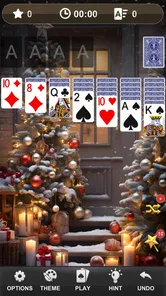
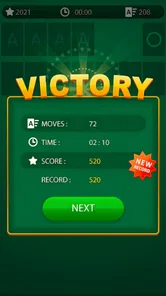
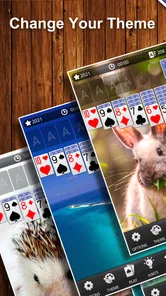
While the game is deeply rooted in its classic appeal, it does come with some modern features that enhance the gaming experience. You can choose from different card themes and backgrounds, adding a personal touch to your game. There’s also an option to track your statistics, so if you’re like me and love a little competition with yourself, this feature is a win!
Theme choices can make the playing area feel more personal, and they may help some people distinguish the cards from the background more comfortably. My practical tip is to try a couple of combinations before a longer game rather than assuming the first look is the easiest to read. The basic interaction still relies on touching and moving cards, so anyone who finds precise taps or repeated gestures tiring should test that feel early. A hands-free or keyboard-based card game would suit those needs better.
There is also a small trade-off between playing quickly and playing deliberately. A swipe can feel natural when moving a card, but if your hands are unsteady or the phone is resting on an unstable surface, a hurried gesture may be less comfortable than a careful tap. I would play seated with the device supported if repeated movement is tiring. That is not a special mode; it is simply a practical way to make a touch-based card game easier to manage.
The statistics are most useful when I treat them as a personal record rather than a score I have to improve every time. They can give a returning player a reason to notice patterns in their own sessions, but they do not replace the pleasure of an easy, low-pressure game. If tracking progress makes play feel like another task, I would ignore that part and use the app for the cards themselves.
Situational access and everyday play
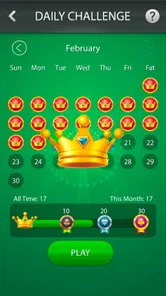
Another cool feature is the daily challenges. It gives you something new to look forward to every day and keeps the game from feeling repetitive. Plus, it’s a great way to test your skills and see how you stack up against other players globally.
In an ordinary day, I can see this working well during a quiet coffee break or while waiting for an appointment: one challenge gives the session a clear purpose, while a regular game leaves me free to play at my own pace. I would avoid starting when I need to watch the clock closely, since solitaire can tempt me into “one more move.” For a noisy commute or a setting where looking down at a screen is inconvenient, an audio-led game or a physical deck may be the more sensible choice.
For a short wait, I would choose the daily challenge if I want a defined prompt, and a regular game if I want to decide my own stopping point. That distinction is useful because a challenge can make a brief session feel more purposeful, while an open-ended deal is easier to leave whenever the appointment is called. Neither option changes the basic need to keep looking at the cards, so I would put the phone away whenever the situation calls for attention elsewhere.
At home, the app works better as a quiet solo pastime than as a substitute for company. I would not pick it when I want conversation, a shared activity, or a game that involves friends around the same table. A physical deck is still a better fit if several people want to play together, and it avoids having to pass a phone around. The mobile version’s convenience is precisely that it is ready for one person; that same focus is a limitation when the occasion is social.
How it compares, and who should choose it
Compared with solitaire apps that foreground elaborate modes, collections, or competitive systems, this one’s strongest appeal is the familiar card-table routine. The daily challenge and personal statistics add reasons to return without changing the basic feel. That makes it a good match for newcomers learning at their own pace and experienced players who want a straightforward solo game. If you want a broad catalogue of card games, deeper tactical variety, or play that does not depend on touch, I’d look elsewhere.
It also occupies a different niche from a physical deck. A deck offers tactile handling and can be easier to share, while a phone is convenient when I have no cards with me and want a game for one. Compared with a more feature-packed digital card collection, this app’s focused approach may be refreshing if I want to reach familiar solitaire quickly. The compromise is clear: anyone seeking a variety of rules and activities may tire of returning to the same central routine.
For someone new to solitaire, I would recommend starting without worrying about speed or statistics. The first few games are a chance to learn how the cards relate and whether the touch interaction feels comfortable. More experienced players may prefer it as a simple fallback rather than a deep competitive destination. If your main goal is multiplayer play, a wider selection of card games, or a different version of solitaire, another app is likely to serve you better.
The game is free to download, is rated for Everyone, and has in-app purchases priced from $2.99 to $9.99 per item. I’d treat those purchases as optional rather than a reason to install: the core attraction is the familiar solitaire routine, and anyone cautious about spending can simply keep that in mind before playing. It has a 4.7 average from around 39,000 ratings and over 5 million installs, which suggests it has found a substantial audience, though popularity alone cannot tell you whether its card size or interaction style suits you.
One practical question is whether it makes sense for an older phone. The current version is 1.7.2 and the minimum Android requirement is 5.0, so people with compatible Android devices have a clear starting point for checking suitability. If you use a different platform, I would verify the app’s availability and requirements in the relevant store before planning to play. Either way, the best test is a short session on the device you will actually use, especially if screen clarity or touch accuracy is important to you.
A classic worth revisiting
Overall, Solitaire Classic is a gem for anyone looking to relive the good old days of card gaming. It’s simple, addictive, and just the right amount of challenging. Whether you're on a break at work or lounging at home, this app is a must-have for your game collection. Trust me, once you start playing, it’s hard to put it down!
Mint Games released it on December 25, 2020, and the current version is 1.7.2, with Android 5.0 as the minimum requirement. Those details make it a practical option for people using an older compatible Android device, while iPhone and iPad users should check their own store before deciding. My inclusive verdict is warm but specific: this is an inviting choice if readable cards, familiar solo play, and touch controls work for you; if vision, dexterity, or the setting makes those controls uncomfortable, choosing a game designed around your needs is the better call.
Who will get the most from it
I would keep this installed for the moments when I want a calm, self-contained activity rather than a game that demands a fixed block of attention from the start. The daily challenge gives a returning player a reason to open it, while the familiar deal remains accessible to someone who only wants to play now and then. That combination is its most useful everyday strength: there is a light structure for people who like a prompt, without turning the whole experience into a complicated routine.
It is not my first recommendation for someone who needs large, high-contrast cards, alternative input, or a screen-free option. Those needs are more important than a familiar game or a pleasing theme. I would also skip it if I know I am likely to lose track of time and need a hard stop, or if I want a game to share with another person. In those cases, choosing a format that better matches the setting is not a rejection of solitaire; it is simply the more comfortable choice.
My final take is that this is a modest, approachable way to play a familiar card game on a phone, with daily challenges and statistics adding a little staying power. Its strengths are directness and a relaxed pace, not extensive variety or specialized access options. If that is what you want, it is easy to see why so many people have tried it; if your priority is a different control style, a broader game library, or more comfortable access for your particular needs, I would choose an alternative that makes those priorities central.
Solitaire Classic Frequently Asked Questions
What does Solitaire Classic offer players who are new to the game?
Solitaire Classic is a card game built around a familiar solitaire format, so it can be approachable if you want a straightforward solo game. Its store description identifies it as Solitaire Classic, and the game’s traditional card-game focus makes the basic idea easy to understand before downloading. It may suit players looking for a casual way to spend time with a classic card pastime.
Who developed Solitaire Classic, and what kind of game is it?
Solitaire Classic is a card game developed by Mint Games. It focuses on the familiar solitaire format, making it a single-player-style card pastime for people who enjoy arranging cards and working through a puzzle-like game. If you are deciding whether it fits your interests, its straightforward card-game identity is the main thing to consider before installing it.
Does Solitaire Classic work on older Android devices?
Solitaire Classic is a card game from Mint Games, and its minimum Android requirement is version 5.0. If your device runs Android 5.0 or later, it meets that stated operating-system requirement. Checking your Android version before downloading can help you decide whether the game is compatible with your phone or tablet.
What are the main features of Solitaire Classic?
Solitaire Classic offers a timeless card game experience with traditional gameplay. It includes features like customizable card designs, daily challenges, and various scoring modes. The app provides a simple interface, allowing players to easily drag and drop cards. It also offers hints and undo options to enhance the gaming experience. The app is designed to work offline, making it perfect for those who want to enjoy the game without an internet connection.
Is Solitaire Classic free to download and play?
Yes, Solitaire Classic is free to download and play. However, it may contain in-app purchases and advertisements. The in-app purchases typically offer additional features or remove ads for a more seamless experience. It's a great way to enjoy the game for free, but if you prefer an ad-free experience, consider the optional purchases. In-app purchases are listed at prices from $2.99 to $9.99 per item.
Pros
- Simple
- intuitive interface
- Offline play available
- Customizable card designs
- No intrusive ads
- Quick game load times
Cons
- Limited game modes
- No multiplayer option
- Repetitive gameplay
- Lacks tutorial for beginners
- Basic graphics