Jigsaw Master - Jigsaw Puzzles
- 1.74K
- 4.4
- Installs
- 5.00M
- Price
- Free

Screenshots






Analysis by Reviewed
My first piece of advice is to approach Jigsaw Master - Jigsaw Puzzles as a small, flexible pastime rather than a project you need to finish in one sitting. The basic appeal is easy to grasp: pick an image, fit pieces together, and stop when you need to. That makes it a reassuring choice for a first-time player, especially if you want a familiar board-game activity on your phone without setting up a table or keeping loose pieces safe.
What to expect from a phone-based puzzle
This is a board game from Mint Games, built around digital jigsaws and a colorful selection of images. The game is free to download, is rated for Everyone, and has a 4.6 average from around 11,000 ratings. It has passed over a million installs, which gives a new player a sense of its reach without telling you whether its particular style will suit you. The current version is 1.0.13, and it runs on Android 5.1 or later.
The appeal is less about competition than settling into a picture and making steady progress. The collection is presented as having more than 20,000 images and puzzles, so browsing is part of the experience: you can look for a scene that feels inviting instead of committing to the first one you see. I’d treat that breadth as a reason to explore gradually, not as a promise that every image will be equally appealing.
Getting started without overcommitting
Once you open the game, choose an image that has recognizable areas and clear visual contrasts. For a first attempt, that is more helpful than picking a detailed scene just because it looks beautiful: distinct colors and objects give your eye useful clues when several pieces seem to fit. Start with a manageable piece count, learn how the board responds to swipes and zooming, and raise the challenge only after the controls feel natural.
That first choice also helps you decide how you want to play. A quick session works best when you pick a simple image and aim to make visible progress; a longer session gives you room to sort out edges and similar-looking sections. If you are trying the game during a break, there is no need to make the first puzzle a test of patience. A comfortable opening is more likely to show whether the basic feel works for you.
The first satisfying solve
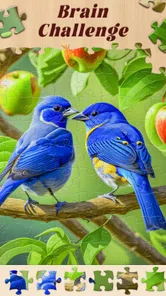
First off, one of the coolest things about Jigsaw Master - Jigsaw Puzzles is the sheer variety of puzzles available. Whether you're into serene landscapes, adorable animals, or abstract designs, there’s something here for everyone. You can scroll through categories and choose from hundreds of puzzles, each with its own unique charm. And the best part? New puzzles are added regularly, so you’ll never run out of new challenges!
For a more deliberate first solve, I’d begin with the outer pieces and use the image as a reference rather than trying to force a match from shape alone. On a small touchscreen, moving pieces around can become harder to follow when too many are scattered across the board. Working in a few visual zones—sky, foliage, buildings, or another clearly different area—keeps your search focused. It is a simple habit, but it makes a large puzzle feel less like a pile of pieces and more like several smaller tasks.
More From Our News Desk

Weather by Xiaomi Review: Clear at a Glance, Less Clear Up Close

X Under Pressure: Can It Recover When Posting Goes Wrong?

Clash of Clans Is Won Between the Battles

Android Auto Makes the Case for Quieter Car Software

MobiOffice: Transforming Mobile Productivity with Seamless Integration

EA SPORTS FC™ Mobile Soccer: Redefining Mobile Sports Gaming
Making the controls work for you
Another standout feature is the level of customization. You can choose the difficulty level by selecting the number of pieces you want to work with. Whether you're a newbie starting with just 16 pieces or a seasoned pro tackling 400-piece monsters, the app caters to all levels. Plus, the interface is super intuitive, making it easy to swipe, zoom, and rotate pieces as needed. It’s like having a physical puzzle without the hassle of losing pieces under the couch!
Piece count is not the only useful way to think about difficulty. A busy image with similar colors can demand more visual attention than a simpler picture, even when both puzzles have the same number of pieces. I would increase one challenge at a time: either choose a more complex image or add more pieces, rather than doing both immediately. That makes it easier to tell whether you enjoy the extra effort or would rather return to a calmer session.
It is also worth choosing a puzzle with your screen and available attention in mind. Zooming is useful for inspecting details, but repeatedly moving between a far-out view and a close-up can interrupt your rhythm. I find it more comfortable to work through a portion of the image before changing scale, then zoom out occasionally to check how the whole composition is developing. If a puzzle starts to feel fiddly, reducing the piece count on the next one is a practical adjustment, not a failure.
When a short session is the right session
Now, let’s talk about the vibe. The app is designed to be relaxing, offering a perfect escape from the daily grind. The soothing background music and sound effects create a tranquil atmosphere, making it easier to focus on solving puzzles. Completing a puzzle is incredibly rewarding, as the app celebrates your achievement with delightful animations. It’s these little touches that make you feel accomplished and eager to tackle the next challenge.
A realistic use is to open it during a quiet stretch at home, choose an image that does not require intense concentration, and work until it is time to move on. It can also suit a brief wait when you want something more absorbing than scrolling but do not want the setup or cleanup of a physical jigsaw. If you are in a shared space, the sound and music may not be welcome, so consider the setting before settling in; the main benefit is the puzzle itself, not needing an elaborate routine around it.
Compared with a physical jigsaw, the phone version is easier to pause and carry around, but the screen makes piece handling a different kind of task. You lose the tactile feel of sorting cardboard pieces, while gaining a compact board and no risk of pieces sliding off a table. Compared with quick matching games, this is a slower, more visual activity: it is a better fit when you want to focus on one image than when you want rapid rounds or a competitive score chase.
Keeping your place and sharing a result
Moreover, I love how Jigsaw Master lets you keep track of your progress. You can save puzzles mid-way and return to them anytime, which is perfect for those moments when life interrupts your puzzle-solving zen. Plus, you can share your completed masterpieces with friends, adding a social element to the solitary joy of puzzling.
Saving a puzzle makes it easier to choose a larger challenge without needing to protect a long uninterrupted block of time. I’d still avoid starting a demanding image right before you have to leave: even when progress is saved, a puzzle is more enjoyable when you can pause at a natural point rather than rushing through a few last moves. Sharing a finished image is a nice extra, but if you mainly want to play alongside someone or compare scores, a multiplayer board game would be a better match for that social goal.
Where the experience can feel less smooth
Of course, no app is without its quirks. While I found the app generally smooth, there were moments when it lagged, especially with larger puzzles. A little patience goes a long way, but it’s something to keep in mind if you’re on a tight schedule. Also, while the app is free, some puzzles and features are locked behind in-app purchases. It’s not a deal-breaker, but if you’re a puzzle purist, you might find yourself reaching for your wallet more often than not.
The purchase range runs from $6.99 to $69.99 per item, so I would make a point of checking what is included before buying anything. You can begin without paying, which is useful for judging the controls and image style first; if the available selection already gives you enough to enjoy, there is no need to spend. The trade-off is straightforward: free access makes it easy to try, while optional paid content may matter if you want more of the locked material.
Large puzzles also ask more of your attention and your device than a quick, low-piece-count session. If you notice lag, switch to a smaller puzzle rather than assuming every image will feel the same. And if you need a distraction that stays brisk, offers head-to-head play, or feels tactile, this is probably not the right choice; a physical puzzle or a faster game will serve that mood better.
Choosing a routine that lasts
For a first week with the game, I would keep the routine deliberately simple: pick one image, finish it at a comfortable difficulty, and notice what slowed you down. Was the image too uniform, did pieces become awkward to manage, or did you simply run out of time? That small check-in gives you a practical way to choose the next puzzle instead of treating difficulty as a single ladder where higher is always better.
If you are deciding whether a phone jigsaw can replace a tabletop one, I would think of them as serving different moods. This version is especially useful when space is limited, a puzzle needs to fit around other plans, or you want to try several pictures without storing a box. A physical puzzle remains the better choice when the feel of the pieces, a shared table, or the slow ritual of sorting by hand is the point. Neither format makes the other unnecessary.
It is also a reasonable pick for someone who enjoys quiet visual tasks but does not want a score, timer, or opponent to dictate the pace. On the other hand, players who need frequent novelty through new mechanics may find the core activity too familiar: the satisfaction comes from recognizing patterns and completing an image, not from learning a different game system each session. I would skip it if fitting pieces on a touchscreen already feels frustrating, since that is central to the experience rather than a hurdle that disappears later.
One helpful way to keep a session from turning into aimless searching is to set a small target before you start: complete the border, connect one clearly colored area, or place a handful of pieces that belong together. This gives you a natural stopping point and makes a short break feel worthwhile even if the whole picture remains unfinished. It also helps when the image has broad patches of similar color, where hunting for any possible match can quickly become tiring.
For parents considering it as a shared activity, the Everyone age rating makes the game broadly suitable in that respect, but I would still choose the image and difficulty with the child’s patience and screen comfort in mind. It is more naturally a calm, turn-taking activity than a lively group game; two people can discuss where pieces might belong, but the basic task remains focused on one board. If your family wants direct competition or a puzzle everyone can handle physically at once, a tabletop option may be more engaging.
Before trying a more demanding board, I would also make sure the screen is comfortable to use and the device is steady in your hands or on a surface. That sounds minor, but frequent zooming and dragging can become annoying if you are holding the phone at an awkward angle. A stable position makes it easier to compare a loose piece with the target area, and taking a brief pause when your eyes start to blur is better than pushing through and making random placements.
A good fit for unhurried puzzling
In conclusion, Jigsaw Master - Jigsaw Puzzles is a fantastic app for anyone who loves a good challenge. It offers a vast array of puzzles, intuitive controls, and a relaxing environment that’s perfect for unwinding. Whether you're looking to kill some time or seriously challenge your brain, this app is worth checking out. Happy puzzling!
I’d recommend starting small, choosing an image with clear visual sections, and seeing whether the touch controls feel comfortable before committing to a demanding board. That first manageable solve is the best way to judge whether its pace suits you. If you enjoy visual problem-solving in short or leisurely sessions, it is an easy game to try; if you want tactile pieces, fast rounds, or guaranteed smoothness on a complex board, another kind of puzzle may fit better.
Jigsaw Master - Jigsaw Puzzles Frequently Asked Questions
What kind of game is Jigsaw Master - Jigsaw Puzzles?
Jigsaw Master - Jigsaw Puzzles is a board game centered on solving jigsaw puzzles. It is presented as a way to enjoy vibrant visuals and a large collection of pictures and puzzles, making it a fit for people who like assembling images at their own pace. The game is developed by Mint Games and is free to download, with optional in-app purchases.
What is Jigsaw Master - Jigsaw Puzzles?
Jigsaw Master - Jigsaw Puzzles is a mobile application designed for both Android and iOS platforms that offers a wide range of jigsaw puzzles for users to solve. The app provides puzzles of varying difficulty levels, allowing users to enjoy a relaxing and challenging experience. With a user-friendly interface and a vast collection of images, it's perfect for puzzle enthusiasts of all ages.
Is Jigsaw Master - Jigsaw Puzzles free to download and play?
Yes, Jigsaw Master - Jigsaw Puzzles is free to download and play. However, the app may offer in-app purchases to enhance the gaming experience. These purchases can include additional puzzle packs, ad-free gameplay, or special features. Users can enjoy a substantial amount of content without making any purchases, but premium features may require payment. In-app purchase options range from around seven dollars to around seventy dollars per item.
What features does Jigsaw Master - Jigsaw Puzzles offer?
Jigsaw Master - Jigsaw Puzzles offers a variety of features to enhance the user experience. It includes a wide range of puzzles with different themes and difficulty levels, a user-friendly interface, and the ability to customize puzzles by adjusting the number of pieces. The app also supports offline play, allowing users to enjoy puzzles without an internet connection. Additionally, there are options to save progress and share completed puzzles with friends. Its collection is promoted as containing more than twenty thousand pictures and puzzles.
Are there any age restrictions for using Jigsaw Master - Jigsaw Puzzles?
Jigsaw Master - Jigsaw Puzzles is suitable for users of all ages. The app is designed to be family-friendly, offering puzzles that cater to both children and adults. Parents can feel confident allowing their children to use the app, as it does not contain any inappropriate content. The range of puzzle difficulties ensures that everyone from beginners to experienced puzzle solvers can find suitable challenges.
Pros
- Extensive variety of puzzles to solve.
- High-quality images enhance gameplay.
- Regular updates with new puzzles.
- User-friendly interface and controls.
- Offline play available.
Cons
- Contains in-app purchases and ads.
- Limited free puzzles available initially.
- No option for custom puzzle creation.
- Can be resource-heavy on older devices.
- Requires internet for some features.