Snes9x EX+
- 5.80K
- 4.2
- Installs
- 10.00M
- Price
- Free

Screenshots
Analysis by Reviewed
I approached Snes9x EX+ as a newcomer would: not as someone who already understands emulators, controller mapping, or ROM folders, but as someone who simply wants to play classic Super Nintendo software on a phone or tablet. That distinction matters. The app is free, aimed at Everyone, and built by Robert Broglia, yet the first few minutes can still feel more technical than a normal arcade download because the game library and the emulator are separate things.
Once that idea becomes clear, the experience is much easier to understand. This is an arcade-focused game utility whose job is to run compatible SNES games, present them through touch controls or a connected controller, and remember the practical settings that make returning to a game less frustrating. It is not a new game with its own campaign. It is a tool for accessing a particular generation of games, and its value depends heavily on what you already own or are legally able to use.
The app has been available since January 11, 2013, and its current version is 1.5.85. It supports Android from version 2.3 onward, which makes it unusually approachable for older devices. Its 4.2 average from roughly 115 thousand ratings and more than 10 million installs suggest that it has reached a broad audience, but popularity does not remove the need to set it up thoughtfully. My strongest recommendation is to treat the first session as a small configuration project rather than expecting an instant, one-tap game launch.
Getting from installation to a comfortable first session
I’d make the first session a small, low-pressure test: choose one legally obtained game file, confirm that Snes9x EX+ can find it, and play long enough to check whether the screen and controls feel comfortable. That gives you a useful baseline before you spend time arranging a larger collection. Once the basics are settled, the next question is how well the app fits the short sessions that make phone play appealing.
What the app actually does
The simplest description is “SNES emulator,” but that phrase can hide the most important practical detail: Snes9x EX+ does not replace the games themselves. You need compatible game files from a legitimate source, and you need to place or access them in a location the app can browse. If you install it without having a game file ready, the opening screen may look empty or confusing even though the installation worked correctly.
I would therefore separate the process into two decisions. First, decide which legally obtained game file you want to test. Second, decide where you want to keep it on the device. A dedicated folder is easier to manage than scattering files across downloads, messaging attachments, and cloud folders. It also makes later backups and troubleshooting much simpler.
The app is a good fit for someone who wants a focused way to revisit SNES games without carrying a separate console. It is less suitable for a person looking for a modern arcade title with built-in levels, online competition, or a guided tutorial. The category label may place it near games, but the experience is closer to a compact game-playing environment than a conventional standalone release.
More From Our News Desk

 Gmail
GmailGmail in a Busy Inbox: Who Benefits Most?
From first account to crowded workday, Gmail earns its place through dependable search and flexible sorting—but its best fit depends on how much inbox maintenance you can tolerate.

 Prime Video
Switching to Prime Video: What Changes in Your Viewing Routine
Prime Video can make a compelling second home for streaming, but switching means learning a different catalog, rental layer, and route from browsing to playback.

 Universal TV Remote Control
Universal TV Remote Control Works Best as a Reliable Backup
A phone remote earns its place through quick setup and reliable habits. Here is how to get more from Universal TV Remote Control—and where its limits show.

 Weather - By Xiaomi
Weather by Xiaomi Review: Clear at a Glance, Less Clear Up Close
Xiaomi’s weather app makes everyday forecasts quick to scan, but its calm surface can leave useful details and recovery paths harder to find than they should be.

 X
XX Under Pressure: Can It Recover When Posting Goes Wrong?
A resilience-focused review of X, examining setup, mistaken posts, interruptions, weak connections, and the gaps that matter when recovery needs to be dependable.

 Clash of Clans
Clash of Clans Is Won Between the Battles
Its raids are quick; its community is a long-term project of coordination, teaching, rivalry, and shared responsibility—with all the friction that entails.
Latest News



First setup without guessing
After installation, I would begin with one game file rather than importing an entire collection. A single test removes several sources of confusion at once: whether the file is compatible, whether the app can see the folder, whether the controls feel usable, and whether the device performs comfortably. Adding everything immediately makes it difficult to tell which part caused a problem.
Use the file browser inside the emulator to navigate to the folder containing that test file. If the folder is not where you expected, look at the device’s normal file manager first and confirm the exact location. On Android, downloaded files can end up in different folders depending on the browser or transfer method. The practical lesson is simple: solve file location before changing emulator settings.
When the game opens, resist the temptation to adjust every option. Start with the default display and controls, then play for a few minutes. Defaults provide a useful baseline. If you change video scaling, button placement, audio, and input behavior simultaneously, you may improve one issue while creating another and have no clear way to reverse the process.
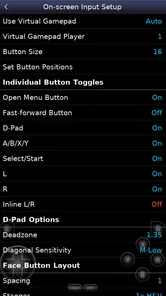
A physical controller can make a major difference, especially for games that depend on precise directional movement or several simultaneous buttons. Touch controls are convenient for a quick session, but they occupy part of the screen and can feel less natural for long play. I would not judge the emulator’s game compatibility based only on an uncomfortable touch layout; the input method itself may be the real limitation.
The first meaningful success
Your first success should be more specific than merely seeing a game screen. Load one legally obtained title, reach a playable moment, and test the buttons you expect to use most. Check movement, the main action buttons, the shoulder buttons, and pause behavior. This quick routine tells you whether the problem is the file, the mapping, or your familiarity with the interface.
For a first-time user, I recommend choosing a game with a forgiving opening rather than one that demands perfect timing immediately. The goal is to learn the emulator’s rhythm: select a file, wait for the game to load, interact with the virtual controls, and return to the app later without repeating unnecessary setup. Once that cycle feels natural, experimenting with other games becomes much less intimidating.
One useful habit is to keep the first session short enough to notice friction. If your thumbs cover important parts of the display, move or resize the controls before starting a long play session. If the screen looks too small, try a different scaling approach only after confirming that the game itself runs correctly. Comfort is not a cosmetic detail here; it affects whether you can play accurately.
I also suggest testing the app in the same situation where you expect to use it. A tablet held with both hands, a phone resting on a stand, and a phone connected to a controller each call for different layouts. A configuration that feels fine while sitting at a desk may be awkward during a short commute or while lying on a sofa. The emulator is flexible enough to invite adjustment, but that flexibility rewards deliberate testing.
Confusion that catches new users
The most common misunderstanding is expecting the emulator to include a ready-made catalog of games. It does not work like an ordinary store download where installation completes the whole experience. The app provides the environment; the user supplies the legally sourced game files. Once you understand that division, an empty file list stops looking like a failure.
Another point of confusion is file compatibility. A file that appears in your storage may still fail to load if it is damaged, packaged in an unexpected way, or not intended for the system this emulator supports. Before changing graphics or audio options, test another known-good file if you have one. That comparison can save a lot of time because it separates a file problem from an emulator problem.
People also sometimes mistake touch-screen discomfort for poor emulation. Virtual buttons cannot provide the same tactile feedback as a physical SNES controller, and your fingers may hide part of the action. If the game runs smoothly but feels difficult to control, try rearranging the touch layout or using a controller before concluding that Snes9x EX+ is unsuitable.
Screen proportions create another trade-off. A larger image may be easier to see, but stretching a classic game can make it look less natural. A smaller or more carefully scaled image may preserve the original appearance while reducing readability on a compact phone. I prefer to choose based on the game: text-heavy titles benefit from clarity, while fast action games benefit from keeping the important play area unobstructed.
Older hardware is a particularly interesting case. The minimum operating-system requirement is Android 2.3, so the app remains accessible to devices that cannot run many newer games. That does not mean every old phone will feel equally comfortable. Screen size, battery condition, touch responsiveness, and controller support can matter more than the operating-system version. The broad compatibility is valuable, but it should not be confused with identical performance on every device.
Saving, returning, and building a reliable routine
When you find a game you enjoy, the next step is to make returning to it predictable. Keep the game files in a stable folder and avoid renaming them casually once you have established your routine. A tidy folder is especially helpful if you move between internal storage and removable storage, or if you use more than one device.
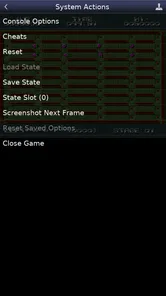
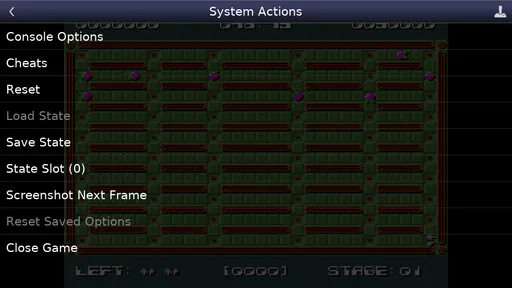
Emulator users often need to think about two kinds of progress: the game’s own save system and the emulator’s quick-session tools. I recommend learning the normal in-game save method first whenever the title supports it. It is usually the most portable and understandable form of progress. Quick saves can be convenient for testing a difficult section or pausing unexpectedly, but they should not be your only plan until you know how that particular workflow behaves.
This is one of the app’s practical strengths: it can make short sessions possible for games originally designed around longer sitting-room play. I can imagine using it during a lunch break, loading one familiar title, playing for ten minutes, and stopping without unpacking a console. The trade-off is that a phone session is more sensitive to accidental touches, notification interruptions, and an awkward grip, so a stable setup still matters.
For a more dependable library, keep a simple record of where your legally obtained files came from and maintain a backup outside the phone. That is not glamorous advice, but it prevents a damaged or replaced device from turning a carefully organized collection into a reconstruction project. The emulator is only one part of the chain; file management determines how easy the whole experience remains over time.
Where it stands beside the usual alternatives
Compared with playing on original hardware, Snes9x EX+ is far more convenient for portability and quick access. You do not need a television, a console, or a cartridge collection beside you. Original hardware still has the advantage of authentic controls, a physical display setup, and a simpler relationship between inserting a cartridge and starting a game. If authenticity and tactile feel are your priorities, a modern phone emulator will not fully replace that experience.
Compared with a general-purpose retro-gaming setup, this app is appealing because it stays focused on the SNES era rather than asking you to learn a large front end covering many systems. That narrow focus can be a benefit for beginners: fewer systems mean fewer layers of menus and fewer decisions. Someone who wants one unified library for several consoles may prefer a broader solution, even if it takes longer to configure.
Compared with touch-first mobile games, the experience is less polished for immediate casual play. You may need to locate files, adjust controls, and understand platform-specific behavior before the fun begins. In exchange, you get access to the design style and game structure of a classic console generation rather than another title built around modern mobile conventions. I would choose this app for deliberate retro play, not for a completely frictionless five-minute download-and-play experience.
Small adjustments that make a large difference
My first non-obvious tip is to create a “test” folder containing only one or two legally obtained files. It gives you a controlled environment for checking a new phone, a new controller, or a fresh installation. Once everything works, move into your main collection. This is much faster than troubleshooting a crowded folder with unfamiliar filenames.
My second tip is to configure controls around the game you are actually playing rather than searching for one perfect layout for everything. A platform game may need a comfortable directional pad and quick access to two action buttons, while a role-playing game may place greater importance on readable menus and shoulder buttons. Saving yourself from constant hand repositioning can make the difference between enjoying a long session and abandoning it.
My third tip is to use a known game screen as a visual reference when changing display settings. Look at small text, straight edges, and fast movement instead of judging the picture from a static title screen. Static screens can hide blur, stretching, or distracting overlays that become obvious during play. Make one change at a time, then return to the same reference point.
A fourth trade-off is worth keeping in mind: maximum convenience is not always maximum reliability. Keeping files in one stable local folder may be less flexible than browsing them from several locations, but it reduces the chance of broken paths or forgotten downloads. Likewise, a physical controller may require extra carrying and pairing steps while providing much better precision. The best setup depends on whether your priority is portability, comfort, or repeatable access.
Who should use it, and who should skip it
I would recommend Snes9x EX+ to someone with a legitimate SNES game collection who wants a lightweight way to play on Android, especially if that person is comfortable spending a few minutes organizing files and controls. It is also a sensible choice for owners of older Android devices, since the stated minimum operating system reaches back to Android 2.3. The free price makes experimenting less risky, provided your expectations match what an emulator is designed to do.
I would steer a complete beginner toward it only if they are willing to learn the basic file workflow. The application itself is not the difficult part; the surrounding concepts are. If you want a curated library, automatic discovery, and immediate play without handling game files, a conventional mobile game or a dedicated retro service may be a better match.
I would also skip it if your main goal is multiplayer convenience, modern achievements, or a game designed specifically for touch screens. Those are not the reasons to choose an SNES emulator. Likewise, if you dislike adjusting virtual buttons or carrying a controller, the convenience of mobile access may not compensate for the control compromise.
My recommendation after the first week of use
What I like most is the balance between a focused purpose and broad device accessibility. Robert Broglia’s emulator does not try to turn retro gaming into a complicated media center. Once a compatible file is in the right place and the controls suit your hands, the path from opening the app to playing is pleasantly direct.
What I like less is the responsibility placed on the user at the beginning. The app cannot make file sourcing, folder organization, or touch control comfort disappear. New users may interpret those hurdles as a broken installation, even though they are part of the emulator model. A short, careful setup session is the price of the flexibility it offers.
For me, the deciding question is not whether Snes9x EX+ looks like a normal game download. It does not. The better question is whether you want a practical SNES player that you can carry with you and shape around your own collection. If the answer is yes, this free arcade utility is worth trying. Start with one legitimate game file, confirm that it loads, adjust only the controls you need, and build from that first successful session rather than attempting to configure everything at once.
With that approach, the app becomes reassuringly simple: choose a game, make the controls comfortable, play long enough to understand the setup, and keep your files organized for the next session. Its 4.2 average and audience of over 10 million installs reflect its lasting appeal, but my recommendation comes from the everyday usefulness rather than the figures. It is a strong choice for focused SNES emulation, not a universal answer for every kind of mobile gamer.
Snes9x EX+ Frequently Asked Questions
Can I play Snes9x EX+ without an internet connection?
Snes9x EX+ is an emulator for playing compatible Super Nintendo game files stored on your device, so it is suited to offline play once you have installed the app and have the files available locally. You do not need to treat it as an online game service. Make sure your game files are accessible on the device before starting, especially if you plan to play somewhere without a connection.
Will Snes9x EX+ work on an older Android phone or tablet?
Snes9x EX+ supports Android 2.3 and later, which makes it an option for a wide range of older and newer Android devices. The minimum operating-system requirement does not guarantee the same results on every device, though: hardware and the individual game can affect performance. If a title runs poorly, adjusting the emulator’s available graphics or audio settings may help.
Can I use Snes9x EX+ on an iPhone or iPad?
Snes9x EX+ is an Android emulator, so it is intended for Android phones and tablets rather than iPhones or iPads. If you are looking for a way to play Super Nintendo games on an Apple device, you would need to find an emulator designed for that platform and check its availability and requirements separately. On Android, Snes9x EX+ is the relevant app to consider.
What kind of games is Snes9x EX+ designed to run?
Snes9x EX+ is designed for classic games made for the Super Nintendo Entertainment System. It is an arcade-category game app whose main purpose is emulation, rather than offering a new collection of built-in games. Your experience depends on using compatible game files, so it is best suited to people who already have titles they are entitled to use and want to play them on an Android device.
What is Snes9x EX+ and what can it do?
Snes9x EX+ is an Android emulator designed to run games originally released for the Super Nintendo Entertainment System. After installing the app, users can load compatible game files from their device, configure on-screen controls, and adjust video and audio settings. It also supports save states, customizable controls, and several display options, making it useful for playing classic titles on modern phones and tablets.
Pros
- Accurate SNES emulation with smooth performance on most devices.
- Supports save states for quick progress recovery.
- Customizable on-screen controls improve comfort during long sessions.
- Works with external Bluetooth controllers for a console-like experience.
- Includes useful features such as fast-forward and cheat support.
Cons
- Requires legally obtained ROM files; games are not included.
- Touch controls can feel cramped on smaller phone screens.
- Some games may need manual settings adjustments for best performance.
- The interface looks dated compared with newer emulator apps.
- Controller mapping may require extra setup for certain Bluetooth gamepads.