NES.emu (NES Emulator)
- 630.00
- 4.3
- Installs
- 100.00K
- Price
- $3.99

Screenshots
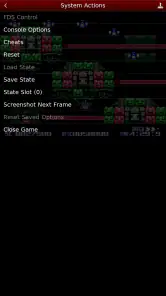
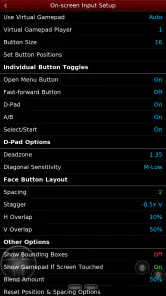
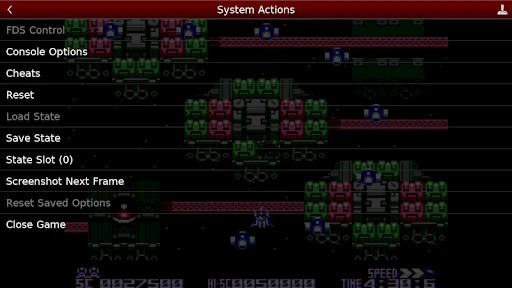
Analysis by Reviewed
I like using a classic game emulator most when it fits into ordinary life rather than demanding a long, uninterrupted session. NES.emu is a mobile arcade game from Robert Broglia, built around playing NES titles on a phone. In a shared home, that makes it easy to pass the device between people: one person can try a familiar game, then hand it over when the next short stretch of free time appears. It works best when everyone treats the phone as a shared console, not as a personal game library that should always be ready for someone else.
Sharing one screen without making it a group project
A realistic use is a quiet evening when one person has the phone nearby and another wants to watch or take a turn. The biggest practical difference from a dedicated console is that the display and controls are on the same small device, so passing it around can interrupt play and the virtual buttons may not suit every hand. I would agree on whose turn it is before starting a longer level, and avoid assuming that a saved position belongs to everyone. That small bit of coordination matters more than any elaborate household rule.
The usual alternative is playing on original hardware, which gives you physical controls and a more console-like setup, but requires the console and compatible games to be available. A general-purpose emulator can be more convenient if you want one app for several systems; NES.emu is the more focused choice when you specifically want NES play. Neither option removes the need to bring your own game files, so the app is most useful for someone who already has a lawful way to access the titles they want.
Keep setup and ownership clear
Before handing over the phone, I’d load the game files you intend to use and make sure the controls feel comfortable. That way, a guest or younger player can get to the game without changing the basic setup. It is also sensible to keep personal files and the emulator’s game collection separate in your own routine: a shared device can make it easy to confuse who added a file or who last changed a save. I wouldn’t count on the emulator itself to manage household accounts or turn-taking; the simplest boundary is agreeing which games and files are being used.
One useful habit is to make a save state before passing the phone to someone else, then explain which game and point in the game it represents. Save states are convenient, but they can also make it less obvious where a person’s regular progress stands if several people use the same device. For a quick session, a separate state can act like a bookmark; for a game you are carefully playing through, I’d keep a consistent routine and avoid overwriting a state without checking first.
Who will enjoy it—and who may prefer something else
This is a good fit for players who already enjoy NES games, want to revisit a particular title during a commute or break, and are comfortable setting up an emulator. It is less appealing if you expect a ready-made catalogue, dislike touchscreen controls, or want a polished, shared multiplayer setup without any configuration. A physical controller can improve the feel, but it adds another item to carry and is not necessary for every game. I’d try the on-screen layout first, then decide whether a controller solves a real problem for your preferred titles.
The app is rated for Everyone, which makes its age context broad, but that rating is not a substitute for choosing suitable games or supervising how a shared phone is used. Classic games vary in pace and difficulty, and a younger player may need help understanding the controls or figuring out how to return to the game. I’d show them how to pause and hand the device back safely rather than assuming the interface will guide every first-time user. The emulator is a tool for playing; the household still sets the rules around screen time, game choice, and device access.
More From Our News Desk

Clash of Clans Is Won Between the Battles

Android Auto Makes the Case for Quieter Car Software

MobiOffice: Transforming Mobile Productivity with Seamless Integration

EA SPORTS FC™ Mobile Soccer: Redefining Mobile Sports Gaming

How Microsoft OneDrive Became a Mobile Productivity Giant

How Google Translate Breaks Language Barriers Effortlessly
A Blast from the Past
NES.emu is like a time machine for your smartphone, transporting you back to the golden age of gaming. As soon as you fire up the app, you're greeted with a simple and intuitive interface that makes it easy to dive into your favorite NES titles. The app supports a wide range of ROMs, so you can relive the magic of games like Super Mario Bros, The Legend of Zelda, and many more.
Easy Setup and User-Friendly Interface
Setting up NES.emu is a breeze. Just load your ROMs, and you're ready to go. The emulator runs smoothly on both Android and iOS devices, offering seamless gameplay with minimal lag. Plus, the app's interface is clean and straightforward, so you won't need to be a tech wizard to get started. Everything is organized neatly, allowing you to focus on what's most important - the games themselves.
Customizable Controls
One of the standout features of NES.emu is its customizable controls. You can adjust the on-screen buttons to suit your playing style, whether you prefer a classic layout or something more modern. The app also supports external controllers, which is a game-changer for those who want the authentic feel of a physical gamepad. It's little touches like these that elevate the gaming experience.
Save and Load States
Remember those times when you had to leave your console on overnight to save your progress? With NES.emu, those days are long gone. The emulator allows you to save and load your game states at any point, so you can pick up right where you left off without any hassle. It's perfect for those tricky levels that require a bit of trial and error.
Perfect for Retro Gaming Enthusiasts
If you're a fan of retro gaming, then NES.emu is a must-have app. It brings a treasure trove of classic games to your fingertips, providing hours of entertainment. Whether you're reliving childhood memories or discovering these iconic titles for the first time, the app delivers an experience that's both nostalgic and fresh.
In conclusion, NES.emu is a stellar emulator that pays homage to the legacy of the NES. Its user-friendly interface, customizable controls, and robust game support make it a top choice for anyone looking to dive into the world of retro gaming. So, grab your smartphone, download the app, and get ready to embark on a pixelated adventure that will keep you entertained for hours on end!
What to expect before paying
NES.emu costs $3.99, so I’d decide based on whether I already have games in mind and expect to use the emulator regularly. It has an average rating of 4.3 from around 2.8 thousand ratings, with roughly 630 written reviews and over 100 thousand installs. Those figures suggest an established audience, but they cannot tell you whether a particular game, phone, or control layout will suit you. The game is listed as released on February 9, 2011, and its concise store label, “NES Emulator,” describes its purpose more plainly than a promise of a complete gaming library.
A practical first session is to choose one game, test the virtual controls on a low-pressure section, and make a save state before experimenting. If the buttons obscure the action or your thumbs feel cramped, adjust the layout before tackling a demanding level; if that still feels awkward, a compatible external controller may be a better fit. I’d also test how passing the phone affects play before making it the household’s shared retro setup. These small checks help reveal whether the convenience is worth more to you than the tactile feel of dedicated hardware.
A household-friendly choice with clear limits
For a household that wants occasional NES play on a phone already in use, this is a straightforward option, especially when one person is comfortable handling setup and explaining the controls. I would skip it if the main goal is a shared catalogue that is ready to browse, or if several players need separate, clearly managed progress on one device. Its strengths are focused emulation, adjustable touch controls, and save states; its trade-offs are the hands-on setup and the fact that a phone remains a phone, with a small shared screen and no substitute for household coordination.
A better rhythm for short sessions
I find this kind of emulator most useful when I choose the game before I have only a few minutes to spare. On a break, for example, I can open a familiar title, play a short stretch, and use a save state as a deliberate stopping point. That is more practical than browsing through a large collection while the break disappears. It also makes the app a poor match for someone who wants a casual game to launch instantly with no file preparation or decisions.
For a shared phone, I’d make one person responsible for initial setup and keep the game files easy to identify. That does not mean creating a complicated household system: a quick verbal note about which game is loaded and whose progress is being continued is often enough. The important distinction is between a temporary save used to pause and the point someone considers their real ongoing progress. Treating those as separate things can prevent a well-meant handoff from undoing another player’s session.
Choosing between touch, controller, and original hardware
The control choice depends heavily on the game. Touch buttons keep the setup portable and are fine for a relaxed tryout, but they share the screen with the action and offer no physical feedback. If accurate directional presses matter to you, an external controller can make the experience feel more natural, though it reduces the grab-and-play convenience. Original hardware remains appealing when you want a television-sized view and physical controls as part of the experience; a focused phone emulator makes more sense when portability and quick access matter more.
I would not assume that a controller automatically solves every comfort issue. It can improve button feel, but it also means carrying and connecting another device, and it does not change the need to source game files or coordinate shared saves. My practical advice is to test one short section with the on-screen layout first. If the limitation is thumb placement rather than the game itself, adjusting the button arrangement may be enough; if the limitation is the feel of tapping glass, then a controller is the more relevant alternative.
Making a shared device easier to hand over
When a younger player or guest is using the phone, I would open the intended game before handing it over and briefly show how to pause, return, and avoid disturbing a saved position. That small demonstration is more useful than assuming a first-time user will recognize emulator controls. It also lets the person holding the phone focus on play instead of searching through setup screens or accidentally changing the household’s usual arrangement.
There is a trade-off here: preparing the device in advance makes the handoff smoother, but it asks the person who knows the emulator to do a little planning. If different people want different games, agree on the next title before the phone changes hands rather than turning each turn into a file hunt. For a household that values independent profiles and clearly separated progress, a shared phone emulator may feel too informal; a dedicated console or separate devices can be a better fit.
What the purchase makes sense for
The one-time cost is easiest to justify if I expect to return to NES games, already know which titles I want to play, and value having them available on a phone. Someone still deciding whether retro games are appealing may be better off trying the genre through another legitimate option before paying for a focused emulator. The price buys an emulator experience, not a ready-to-browse collection, so the value depends on the games and setup the player brings to it.
Its long-standing presence and audience give me some reassurance that this is not an obscure experiment, but popularity does not guarantee that every device or personal control preference will feel right. I would judge it by a small, realistic test: load a game I genuinely want to play, check the controls, make a save, and return to it later. If that routine feels simple rather than fiddly, the app is doing the job I need from it.
My household verdict
NES.emu is best for a household where one person enjoys handling the setup and everyone else is happy to share a phone for occasional NES sessions. The Everyone age rating gives a broad age context, but parents still need to choose the games and set expectations for screen use; it does not turn the emulator into a family-management tool. I’d recommend it to a retro fan who wants portable play and is comfortable with game files, touch-control adjustments, and a little coordination.
I would choose something else if the priority is a ready-made library, separate household accounts, or a living-room experience with physical controls and a larger display. For everyone else, its appeal is practical rather than magical: it brings focused NES play to a device that is already close at hand. Set up one game, test the controls, and agree how saves will be handled, and it can fit neatly into short breaks without pretending to replace a dedicated console.
NES.emu (NES Emulator) Frequently Asked Questions
How much does NES.emu cost, and is it suitable for all ages?
NES.emu is a paid arcade game priced at $3.99, so you can check that cost before downloading. Its content rating is Everyone, making it suitable for a broad audience. The app is an emulator rather than a collection of included games, so you will need compatible game files to play.
What is NES.emu and how does it work?
NES.emu is a Nintendo Entertainment System emulator for Android and iOS devices. It allows users to play classic NES games on their smartphones and tablets by emulating the original hardware. The app supports a variety of ROM files, which are digital copies of NES cartridges, and offers features like save states, customizable controls, and cheat code support to enhance the gaming experience.
Is NES.emu legal to use?
Using NES.emu itself is legal as it is just an emulator. However, the legality of using ROMs (the game files) can be a gray area. It's legal to use ROMs of games you own physically, but downloading ROMs of games you don't own might infringe copyright laws. Always ensure you comply with local laws concerning ROM usage.
What features does NES.emu offer to enhance gameplay?
NES.emu offers a variety of features to improve the gaming experience, including customizable on-screen controls, support for external controllers, and the ability to save and load games using save states. It also supports various cheat codes and has high compatibility with a wide range of NES games, ensuring smooth and enjoyable gameplay on modern devices.
Can I use NES.emu on both Android and iOS?
Yes, NES.emu is available for both Android and iOS platforms. The emulator provides a consistent experience across these operating systems, allowing users to enjoy classic NES games on their preferred device. It's important to check the app store for the availability and compatibility of the version specific to your device before downloading.
Pros
- Highly customizable controls.
- Supports various ROM formats.
- Fast and smooth gameplay.
- No ads or in-app purchases.
- Works offline seamlessly.
Cons
- Limited to NES games only.
- No multiplayer support.
- Requires own ROMs.
- Occasional bug reports.
- Interface feels outdated.
- Category
- Arcade
- Version
- Varies with device