MD.emu (Genesis Emulator)
- 599.00
- 4.0
- Installs
- 100.00K
- Price
- $4.99

Screenshots
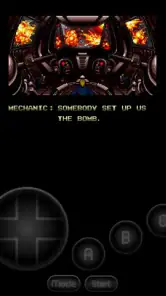
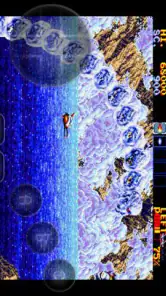

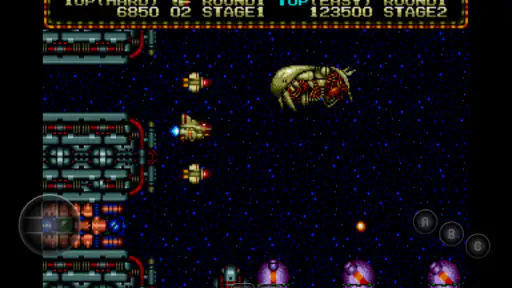
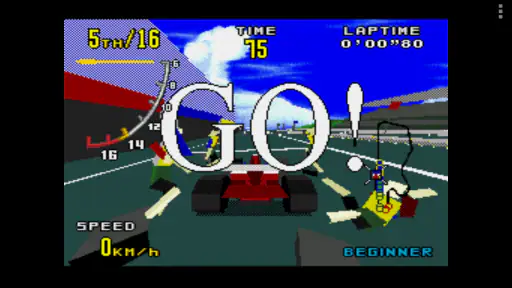
Analysis by Reviewed
Ever had that nostalgic itch to replay some of your favorite Sega Genesis games? Well, you're in luck! Let me introduce you to MD.emu, a delightful emulator that brings back the classic vibes of the Sega Genesis right on your smartphone. Whether you're on Android or iOS, this app promises to deliver an authentic retro gaming experience.
For me, the best way to approach an emulator is to keep the first session simple: choose a game file you already have, open it, and check how the picture, sound, and controls feel before adjusting anything. That makes it easier to tell whether a problem comes from a setting or from the game file itself. I also keep a small, clearly named collection rather than browsing a crowded downloads folder every time I want to play. That little habit makes short play sessions much less fussy.
Getting Started with MD.emu
So, you’re ready to take a trip down memory lane? First things first, downloading MD.emu is a breeze. Once installed, the app seamlessly guides you through the setup process. I was pleasantly surprised by how intuitive it was. You don’t need to be tech-savvy to get your favorite games up and running; just a couple of clicks, and you’re in!
One practical point is that an emulator plays games from files you supply; it is not a catalog of games to browse and start instantly. I would sort out the files I’m entitled to use before settling in, and test one at a time so it is clear which ones open correctly. The game itself is the important part of the setup, so I would not assume that a familiar title will work just because it is for a Sega system.
Features That Stand Out
One of the coolest features of MD.emu is its support for a wide range of file formats. Whether you have ROMs in .bin, .smd, or even .zip, this emulator can handle them all. Plus, the app supports hardware controllers, which amplifies the gaming experience tenfold. Imagine playing those classic titles with a controller in hand, just like the good old days!
Another thing I love is the customizable controls. You can tweak the on-screen buttons to your liking, making gaming as comfortable as possible. And for those who love a bit of a challenge, the app offers cheat code support. Remember those sneaky codes you used to use? They still work here!
My useful routine is to make one control adjustment at a time, then try it in a game that asks for the kind of input I care about. A layout that feels fine in a slow platforming section may be awkward when I need quick directional changes. If I switch between touchscreen play and a hardware controller, I check the active input before a longer session instead of assuming the same setup will feel right on both. Cheat codes are best treated as optional experiments: I’d try them in a separate session rather than making them part of a first playthrough.
More From Our News Desk

Clash of Clans Is Won Between the Battles

Android Auto Makes the Case for Quieter Car Software

MobiOffice: Transforming Mobile Productivity with Seamless Integration

EA SPORTS FC™ Mobile Soccer: Redefining Mobile Sports Gaming

How Microsoft OneDrive Became a Mobile Productivity Giant

How Google Translate Breaks Language Barriers Effortlessly
Performance and Compatibility
When it comes to performance, MD.emu doesn’t disappoint. The games run smoothly, with hardly any noticeable lag. I’ve tried a range of titles, from Sonic the Hedgehog to Streets of Rage, and the emulator handled them like a champ. The audio quality is also top-notch, perfectly capturing the essence of those 16-bit tunes we all love.
Compatibility-wise, this app is pretty robust. It supports a variety of devices and screen sizes, so whether you’re on a tablet or a smartphone, the gaming experience remains consistent. It’s also worth noting that the app receives regular updates, ensuring that any pesky bugs are quickly squashed.
In everyday use, that makes it a good fit for a commute or a quiet break: I can return to a familiar game without needing a dedicated console setup. Still, a phone’s touchscreen is not the same as a physical gamepad, and long play sessions may feel less comfortable if the on-screen buttons do not suit your hands. Before blaming performance, I’d also check whether the same file behaves consistently across sessions; keeping a known-working game handy gives me a useful comparison when troubleshooting.
Settings, Shortcuts, and Limits
The strongest approach here is not to chase every possible tweak, but to settle on a repeatable setup. I would choose a comfortable control arrangement, test it in more than one kind of game, and then leave it alone unless it causes a real problem. That avoids spending the whole evening adjusting buttons instead of playing. If a game file does not load as expected, checking its format and trying another known-good file is a more useful first step than changing several settings at once.
Compared with simpler arcade-style mobile games, an emulator asks for more preparation: you need compatible game files, and you may need to make your own control choices. Compared with playing on original hardware, it is more convenient to carry on a phone, but it cannot make touchscreen controls feel identical to a traditional controller. A hardware controller is the better option if precise physical input matters most to you; a standard mobile game is easier if you want something that starts immediately without file setup.
MD.emu is a paid arcade game by Robert Broglia, priced at $4.99, and its audience rating averages 4.0 from around 3,600 ratings. It has over 100,000 installs and an Everyone age rating. Those details help set expectations: this is a focused emulator for people who already know why they want to revisit Sega games, rather than a free game library or a general-purpose source of new titles. I’d skip it if I mainly wanted a no-setup casual game or did not have game files to use.
Making a Setup That Fits Your Routine
The most useful setup is the one I can return to without thinking. I would decide where my game files live, use names that make them easy to recognize, and avoid reorganizing the collection just before a quick session. That sounds mundane, but it reduces the chance of opening the wrong file or wasting a short break searching through folders. A small collection of games I actually intend to play is easier to manage than a large, poorly labeled pile.
For a practical evening routine, I might choose one game for focused play at home and another that works well in brief bursts while waiting somewhere. I would test both with the same input method I plan to use later. If one depends on frequent, precise directional changes, I’d give the on-screen layout a proper trial before taking it on a commute. A controller can make that kind of play more comfortable, but carrying and connecting extra hardware is a trade-off against the convenience of using only a phone.
There is also a useful distinction between setup problems and preference problems. If a game file fails to open, I would first test a different file known to work rather than immediately altering controls. If it opens but feels awkward, I would adjust the controls in small steps and repeat the same section of play. Keeping those checks separate makes troubleshooting clearer and stops a working configuration from being changed for no reason.
Choosing the Right Input and Pace
Touch controls are convenient because the phone is already in hand, but virtual buttons ask for a little patience. Their comfort depends on the game, the screen, and how I hold the device. I would not judge the whole emulator from a few minutes with one layout; instead, I’d try a short, familiar section and notice whether my thumbs obscure the action or whether reaching the buttons feels tiring. If the controls remain uncomfortable after reasonable adjustments, a hardware controller is the more sensible choice.
That distinction matters most for longer sessions. A quick round during a break can be enjoyable on a touchscreen, while an evening spent on a demanding game may make physical controls feel worthwhile. The app’s flexibility does not remove the ergonomics of the device itself. I also prefer not to change layouts constantly: a consistent arrangement helps muscle memory, and frequent tweaking can make familiar inputs feel unfamiliar again.
For players who use cheat codes, I’d keep experimentation separate from a normal run. It gives me a clean way to enjoy a game as intended while still having the option to test codes when curiosity takes over. This is especially helpful when returning to an old favorite: I can decide whether I want the original challenge or a more playful session without mixing those goals together.
Where an Emulator Is the Better Fit
Against a typical mobile arcade game, MD.emu is less immediate but offers a different kind of value. A conventional phone game usually supplies its own content and is ready to play after installation. Here, the appeal is revisiting Sega titles through files you provide, with support for hardware controllers and controls you can tailor. If choosing and managing those files sounds like needless work, a self-contained mobile game is likely the better match.
Against original Sega hardware, the phone is easier to carry and can make a familiar game available during small pockets of free time. The compromise is that a phone does not automatically reproduce the feel of a console and physical controller. Players who care most about the original hardware experience may prefer that setup; players who value portability and already have suitable files may appreciate this more compact route.
The game is also not a universal answer for every Sega system or every file. Its focus is the Genesis/Mega Drive family alongside CD and Master System/Mark III emulation, so I would check that a title belongs to a supported system before building a session around it. Even within the right family, trying one file first is a sensible way to avoid assuming that every personal backup will behave the same way.
Who Will Get the Most from It
I’d recommend it most to someone who already has a reason to play Sega classics, is comfortable managing game files, and wants a portable option rather than a new library of games. It can also suit a player who enjoys setting up controls until they feel familiar, or who expects to connect a controller for more demanding sessions. Robert Broglia is the developer, and the game has been available since June 27, 2011; that long-running presence gives it the feel of a focused emulator rather than a newly assembled casual gaming package.
It is less suitable for someone who expects to tap an icon and immediately browse a collection, or for a player who does not want to handle files at all. I would also steer away from touchscreen play if physical buttons are essential to your enjoyment and you do not plan to use a controller. Those are not flaws that a settings adjustment can always solve; they are part of the difference between emulation on a phone and playing on dedicated hardware.
The purchase decision is straightforward if the use case is clear. At $4.99, I would consider whether I will actually use its Sega-focused emulation and whether I have appropriate game files, rather than comparing it with free-to-start mobile titles as if they offered the same thing. Its average of 4.0 across around 3,600 ratings and more than 100,000 installs suggest an established audience, while the 599 written reviews offer additional perspectives for anyone who wants to read other players’ experiences before deciding.
Final Thoughts
In a nutshell, MD.emu is a must-have for any retro gaming enthusiast. It brings the magic of Sega Genesis games right to your fingertips, effortlessly blending nostalgia with modern technology. The app is user-friendly, performs beautifully, and offers a plethora of features that cater to both casual and hardcore gamers alike.
If you’re eager to relive those cherished gaming memories, give MD.emu a try. Trust me, once you start playing, you won’t want to stop. Happy gaming!
My recommendation comes with one sensible caveat: go in expecting an emulator, not a ready-made collection. If you have the right files and are willing to spend a little time settling your controls, the combination of portable play and controller support is appealing. If you prefer a console-style experience with physical buttons from the first moment, pair it with a controller; if you want instant, self-contained entertainment, a conventional mobile arcade game will suit you better.
MD.emu (Genesis Emulator) Frequently Asked Questions
Can MD.emu run games from other Sega systems besides Genesis and Mega Drive?
MD.emu is described as a Genesis/Mega Drive/CD and Master System/Mark III emulator, so it covers more than the original Genesis and Mega Drive systems. It is an arcade-style game app for people interested in playing classic Sega titles on a modern device. You will still need compatible game files to play; the app itself is the emulator, not a collection of games.
What is MD.emu and what platforms is it available on?
MD.emu is a high-quality Sega Genesis/Mega Drive emulator that allows you to play classic Genesis games on modern devices. It is available for both Android and iOS platforms, providing a seamless gaming experience with a variety of features including save states, cheat support, and customizable controls. Whether you’re a nostalgic gamer or new to retro gaming, MD.emu offers a comprehensive platform to enjoy these classics.
How user-friendly is the interface of MD.emu?
MD.emu is designed with user-friendliness in mind, featuring an intuitive interface that is easy to navigate for both beginners and advanced users. The app provides customizable on-screen controls that can be tailored to your gaming preferences, ensuring a comfortable gaming experience. Additionally, it supports hardware controllers for those who prefer a more authentic gaming feel.
Does MD.emu support game saves and other advanced features?
Yes, MD.emu supports a variety of advanced features to enhance your gaming experience. It includes save states, allowing you to save and resume games at any point. The emulator also supports cheat codes for those looking to modify their gaming experience. Additionally, it offers support for various file formats and allows for backup and restore of game states, ensuring your progress is never lost.
What are the system requirements for running MD.emu?
MD.emu requires a device running Android 3.0 and above or iOS 9.0 and later. It is optimized to run smoothly on most modern smartphones and tablets. While it doesn’t demand high-end hardware, ensuring your device meets these minimum requirements will provide a smoother and more responsive gaming experience. It's also recommended to have a device with sufficient storage space for game ROMs.
Pros
- High compatibility with Genesis games.
- Customizable on-screen controls.
- Supports various cheat codes.
- Save and load game states easily.
- Fast
- smooth performance on devices.
Cons
- Limited free version features.
- Occasional minor graphical glitches.
- No native multiplayer support.
- Requires external BIOS files.
- Interface lacks modern design.
- Category
- Arcade
- Version
- Varies with device