

Senior Word Game
- 1.38K
- 4.8
- Installs
- 500.00K
- Price
- Free

Screenshots
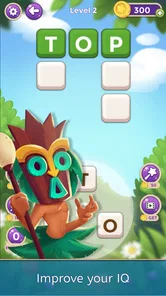
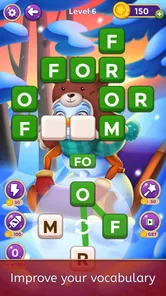
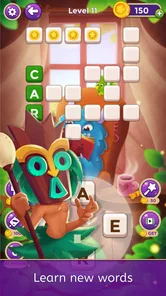
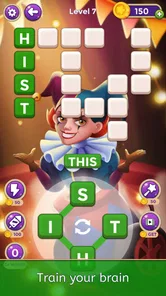
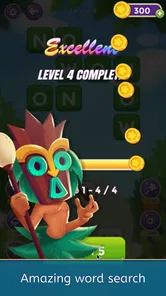
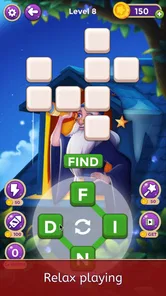
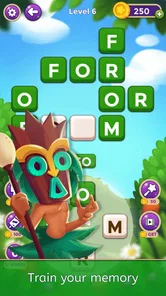
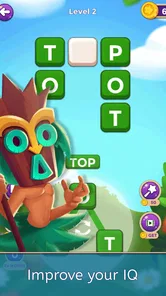
Analysis by Reviewed
I spent time with Senior Word Game as a quiet, low-pressure word puzzle rather than as a fast competitive game, and that distinction matters. Its appeal is simple: it gives you a reason to pause, look at letters, search for connections, and keep your mind occupied without demanding a complicated setup. I found it most enjoyable in short sessions, especially when I wanted something calmer than a typical mobile game.
Created by EPIC PANDA GAMES, this free word game is aimed particularly at older players, although the age rating is Everyone, so it is not limited to seniors. The central idea is easy to understand, and the offline focus makes it practical for moments when I do not want to depend on a connection. Its average rating is 4.7 from around 6.9 thousand ratings, while its reach has passed 500 thousand installs. Those figures suggest that the straightforward format is connecting with a substantial audience, but my own experience is more nuanced: the game works best when you want steady mental exercise, not constant novelty.
A calm word-puzzle routine that rewards patience
The strongest part of the experience is how approachable it feels. I did not need to learn a long set of rules before starting, and the word-game format is familiar enough that most players can understand the objective quickly. That makes it suitable for someone who finds action games tiring, confusing interfaces frustrating, or timed challenges unnecessarily stressful.
There is also a useful psychological advantage to this kind of design. A word puzzle gives me a clear task without filling the screen with noise. I can examine the available letters, try a likely answer, reconsider a pattern, and move on. That rhythm is especially valuable for a short break during the day. Instead of opening a social feed and losing track of time, I can use a few minutes on a focused activity.
I would not describe it as a replacement for formal memory training or language study. The store presents it as a way to support brainpower and memory skills, but I treat that as a reason to engage with the puzzles, not as a medical promise. The real benefit I noticed was the habit of concentrating on one small problem at a time. For me, that was more convincing than any broad claim about mental performance.
The offline nature is another meaningful strength. A game that can be played without an active connection fits naturally into travel, waiting rooms, commutes, or places with unreliable reception. It also makes the experience feel more self-contained. I could open it for a puzzle session without first checking whether a network was available.
Why the interface suits older players
The intended audience is reflected in the general tone of the game. It does not feel built around reflexes, rapid tapping, or complicated controls. That gives older players a gentler entry point, particularly those who enjoy crosswords, word searches, anagrams, or traditional newspaper puzzles but want something available on a phone or tablet.
More From Our News Desk

 Gmail
GmailGmail in a Busy Inbox: Who Benefits Most?
From first account to crowded workday, Gmail earns its place through dependable search and flexible sorting—but its best fit depends on how much inbox maintenance you can tolerate.

 Prime Video
Switching to Prime Video: What Changes in Your Viewing Routine
Prime Video can make a compelling second home for streaming, but switching means learning a different catalog, rental layer, and route from browsing to playback.

 Universal TV Remote Control
Universal TV Remote Control Works Best as a Reliable Backup
A phone remote earns its place through quick setup and reliable habits. Here is how to get more from Universal TV Remote Control—and where its limits show.

 Weather - By Xiaomi
Weather by Xiaomi Review: Clear at a Glance, Less Clear Up Close
Xiaomi’s weather app makes everyday forecasts quick to scan, but its calm surface can leave useful details and recovery paths harder to find than they should be.

 X
XX Under Pressure: Can It Recover When Posting Goes Wrong?
A resilience-focused review of X, examining setup, mistaken posts, interruptions, weak connections, and the gaps that matter when recovery needs to be dependable.

 Clash of Clans
Clash of Clans Is Won Between the Battles
Its raids are quick; its community is a long-term project of coordination, teaching, rivalry, and shared responsibility—with all the friction that entails.
Latest News



Still, “senior” should not be read as “only for seniors.” I can see this working for adults of many ages who prefer a relaxed pace. Someone learning English may also appreciate the opportunity to think through familiar vocabulary, although I would not rely on it as a structured language course. The game is better understood as accessible word entertainment with a brain-training flavor.
One practical tip is to play with a deliberate routine instead of rushing from puzzle to puzzle. I found that taking a moment to group letters mentally was more satisfying than repeatedly guessing. If you are playing with a parent or grandparent, sitting together and discussing possible words can turn a solitary puzzle into a shared activity. That is a more interesting use than simply handing over the phone and leaving the player to work alone.
Small sessions reveal its best qualities
The game is particularly well suited to a “one break, one session” habit. I would use it after breakfast, while waiting for an appointment, or before bed when I wanted something more purposeful than scrolling. Because the basic activity is easy to resume, it does not require the same commitment as a long story-driven game.
That flexibility also helps people with uneven energy or attention. On a day when I wanted a challenge, I could spend longer considering the words. On a day when I was tired, I could stop without feeling that I had abandoned a complicated campaign. This is a small design advantage, but it is important for the audience the game is trying to reach.
A less obvious benefit is that it can serve as a gentle conversation starter. If two people look at the same puzzle, they may notice different word possibilities. That makes it suitable for family visits or casual shared play, especially when one person is more comfortable with phones than the other. I would not call it a full multiplayer experience, but it can still support social interaction around the screen.
Where the experience falls short
The same simplicity that makes the game welcoming can also limit its long-term appeal. Players who want elaborate progression, a strong narrative, competitive rankings, or dramatic visual rewards may find the format too restrained. I never expected a word puzzle to behave like an adventure game, but after repeated sessions, the basic loop can feel familiar rather than surprising.
This is the main trade-off: accessibility comes at the expense of depth. The game does not appear designed to overwhelm the player with systems, and that is good for beginners, but experienced puzzle fans may want more variety in how challenges are presented. If your favorite word games constantly introduce new modes, unusual rules, or demanding difficulty spikes, this may feel modest by comparison.
There is also a potential issue with the free-to-play model. The game is free to download, with in-app purchases ranging from $0.99 to $49.99 per item. That does not automatically make the experience poor, but it is something I would keep in mind before recommending it to someone who wants a completely purchase-free app. I would approach optional spending cautiously and decide whether the core play is already enjoyable without buying anything.
For families sharing a device, I would also set expectations before handing it to a less experienced player. A senior-friendly game should be easy to understand, but ease of rules does not always mean every screen or prompt will be equally comfortable for every person. Larger displays may be preferable for players who find phone text or touch targets difficult. A tablet can make the activity feel less cramped, particularly during longer sessions.
Another limitation is that word puzzles depend heavily on vocabulary and language comfort. A player who is not confident with the language used in the game may experience the challenge as a vocabulary test rather than a relaxing brain exercise. That is not a flaw in the concept, but it changes who will enjoy it. For those users, a visual puzzle or number game might be a better fit.
How it compares with familiar alternatives
Compared with a daily crossword, this game is more convenient for quick phone sessions and does not require a newspaper, pencil, or a large uninterrupted block of time. A crossword can offer richer clues and a stronger sense of completion, though, so dedicated crossword fans may still prefer the traditional format when they want a deeper challenge.
Compared with an anagram game, Senior Word Game feels more approachable for someone who does not want a highly competitive pace. Anagram-focused alternatives often push players toward speed or long word lists. Here, I would choose this game for calm concentration rather than for proving how quickly I can solve a puzzle.
Compared with a general brain-training suite, its narrower focus is both an advantage and a weakness. I like that I can open it without choosing among many unrelated exercises. On the other hand, anyone seeking arithmetic, visual memory, logic, and reaction tests in one place will probably be better served by a broader training app.
The comparison with paper word puzzles is especially useful. Paper offers fewer distractions and no purchase prompts, but a phone is easier to carry and can be used in situations where a notebook is inconvenient. I would choose the app for portability and choose paper when I wanted a slower, more tactile activity.
Practical advice before you settle in
If you are installing it for yourself, I suggest beginning with short sessions and judging the experience by how naturally you return to it. Do not expect every puzzle to feel equally difficult or equally rewarding. The value is in having a dependable activity available when you want to focus, not in turning every play session into a personal test.
If you are installing it for an older relative, spend a few minutes helping with the first launch and explaining the basic interaction. After that, let the player develop a comfortable rhythm. It can help to keep the device charged and use a larger screen when possible. The offline capability is useful here because the game can remain available during travel or in homes where internet access is inconsistent.
Parents should also remember that the Everyone rating makes the game broadly suitable from an age perspective, but spending controls are still worth discussing because optional purchases are available. I would explain that the game can be enjoyed as a free title and that purchases should be treated as a deliberate choice, not as part of solving a puzzle.
Players who need a stronger challenge should try to create their own goals. For example, you can focus on solving without immediately seeking help, keep track of which kinds of words slow you down, or use each session as a vocabulary warm-up. These are personal methods rather than built-in systems, but they make the relatively simple format more engaging.
Who should choose it, and who should skip it?
I would recommend it to older adults who enjoy word activities and want something less intimidating than a complex game. It is also a good option for family members searching for a quiet app that can be introduced quickly. Casual players, people who prefer offline entertainment, and anyone who likes short mental challenges are likely to get the most from it.
I would be more hesitant to recommend it to players who need constant progression or who lose interest when a game repeats a familiar structure. Competitive word-game fans may prefer an alternative with live opponents, leaderboards, or more advanced modes. Likewise, people looking for a comprehensive cognitive-training program should compare it with apps that cover several types of exercises rather than focusing mainly on words.
It is also not my first choice for someone who dislikes in-app purchase models altogether. Even when spending is optional, the presence of items priced from $0.99 up to $49.99 can make a difference to how comfortable a person feels using a free game. I would recommend trying the free experience first and making no purchase unless the benefit is clear and worthwhile.
Current details and long-term value
The game was released on December 13, 2022, and the current version is 1.3.0. It supports devices running Android 7.1 or later, which gives it a useful level of compatibility for people who do not own a recent phone. The developer is EPIC PANDA GAMES, and the title has built a solid audience without losing its straightforward identity.
What matters more to me than the version number is whether the game fits a real routine. In this case, it does, provided you are comfortable with a focused word-puzzle loop and do not demand endless novelty. Its usefulness comes from being easy to pick up, easy to pause, and suitable for offline moments. That is a practical form of longevity, even if it is not the same as the long-term pull of a large progression-based game.
I also appreciate that the game does not need to be treated as a serious commitment. You can use it as a daily mental warm-up, a distraction during a wait, or a shared activity with someone who enjoys words. The most effective approach is to let it occupy a small, regular place in your day rather than expecting it to become your main source of entertainment.
My final recommendation
Senior Word Game is a good choice when you want gentle, accessible word practice rather than a feature-heavy gaming experience. I enjoyed its calm pace, offline usefulness, and low barrier to entry. The game makes sense for older players, but its relaxed format also suits anyone who likes solving words without timers, complicated controls, or a demanding story.
Its weaknesses are equally clear. The focused design may feel repetitive to experienced puzzle fans, and the available in-app purchases mean free-to-play expectations should be handled carefully. It also cannot replace a richer crossword, a competitive word battle, or a full collection of cognitive exercises.
My verdict is positive for the right audience. If I were recommending one simple word game to a friend who wanted something approachable for short daily sessions, I would include this one. I would just explain that its strength is dependable, quiet concentration—not endless variety—and I would suggest trying the free experience before spending anything.
Senior Word Game Frequently Asked Questions
Is Senior Word Game suitable for playing without Wi-Fi?
The store describes Senior Word Game as offering offline puzzles, so it is intended to let players enjoy word challenges without a constant internet connection. Offline play can be handy at home, while traveling, or whenever mobile data is unavailable. It is still sensible to download the game and check that it opens and plays as expected before depending on it in a place without connectivity.
What is Senior Word Game, and who is it designed for?
Senior Word Game is a word-puzzle app designed primarily for older adults, although anyone who enjoys relaxed vocabulary challenges can play it. It typically focuses on finding words, solving clues, or completing letter-based puzzles at a comfortable pace. The clear format and straightforward controls make it suitable for users who prefer simple gameplay rather than fast reactions or complicated rules.
Is Senior Word Game easy to use for people with limited smartphone experience?
The game is generally easy to understand because its main interaction is based on tapping letters, selecting answers, or moving through simple puzzle screens. Seniors may still want to adjust the device’s text size or brightness for improved readability. Before downloading, it is worth checking the screenshots and current store description to confirm that the interface, contrast, and available accessibility options meet the player’s needs.
Does Senior Word Game require an internet connection?
Many word games allow at least some puzzles to be played offline after installation, which can be useful when traveling or when a reliable connection is unavailable. However, features such as advertisements, daily challenges, progress synchronization, updates, or extra content may require internet access. Because offline availability can vary by version and device, check the app-store listing before relying on it without Wi-Fi or mobile data.
Is Senior Word Game free to download, and are there in-app purchases?
Senior Word Game is free to download, with optional in-app purchases priced from $0.99 to $49.99 per item. Free access does not always mean that every feature is included, so review the purchase options in the store before installing, especially if the device is shared with a child or another family member. The game is rated Everyone, but purchase controls may still be useful on a shared device.
Pros
- Simple interface is easy for older adults to navigate.
- Large
- readable letters support users with weaker eyesight.
- Relaxed gameplay can help keep the mind active daily.
- Works well for short sessions without demanding quick reflexes.
- Word puzzles offer a satisfying way to expand vocabulary.
Cons
- Some levels may feel repetitive after extended play.
- Hints or extra features may be limited without in-app purchases.
- Ads can interrupt the experience between puzzles.
- Difficulty may increase unevenly across certain stages.
- Offline availability may vary depending on the game version.











