

See & Solve Trivia Game Show
- 439.00
- 4.8
- Installs
- 10.00K
- Price
- Free
Screenshots
Analysis by Reviewed
I went into See & Solve Trivia Game Show expecting a quick word game, but its appeal is a little more specific: it turns trivia into a short mental workout built around recognizing clues and arriving at an answer. The idea is simple enough for a casual player, yet it rewards the kind of flexible thinking that makes a quiz feel satisfying rather than purely dependent on memorized facts.
This is a free word game from Hoyt Games, aimed at Everyone and available for devices running Android 6.0 or later. It has reached over ten thousand installs and holds an average rating of 4.8 from around eight hundred ratings, which suggests that its focused format is connecting with the people who have tried it. I would not treat those figures as proof that it suits every trivia fan, but they do make it worth a closer look.
How the current version feels to play
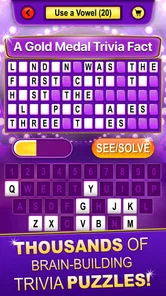
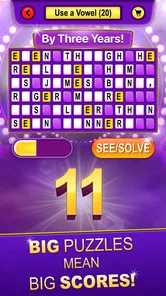
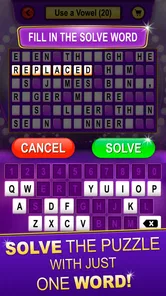
The central rhythm is easy to understand: you see a prompt, work through the information in front of you, and solve the word or trivia challenge. That “see, then solve” pattern is the important distinction. Instead of asking you to browse a large menu of quiz categories or manage a complicated game system, it puts the attention on the clue itself.
In my experience, that makes the game particularly comfortable in short sessions. I can imagine opening it while waiting for an appointment, taking a few turns during a commute, or using it as a lighter alternative to scrolling through social media. It does not require the same commitment as a long puzzle campaign, and the format is approachable enough to share with someone who does not normally play mobile games.
The game-show framing also gives the trivia a little more personality than a plain list of questions. That matters because word games can become dry when every interaction feels like a test sheet. Here, the presentation encourages me to treat each clue as a small performance: identify what matters, ignore distractions, and commit to an answer.
That does not mean every round will feel equally difficult. Trivia naturally depends on personal knowledge, and a clue that seems obvious to one player can stop another completely. The best way to judge the experience is not by expecting a constant difficulty curve, but by asking whether the solving process remains enjoyable when I do not immediately know the answer. For me, the strongest moments come from making a connection rather than simply recalling a fact.
A useful game for small pockets of time
One of the less obvious strengths is how well the format fits interrupted play. If I have only a few minutes, I can approach it as a warm-up for my attention instead of starting a game that demands a long uninterrupted session. That makes it suitable for a quick morning routine, a break between tasks, or a relaxed evening when I want something more active than watching videos.
More From Our News Desk

 Gmail
GmailGmail in a Busy Inbox: Who Benefits Most?
From first account to crowded workday, Gmail earns its place through dependable search and flexible sorting—but its best fit depends on how much inbox maintenance you can tolerate.

 Prime Video
Switching to Prime Video: What Changes in Your Viewing Routine
Prime Video can make a compelling second home for streaming, but switching means learning a different catalog, rental layer, and route from browsing to playback.

 Universal TV Remote Control
Universal TV Remote Control Works Best as a Reliable Backup
A phone remote earns its place through quick setup and reliable habits. Here is how to get more from Universal TV Remote Control—and where its limits show.

 Weather - By Xiaomi
Weather by Xiaomi Review: Clear at a Glance, Less Clear Up Close
Xiaomi’s weather app makes everyday forecasts quick to scan, but its calm surface can leave useful details and recovery paths harder to find than they should be.

 X
XX Under Pressure: Can It Recover When Posting Goes Wrong?
A resilience-focused review of X, examining setup, mistaken posts, interruptions, weak connections, and the gaps that matter when recovery needs to be dependable.

 Clash of Clans
Clash of Clans Is Won Between the Battles
Its raids are quick; its community is a long-term project of coordination, teaching, rivalry, and shared responsibility—with all the friction that entails.
Latest News



I would use it differently depending on my energy. When I am alert, I can treat each clue as a genuine challenge and try to solve it without rushing. When I am tired, it works better as a gentle brain exercise. That flexibility is more valuable than it sounds, because many quiz games are either too shallow to hold attention or too demanding for casual use.
A practical tip is to avoid guessing instantly when a clue feels familiar. I found that taking a moment to separate the key wording from the general topic can improve the solving process. The game becomes less about blurting out the first association and more about reading carefully. That is a small habit, but it changes the experience from a reaction test into a reasoning exercise.
What the version and release history tell me
The game was released on July 17, 2024, and the current version is 1.9. That combination tells me I am looking at a product that has moved beyond its initial launch build, rather than an untouched first release. The version number alone does not reveal the exact changes, so I would not pretend to identify a particular feature update or redesign. What it does show is that the app has had room to evolve since arriving on mobile.
For an existing player, that is encouraging in a modest way. A later version can mean the developer has been refining the experience, correcting rough edges, or adjusting content. Still, I would separate that reasonable expectation from confirmed gameplay changes. The current version is the useful reference point when deciding whether to install, while the release date provides context about how established the game is.
Hoyt Games is clearly associated with the trivia concept through the developer credit and the store summary’s reference to David L. Hoyt. That gives the game a more personal identity than an anonymous quiz collection. I appreciate that connection because it makes the title feel built around a particular style of trivia rather than assembled as a generic question bank.
At the same time, anyone returning after an earlier installation should judge the present build on its own merits. A version number is not a promise that the game now includes every feature a player may want. If your decision depends on a specific option, such as a particular play mode or a certain type of progress system, it is better to install and inspect the current experience directly rather than assume that the app has grown in that direction.
Who will get the most from it
I think this is a strong fit for players who enjoy trivia with a word-game focus, especially those who prefer solving clues to managing characters, collecting items, or competing through a large online structure. It is also a sensible choice for families because the content rating is Everyone, although individual comfort will still depend on the subject matter of particular questions and on the age of the person playing.
It can work well for someone trying to build a small daily thinking habit. Rather than setting an ambitious target, I would play a short session and pay attention to the types of clues that slow me down. That turns the game into a way to notice gaps in general knowledge, vocabulary, or careful reading. I would not call it a complete learning tool, but it can make curiosity feel more playful.
It is less suitable for players who need a clearly documented competitive ladder, a deep progression system, or a large collection of elaborate modes before a game feels worthwhile. The attraction here is the solving itself. If you only enjoy trivia when there are live opponents, timed tournaments, or extensive customization, a more feature-heavy quiz app may be a better match.
I would also hesitate to recommend it as the only choice for someone seeking specialist education. A general trivia game can encourage recall and lateral thinking, but it should not replace a structured course, reference book, or dedicated subject app. Its value is in the moment-to-moment challenge, not in promising a complete curriculum.
How it compares with familiar alternatives
Compared with a traditional crossword, this game places more emphasis on trivia knowledge and clue interpretation than on filling a grid through intersecting letters. That makes it quicker to start and easier to play in brief bursts, but players who love the slow construction of a crossword may miss the satisfaction of seeing a whole puzzle take shape.
Compared with a standard multiple-choice quiz, the See & Solve format feels more focused on the act of reaching the answer. Multiple-choice games can be forgiving because the options provide helpful hints, while a word-oriented challenge asks me to make a stronger connection between the clue and the solution. That can feel more rewarding when I solve it, but more frustrating when the wording does not lead me in the right direction.
It also differs from large social trivia games. Those alternatives often emphasize matches, rankings, or the excitement of playing against other people. This title is more appealing when I want a private, self-contained challenge. The trade-off is obvious: I get less social pressure and a calmer pace, but I may also miss the motivation that comes from competing with friends.
My advice is to choose based on the kind of tension you enjoy. Pick this one when you want to examine a clue and solve it at your own pace. Choose a crossword when structure and vocabulary construction matter most. Choose a multiplayer quiz when the opponent is part of the fun. Those are not interchangeable experiences, even though all three belong somewhere in the broader puzzle and trivia space.
Small strategies that improve the experience
My first strategy is to read the clue twice, with a different purpose each time. On the first pass, I look for the broad subject. On the second, I search for the exact wording that narrows the answer. This prevents a familiar topic from pulling me toward an answer that sounds plausible but does not actually fit.
My second strategy is to treat mistakes as information about my thinking rather than as a reason to rush through the next challenge. If I miss an answer because I focused on one word and ignored another, I try to identify that pattern. The game becomes more useful when I pay attention to how I solve, not only to whether I am right.
A third approach is to play with another person without turning every round into a contest. One player can explain why an answer came to mind while the other checks whether the clue supports it. That makes the game a conversation starter and can be especially enjoyable with family members who have different areas of knowledge.
There is also a practical trade-off in playing on a small screen. A compact display keeps the game convenient, but it can make careful reading less comfortable for some people. I would increase the device’s text size or use a larger screen when possible if visual fatigue becomes a problem. The game’s simplicity helps here, because it does not require a crowded interface to be useful.
Where the experience still has limits
The biggest limitation is that a clue-based trivia game can feel uneven from one round to the next. Difficulty is personal, and broad trivia inevitably favors some players more than others. I would not judge the title harshly for including questions outside my strongest subjects, but I would expect occasional stretches that feel either too easy or unexpectedly obscure.
Another limitation is the narrowness that makes the game appealing. The focused design keeps the experience approachable, yet players who need a sense of long-term achievement may eventually want more visible variety. If the solving loop itself does not hold your attention, the clean format will not magically create depth.
The free price makes trying it easy, which is a genuine advantage, but free access alone is not a reason to keep an app installed. I would give it a fair session and ask whether I am enjoying the clues, not whether I feel obligated to use it because it cost nothing. That is especially important for people with limited storage or a crowded collection of puzzle apps.
I also would not assume that the strong average rating means every trivia style is represented equally well. A high rating from around eight hundred ratings is a positive signal, but it reflects the experiences of the people who chose to rate it, not a universal verdict. My own recommendation is strongest for casual word-and-trivia players, not for every kind of quiz enthusiast.
What current users and new players should watch
New players should pay attention to whether the clue wording feels fair to them, not just whether they can answer quickly. A good session can include questions I miss, provided the path to the answer becomes understandable afterward. If I consistently feel that success depends on guessing the developer’s intended wording instead of interpreting the clue, that is a sign the game may not suit my preferences.
Existing users should watch how the current version develops over time, while keeping expectations grounded. Version 1.9 shows that the project has progressed since its release, but future improvements should be evaluated through the actual play experience rather than assumed from a number. I would look for smoother solving, useful content refinement, and continued attention to the clarity that makes short trivia sessions enjoyable.
One question many people will have is whether the game is safe for younger players. Its Everyone content rating makes it broadly accessible, but I would still use normal family judgment because trivia can cover many subjects and because suitability is not identical for every child. Another likely concern is device compatibility: Android 6.0 or later gives it a reasonably broad starting point for older Android hardware.
Players may also wonder whether they need to spend money before they can decide if it is worthwhile. Since the game is free, the barrier to trying it is low. My recommendation is to approach that as an experiment: install it, play enough rounds to experience both easy and difficult clues, and then decide whether its particular style deserves a place in your routine.
My recommendation after playing
I like See & Solve Trivia Game Show because it understands the value of a compact idea. It does not need to overwhelm me with systems to make a clue satisfying. When the wording clicks and I arrive at the answer, the reward comes from the connection itself. That is the kind of small, repeatable pleasure I want from a mobile word game.
My recommendation is strongest for anyone who wants a free, approachable trivia session that can fit around everyday life. I would choose it for a quiet break, a family challenge, or a few minutes of mental warm-up. The Everyone rating and support for Android 6.0 or later also make it an accessible option for a wide range of players.
I would skip it if your ideal quiz game depends on live competition, detailed progression, or a very specific subject area. Those needs call for a different kind of app. But if you enjoy reading a clue carefully, testing your general knowledge, and solving words without a lot of setup, this is an easy game to try. For me, its best quality is not that every round is perfect; it is that the simple loop gives ordinary spare moments a little more thought and curiosity.
See & Solve Trivia Game Show Frequently Asked Questions
Who makes See & Solve Trivia Game Show, and what kind of game is it?
See & Solve Trivia Game Show is a word game from Hoyt Games. Its store description invites players to “Train your brain to be a game show genius with trivia from David L. Hoyt!” If you enjoy word-based challenges and trivia presented in a game-show style, its central idea may be a good fit. The short description, “See & Solve,” reflects its focus on observing clues and working toward answers.
What is See & Solve Trivia Game Show?
See & Solve Trivia Game Show is a quiz-style mobile game built around visual clues, general knowledge questions, and timed challenges. Instead of relying only on written questions, it encourages players to observe images, identify patterns, and connect clues with the correct answer. It is designed for casual solo play and may also appeal to users who enjoy testing their knowledge in a television game-show format.
How does the gameplay work in See & Solve Trivia Game Show?
Gameplay generally consists of viewing a clue or puzzle, considering the possible solution, and selecting an answer before time runs out. The visual format makes the experience different from a standard trivia app because careful observation can be just as important as memorized knowledge. As you progress, questions may become more challenging, so reading clues carefully and avoiding rushed guesses is useful.
Is See & Solve Trivia Game Show suitable for children and families?
The game is rated Everyone, so its age classification makes it suitable for a broad audience. It can be suitable for family play, particularly for users who enjoy educational quizzes and visual problem-solving. Difficulty and subject matter can vary, and some questions may be more appropriate for older children, teenagers, or adults, so families can decide together whether the questions are a good fit.
Does See & Solve Trivia Game Show require an internet connection?
Whether an internet connection is required can depend on the version of the app and the feature being used. Basic question content may sometimes be available after installation, while advertisements, updates, leaderboards, cloud features, or additional game content may need connectivity. Before downloading, check the store listing and test the game with Wi-Fi and mobile data disabled if offline access is important.
Pros
- Quick rounds make it easy to play during short breaks.
- Trivia categories offer variety for different interests.
- Simple controls are accessible for most players.
- Competitive scoring adds excitement to repeated games.
- Bright visuals and sound create a lively game-show feel.
Cons
- Some questions may feel repetitive after extended play.
- Difficulty can vary noticeably between consecutive questions.
- Ads may interrupt the flow for free users.
- Reliable internet access may be needed for all features.
- Players seeking deep trivia explanations may find answers limited.












