Polysphere: Art Puzzle Game
- 25.56K
- 4.3
- Installs
- 50.00M
- Price
- Free

Screenshots







Analysis by Reviewed
I find Polysphere: Art Puzzle Game easiest to enjoy when I treat it as a short visual break rather than a puzzle challenge I need to conquer quickly. The central task is to rotate scattered pieces until they form a recognizable image, so progress comes from changing your viewpoint, not from fitting conventional jigsaw edges together. That difference is appealing, but it can also be where a new player gets stuck: a shape may look confusing from one angle and suddenly make sense after a small adjustment.
When the rotation stops feeling obvious
If I’m circling around a puzzle without seeing the picture, I try broad, deliberate swipes first, then make smaller movements and pause after each one. Constantly dragging in every direction can make it harder to notice which angle is helping. I also look for a clear outline or color grouping rather than trying to identify the whole image at once. The useful trick is to use the emerging silhouette as feedback: when a section begins to look coherent, keep that orientation in mind and refine from there.
This is a different kind of concentration from a word puzzle or a classic jigsaw. There’s no need to calculate a route or remember a long sequence, but you do need patience with spatial perspective. That makes it a gentle option when I want to focus on one small task, though anyone who finds repeated visual adjustment irritating may prefer a puzzle with more explicit clues or varied mechanics.
A few sensible checks before playing
Polysphere is a free puzzle game from CASUAL AZUR GAMES, rated for Everyone. Its current version is 1.15.44, and it requires Android 7.0 or later on Android devices. The game has a 4.3 average from around 502,000 ratings, with more than 50 million installs. Those figures suggest it has reached a broad audience, but they don’t tell me whether its particular style will suit someone who prefers faster or more complex puzzles.
If a level seems unresponsive, I’d first check the basics: make sure the game is fully loaded, try a slower swipe, and close and reopen it if touch input still feels stuck. On a smaller screen, a broad finger movement can obscure the artwork, so I use controlled gestures and avoid rushing. These are simple checks, not a guarantee that every interruption is caused by the game; device performance or a temporary system issue can affect how any mobile title responds.
Unfolding the Experience
From the moment you launch Polysphere: Art Puzzle Game, you're greeted with a visually stunning interface that sets the tone for a creative adventure. The premise is simple yet captivating: you’re presented with fragmented 3D pieces of an image, and your job is to rotate and align them until you reveal the complete picture. It’s like a modern twist on the classic jigsaw puzzle, but with a more dynamic and engaging approach.
Gameplay and Mechanics
The mechanics of the game are intuitive, allowing players of all ages to dive right in. You use your fingers to swipe and rotate the pieces, and there's a certain satisfaction when everything clicks into place. Each level offers a new artwork, ranging from animals and landscapes to abstract designs. The difficulty gradually increases, which keeps the game both challenging and rewarding.
More From Our News Desk

Weather by Xiaomi Review: Clear at a Glance, Less Clear Up Close

X Under Pressure: Can It Recover When Posting Goes Wrong?

Clash of Clans Is Won Between the Battles

Android Auto Makes the Case for Quieter Car Software

MobiOffice: Transforming Mobile Productivity with Seamless Integration

EA SPORTS FC™ Mobile Soccer: Redefining Mobile Sports Gaming
What I particularly appreciate about Polysphere is how it manages to be both calming and stimulating. It’s a perfect blend of art and logic, requiring just the right amount of concentration to solve each puzzle without feeling overwhelmed. Plus, there’s no time limit, so you can take a leisurely approach to each puzzle, making it a great way to unwind after a hectic day.
Visuals and Sound
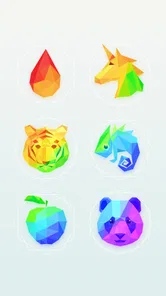
Visually, the game is a treat. Each artwork is beautifully rendered, and the 3D effect adds depth and realism to the experience. The color palette is vibrant, yet soothing, enhancing the overall aesthetic appeal. Accompanying the visuals is a gentle background music track that complements the game's relaxing vibe perfectly. It’s one of those games where you might find yourself lost in the beauty of the designs just as much as the gameplay itself.
Using it in everyday moments
I’d choose this for a quiet wait at a café or a wind-down break at home: open a level, give it my attention for a few minutes, and stop when I’m ready. It suits people who enjoy visual recognition and low-pressure play more than players seeking competition, a story campaign, or a constant stream of different puzzle rules. Compared with standard jigsaws, its rotating 3D arrangement feels more immediate and less about sorting pieces; compared with quick-match games, it asks for steadier observation rather than rapid reactions.
A practical way to keep the experience relaxing is to stop once I start making random swipes. I’ll take a moment to inspect the colors and silhouette, then resume with smaller movements. If I’m interrupted, I simply return to the puzzle and reorient myself from the visible image instead of trying to remember every previous gesture. That makes it a reasonable fit for short gaps in the day, although it is not my pick when I want a deep, multi-session logic problem.
Who will get the most from it
I’d recommend it to someone who likes looking at an image and gradually making sense of how its parts fit together, but doesn’t want a competitive score or a timer adding pressure. It can also work as a low-key shared activity: one person can suggest a direction while the other makes a careful adjustment. That small back-and-forth makes the visual search feel social without turning it into a race. For a child or adult who enjoys patient observation, the Everyone age rating makes it approachable, though the right fit still depends on whether rotating pieces feels satisfying or repetitive to them.
I’d steer away from it if your favorite puzzles rely on a strong sense of progression through different rules, a story, or a steadily rising logic challenge. Polysphere’s central interaction stays focused on adjusting the view until an image resolves. That simplicity is its strength when I want something easy to pick up, but it also sets a ceiling on variety for players who quickly tire of repeating one kind of spatial task. A classic jigsaw is a better choice if you want to sort many separate pieces, while a word or number puzzle is more suitable when you want explicit clues and a clear reasoning path.
Small habits that make play smoother
One useful habit is to change only one thing at a time: make a measured swipe, pause, and judge whether the composition is becoming clearer before moving again. If I make several fast gestures in succession, I lose track of what helped and can end up correcting a good angle by accident. I also avoid trying to name the finished object too early. A color boundary or a broad curve can be a more useful guide than guessing whether the image is an animal, a flower, or something else.
For a short break between errands, I’d treat each attempt as a self-contained activity rather than expecting to make a long session of it. If I need to put the phone down, I can resume by looking at the arrangement on screen and rebuilding my sense of direction from the visible shapes. That is less demanding than keeping a chain of moves in memory, but it also means this isn’t the sort of game where I’d expect a complicated strategy to carry over from one sitting to another.
When the friction may be outside the puzzle
Before deciding that a puzzle is malfunctioning, I’d separate visual difficulty from input trouble. If a deliberate swipe changes the arrangement but doesn’t reveal anything recognizable, the issue may simply be that I haven’t found the right viewpoint yet. If touch input seems unreliable across the screen, I’d close and reopen the game, then check whether other apps respond normally. When several apps feel sluggish, general device workload or a temporary system issue is a more useful place to investigate than repeatedly making faster gestures inside the puzzle.
On Android, the minimum operating system requirement is 7.0, so I’d check that before trying to troubleshoot installation or performance. The game is also available on iOS, but I would still check that the version offered for my device is compatible before downloading. These basic checks won’t solve every technical problem, but they help avoid mistaking a device compatibility or touch-response issue for a puzzle mechanic that is meant to be gradual.
Progress, spending, and expectations
The game is free to download, with in-app purchases ranging from $0.99 to $89.99 per item. I’d start without spending and see whether the available play is enough for my habits before considering any purchase. Since the appeal is the act of rotating each picture into place, I wouldn’t assume that paying changes the basic puzzle style. Anyone trying to keep mobile spending predictable should check purchase choices carefully and use their device’s purchase controls if needed.
If progress or input seems interrupted, I’d distinguish between a puzzle that is simply hard to read and a technical problem. A tricky image can make the pieces feel unresponsive even when they are moving; I’d test a slow, short swipe and watch for any change in the arrangement. If the whole game stops responding, reopening it is a sensible first step. If other apps are also sluggish, the device or its current workload may be the more likely source of friction, so restarting the device and checking that the operating system is supported are reasonable general steps.
Why You Should Try It
One of the standout features of Polysphere is its accessibility. It’s suitable for a wide range of players, whether you’re a casual gamer looking for something to pass the time or someone who enjoys a bit of a mental workout. The game is free to download, with optional in-app purchases that unlock more puzzles and features if you’re keen to explore further.
In conclusion, Polysphere: Art Puzzle Game is a delightful addition to the mobile gaming world. It successfully marries art with interactive gameplay, providing a unique experience that’s both fun and meditative. Whether you’re looking to relax or engage your brain, Polysphere offers a fantastic escape into a world of color and creativity. Give it a go – you might just find it’s the perfect game to brighten your day!
Polysphere: Art Puzzle Game Frequently Asked Questions
Can I play Polysphere with one hand, or does it require precise controls?
Polysphere is built around manipulating a fragmented image until its pieces line up into a recognizable picture, so the main interaction is visual and touch-based rather than action-focused. It is best approached at your own pace, rotating the puzzle and checking how the shapes fit together. Players who prefer fast reactions or complex control schemes may find its simple puzzle style less engaging.
Is Polysphere suitable for short play sessions?
Polysphere’s puzzle format makes it easy to pick up when you have a little time to spare: you can focus on the image in front of you and work toward making its fragments come together. Its relaxing, antistress approach is also suited to quieter moments. If you prefer games built around long stories or extended competitive sessions, this is a more focused, self-contained kind of experience.
Does Polysphere include ads?
Polysphere is a free-to-play puzzle game, and optional in-app purchases are available. Ads and purchase prompts can affect how uninterrupted a session feels, so it is sensible to check the app’s behavior on your own device and review its settings before settling in for a longer play session. If a child will be playing, consider using your device’s purchase controls as well.
How much storage space does Polysphere need?
Polysphere is a mobile puzzle game, so it’s worth checking that your device has room for the app before downloading. The game’s listed minimum operating system is Android 7.0, while iOS players can find it through the Apple App Store. Keeping some free space available can also help with app updates and any additional content you choose to access.
Who developed Polysphere, and is it popular?
Polysphere is developed by CASUAL AZUR GAMES and has built a substantial audience among mobile puzzle fans. It has over 50 million installs and an average rating of 4.3 from around 502,000 ratings. Those figures suggest that many players have tried its relaxing image-assembly concept, though whether its style suits you will depend on how much you enjoy visual, spatial puzzles.
Pros
- Visually stunning 3D puzzle graphics.
- Enhances spatial reasoning skills.
- Easy to learn with intuitive controls.
- Regular updates with new levels.
- Suitable for all age groups.
Cons
- Requires internet for some features.
- Can become repetitive over time.
- In-app purchases can be costly.
- Limited hints available for difficult puzzles.
- Advertisements can interrupt gameplay.