My OldBoy! - GBC Emulator
- 926.00
- 3.7
- Installs
- 500.00K
- Price
- $3.99

Screenshots

Analysis by Reviewed
I think My OldBoy! - GBC Emulator makes the most sense when you know what you want from a retro handheld experience: a way to play Game Boy and Game Boy Color games on a phone, with modern conveniences rather than a hunt for original hardware. It is an arcade-style game app from Pixel Respawn LLC, and its focus is deliberately specific. If your goal is to revisit portable classics, that focus is a strength; if you want a broad collection of built-in games, it is not the right starting point.
Decide what matters before you install
The key choice is whether you already have game files you can use and are comfortable bringing them into an emulator. Once that part is sorted, the appeal is straightforward: familiar handheld games, phone-based controls, and options that can make older titles easier to fit into short sessions. I would not treat an emulator as a replacement for owning a library or as a source of games; it is the player, not the collection.
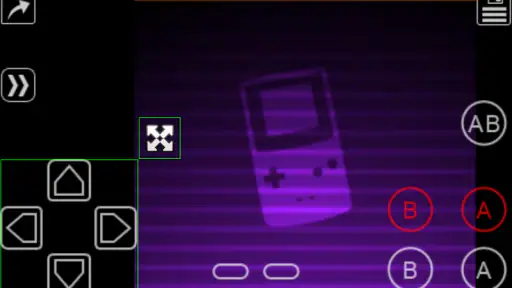
There is also a practical distinction between touch controls and a physical controller. Touch input is convenient when I am away from home, but buttons can cover part of the screen and may feel less precise in games that demand quick timing. If you already own a compatible external controller, using it can make longer sessions more comfortable. For a quick check-in during a commute or a break, though, the on-screen layout is often the easier option.
A quick way to judge whether it suits you
I would decide based on three things before paying: whether I have legitimate game files ready, whether I am happy playing on a phone-sized screen, and whether Game Boy and Game Boy Color are the systems I actually want to revisit. This is a focused tool, not a substitute for a general mobile game library. If those three answers are yes, its dedicated scope is useful; if one is no, the initial appeal can fade quickly.
It is also worth thinking about where you play. A phone is handy for a few minutes of downtime, but an older handheld game can invite longer sessions, and touch controls may become tiring when your thumbs are constantly covering the display. I would try a familiar, low-pressure game first rather than judging the setup during a demanding section. That gives you a fair sense of screen size, button placement, and whether a controller would make the experience better.
Bringing Back the Classics
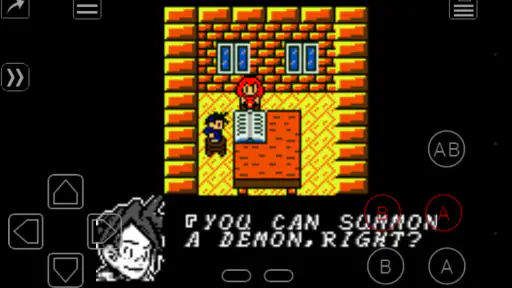
First off, let's talk about the magic this emulator works. The My OldBoy! - GBC Emulator is like a time machine that transports you to the era of pixelated graphics and chiptune music. The app does an incredible job in replicating the classic Game Boy Color experience with stunning accuracy. You can play your favorite titles from yesteryears just as you remember them, minus the need for AA batteries!
Features That Stand Out
One of the standout features of this emulator is its wide range of compatibility. It supports a plethora of Game Boy and Game Boy Color games, ensuring that no game is left behind. Plus, it offers high-level BIOS emulation, which means you don't need a BIOS file to get started. Just load your ROMs and you’re good to go!
More From Our News Desk

Clash of Clans Is Won Between the Battles

Android Auto Makes the Case for Quieter Car Software

MobiOffice: Transforming Mobile Productivity with Seamless Integration

EA SPORTS FC™ Mobile Soccer: Redefining Mobile Sports Gaming

How Microsoft OneDrive Became a Mobile Productivity Giant

How Google Translate Breaks Language Barriers Effortlessly
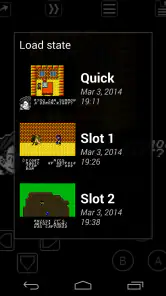
And let’s not forget about the handy features that modern gamers will appreciate. We’re talking about save states, fast forward, and even link cable emulation. Yes, you heard that right! You can connect with your friends over Bluetooth or Wi-Fi and relive those epic multiplayer battles. The app also supports external controllers, so if you have a Bluetooth gamepad lying around, it’s time to put it to good use.
Where it fits among emulator choices
For someone who only wants to play Game Boy and Game Boy Color titles, a focused emulator can be simpler than an all-in-one retro app with menus for many systems. The trade-off is that it will not be the natural choice if your library spans several consoles and you want one interface for everything. I would choose this when handheld Nintendo-era play is the priority, and look at a broader emulator when variety matters more than a dedicated experience.
Link emulation is a particularly useful reason to consider it if you have a friend who also plays compatible games. It can bring back the social side of handheld play without carrying two original devices, but it is not essential for solo players. If multiplayer is your main reason to buy, check that your intended game and the way you plan to connect suit your setup before making it the deciding factor.
There are a few different kinds of alternatives to weigh up. A multi-system emulator makes more sense if you want to keep games from several old platforms under one roof, while a dedicated handheld is the better fit if you want physical buttons without configuring a phone. Neither choice is automatically better: the all-in-one route can be convenient but broader than you need, and dedicated hardware means carrying another device. I would pick this app when using the phone I already have is part of the point.
For a shared session, plan the setup before you meet your friend rather than making link play the first thing you test together. Confirm that both of you have the game files you intend to use, and try the connection with a game where a brief interruption is not frustrating. That simple check keeps a potentially fun feature from becoming the whole evening’s troubleshooting task.
Small choices that improve everyday play
A realistic use for the app is keeping a long-running game ready for spare moments: I might play a short section during a quiet break, use a save state when I need to stop immediately, then return later without searching for the last in-game save point. Save states are convenient, but I would use them alongside a game’s own save system where possible. That gives me a fallback if I switch devices or later change how I organize my files.
Fast forward can help with slow stretches, repeated traversal, or waiting through familiar scenes, but I would turn it off for platforming and other sections where timing matters. Likewise, palette and screen-layout adjustments are worth trying before deciding a game looks wrong on a modern display. A small layout change can make touch buttons less intrusive, while a shader is a matter of taste rather than an automatic improvement.
One useful habit is to make adjustments one at a time. If a game looks too washed out, try a palette change before adding a shader; if controls feel awkward, move or resize the layout before deciding the game itself is uncomfortable to play. This keeps the setup understandable and makes it easier to undo a change that does not help. I would also keep the game files organized by title from the beginning, since a tidy library is much easier to browse when you return after a few weeks.
For an everyday routine, the app works best when I treat it as a small, ready-to-go collection rather than trying to load everything at once. I might keep one game for a commute and another for a relaxed evening at home, then use fast forward only when a familiar stretch starts to feel like busywork. The trade-off is that phone play is always available, but it can also make a focused game session easier to interrupt with notifications and other phone activity.
Performance, setup, and expectations
When it comes to performance, the app runs like a dream. Games load smoothly without any noticeable lag, and the controls are responsive, ensuring an enjoyable gaming experience. The user interface is intuitive and user-friendly, making it easy even for the less tech-savvy to navigate through their gaming library.
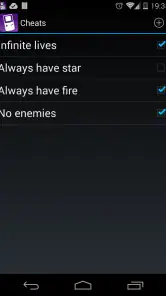
What’s more, the emulator provides a range of customization options. You can tweak the color palettes, adjust the screen layout, and even apply shaders to give your games a fresh look. The app also supports cheat codes, so if you're in the mood to breeze through those tricky levels, you have all the tools at your disposal.
My practical advice is to test one game first, set the screen and controls to your liking, and then build out your library. That makes it easier to spot whether a problem comes from a particular game file or from your preferred control layout, rather than changing several things at once. Cheats can be fun for experimentation, though I would avoid them on a first playthrough if discovery and challenge are part of the appeal.
If a title does not behave as expected, I would first check the file and try another game before changing several emulator settings. That basic comparison can help separate a file-specific issue from a general setup problem. It is also a reason to keep an original save where possible instead of relying only on a quick state: convenience is valuable, but a second way to preserve progress makes experimentation less risky.
People often wonder whether they need a BIOS file, whether a controller is required, and whether the app provides games. The practical answers are straightforward: BIOS emulation means a separate BIOS file is not needed to get started; a controller is optional because touch controls are available; and you bring the games you want to play rather than receiving a built-in collection. Sorting out that last point before purchase is especially important, since the emulator itself is only one part of the setup.
Who should spend the money
The game costs $3.99, carries an Everyone age rating, and has an average rating of 3.7 from around 8.3K ratings, alongside roughly 926 written reviews. It has passed 500K installs, which suggests a substantial audience for this specialized kind of play, but those figures do not tell me whether it fits your needs. I would weigh the one-time purchase against how often you expect to use it and whether the Game Boy library is genuinely what you want to revisit.
Version 2.0.1 requires Android 5.0 or later. That makes checking your device’s system version a sensible first step, especially if you plan to use an older phone. I would skip it if you do not have games to load, dislike configuring touch controls, or mainly want current releases; a modern mobile game or a handheld device may suit those preferences better.
The purchase is easiest to justify for someone who already knows a handful of Game Boy or Game Boy Color games they want to return to. If you are only curious about retro gaming in general, a broader option may help you explore different systems before committing to this narrower focus. On the other hand, if these particular handheld games are the reason you are looking, paying for a dedicated emulator can be more appealing than wrestling with an interface designed around many unrelated platforms.
I would also skip it if the main thing you want is a modern game designed for touchscreens, with short levels and no setup decisions. This app asks you to bring your own library and make a few choices about controls and display. Those steps are manageable, but they are part of the experience, not an invisible detail. A person who enjoys customizing a familiar game will likely find that worthwhile; someone who just wants to tap and start may not.
Final Thoughts
In a world where modern gaming often prioritizes cutting-edge graphics and complex mechanics, the My OldBoy! - GBC Emulator serves as a delightful reminder of simpler times. It manages to strike a perfect balance between nostalgia and functionality, offering features that cater to both old-school gamers and newcomers alike.
If you’re in the mood to relive the golden days of gaming or simply want to experience what the fuss was all about, this emulator is worth every penny. So, go ahead, dust off those ROMs, and let the gaming nostalgia take over!
My recommendation is clear: choose it for a compact, phone-based way to return to Game Boy and Game Boy Color games, especially if save states, display adjustments, and link play are useful to you. Give it a pass if you need a ready-made game collection, want one emulator for a wide range of systems, or strongly prefer physical buttons without bringing a controller. For the right player, the focused approach is the point; for everyone else, a broader emulator or dedicated handheld may be a better match.
My OldBoy! - GBC Emulator Frequently Asked Questions
Does My OldBoy! - GBC Emulator include games, or do I need to provide my own?
My OldBoy! - GBC Emulator is an emulator for playing Game Boy and Game Boy Color games, rather than a game collection. You will need game files to use it, and the app does not replace the games themselves. Before downloading, make sure you have access to game files you are entitled to use and that you understand how to load them into the emulator.
Is My OldBoy! - GBC Emulator free to download?
My OldBoy! - GBC Emulator is a paid app, priced at $3.99. That makes it worth considering whether its classic handheld gameplay features fit what you want before purchasing. It is an Arcade game developed by Pixel Respawn LLC, and its store description presents it as a fast, full-featured GB/GBC emulator with link cable emulation.
What is My OldBoy! - GBC Emulator and what devices is it compatible with?
My OldBoy! - GBC Emulator is a highly versatile Game Boy Color emulator designed for Android devices. It allows users to play classic Game Boy and Game Boy Color games on their smartphones or tablets. The app is optimized for performance and compatibility, making it suitable for a wide range of Android devices, from older models to the latest high-end smartphones. With its extensive support and user-friendly interface, it’s a must-have for fans of retro gaming. It requires Android 5.0 or later.
How user-friendly is the My OldBoy! - GBC Emulator interface?
The My OldBoy! - GBC Emulator boasts a highly intuitive and user-friendly interface, designed to make navigation and gameplay as seamless as possible. The app features customizable controls and layout options, allowing users to tailor their gaming experience to their preferences. Additionally, the emulator offers a clean and straightforward menu system, ensuring that even newcomers to emulation can easily find and run their favorite games without any hassle.
Does My OldBoy! - GBC Emulator support game save states and cheats?
Yes, My OldBoy! - GBC Emulator supports both game save states and cheats, enhancing the gaming experience significantly. Users can save their game progress at any point, allowing them to resume from exactly where they left off. This feature is particularly useful for longer games or challenging levels. Additionally, the emulator supports cheat codes for those who wish to modify their gaming experience, making it a flexible option for both casual and hardcore gamers.
Pros
- Highly accurate emulation of GBC games.
- Supports fast-forward to skip long intros.
- Link cable emulation via Bluetooth.
- Customizable control layouts.
- Saves games at any point with save states.
Cons
- Ads present in the free version.
- Requires configuration for optimal performance.
- Limited features in free version.
- No built-in game library included.
- Occasional bugs when loading ROMs.
- Category
- Arcade
- Version
- 2.0.1