My Boy! - GBA Emulator
- 7.21K
- 3.6
- Installs
- 1.00M
- Price
- $4.99

Screenshots
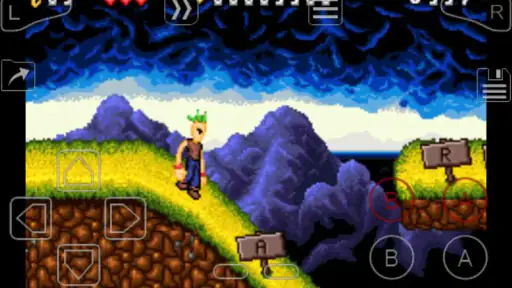
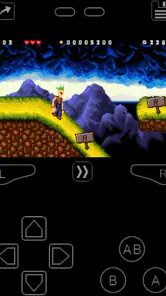
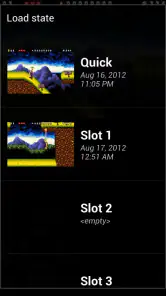
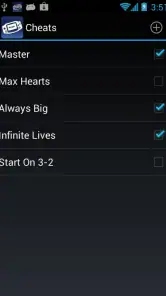
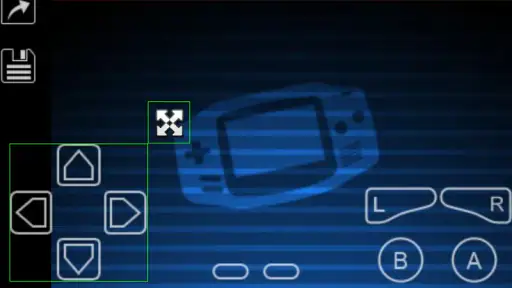
Analysis by Reviewed
I like My Boy! most as a focused way to revisit Game Boy Advance games, not as a promise that every old title will work perfectly on every phone. Its appeal is the combination of portable play, flexible controls, and link cable emulation; its trade-off is that an emulator still needs games you have the right to use and a little setup before the nostalgia starts. If that sounds like a fair bargain, Pixel Respawn LLC’s arcade game is worth a look.
What the GBA experience gets right
Playing on a phone changes the feel of a handheld classic: the screen is larger, but virtual buttons do not have the same tactile feedback as a physical console. I’d spend a few minutes adjusting the on-screen layout before settling into a longer session. Moving controls away from the edges or making room for a particular grip can matter more than any visual tweak, especially in games that ask for quick directional inputs.
Save states are useful for more than rescuing a run just before putting the phone away. I find them best treated as a convenient pause point alongside a game’s own save system, rather than the only record of progress. For a long RPG, keeping normal in-game saves gives you a familiar fallback; for a brief arcade-style session, a state can make it easier to return to the exact moment you stopped.
Fast-forwarding also has a practical role beyond speeding through slow sections. It can help when replaying a familiar stretch or moving through routine parts of a game, but it is less useful when timing and sound cues matter. I’d switch it off before a new boss or an unfamiliar platforming sequence, then turn it back on only when the action no longer needs careful attention.
Reviving the Classics
The first thing you’ll notice about My Boy! - GBA Emulator is its seamless ability to emulate Game Boy Advance games. It's like magic, really! The app runs smoothly, giving you the feel of a genuine GBA console. Whether you're a fan of Pokémon, Zelda, or Mario, this emulator breathes life into all those classic titles.
Features That Impress
What sets this emulator apart is its impressive array of features. From the fast forward option that helps you breeze through slow-paced sections to the cheat codes support that lets you bend the rules a little, it's got it all. And let's not forget the link cable emulation, which allows for multiplayer gaming on the same device. It's like having a mini arcade right in your hands!
Another noteworthy feature is the customizable layout. You can tweak the controls to suit your gaming style, making it a truly personalized experience. Plus, the app’s ability to save and load game states means you can pick up right where you left off without a hitch.
More From Our News Desk

Clash of Clans Is Won Between the Battles

Android Auto Makes the Case for Quieter Car Software

MobiOffice: Transforming Mobile Productivity with Seamless Integration

EA SPORTS FC™ Mobile Soccer: Redefining Mobile Sports Gaming

How Microsoft OneDrive Became a Mobile Productivity Giant

How Google Translate Breaks Language Barriers Effortlessly
Performance and Compatibility
One thing I absolutely loved about this app is its performance. It's optimized to ensure that games run at full speed without any lags, even on older devices. The compatibility is top-notch, supporting almost every GBA game you can think of. Now, that’s something to cheer about!
Moreover, the app supports a wide range of ROMs and even allows you to connect external controllers for a more authentic gaming experience. Whether you’re a hardcore gamer or just someone looking to kill time, this emulator caters to all your gaming needs.
A Few Words on Accessibility
Downloading and setting up My Boy! - GBA Emulator is a breeze. The user interface is intuitive, making it easy for even the most tech-challenged individuals to navigate. The app is lightweight, so it doesn’t hog up your device’s resources, leaving you with ample space for your favorite games.
There is one important practical distinction: an emulator is not a game collection. You’ll need to supply game files yourself and should use only files you’re legally entitled to play. That makes this a better fit for someone who already has legitimate game backups and knows how to access them than for a newcomer expecting a library ready to launch. If you want a plug-and-play game subscription, a current mobile game or an official retro collection is the simpler choice.
For everyday use, I can see this working well on a commute or during a short break: open a familiar title, play a few minutes, save at a sensible point, and resume later. A Bluetooth controller can make longer sessions more comfortable if you already use one, though touch controls are handy when carrying extra gear is not practical. For link cable play, it is worth checking how the feature fits the particular game and setup you have in mind; the headline feature alone does not make every multiplayer experience effortless.
My Boy! is a paid app at $4.99, so I’d weigh that cost against how often I expect to use it and whether I already have suitable games. Its average rating is 3.6 from around 57,000 ratings, with roughly 7,200 written reviews, and it has over one million installs. Those figures suggest an established audience, but they are not a guarantee that it will suit every device or every game. It is rated Everyone, was released on August 12, 2012, and version 2.0.7 requires Android 5.0 or later.
Compared with a basic emulator, the strongest reason to choose this one is its combination of speed controls, save states, customizable touch input, external-controller support, and link cable emulation. The catch is that extra options bring a little tinkering: you may need to adjust controls for each style of play and manage your own files. If you mainly want one familiar GBA game and prefer physical buttons, a handheld device may feel better; if you enjoy configuring an emulator, this is a more flexible phone-based option.
It also makes sense to start with one game you know well rather than loading up a large collection immediately. That lets you check whether the controls feel comfortable and whether your chosen file behaves as expected before investing time in a long playthrough. If something feels off, adjusting the layout or trying a controller is a more useful first step than assuming every problem is a performance issue.
For newcomers, the key question is whether you are comfortable finding and managing your own game files. If not, this app may create more setup work than fun, and an official collection is likely a better fit. If you already have legitimate files and want portability with useful emulator controls, the learning curve is modest and the options reward a little experimentation.
Downloading and setting up My Boy! - GBA Emulator is a breeze. The user interface is intuitive, making it easy for even the most tech-challenged individuals to navigate. The app is lightweight, so it doesn’t hog up your device’s resources, leaving you with ample space for your favorite games.
Perhaps the best part about this app is that it’s available for both Android and iOS, ensuring that everyone can join in on the fun, no matter what device they own.
In conclusion, My Boy! - GBA Emulator is more than just an app; it's a portal to relive your childhood memories. Its robust features, smooth performance, and easy accessibility make it a must-have for anyone looking to experience the joy of retro gaming. So, why wait? Dive into the world of GBA gaming and let the adventures begin!
Making a phone session feel less fiddly
The most useful setup habit is to decide how you plan to play before changing settings. A one-handed puzzle or turn-based RPG session has different demands from a platform game that needs quick, repeated inputs. I’d arrange the buttons around the game I’m actually opening, then test the layout in a low-stakes area instead of discovering during a difficult section that a button sits under my thumb or gets tapped accidentally.
For a longer game, I’d also make a simple save routine: use the game’s own save when it offers one, then use a save state when I need to pause between natural checkpoints. That distinction is especially helpful if I switch between short phone sessions and longer play. A state is convenient, but treating it as a supplement rather than a replacement keeps the game’s regular progress system in the loop.
Cheat support is another feature that deserves a little restraint. It can be tempting to turn a difficult game into a quick victory, but codes may change the challenge or the rhythm that made a favorite title enjoyable in the first place. I’d reserve them for experimentation, a replay, or a section that has become a genuine barrier, rather than enabling several at once and then wondering which change affected the experience.
Where the trade-offs show up
The biggest compromise is not about raw convenience; it is about the gap between touchscreens and dedicated controls. On-screen buttons make the phone self-contained, but your thumbs cover part of the display and you cannot feel a button press in the same way as on a handheld. That is a real drawback for games that rely on precise movement. A controller can help, but it also means carrying another device and taking a moment to connect it, so the best option depends on whether portability or tactile control matters more to you.
Emulation also asks the player to be a little more hands-on than a packaged retro collection. You need to manage your own game files, understand where they are stored, and choose a sensible way to keep your progress. If you enjoy having control over your setup, that flexibility is part of the appeal. If you want to tap an icon and immediately browse a curated catalogue, this is simply a different kind of product, and an official collection is likely to feel more straightforward.
Nor would I assume that one successful game proves every title will behave identically. The way a game feels can depend on its control demands, the file you use, and how you have configured the app. Starting with a familiar title is a practical test: it gives you a reference for responsiveness and lets you adjust before committing to a lengthy playthrough. For someone who wants a guaranteed, uniform experience across a specific collection, original hardware or a supported official release can be the safer choice.
Who will get the most from it
I’d recommend it to players who already have games they are entitled to use and want a portable way to revisit them, especially if they value quick saves, adjustable controls, and the ability to speed through sections they know well. It can suit a casual player dipping into a familiar game during a break, as well as a more involved fan who wants to experiment with a controller or link cable emulation. The appeal is strongest when you see the emulator as a flexible player for games you bring to it, not as a ready-made retro library.
It is less suitable if you have never handled game files and do not want to learn how to manage them, if touchscreen controls frustrate you, or if you expect every game to require no adjustment. Someone shopping for a simple collection with licensed titles included should look at official retro offerings instead. And if physical buttons are central to the fun, a dedicated handheld can offer a more natural feel than any phone layout, even when the phone is easier to keep in your pocket.
There is also a useful distinction between a quick test and a real commitment. Before starting a long RPG, try a short session, check the layout, and confirm that the game’s ordinary save process makes sense to you. If your first experience is comfortable, the app’s portability can make it easy to keep returning. If the setup already feels like work, paying for a more involved emulator may not solve the part you dislike.
A practical verdict for retro players
For me, the case for this app rests on how well its tools support the way people actually revisit older games: a brief session here, a longer stretch when time allows, and the occasional need to make controls or pacing more comfortable. The combination is more compelling than a bare emulator, but it still asks you to bring your own games and make a few personal choices. That balance is honest: flexibility comes with responsibility, and the app cannot remove every inconvenience of playing through a touchscreen.
If you are comfortable with that exchange, the paid price can make sense as a focused tool for a library you already own and want to carry around. If you mainly want a collection that is ready to play, or you know you dislike configuring virtual controls, I would choose another route rather than expect this one to become a console-like experience. For the right player, though, its save options, fast-forward, controller support, and link cable emulation give old GBA games a useful second life on a phone.
My Boy! - GBA Emulator Frequently Asked Questions
Does My Boy! - GBA Emulator include games, or do I need to provide my own?
My Boy! - GBA Emulator is an emulator rather than a library of GBA games. You need compatible game files stored on your device and can then browse to them from the app to start playing. Make sure you obtain game files lawfully; the emulator does not make downloading games you do not own legal.
Can My Boy! - GBA Emulator save my progress?
The published description presents My Boy! as a full-featured GBA emulator, and the app is commonly associated with save states for keeping track of progress. Save states can be useful when you want to resume a session without relying only on a game’s usual save system. Your experience can depend on the game file and device, so it is sensible to check that your progress has been saved before closing the app.
Can My Boy! - GBA Emulator be used on an iPhone or iPad?
My Boy! - GBA Emulator is an Android application, so it is intended for Android devices rather than iPhone or iPad. Before downloading, check that your device is running Android 5.0 or later. The app is a GBA emulator, not a collection of games, so you will also need compatible game files to play.
What is My Boy! - GBA Emulator and what can it do?
My Boy! - GBA Emulator is a popular Android application that allows users to play Game Boy Advance games on their mobile devices. The app emulates the GBA hardware, enabling users to enjoy their favorite classic games with high compatibility and performance. It supports features like fast forward, save states, and even link cable emulation over Bluetooth or Wi-Fi. Its store summary describes it as a fast, full-featured GBA emulator with link cable emulation.
Is My Boy! - GBA Emulator free to download and use?
My Boy! - GBA Emulator offers both a free and a paid version. The free version provides basic functionalities, allowing users to play GBA games with some limitations, such as ads and fewer features. The paid version unlocks additional features, such as faster gameplay, more save slots, and the removal of ads, enhancing the overall gaming experience. The app is listed at $4.99, so check the price shown for your account before purchasing.
Pros
- Fast and smooth gameplay experience.
- Supports a wide range of GBA games.
- Highly customizable controls.
- Save and load game states easily.
- Low battery consumption.
Cons
- Ads can be intrusive at times.
- Some features require in-app purchases.
- Compatibility issues with certain games.
- Limited support for ROM hacks.
- No multiplayer support.
- Category
- Arcade
- Version
- 2.0.7