

My Home Design: Makeover Games
- 477.00
- 4.7
- Installs
- 1.00M
- Price
- Free

Screenshots



Analysis by Reviewed
I like the idea behind My Home Design: Makeover Games: it turns room decorating into a small creative reward you earn through puzzles. Rather than treating interior design as a free-form sandbox, it gives each makeover a goal and a reason to keep playing. That combination makes it an easy game to pick up when I want something colorful and low-pressure, though it will not suit everyone who enjoys designing spaces.
One loop, two kinds of play
The game’s defining capability is the link between matching puzzles and room makeovers. You solve match-3 levels to earn coins, then use those coins toward design choices. In practice, that means the puzzle side is not a separate distraction: it is the route to the decorating side. I find that structure useful when I want a clear next step instead of facing a blank room and having to invent a whole project myself.
There is a trade-off in that arrangement. If I am in the mood to decorate but a puzzle level takes more effort than I expected, progress on the room can feel held up by a different kind of play. Conversely, someone who mainly wants match-3 puzzles may see the design decisions as a pleasant payoff rather than the main event. The game works best when both parts sound appealing.
Making a room feel like your own
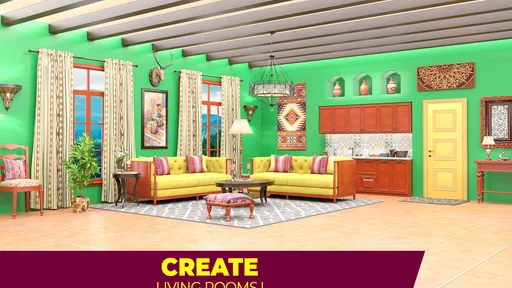
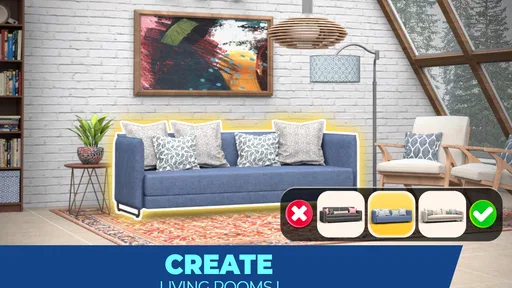
Diving into My Home Design: Makeover Games was like entering a wonderland of possibilities. The app kicks off by giving you a rundown of the basics, but don’t worry, it’s as easy as pie! You’re presented with a variety of rooms that are in desperate need of a makeover. The best part? You’re the boss! From picking out chic furniture to choosing the perfect shade of paint, you have full control over every tiny detail.
Gameplay That Hooks You In
What makes this game incredibly addictive is its blend of design and puzzle-solving. To earn coins for your design endeavors, you’ll need to complete some fun match-3 puzzles. It’s a brilliant twist that keeps you engaged and, dare I say, a tad competitive. Each puzzle you conquer brings you closer to creating that dream room you’ve envisioned.
The challenges escalate in difficulty, but that’s where the thrill lies. You’re not just decorating; you’re strategizing your next move in this delightful puzzle world. Plus, the satisfaction of seeing your coins stockpile as you complete each level is truly rewarding.
A good fit for short breaks
I can see this working especially well in an everyday lull: say, when I have a few minutes between errands and want one puzzle rather than a long session. The room goal gives that quick play a sense of direction. My practical tip is to treat the coins as a decorating budget: pause before spending them on an option that does not fit the look you want, because puzzle progress is what replenishes that budget. That little bit of planning makes the design choices feel more deliberate.
More From Our News Desk

 Gmail
GmailGmail in a Busy Inbox: Who Benefits Most?
From first account to crowded workday, Gmail earns its place through dependable search and flexible sorting—but its best fit depends on how much inbox maintenance you can tolerate.

 Prime Video
Switching to Prime Video: What Changes in Your Viewing Routine
Prime Video can make a compelling second home for streaming, but switching means learning a different catalog, rental layer, and route from browsing to playback.

 Universal TV Remote Control
Universal TV Remote Control Works Best as a Reliable Backup
A phone remote earns its place through quick setup and reliable habits. Here is how to get more from Universal TV Remote Control—and where its limits show.

 Weather - By Xiaomi
Weather by Xiaomi Review: Clear at a Glance, Less Clear Up Close
Xiaomi’s weather app makes everyday forecasts quick to scan, but its calm surface can leave useful details and recovery paths harder to find than they should be.

 X
XX Under Pressure: Can It Recover When Posting Goes Wrong?
A resilience-focused review of X, examining setup, mistaken posts, interruptions, weak connections, and the gaps that matter when recovery needs to be dependable.

 Clash of Clans
Clash of Clans Is Won Between the Battles
Its raids are quick; its community is a long-term project of coordination, teaching, rivalry, and shared responsibility—with all the friction that entails.
Latest News



Compared with a traditional word or logic game, this is less about exercising language or solving a standalone brainteaser and more about using puzzles to unlock visual decisions. Compared with a pure decorating sandbox, it offers a more guided rhythm, but less freedom to simply experiment whenever you like. If you want a puzzle with no decorating layer, or a design tool where you can freely build without earning resources, a different game will likely be a better match.
Visuals and Interface
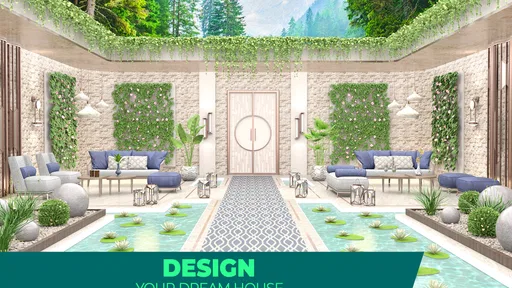
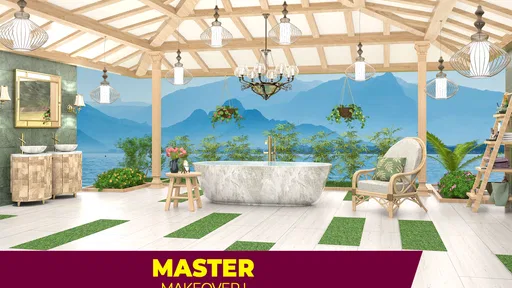
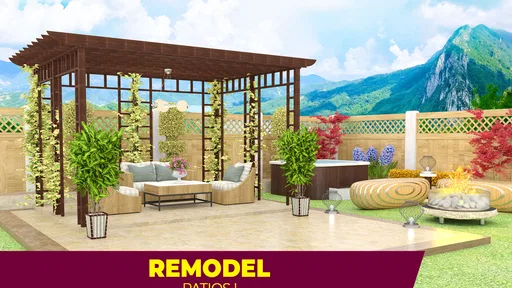
The visuals in My Home Design: Makeover Games are nothing short of gorgeous. The rooms are designed with an eye for detail that makes them pop right off the screen. The interface is smooth and user-friendly, letting you glide through the app with ease. Whether you’re an iOS or Android user, the app works seamlessly, ensuring everyone gets to enjoy the design fun.
One thing I absolutely adore is the variety of styles available. Whether you’re into modern minimalism or cozy rustic themes, there’s something here to tickle every fancy. And the best part? You get to mix and match to your heart’s content.
Planning a session around the room
For a more satisfying session, I would decide on a rough direction for a room before spending coins: perhaps lighter colors, a warmer feel, or a cleaner look. That is not a formal design brief; it is simply a way to avoid choosing each item in isolation and ending up with a result that feels accidental. If I am unsure, I would keep the decision small and make one change at a time, checking how it reads beside the choices already made.
This approach also helps when I only have time for a quick visit. I can make progress on a puzzle, then return to the room with a clearer idea of what I want rather than tapping through choices just to finish a task. The useful question is not only “Which option looks nicest?” but “Which option makes the rest of this room easier to decide?” That small shift turns the makeover into a sequence of manageable choices.
When the puzzle gate changes the mood
The link between puzzles and decorating is the main appeal, but it also determines the pace. If I have a strong visual idea and want to apply it immediately, needing to earn coins first can interrupt the creative flow. I would not install this expecting to spend every session freely arranging interiors; the puzzle is part of the deal, not an optional side activity. On the other hand, if I tend to abandon open-ended design games because they give me too many choices at once, the staged progress can make starting easier.
That difference matters for younger players and families as well as adults. The Everyone age rating makes the game broadly approachable, but a rating does not tell me whether a child will enjoy its particular rhythm. I would expect the best fit to be someone who likes both matching puzzles and visual decisions, and I would keep purchase prompts in mind if a child is playing on a device where in-app spending is possible.
A realistic everyday use
Imagine waiting for a ride or taking a quiet break after lunch. I could open the game, work on a match-3 level, and use the resulting coins when I have enough for a room choice. If the puzzle takes longer than the break, I can leave the decorating decision for later rather than rushing into an option simply to feel finished. The game’s two-part structure is most useful when I treat progress as something to return to, not a demand to complete a whole makeover at once.
It is also a reasonable choice for someone who wants a light activity to share in conversation: one person can say which furnishing or color they prefer, while the player handles the puzzle. That does not require the game to become a competitive contest or a serious design exercise. Its value in that moment is simply that it gives people a concrete visual choice to react to, with a puzzle providing the next step when the discussion is over.
How it compares with other casual games
In the broader casual-game landscape, this sits between a conventional match-3 title and a decorating simulator. A puzzle-first alternative is usually the better choice if I want every session to focus on board decisions and do not care about furnishing a room. A design-first alternative is better if I want to explore arrangements without earning resources through another activity. This game’s distinction is the exchange between those modes: puzzle effort becomes a reason to make a visual choice.
That middle ground can be refreshing, but it is not automatically the best of both worlds. It can feel like two interests sharing one progression system, which is engaging when I want both and awkward when I only want one. I would judge it by the mix I actually enjoy, not by the decorating theme alone. If I usually skip match-3 games, the room makeover may not be enough to make the repeated puzzle steps appealing.
What to expect before installing
Holy Cow Studio’s free word-game-adjacent puzzle title has a 4.7 average from around 8,700 ratings, with more than a million installs and roughly 477 written reviews. It is rated for Everyone, runs on Android 5.0 or later, and its listed release date is December 22, 2022; the current version is 2.3.1. The game is free to start, while optional in-app purchases range from $0.99 to $99.99 per item, so I would check purchase prompts carefully if I prefer to keep spending to zero.
Those details make it approachable for casual players, but the right choice still depends on what you want from a game. It is a good pick for someone who likes visual makeovers and does not mind solving match-3 puzzles to move them along. It is a weaker fit for anyone who dislikes puzzle gates, wants unrestricted room editing, or is specifically looking for a word-focused experience. The word category label does not change the actual appeal here: the central loop is matching puzzles paired with decorating.
Who is likely to enjoy it
I would recommend this to a friend who likes having a visible project in progress but does not want to invent one from scratch. The room gives the puzzles context, and each design choice offers a small payoff that can make a short session feel connected to a larger goal. It is especially suited to players who enjoy comparing visual options and are content to earn their way toward them through matching levels.
I would suggest skipping it if your favorite part of a decorating game is unrestricted experimentation, or if you become frustrated when a puzzle controls how quickly you can make design progress. It is also not the obvious pick for someone searching for a conventional word game: despite its word-game-adjacent category context, the play described here centers on match-3 puzzles and room decisions. Being clear about that distinction before installing should prevent the wrong expectations.
Keeping the experience comfortable
Because the game is free to start and includes optional purchases, I would decide in advance whether I want to spend anything. If I prefer not to, I can approach the coins as a limited budget and treat each puzzle as progress toward a choice rather than a reason to buy my way past a pause. For a shared family device, checking the device’s purchase controls is a sensible precaution; it keeps the focus on the game and avoids an accidental purchase becoming part of the experience.
Another practical habit is to stop when I am no longer enjoying either half of the loop. There is little benefit in pushing through a puzzle simply because I have a room in mind, or choosing décor without interest just to clear a task. Coming back later is a better fit for a low-pressure game. That is a modest but useful boundary: it preserves the relaxing side of the experience instead of turning its progression into an obligation.
Final Thoughts
In conclusion, My Home Design: Makeover Games is a delightful escape into the world of interior design. It’s perfect for anyone looking to flex their creative muscles or just unwind after a long day. The combination of decorating and puzzle-solving offers a satisfying and immersive experience that’s hard to put down.
If you’re ready to channel your inner Joanna Gaines or just want to see how much of a design maestro you can become, give this app a whirl. You won’t be disappointed!
My Home Design: Makeover Games Frequently Asked Questions
What age group is My Home Design: Makeover Games suitable for?
My Home Design: Makeover Games is rated Everyone, so it is presented as suitable for a broad audience. Its mix of word-based puzzles and home design gives players a relaxed way to engage with makeover themes while solving challenges. Parents can still decide whether the game’s puzzle and decorating style is a good fit for their child, and review the in-app purchase options before downloading.
Does My Home Design: Makeover Games focus on decorating or puzzles?
It brings both elements together: the game’s store description highlights designing, decorating, flipping, and matching, while its makeover theme centers on creating a dream home. Players who enjoy either solving puzzles or making interior design choices may find something appealing here. The balance between these activities is part of the game’s identity, rather than presenting it solely as a decorating tool or a standalone puzzle experience.
What is My Home Design: Makeover Games about?
My Home Design: Makeover Games is a mobile application that allows users to unleash their creativity by designing and decorating virtual homes. Players are given a variety of design challenges, where they can choose from a wide array of furniture pieces, decor items, and color palettes to transform spaces according to their tastes. The game combines elements of puzzle-solving with interior design, making it both entertaining and engaging for users who love home makeover projects.
How does the gameplay work in My Home Design: Makeover Games?
In My Home Design: Makeover Games, players complete various design challenges by solving match-3 puzzles. Each puzzle solved earns points and rewards that can be used to purchase new items and upgrades for their home design projects. The game offers multiple levels, each with increasing difficulty and new challenges, ensuring that players remain engaged. The blend of puzzle-solving with creative design tasks makes the gameplay both dynamic and rewarding.
Is My Home Design: Makeover Games free to play?
Yes, My Home Design: Makeover Games is free to download and play. However, it does offer in-app purchases priced from $0.99 to $99.99 per item, which allow players to buy additional items, lives, or special features. These purchases can enhance the gameplay experience but are not necessary to progress in the game. Players can enjoy the core features of the game without spending money, though some may opt for purchases to expedite their progress or enhance their designs.
Pros
- Intuitive and user-friendly interface.
- Wide range of design options and styles.
- Regular updates with new challenges.
- Engaging storyline and characters.
- Offline mode available for uninterrupted play.
Cons
- In-app purchases can be expensive.
- Some levels are too challenging.
- Occasional ads can disrupt gameplay.
- Limited energy restricts playtime.
- Graphics could be improved.











