

Make Words
- 2.88K
- 4.3
- Installs
- 500.00K
- Price
- Free
Screenshots
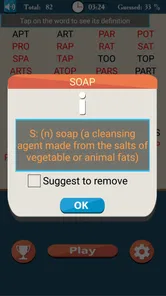
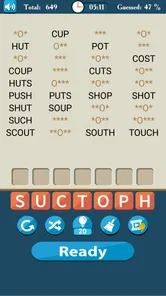
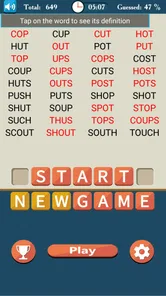
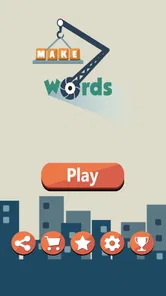
Analysis by Reviewed
I approached Make Words as the kind of game I could open for a few minutes without needing to learn a complicated system first. That impression is accurate: this is a word game from Mobiloids built around forming words from available letters and solving unscrambling puzzles. It is free to download, aimed at a Teen audience, and its straightforward format makes it easy to understand almost immediately.
What matters is whether that simplicity stays enjoyable after the first few rounds. In my experience, it does best when I want a quiet mental break, a vocabulary workout, or something to play in short sessions. It is less convincing if I am looking for a rich story, competitive multiplayer, or a large collection of radically different game modes. The central question is therefore not whether it is easy to start, but whether its focused wordplay matches the kind of challenge I want.
How to decide if this word game fits you
The first decision point is the type of thinking you enjoy. Make Words rewards recognizing letter patterns, testing possible combinations, and remembering less obvious vocabulary. It is not a spelling lesson presented as a classroom exercise, but it naturally encourages me to think about prefixes, endings, short connecting words, and alternate arrangements of the same letters.
That makes it a good match for anyone who likes word puzzles without wanting a heavy time commitment. I can play while waiting for an appointment, during a short commute, or at the end of the day when I want something more active than scrolling. A useful everyday routine is to play a handful of puzzles, note which letter combinations repeatedly slow me down, and then treat those moments as vocabulary practice rather than simply chasing a score.
The game also suits players who prefer a clear objective. There is no need to manage a character, build a team, or study a complicated map. The letters are the problem, and the solution comes from examining them carefully. That narrow focus is a strength for some people, although it can feel repetitive to anyone who needs constant novelty.
The Teen content rating is worth keeping in mind for families choosing games for younger players. Parents should use their own judgment rather than assuming that a word game automatically suits every child. Vocabulary level, frustration tolerance, and the way a child handles hints or purchases matter more than the basic puzzle format alone.
The first-session experience
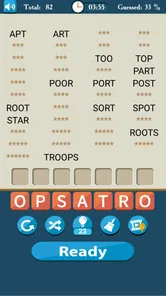
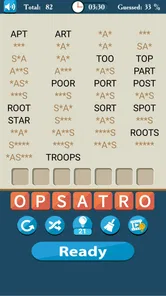
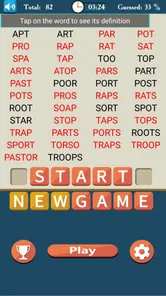
Starting is pleasantly direct. The store presents it as “Make Words,” and that describes the core interaction without dressing it up. I do not need a long explanation to understand what I am trying to do: inspect the available letters, form valid words, and work through scrambled arrangements.
More From Our News Desk

 Gmail
GmailGmail in a Busy Inbox: Who Benefits Most?
From first account to crowded workday, Gmail earns its place through dependable search and flexible sorting—but its best fit depends on how much inbox maintenance you can tolerate.

 Prime Video
Switching to Prime Video: What Changes in Your Viewing Routine
Prime Video can make a compelling second home for streaming, but switching means learning a different catalog, rental layer, and route from browsing to playback.

 Universal TV Remote Control
Universal TV Remote Control Works Best as a Reliable Backup
A phone remote earns its place through quick setup and reliable habits. Here is how to get more from Universal TV Remote Control—and where its limits show.

 Weather - By Xiaomi
Weather by Xiaomi Review: Clear at a Glance, Less Clear Up Close
Xiaomi’s weather app makes everyday forecasts quick to scan, but its calm surface can leave useful details and recovery paths harder to find than they should be.

 X
XX Under Pressure: Can It Recover When Posting Goes Wrong?
A resilience-focused review of X, examining setup, mistaken posts, interruptions, weak connections, and the gaps that matter when recovery needs to be dependable.

 Clash of Clans
Clash of Clans Is Won Between the Battles
Its raids are quick; its community is a long-term project of coordination, teaching, rivalry, and shared responsibility—with all the friction that entails.
Latest News



That low entry barrier is especially helpful for people who normally avoid puzzle games because they expect tutorials, complicated scoring rules, or too many menus. Here, the mental effort goes into solving the puzzle instead of learning the interface. The trade-off is that players who enjoy discovering elaborate mechanics may find the opening too plain.
One practical tip is to avoid committing to the first familiar word that appears. I get more value from scanning the whole set of letters first, looking for common endings and smaller words before attempting a longer answer. This habit reduces the tendency to stare at the letters randomly and makes the game feel more like a process of elimination.
What the core challenge does well
The strongest part of Make Words is its ability to turn a small group of letters into a compact reasoning task. A puzzle can look obvious until one missing arrangement refuses to appear. That final step is where the game becomes more satisfying than simply entering the first word that comes to mind.
I also like that the same basic skill can be approached in different ways. Some players will search for the longest possible word first. I often begin with short words, because they reveal the available letter patterns and make the remaining possibilities easier to inspect. When I get stuck, I mentally separate vowels from consonants and try common word endings rather than repeatedly shuffling everything without a plan.
This is one of the less obvious strengths of the format: it encourages flexible thinking without requiring a large ruleset. The game does not need a story or elaborate progression to make a single puzzle worthwhile. The satisfaction comes from changing how I look at the letters.
Where it wins over broader word-game alternatives
Compared with crossword-style games, Make Words feels more immediate. A crossword usually asks me to interpret clues, understand a grid, and balance answers that cross one another. Here, the main obstacle is arranging letters and recognizing words. That makes it a better choice when I want language play without clue solving.
It also has a different appeal from word-building board games. Those games often involve placement strategy, board control, or competition against another player. Make Words is more private and self-contained. I can concentrate on the vocabulary problem without worrying about an opponent taking a valuable space or setting a pace I do not enjoy.
Against anagram-focused alternatives, the distinction is subtler. Many anagram games offer a similar basic pleasure, so the choice comes down to presentation, puzzle flow, and personal tolerance for repetition. Make Words is appealing because it keeps attention on the central task rather than asking me to manage a sprawling collection of systems around it.
That simplicity is not automatically superior. If I want clues, a competitive board, or a social challenge, a different category will probably be more satisfying. But if my priority is a clean letter puzzle I can understand quickly, this game makes a strong case for itself.
Small habits that make difficult puzzles easier
My most useful approach is to treat each puzzle as a set of patterns rather than a pile of isolated letters. I look for common combinations, consider whether a letter can begin or end a word, and test shorter possibilities before assuming the answer must be long. This is more reliable than repeatedly tapping letters in a random order.
Another useful habit is to pause before using help, if a particular puzzle offers that kind of assistance during play. I first make a mental list of possible word families, then decide whether I am genuinely stuck or merely overlooking a familiar arrangement. That keeps the solving process meaningful and prevents the game from becoming a sequence of automatic reveals.
I also recommend playing in focused bursts instead of forcing a long session. Word recognition becomes less enjoyable when I am tired, and a short break often makes an apparently impossible arrangement visible later. The game works well as a pocket-sized activity precisely because I do not need to finish a long narrative or preserve a complex strategy between sessions.
Limitations I noticed during regular use
The same focused design that makes Make Words accessible can eventually feel narrow. If I want changing objectives, character development, a story, or a strong social layer, the game does not appear to be aiming at those experiences. Its pleasure depends on whether I continue to enjoy the central act of finding words.
Vocabulary can also create uneven difficulty. A familiar letter group may be solved instantly, while another may depend on a word I rarely use. That can be educational, but it can also feel less like a test of cleverness and more like a test of what happens to be in my personal vocabulary. Players who dislike encountering unfamiliar words may prefer a clue-based game that provides more context.
There is also a difference between improving vocabulary and memorizing solutions. If I rush through puzzles or rely heavily on assistance, I may finish more quickly without retaining much. I get better value when I pause over unfamiliar words, say them quietly, and connect them with a meaning or example. The game can support vocabulary growth, but the learning benefit depends on how actively I engage with the words.
Free access and the practical cost of switching
Make Words is free, which removes the biggest barrier to trying it. There are in-app purchases ranging from $0.99 to $15.99 per item, so I would still approach the game with a clear personal spending limit. The important point is that the free entry makes it possible to judge the puzzle style before deciding whether any optional purchase is worthwhile.
For me, the real cost of switching is not money but habit. If I already use a crossword app, an anagram game, or a board-style word game, moving to this one means giving up some variety in exchange for a more concentrated letter challenge. That is a good trade when I want quick solo play, but not when my existing favorite provides the social or clue-based experience I value most.
I would also avoid choosing it solely because it promises vocabulary improvement. A dedicated learning tool may be better for structured study, definitions, pronunciation, or progress tracking. Make Words is primarily a game, and its educational value comes through repeated exposure to words and the effort of solving them, not through a formal lesson plan.
Device expectations and longevity
The current version is 8.2_appod, and the game supports devices running Android 6.0 or later. That makes the minimum operating-system requirement relatively approachable for people using older compatible Android hardware. I would still check the device experience before settling in for long sessions, especially if I prefer a larger screen for examining letter groups.
Its audience size also suggests that it is not an obscure experiment. The game has passed 500 thousand installs, with an average rating of 4.3 from around 13 thousand ratings and roughly 2.9 thousand written reviews. I treat those figures as useful signs of sustained interest rather than a guarantee that every player will enjoy the same style of puzzle.
Longevity depends heavily on my relationship with word games. Someone who enjoys gradually becoming faster at recognizing patterns may keep returning for a long time. Someone who needs fresh mechanics every few sessions may reach the limits sooner. That is not a flaw unique to this title; it is the natural trade-off of building an experience around one clear idea.
Who should choose it, and who should skip it
I would recommend Make Words to casual puzzle players, vocabulary enthusiasts, and anyone who wants a low-friction game for short breaks. It is particularly suitable when I want to play alone and prefer thinking with letters over reading clues or managing a board. It can also be a useful supplement to everyday language practice, provided I actively reflect on unfamiliar words instead of simply moving on.
I would be more cautious about recommending it to players who need multiplayer competition, elaborate progression, or a strong narrative reason to keep playing. Crossword fans who love clue interpretation may find the letter arrangement too direct. Likewise, people looking for a structured educational app should choose a product designed specifically for lessons and measurable study.
For younger users, I would make the choice with the Teen rating in mind and supervise purchasing decisions. The game’s basic concept may be approachable, but age suitability is a family decision, not something I would infer from the fact that it uses words and letters.
My recommendation after weighing the alternatives
Make Words is a focused, free word game that earns its place through clarity rather than spectacle. I enjoy it most when I have a few spare minutes and want a puzzle that starts immediately, rewards careful observation, and gives me a reason to think about vocabulary. Mobiloids has kept the concept easy to grasp, which is exactly why it works for casual sessions.
My recommendation is strongest for players who want anagrams and word formation without the extra demands of crosswords, board games, or story-driven puzzles. I would try it before paying for anything, set a spending boundary if optional purchases become tempting, and use the pattern-based solving habits described above to make the harder rounds more satisfying.
Choose it for concentrated solo wordplay, not for variety or competition. If that is the experience you are looking for, Make Words is an easy game to keep installed. If your ideal alternative includes clues, opponents, lessons, or a richer progression system, switching categories will likely give you more lasting value.
Make Words Frequently Asked Questions
Can I play Make Words in short sessions?
Yes. Make Words is built around forming words from letters, so it can fit a brief break as well as a longer puzzle session. You can focus on solving a puzzle and return to the game later when you have more time. Its straightforward word-game format makes it a natural choice for players who want a casual activity rather than a game that demands extended, uninterrupted play.
Who develops Make Words, and what should I know about its age rating?
Make Words is developed by Mobiloids and is rated Teen. That rating is useful to consider before downloading for a younger player, particularly if you prefer to review a game’s content and purchase settings together. The game centers on word puzzles, but parents and guardians should still make their own decision about suitability and supervise children’s access to optional purchases where appropriate.
What kind of game is Make Words, and who is it for?
Make Words is a word puzzle game from Mobiloids, designed for players who enjoy spelling challenges and working with letters. Its casual format can suit someone looking for a quick game during a break, as well as word-game fans who like spending longer sessions solving puzzles. The game is rated Teen, so parents may want to consider that rating when deciding whether it is suitable for younger players.
What is Make Words, and how does the game work?
Make Words is a word puzzle game in which you create valid words from the letters provided on the screen. After installing and testing it, the gameplay feels simple to understand but increasingly challenging as levels progress. You usually need to arrange or connect letters to complete targets, solve puzzles, and move forward. It is suitable for short sessions, casual play, and anyone who enjoys vocabulary-based challenges.
Will Make Words run on my Android device?
Make Words requires Android 6.0 or later, so it is worth checking your device’s operating-system version before downloading. The game’s current version is 8.2_appod, and it has been available since December 25, 2011. If your device meets the minimum requirement, you can check the app page on your platform for compatibility and installation details before proceeding.
Pros
- Simple word puzzles are easy to learn and suitable for quick sessions.
- Helpful for improving vocabulary
- spelling
- and pattern-recognition skills.
- Gradually increasing difficulty keeps the challenge engaging.
- Clean interface makes navigation comfortable on phones and tablets.
- Works well for casual play without requiring long uninterrupted sessions.
Cons
- Some puzzles may feel repetitive after extended play.
- Later levels can become frustrating without hints or a broad vocabulary.
- Hint systems may be limited or tied to in-game rewards.
- The experience may feel too simple for dedicated word-game players.
- Performance and available features can vary between Android and iOS versions.











