

Make Money: Word Search
- 414.00
- 4.8
- Installs
- 100.00K
- Price
- Free
Screenshots



Analysis by Reviewed
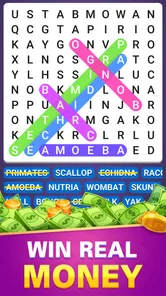
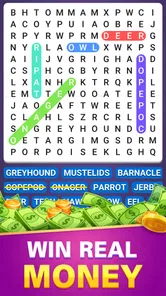
I approached Make Money: Word Search as a casual word game first and a rewards-focused app second. From the opening idea, its appeal is easy to understand: you search for hidden words, keep your attention on a simple puzzle, and work toward real-money rewards. That combination can make a familiar activity feel more purposeful, especially when you want something light to do during a break.
My overall impression is that this is best viewed as a short-session word search game rather than a dependable income source. The puzzles provide the main reason to return, while the reward angle adds motivation. If you already enjoy scanning letter grids, the format is immediately approachable. If you are downloading it mainly because of the promise of earning, I would keep expectations measured and judge the experience by the quality of the game before anything else.
How the word-search experience feels in everyday use
The basic activity suits the moments when I want a game that does not require a long tutorial or a complicated control scheme. A word search works with a quick glance at the screen, a little concentration, and a finger drag across the letters. That makes it a natural choice for a commute, a waiting room, or a few minutes between tasks. I do not need to remember a storyline, manage a character, or learn a large set of controls before starting.
That simplicity is also the central trade-off. Word searches are relaxing for people who enjoy visual scanning, but they can become repetitive for players who need changing mechanics, action, or a strong sense of progression. The reward framing may make a familiar puzzle feel more engaging, yet it does not automatically turn the underlying activity into a deeper game. I would recommend it to someone who genuinely likes finding words, not to someone who normally avoids this genre.
The developer is listed as PAmos, and the game is free to download. That removes the purchase decision at the start, which is useful when I am only testing whether the format suits me. At the same time, free reward-oriented games deserve a more careful reading of the in-app experience. I would pay attention to how much of my time goes into actual puzzles compared with any interruptions or reward-related steps, because that balance determines whether the app feels worthwhile.
What makes the first sessions approachable
The strongest entry point is its low learning curve. Someone who has played newspaper word searches, puzzle books, or similar mobile games should understand the objective almost immediately. This is especially helpful for casual players who do not want an elaborate interface. The game’s mature age classification also means it is not something I would casually hand to a child, even though the core puzzle concept is simple.
For me, the most practical way to use it is to set a small session goal. I might play while taking a short break, complete a puzzle, and then stop rather than treating the reward promise as a reason to keep playing indefinitely. This keeps the game in its natural role: a compact distraction with a possible incentive attached. It also makes it easier to notice whether the experience is enjoyable on its own.
More From Our News Desk

 Gmail
GmailGmail in a Busy Inbox: Who Benefits Most?
From first account to crowded workday, Gmail earns its place through dependable search and flexible sorting—but its best fit depends on how much inbox maintenance you can tolerate.

 Prime Video
Switching to Prime Video: What Changes in Your Viewing Routine
Prime Video can make a compelling second home for streaming, but switching means learning a different catalog, rental layer, and route from browsing to playback.

 Universal TV Remote Control
Universal TV Remote Control Works Best as a Reliable Backup
A phone remote earns its place through quick setup and reliable habits. Here is how to get more from Universal TV Remote Control—and where its limits show.

 Weather - By Xiaomi
Weather by Xiaomi Review: Clear at a Glance, Less Clear Up Close
Xiaomi’s weather app makes everyday forecasts quick to scan, but its calm surface can leave useful details and recovery paths harder to find than they should be.

 X
XX Under Pressure: Can It Recover When Posting Goes Wrong?
A resilience-focused review of X, examining setup, mistaken posts, interruptions, weak connections, and the gaps that matter when recovery needs to be dependable.

 Clash of Clans
Clash of Clans Is Won Between the Battles
Its raids are quick; its community is a long-term project of coordination, teaching, rivalry, and shared responsibility—with all the friction that entails.
Latest News



One useful habit is to avoid rushing through every grid. Searching randomly can make a puzzle feel harder than it is. I prefer scanning in a consistent pattern, checking horizontal and vertical directions first, then looking for diagonal arrangements. This is not a special feature of the app, but it is a practical way to make its particular gameplay less tiring during longer sessions.
Speed expectations and the feel of a quick puzzle
Because this is a word-search game rather than a graphics-heavy action title, I would expect the core interaction to feel relatively light on a compatible phone. The important question is not whether it delivers console-style performance; it is whether the grid responds cleanly when I drag across a word and whether moving between puzzle moments feels uncomplicated. A simple format gives the app a chance to be efficient, but the actual experience can still depend on the device and the surrounding reward workflow.
I would judge speed in two separate ways. The first is puzzle responsiveness: can I mark a word without fighting the touch controls? The second is the pace around the puzzle: does the app let me get back to searching quickly, or does the reward-focused presentation make each session feel drawn out? For this title, the second point matters more than visual polish. A word search does not need elaborate animation, but it does need to respect my time.
When I am playing in a short break, even small delays feel more noticeable because the activity itself is meant to be immediate. A smooth puzzle can feel satisfying after only a few minutes, while a slow transition can make the whole experience seem less rewarding. I would therefore use the first few sessions as a practical test: start a puzzle, search at a normal pace, and see whether the game fits comfortably into the time I actually have.
What happens during heavier or longer use
Longer sessions create a different challenge from quick play. Repeatedly scanning letter grids can strain attention before it strains the phone. I find that the best approach is to take brief pauses rather than forcing myself to finish several puzzles in one sitting. Looking away from the screen for a moment can make hidden words easier to spot when I return, and it prevents the game from turning into a tedious visual chore.
Heavy use also changes how I evaluate the rewards. If I am playing for a long stretch solely to reach a payout, the activity may stop feeling like entertainment. The sensible trade-off is to treat any reward progress as a bonus and decide in advance how long I am willing to play. That boundary is particularly important for people who are easily drawn into repetitive tasks by a progress indicator or a money-related goal.
On the device side, a word-search title should generally be less demanding than a modern 3D game because its central task is a static letter grid. Still, I would not assume that every phone will behave identically. Background activity, available storage, operating-system condition, and general device age can affect how any app opens and recovers. If the game feels sluggish, I would first close unused apps, restart the phone, and try again before deciding that the puzzle itself is the problem.
Another practical tip is to play with a stable connection when moving through reward-related parts of the experience. The hidden-word activity may be simple, but anything involving account progress or redemption can be more sensitive to interruptions. I would avoid starting a reward step just before entering a place with unreliable reception. That is a small workflow change, but it can reduce frustration when a session is interrupted at the wrong moment.
Reliability, recovery, and sensible expectations
The game has an average rating of 4.8 from around fifteen thousand ratings, with over four hundred written reviews. That level of public response suggests that many players have found the overall concept appealing. I still would not treat a high rating as a guarantee that every phone, session, or reward interaction will feel identical. Ratings describe broad user sentiment; they do not remove the need to test how the app behaves on my own device.
Recovery is especially important in a game built around repeated short sessions. If I leave the app and return later, I want to know that the experience is easy to resume rather than requiring me to reconstruct what I was doing. I would make a habit of finishing a clear puzzle step before closing the game, particularly if I am playing during a brief break. That reduces the chance of confusing an unfinished activity with completed progress.
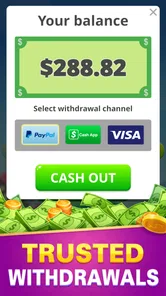
I would also keep careful track of reward-related progress instead of relying only on memory. If the app presents a balance or milestone, noting where I stopped can help me recognize whether a later session has continued normally. This is not about assuming a problem; it is simply good practice for any free app that connects gameplay with money-related goals. A clear personal record makes it easier to distinguish a temporary display issue from a genuine change in progress.
The title is currently at version 1.0, so I would approach it as an early version of the product rather than a mature platform with a long history of refinements. That does not make it unusable, but it does make patience more valuable. If I encounter an awkward transition or an unexpected restart, I would first reopen the app and check whether the session recovers before abandoning it. I would also keep the operating system and the app itself updated when updates are available through the normal store process.
Device compatibility and who should think twice
The minimum operating-system requirement is Android 5.1, which gives the game a broad potential range of compatible Android phones. Compatibility on paper is not the same as a perfect experience, however. Older hardware may open the game successfully while still feeling less comfortable during repeated use, especially if the phone has limited free space or struggles with many background processes.
For an older device, I would test three things before investing much time: whether the letter grid registers drags accurately, whether the app returns properly after being minimized, and whether the phone remains comfortable during a longer session. Those checks are more useful than judging the game by its install screen alone. A simple puzzle can run on modest hardware, but touch accuracy and recovery still determine whether it is pleasant.
People who need a game with no money-related framing may prefer a traditional word-search app. A standard puzzle alternative can be a better fit if I only want offline relaxation, a larger variety of modes, or a clear one-time purchase without thinking about rewards. On the other hand, someone who already enjoys casual word games and likes having an incentive attached may find this approach more motivating than a conventional puzzle book.
I would also skip it if the main goal is predictable earnings. The phrase “make money” can create expectations that a casual puzzle app cannot reasonably satisfy for everyone. I see the reward element as a reason to try the game, not as a substitute for employment or a reliable financial plan. That distinction is the most important piece of advice I would give a friend before downloading it.
How it compares with familiar word-game alternatives
Compared with a classic newspaper-style word search, this game is more convenient because it stays on the phone and connects the activity with a reward-oriented purpose. The trade-off is that the experience may feel less self-contained than a printed puzzle. With paper, I know exactly what I am getting: a grid, a pen, and a quiet activity. Here, I am evaluating both the puzzle and the surrounding app experience.
Compared with crossword games, the appeal is immediacy. I do not need to interpret clues or produce answers from memory; I only need to locate words in the grid. That makes it friendlier when I am tired or want something with less mental setup. Crossword fans who enjoy language, clues, and layered reasoning may find the format too straightforward, while visual search fans may appreciate its directness.
Compared with word puzzles that focus on streaks, levels, or competitive leaderboards, the reward angle changes the motivation. I may be less interested in beating a personal score and more interested in whether each session feels like a fair exchange of time for entertainment and progress. That is a personal trade-off: competitive players may prefer a richer achievement system, while casual users may like the uncomplicated task.
The game has reached over one hundred thousand installs, which indicates that it has attracted a substantial audience for a relatively focused concept. I would take that as a reason to investigate it, not as proof that it is automatically the best word game for me. The right comparison is still practical: do I want hidden-word searching, do I enjoy the reward framing, and does the app behave comfortably on my phone?
Realistic ways I would use it
My favorite use case is a short afternoon pause. I can sit down with a drink, play one puzzle, and stop before the activity becomes tiring. In that setting, the game succeeds because it gives my attention a narrow target without demanding a large commitment. The possible reward adds a little extra interest, but the session remains manageable even if I do not want to play for a long time.
Another use is during travel, provided I have enough battery and a dependable connection for any part of the experience that needs it. I would not begin an important reward step while rushing between locations. Instead, I would use travel time for the puzzle itself and handle any account or progress-related action when I am settled. Separating those two moments is a simple way to avoid turning a relaxing game into a connectivity problem.
For someone trying to build a small daily puzzle habit, I would suggest a fixed time limit rather than an earnings target. A limit keeps the activity from expanding endlessly and gives me a consistent basis for judging it. After several sessions, I can ask whether I am returning because I enjoy finding words or only because I am chasing the next reward milestone. That answer tells me far more about whether the app belongs on my phone.
It may also suit adults who enjoy visual concentration but do not want a fast reaction game. The mature rating should still be respected, and I would not present it as a children’s title simply because word searches are familiar to younger players. The age label is part of deciding where and with whom to use it, especially on a shared device.
What I would check before committing time
Before making it part of my routine, I would confirm that the basic puzzle interaction feels comfortable with one hand. If the grid is difficult to read or the drag gesture is inconsistent, no reward feature will compensate for that friction. I would also make sure I understand how the app shows progress, because unclear progress can make a repetitive game feel more demanding than it needs to be.
I would then test the app in both a quick session and a longer session. The quick test shows whether it opens and gets me into the activity without unnecessary delay. The longer test reveals whether my attention, battery comfort, and patience hold up. This two-stage check is more useful than playing once and immediately deciding, because the game’s strengths are likely to appear in short bursts while its limitations become clearer with repetition.
Finally, I would decide whether the reward promise changes my behavior in a healthy way. If it gives me a reason to enjoy a puzzle I already like, that is a positive. If it makes me continue after the game has stopped being fun, I would step back. The best way to use this app is to protect the value of your time before chasing the value of its rewards.
My performance verdict
Make Money: Word Search is a focused free word game from PAmos that combines familiar hidden-word puzzles with a money-oriented incentive. Its strongest qualities are accessibility, short-session appeal, and a format that should feel understandable to casual players. The public response is encouraging, and its broad Android compatibility makes it worth testing on an older phone as well as a newer one.
My reservations are equally clear. The gameplay can become repetitive, reward-focused use can encourage longer sessions than the puzzle deserves, and the early version number means I would keep realistic expectations about refinement and recovery. I would not choose it over a traditional word-search app if I wanted a purely offline, distraction-free puzzle experience. I would also avoid treating it as a dependable source of income.
For me, the right recommendation is conditional: try it if you enjoy word searches, want a lightweight activity, and are comfortable treating rewards as an extra rather than a promise of meaningful earnings. Use short sessions, test the touch response on your own phone, and handle progress-related steps when your connection is stable. If the puzzle itself keeps you coming back, the reward angle can make it more interesting. If the reward angle is the only reason you stay, a conventional word game may be the better choice.
Make Money: Word Search Frequently Asked Questions
Does Make Money: Word Search require an internet connection?
If you are considering downloading Make Money: Word Search, it is worth checking whether you will have a reliable connection while playing. The game centers on finding hidden words in puzzle grids, while its rewards-based features may involve account or reward information. A stable connection can help those features work as intended, so plan to use the app where you can get online access.
What kind of gameplay does Make Money: Word Search offer?
Make Money: Word Search is built around the familiar task of locating words hidden in letter grids. That makes the basic play easy to pick up, whether you want a brief puzzle break or a more focused session. Its central appeal is the combination of word-search challenges and a rewards theme, so it may suit players who enjoy simple word games with an additional incentive.
Is Make Money: Word Search suitable for younger players?
The game has a Mature 17+ content rating, so it may not be appropriate for children or younger teens. Parents and guardians should check the rating and consider whether the game suits the player before downloading it. The core activity is solving word-search puzzles, but the age rating is an important part of deciding who should use the app.
What is Make Money: Word Search?
Make Money: Word Search is a casual word puzzle game that combines traditional word-finding challenges with a rewards-based system. Players search for hidden words in letter grids, complete levels, and may receive in-game points or rewards for their progress. The game is designed for short sessions and is generally easy to understand, making it suitable for users who enjoy simple puzzles and want an entertaining way to pass the time.
How do you earn rewards in Make Money: Word Search?
Rewards are typically earned by completing word-search puzzles, advancing through levels, and participating in available tasks or bonus activities. The exact earning methods, point requirements, and redemption options can vary depending on the version of the app and your location. Before spending significant time on it, check the in-app reward section carefully to understand minimum withdrawal limits, supported payment methods, and any applicable conditions.
Pros
- Simple interface makes the game easy to start playing immediately.
- Short rounds fit well into quick breaks or commutes.
- Word lists help improve spelling and vocabulary recognition.
- Offline play may be useful when you have limited internet access.
- Relaxing gameplay offers a low-pressure alternative to competitive games.
Cons
- Rewards may feel small compared with the time needed to earn them.
- Frequent ads can interrupt gameplay and reduce the relaxing experience.
- Some word puzzles may become repetitive after extended play sessions.
- Earning options and rules may vary by region or change over time.
- Cash-out requirements can make rewards difficult to redeem quickly.











