Let's Create! Pottery
- 4.38K
- 4.5
- Installs
- 100.00K
- Price
- $4.99
Screenshots
Analysis by Reviewed
I like pottery games best when they let me slow down and make small choices without demanding a long session, and that is where Let's Create! Pottery makes its case. It is a casual game from Infinite Dreams, built around shaping and decorating clay rather than chasing quick reflexes. The appeal is easy to understand: I can try an idea, see how it looks, and adjust it without setting up a real workspace or cleaning clay off the table. That makes it a pleasant choice for a quiet break, though it is not a substitute for learning the feel of real materials.
How quickly it gets going
The game is aimed at getting you into the pottery-making process quickly, and the basic idea is approachable even if you have never used a pottery wheel. I would expect the experience to feel more relaxed than a typical action game: the pleasure comes from shaping and refining an object, not from racing through levels. That also means it is best enjoyed when you have a little time to focus. If you only want a burst of rapid-fire play, its slower creative rhythm may not be the right fit.
For a realistic everyday use, imagine having a few minutes after dinner and wanting something more hands-on than scrolling through a feed. You can spend that time experimenting with a pot’s shape or trying a different decorative direction. A useful habit is to settle on the silhouette first, then move to color and pattern; changing the form late can make earlier decoration feel less intentional. Treating each attempt as a small design exercise keeps the process satisfying rather than turning it into a hunt for a perfect result.
What a short session can accomplish
The game’s unhurried pace makes it a better fit for a deliberate pause than for filling every spare second. I would start a session with one modest intention—testing a wider rim, making a taller profile, or trying a simple color combination—rather than expecting to finish a masterpiece. That gives a brief visit a natural endpoint and makes it easier to return later with a fresh idea. If you are playing while distracted, the small visual adjustments can feel fiddly; a few minutes of focused attention are more rewarding than repeatedly checking the screen between other tasks.
It also works as a low-pressure way to explore visual taste. A player who likes arranging colors or spotting how a shape changes when its proportions shift can get something from the process even without a background in art. I would not treat it as a practical course in pottery, though: a screen can show a pleasing form, but it cannot teach how wet clay responds to pressure or how a physical vessel behaves. For those goals, a real beginner class or hands-on craft kit is a better choice; this game offers a convenient digital alternative when the aim is experimentation, not technique.
Getting Started with Pottery Magic
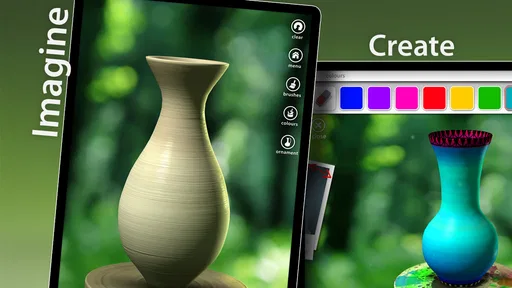
When you first fire up Let's Create! Pottery, you're greeted with a simple and intuitive interface. The app guides you through the process of creating your first pot, and believe me, it’s easier than you think. You start by shaping your clay on the wheel, using your fingers to mold it just the way you like. It's incredibly satisfying to see your creation take form, almost as if you're working with real clay. The tactile feedback is so realistic, you might forget you're on your phone!
The Art of Customization
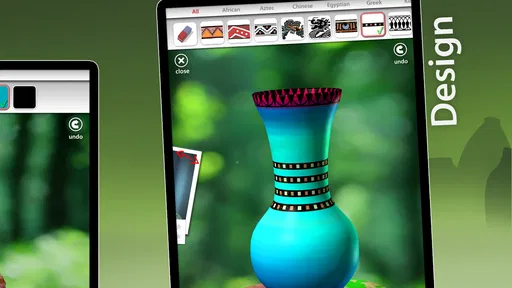
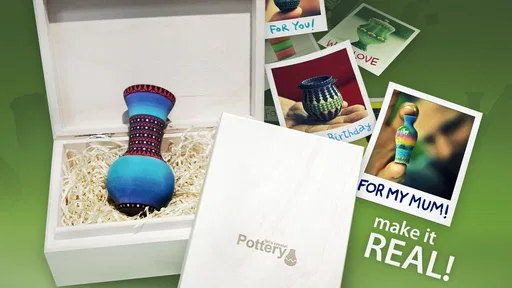
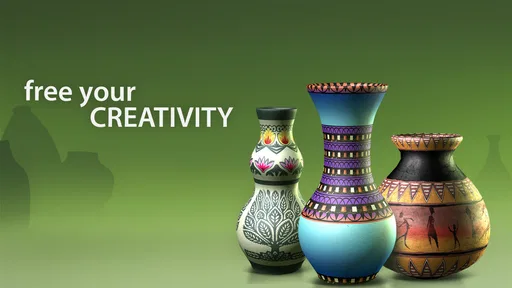
One of the coolest features of this app is the sheer amount of customization available. You can get creative with a variety of colors, patterns, and textures to make your pottery truly unique. The app offers a plethora of tools to decorate and paint your pot just the way you envision it. And the best part? No two pots will ever be the same. It’s like having a personal art studio where you can let your creativity run wild.
More From Our News Desk

Weather by Xiaomi Review: Clear at a Glance, Less Clear Up Close

X Under Pressure: Can It Recover When Posting Goes Wrong?

Clash of Clans Is Won Between the Battles

Android Auto Makes the Case for Quieter Car Software

MobiOffice: Transforming Mobile Productivity with Seamless Integration

EA SPORTS FC™ Mobile Soccer: Redefining Mobile Sports Gaming
For a more considered result, I would avoid changing everything at once. Pick one visual idea—such as a restrained color choice or a repeated motif—and build around it. This makes it easier to see which decisions are doing the work, and it gives the finished piece a clearer identity. The trade-off is that players who want precise, technical control may find a touch-based simulation less dependable than working with clay in person; the game is strongest as a creative sketchpad, not a pottery lesson.
Making a design easier to judge
A useful way to avoid losing track of an idea is to make changes in stages. I would first settle the outline, then pause and look at the overall proportions before committing to decoration. Once the form feels coherent, a limited palette or one repeated pattern can help the object read clearly instead of turning into a collection of unrelated choices. This is not about following a strict artistic rule; it is a practical way to notice what you like. If a result feels crowded, simplifying the decoration on the next attempt is often more instructive than adding another detail.
There is a small trade-off between freedom and direction here. Open-ended making gives you room to follow an idea, but it can also leave you wondering what to do next. A brief or a self-imposed constraint—using one main color, for example—can make that freedom easier to manage. I find that more useful than trying to make every piece elaborate. The game suits people who enjoy revising a visual choice; anyone who wants a clearly defined win condition in every session may prefer a level-based casual game instead.
Challenges and Community
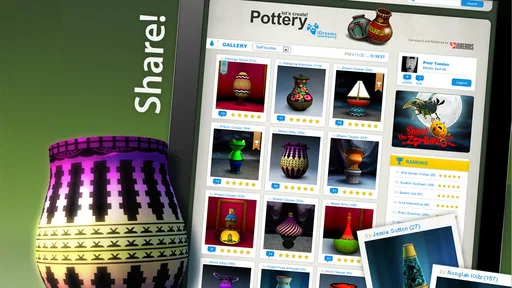
Once you've mastered the basics, Let's Create! Pottery offers various challenges to keep you engaged. From replicating famous historical pots to creating custom designs for clients, there's always something new to try. Plus, the app has a vibrant community of pottery enthusiasts. You can share your creations, get inspiration from others, and even compete in pottery contests. It's a fantastic way to connect with fellow artists from around the globe.
Those tasks can be useful when a blank canvas feels daunting: a prompt gives you a starting point, while free creation leaves more room to experiment. I would use challenges to practice responding to a brief, then switch back to open-ended making when I want to follow my own taste. If you mainly want a quiet solo activity and have no interest in sharing or competing, the creative process itself is the draw; the social side is a bonus rather than a reason everyone needs to play.
When a prompt helps—and when it does not
I would treat a challenge as a design exercise, not as proof that there is one correct way to make a pot. If a prompt asks for a particular look, it can be satisfying to work within that boundary and compare your interpretation with the result you had in mind. If the brief starts to feel restrictive, returning to free creation is a sensible change of pace. That flexibility is useful for players who like both a nudge and room to improvise, while those who dislike creative assignments may prefer to ignore that side and focus on making their own designs.
Sharing can add inspiration, but it also changes the mood of a relaxing activity. I would first make pieces for myself and only involve other people if showing work sounds enjoyable. That keeps the game from becoming a performance test. It is especially appropriate for someone who wants a private creative pastime; a player seeking a large competitive scene or a social network as the main attraction should look for a game built around those priorities instead.
Reliability, value, and who should play
Because this is a touch-led game, a comfortable screen and responsive controls matter more than raw speed. On a device that feels cramped, careful shaping and decoration may be less enjoyable, so I would choose the largest screen you already like holding rather than assume every phone is equally suited. The game lists Android 6.0 as its minimum operating system, and its current version is 1.85. It has been available since February 22, 2011, with a 4.5 average from around 31,000 ratings and over 100,000 installs. Those figures suggest an established audience, but they do not guarantee identical performance on every device.
For heavy use, the practical question is whether you enjoy spending a longer stretch refining one piece. If you notice a pause or an accidental touch, take a moment before continuing rather than rushing through delicate adjustments. I would also avoid treating a single session as a test of artistic skill: the appeal is experimenting, and an imperfect result can still teach you which proportions or decorations you prefer. This is a more forgiving kind of play than a timed puzzle, but patience helps.
Choosing a device and setting expectations
The listed Android 6.0 minimum gives older Android users a useful starting point when checking compatibility, but it is not a promise that every supported device will feel equally comfortable. For this particular game, screen space and steady touch input affect the experience directly: a cramped display can make careful shaping less pleasant even if the game opens. If you have both a phone and a tablet available, I would try the device that gives your fingers more room and that you can hold without strain. That is a comfort recommendation, not a claim that the game needs high-end hardware.
I would also separate responsiveness from the game’s deliberate pace. The pottery process is meant to invite careful adjustments, so a calm rhythm should not automatically be mistaken for sluggishness. On the other hand, if controls feel imprecise on your device, that matters more here than it would in a game based mostly on tapping through menus. There is no reason to push through a frustrating session: taking a break or switching to a larger screen may make the same creative task feel easier.
For reliability, I would judge it by whether it lets you return to making without turning each session into device troubleshooting. The game has a long-running presence and a current version of 1.85, but neither that history nor its audience can guarantee identical stability across different phones and tablets. I would keep expectations practical: install it on a compatible device, try a short shaping session, and see whether your touch input feels comfortable before spending a long time on a detailed design. That is a more useful test than assuming a rating predicts your personal experience.
The game costs $4.99, is rated Everyone, and includes optional in-app purchases ranging from $0.99 to $2.29 per item. I would decide whether its creative loop is worth that upfront price before considering extras; players who want an entirely free pastime may prefer a free casual game, while people who enjoy making and decorating objects may find the focused format more rewarding than a generic time-killer. Its 4.4K reviews point to substantial player feedback, though popularity alone is not a reason to buy. Infinite Dreams has kept the game’s central pottery idea in view, and that specificity is a strength.
For a fair comparison, think of this as a digital craft activity rather than a conventional casual game built around quick rounds, matching pieces, or score chasing. Those alternatives are easier to pick up for a few seconds and often provide clearer goals, but they do not put the same emphasis on shaping an object and making choices about its appearance. A real pottery session offers the material and tactile learning this game cannot provide, but it asks for equipment, space, and cleanup. This title sits between those options: more creative than a standard time-killer, far more convenient than a physical studio, and less useful if your main goal is technical instruction.
In an everyday routine, I can imagine opening it during a quiet break, making one small change to a design, and stopping when I have answered a simple question: does a narrower neck look better, or does the wider shape suit the decoration? That kind of focused experiment gives the session a purpose without requiring a long commitment. If you tend to lose interest unless a game offers rapid rewards or a clear campaign to finish, the slower pace may feel too open-ended. If you like seeing an idea take shape through several small decisions, that openness is the point.
The age rating is Everyone, which makes the game suitable for a broad audience, but the best fit still depends on what the player enjoys. I would recommend it to curious beginners, people who like visual design, and anyone who wants a calmer activity that does not demand quick reactions. I would steer away from it for someone looking for a realistic pottery tutor, a fast competitive game, or a completely free option with no purchase decision. Parents choosing it for a child may also want to consider whether the child enjoys patient, creative play rather than assuming the broad rating means it will suit every play style.
While the app is free to download, there are in-app purchases available if you want to unlock additional features and designs. But honestly, the free version offers plenty to keep you entertained for hours. Whether you're a seasoned artist or a complete beginner, this app is a delightful way to explore your creative side.
In conclusion, Let's Create! Pottery is not just an app; it's an experience. It brings the joy of pottery-making to your fingertips without any of the hassle. So go ahead, give it a whirl, and discover the joy of creating something beautiful from scratch. Who knew pottery could be this much fun?
Let's Create! Pottery Frequently Asked Questions
Is Let's Create! Pottery a good choice if I want a relaxing game?
Let's Create! Pottery is built around a slower, creative activity rather than fast-paced action. You shape clay on a virtual potter’s wheel, then paint and decorate your work, making the process suitable for players who want a calm experience. Its store summary, “Enjoy the craft without the mess,” captures the appeal of trying pottery in a virtual setting.
Can I play Let's Create! Pottery without any real pottery supplies?
Yes. Let's Create! Pottery lets you work with pottery virtually, so the activity takes place in the game rather than with physical clay, tools, or a real potter’s wheel. You can shape, paint, and decorate a piece on screen. That makes it a way to explore the craft without setting up a real pottery workspace or dealing with the mess.
What kind of game is Let's Create! Pottery?
Let's Create! Pottery is a casual game from Infinite Dreams, centered on making pottery in a virtual setting. Its short description is “Let's Create!” and its store summary is “Enjoy the craft without the mess.” The focus is on shaping and decorating pottery rather than playing a fast-paced action game.
What is Let's Create! Pottery?
Let's Create! Pottery is a creative app that allows users to design and craft their own pottery pieces. It provides a realistic pottery-making experience, letting you mold clay, paint, and decorate your creations. The app is available for both Android and iOS platforms, offering a relaxing and meditative hobby for users of all ages.
How do I get started with Let's Create! Pottery?
To get started with Let's Create! Pottery, download the app from the Google Play Store or Apple App Store. Once installed, you can begin by selecting the type of clay and shaping it on the virtual potter's wheel. The app provides a tutorial for beginners, guiding you through each step of the pottery-making process and helping you unleash your creativity.
Pros
- Intuitive controls for creating pottery
- Extensive glaze and decoration options
- Relaxing and therapeutic gameplay
- Offline mode available
- Suitable for all ages
Cons
- Limited color palette without in-app purchases
- Occasional bugs affecting performance
- Repetitive music tracks
- Ads can be intrusive
- Limited social sharing features












