John GBC
- 552.00
- 3.9
- Installs
- 100.00K
- Price
- $2.99

Screenshots

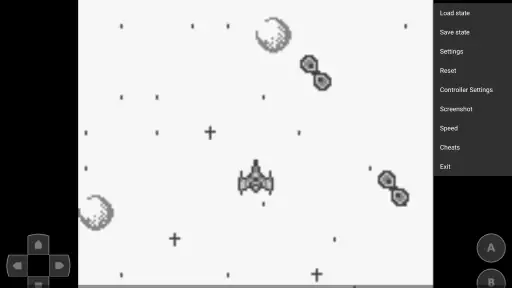
Analysis by Reviewed
I’d treat John GBC as a way to play your own Game Boy and Game Boy Color games on a phone, rather than as a collection of games included with the app. That distinction matters: the emulator can be easy to open, but the first hurdle is having a game file ready and knowing where you saved it. If you want to revisit a particular title, it’s worth checking your files before you settle in for a session.
Start with the file and controls
When a game doesn’t appear to load, I’d first check that I’m selecting the intended file and that it is stored somewhere I can find again. Then I’d close and reopen the game rather than changing several settings at once. This simple, one-change-at-a-time approach makes it easier to tell whether the problem is the file, the selection process, or a control setting.
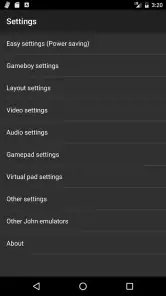
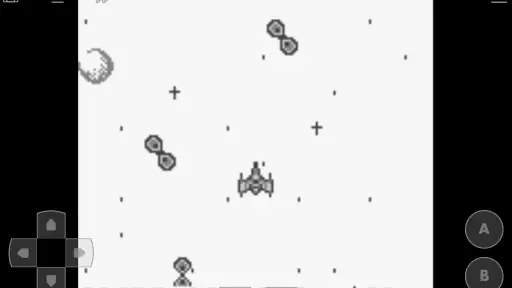
For touch play, spend a minute adjusting the on-screen buttons before starting a game that needs precise timing. A layout that feels fine in a menu can become awkward during a fast sequence, especially if your thumbs cover part of the play area. If you have a compatible external gamepad, trying it can help separate a control problem from a performance problem. I’d also test the buttons in a low-pressure section before relying on them in a difficult encounter.
Make short sessions easier to recover
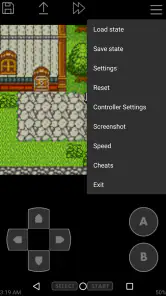
Save states are useful when everyday interruptions are likely: I can pause a short session before putting my phone away instead of keeping a handheld game running in my mind all afternoon. I’d use them as convenient checkpoints, while also keeping ordinary in-game saves where a title supports them. That gives me a practical fallback if I return to a different point than expected or want to continue through the game’s own save system.
There is a small trade-off: saving frequently can make it harder to remember which point represents the cleanest progress. I’d give a state a clear place in my routine, such as saving before I leave a session, rather than making several hurried saves with no distinction. For a quick commute or a brief break, that habit keeps pick-up-and-play simple without turning progress management into another task.
The Nostalgia Factor
There’s something incredibly comforting about the chime of an 8-bit soundtrack and the feel of those chunky, colorful graphics. The John GBC app perfectly captures that essence, offering a seamless emulation of Game Boy Color games. With a straightforward user interface, it allows you to dive right into your favorite old-school titles without any hassle. Just load up your ROMs and you’re good to go!
Features that Stand Out
One of the standout features of this app is its customizable on-screen controls. You can tweak and adjust them to your heart’s content, ensuring that your gaming experience is as comfortable as possible. Moreover, if you’re someone who prefers the tactile feel of a physical controller, the app supports external gamepads, which is a massive plus in my book.
More From Our News Desk

Clash of Clans Is Won Between the Battles

Android Auto Makes the Case for Quieter Car Software

MobiOffice: Transforming Mobile Productivity with Seamless Integration

EA SPORTS FC™ Mobile Soccer: Redefining Mobile Sports Gaming

How Microsoft OneDrive Became a Mobile Productivity Giant

How Google Translate Breaks Language Barriers Effortlessly
Another neat feature is the ability to save and load game states. Remember those frustrating times when you couldn’t save your progress and had to leave your console running all night? Those days are long gone, thanks to this handy feature. Whether you’re on a quick break or about to face a tough boss, you can save your game anytime, anywhere.
Performance and Compatibility
Performance-wise, the app is pretty solid. I didn’t encounter any significant lag or glitches while playing, which is crucial for an emulator. It supports a wide range of Game Boy and Game Boy Color games, so you’re likely to find most of your childhood favorites here. Plus, it’s available for both Android and iOS, making it accessible to a broader audience.
The app also allows for screen filters, giving you the option to adjust the visuals to your liking. Whether you prefer a crisp, clean look or a more classic, grainy feel, there’s something for everyone. This level of customization really enhances the overall experience, making each game feel unique and tailored to your preferences.
Choosing a screen and session style
I’d think about where and how I plan to play before settling on a visual setup. On a small phone screen, a filter that makes pixels look softer can feel pleasing, but it may also blur tiny text or make similar colors harder to distinguish. I’d test a dialogue-heavy scene and a busy action scene rather than judging a filter from a title screen. If either becomes less readable, the plainer view is the more useful choice, even if it feels less nostalgic.
Phone orientation and grip also affect comfort. Before a long session, I’d hold the device the way I expect to play and check whether my hands cover important parts of the screen or press neighboring controls. A short test is especially helpful when using a gamepad: confirm that the buttons respond as expected in a safe area, then start a demanding section. That small preparation can prevent a control mismatch from looking like a game problem.
Fit, cost and alternatives
As an arcade-style emulator from John emulators, this is a focused choice for players who already have Game Boy or Game Boy Color files and want a phone-friendly way to revisit them. It is rated for Everyone, has a 3.9 average from around 4,300 ratings, and has passed 100,000 installs. The asking price is $2.99, so I’d weigh that against how often I expect to use it rather than treating it as a free trial. It runs from Android 6.0 and is currently at version 4.11; its release goes back to June 2, 2011.
Compared with a general retro-gaming app that tries to cover many systems, John GBC has a narrower purpose: it concentrates on the original Game Boy and Color libraries. That focus suits someone who knows what they want to play and values quick access, but it is not the best fit if your goal is one place for games from several console generations. And if you want a ready-made library rather than an emulator that works with your own files, this is the wrong starting point.
A realistic way to use it
For me, the strongest everyday use is a short, planned session rather than an attempt to recreate a full living-room setup. I might choose a game at home, confirm that its file opens, adjust the controls, and then play during a quiet break later. If an errand or train ride interrupts me, a save state gives me a convenient stopping point. The useful part is not simply being able to play anywhere; it’s doing the small setup checks in advance so the brief free moment isn’t spent hunting through folders or rearranging buttons.
That routine also helps answer whether the purchase makes sense. If I return to these two handheld libraries regularly, the focused emulator and its quick-save workflow may justify the $2.99 cost. If I only feel nostalgic once in a while, or want a varied catalogue without managing files, a broader alternative may be more convenient. For long play sessions, a dedicated handheld can be more comfortable than holding a phone, even if it is less handy to carry for spontaneous breaks.
When a hiccup may be elsewhere
If a game starts but behaves unexpectedly, I would not assume the emulator is automatically at fault. First check whether the same issue appears after reopening the game, whether the controls are mapped comfortably, and whether the problem follows one title or affects every title you try. Changing one thing at a time is more useful than repeatedly adjusting the screen filter, controls, and save state together.
Visual filters are a matter of taste, but they can also make small sprites harder for some players to read. I’d compare the clean view with a filtered one in the same scene, then stick with whichever makes movement and text clearer. This is a practical adjustment, not a fix for a game that fails to load; keeping those questions separate saves time.
Who will enjoy it most
I’d recommend it to someone who already has a specific Game Boy or Game Boy Color game in mind, enjoys handheld-era design, and is willing to spend a little time setting up files and controls. A realistic use is loading a familiar title before a train ride, adjusting the buttons at home, then using a save state when the journey ends unexpectedly. A newcomer can also use it to explore these older systems, but should expect to bring their own game files and learn the basic emulator workflow.
On the other hand, players who dislike touchscreen controls, want a broad multi-system catalogue, or prefer not to manage game files should consider a different approach. A physical handheld may be more comfortable for long sessions, while a wider-ranging emulator may suit someone whose library spans several platforms. The best choice depends less on nostalgia in general than on whether this particular pair of systems is what you want to play.
Questions worth settling before a session
One practical question is whether I need to keep the game running to preserve progress. I wouldn’t rely on a phone session staying open when I’m about to leave; I’d use a save state for an immediate pause and the game’s own save option when available. Using both in a sensible routine gives me a checkpoint without replacing the title’s normal progression.
If a game won’t open, I’d avoid repeatedly importing or changing unrelated settings. I’d verify that I selected the intended file, try reopening the game, and see whether another title behaves differently. If only one file is affected, that narrows the likely source of the trouble; if several titles show the same behavior, checking the app’s controls and basic setup is a more sensible next step.
For control trouble, I’d first test the on-screen layout in a calm section, then try a compatible gamepad if one is available. If the gamepad improves response, touch placement was likely the main inconvenience. If it does not, I’d return to the simple checks rather than assume that changing a visual filter will solve an input issue. These checks are not guarantees, but they keep troubleshooting focused and reversible.
Final Thoughts
In conclusion, John GBC is a fantastic app for anyone looking to relive the glory days of Game Boy Color gaming. It’s user-friendly, packed with features, and does a splendid job of emulating those timeless classics. Whether you’re an old-school gamer like me or a newcomer curious about retro games, this app is definitely worth checking out. So go ahead, dust off those ROMs, and embark on a nostalgic journey down memory lane. Happy gaming!
My recommendation is strongest for someone with a particular Game Boy or Game Boy Color game ready to play and a willingness to do a little preparation. The emulator’s appeal is its focused, phone-friendly route back to those games, not a ready-made library or an all-purpose retro hub. If that matches what you want, setting up a comfortable control layout and a straightforward save habit can make it a pleasant companion for short sessions. If not, a broader platform or dedicated handheld may be the better fit.
John GBC Frequently Asked Questions
What devices can I use John GBC on?
John GBC is an Android game emulator, so it is intended for compatible Android devices rather than iPhones or iPads. It requires Android 6.0 or later, which makes the minimum operating-system requirement an important check before downloading. If your device meets that requirement, you can use the app to play supported Game Boy and Game Boy Color games.
What is John GBC and what are its main features?
John GBC is an advanced Game Boy and Game Boy Color emulator for Android. It boasts a high level of compatibility and a seamless gaming experience. The app supports original GBC games as well as ROM hacks. Key features include customizable game controls, support for cheat codes, and the ability to save and load game states. It also offers options for fast forward and slow motion to enhance gameplay. The emulator provides a user-friendly interface and is compatible with a wide range of Android devices.
Is John GBC free to download and use?
John GBC is a paid application on the Google Play Store, priced at $2.99. While there is a free version available, it comes with limitations and ads. The paid version, known as John GBC, offers a more comprehensive experience without interruptions from advertisements. Users who are serious about retro gaming on their Android devices often prefer the paid version for its full range of features and ad-free experience.
Do I need to provide my own game files to play with John GBC?
John GBC is an emulator for Game Boy and Game Boy Color games, not a collection of games bundled with the app. You will need compatible game files to play, so consider whether you already have files you are entitled to use before buying and installing it. The app’s purpose is to run those games on Android, with emulator features such as customizable controls and save states.
What ROM formats are supported by John GBC?
John GBC supports a variety of ROM formats, including .gb and .gbc files, which are standard for Game Boy and Game Boy Color games. It also supports zip files, allowing users to compress their ROMs to save space. The emulator can handle ROM hacks and fan translations, making it versatile for gamers who want to explore a wide array of titles. Ensure that you legally own the games you intend to emulate.
Pros
- User-friendly interface for easy navigation.
- Supports a wide range of Game Boy games.
- High-quality graphics rendering.
- Customizable control layouts.
- Regular updates and bug fixes.
Cons
- Ads can be intrusive during gameplay.
- Limited free features without purchase.
- Requires additional BIOS files.
- Occasional crashes on older devices.
- Compatibility issues with some ROMs.
- Category
- Arcade
- Version
- v4.11