CubeAway - 3DPuzzle
- 2.08K
- 4.5
- Installs
- 5.00M
- Price
- Free

Screenshots
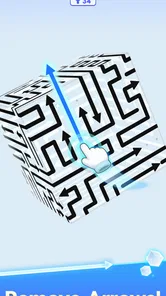
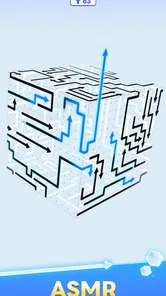
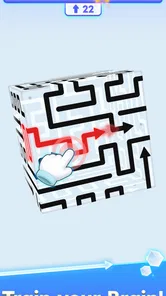
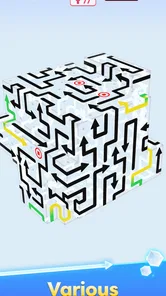
Analysis by Reviewed
Before making a first move, I’d set aside the idea that this is a speed puzzle. CubeAway - 3DPuzzle is easier to enjoy when you treat the cube like a small object you’re inspecting from several angles: look, choose, then see what changed. That approach makes the first session feel manageable, even if the arrangement is not immediately clear.
Choosing the right moment to play
This is a better fit for a short pause when you can give the board your attention than for a moment when you’re half watching something else. If I had only a minute, I’d rather make one considered move and stop than keep tapping while distracted. The game’s spatial focus rewards noticing details, so a quiet coffee break or a wait in a lobby is more suitable than a rushed walk between errands.
It may also be a nice choice for someone who enjoys puzzles but tires of familiar grids. The cube changes the kind of attention involved without asking you to learn a complicated premise first. If you prefer a story to follow, a rotating collection of puzzle mechanics, or a contest against other players, though, I’d look for a different game; the appeal here is concentrated on reading this particular shape.
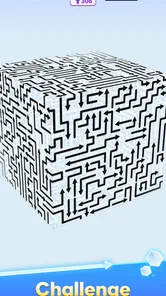
I like puzzle games that give me one clear problem to think about without asking me to learn a long list of rules first. CubeAway - 3DPuzzle makes a strong first impression on that front: its central challenge is to clear arrows from a six-sided cube. That is an easy idea to understand, but the three-dimensional arrangement gives each move a little more to consider than a simple flat matching puzzle. My first useful piece of advice is to treat the cube as a small spatial problem, not as a sequence of taps to rush through.
It is a free puzzle game from GOODROID,Inc., rated for Everyone, and the basic appeal is straightforward: look at the arrows, work out what can be removed, and gradually clear the shape. The game has a 4.5 average from around 180,000 ratings and over 5 million installs, so it has found a sizable audience among people who enjoy compact, approachable puzzles. That popularity is reassuring, but the more important question is whether this particular style of puzzle suits the way you like to play. For me, it works best when I want a focused mental break rather than a deep campaign or a competitive challenge.
What the cube asks you to notice
The first thing to expect is a puzzle built around orientation. An arrow is not just a symbol to remove; its direction matters in relation to the cube and the surrounding pieces. The board’s six-sided form encourages you to inspect more than the face immediately in front of you. If you only scan the visible surface, you may miss how the arrangement fits together, so pausing to look over the whole shape is a better habit than tapping the first arrow that catches your eye.
That gives the game a different feel from familiar match-three puzzles, where colors and patterns often make the next move obvious, or word games, where progress comes from recalling vocabulary. Here, the useful skill is visual reasoning: noticing direction, considering what is exposed, and deciding which removal will make the remaining puzzle easier to read. It is a modest but satisfying shift, especially if you enjoy untangling shapes more than chasing a score or racing a timer.
More From Our News Desk

 Gmail
GmailGmail in a Busy Inbox: Who Benefits Most?
From first account to crowded workday, Gmail earns its place through dependable search and flexible sorting—but its best fit depends on how much inbox maintenance you can tolerate.

 Prime Video
Switching to Prime Video: What Changes in Your Viewing Routine
Prime Video can make a compelling second home for streaming, but switching means learning a different catalog, rental layer, and route from browsing to playback.

 Universal TV Remote Control
Universal TV Remote Control Works Best as a Reliable Backup
A phone remote earns its place through quick setup and reliable habits. Here is how to get more from Universal TV Remote Control—and where its limits show.

 Weather - By Xiaomi
Weather by Xiaomi Review: Clear at a Glance, Less Clear Up Close
Xiaomi’s weather app makes everyday forecasts quick to scan, but its calm surface can leave useful details and recovery paths harder to find than they should be.

 X
XX Under Pressure: Can It Recover When Posting Goes Wrong?
A resilience-focused review of X, examining setup, mistaken posts, interruptions, weak connections, and the gaps that matter when recovery needs to be dependable.

 Clash of Clans
Clash of Clans Is Won Between the Battles
Its raids are quick; its community is a long-term project of coordination, teaching, rivalry, and shared responsibility—with all the friction that entails.
Latest News



I would not approach every board as though there must be one clever trick hidden in it. A more reliable way to begin is to identify arrows whose direction and position look least obstructed, then check how each removal changes what you can see. This gives you a simple working loop: inspect, choose, and inspect again. The reward is not a dramatic reveal so much as the gradual moment when a crowded-looking cube becomes easier to understand.
A comfortable first run
When you first open the game, give yourself a moment to understand the board before making a move. Look at the arrows as a group and mentally sort them by direction or by which ones seem easiest to deal with. You do not need to solve the whole cube in your head. The aim is simply to avoid treating every arrow as equally available and to make a first choice you can explain to yourself.
Your first meaningful success is likely to come from removing a clearly manageable arrow and then checking the new arrangement, rather than trying to clear a large section in one burst. That small pause after each move is useful. It lets you notice whether the layout has opened up, whether another direction is now easier to judge, and whether your original plan still makes sense. If the cube feels confusing at first, this slower rhythm is more reassuring than guessing repeatedly.
A practical tip is to use the visible changes as feedback. After a removal, scan the full shape again instead of keeping your eyes fixed on the spot where you tapped. In a three-dimensional puzzle, the most useful consequence may be elsewhere on the cube. That habit helps you build a better picture of the arrangement and makes each choice feel deliberate, even when you are only playing for a few minutes.
Where new players can get turned around
The most natural source of confusion is perspective. A cube can make direction feel less intuitive than it does on a flat grid, especially when you are concentrating on one face. If an arrow seems obvious but the move does not produce the progress you expected, stop and reorient yourself rather than tapping faster. Checking the neighboring faces and following the arrow’s direction with your eyes can help you distinguish what you are seeing from what you are assuming.
Another trap is trying to plan too many moves ahead before you have learned how the board responds. That can turn a light puzzle into unnecessary mental bookkeeping. I find it more practical to plan one move, or at most a short sequence, and then reassess. The cube is the information you have; there is no need to invent a complicated theory before making a reasonable first move.
It also helps to separate a difficult-looking board from an impossible one. A dense arrangement may simply be hard to read at a glance. Rather than deciding that you are stuck immediately, look for a direction or area that seems clearer and use it as a starting point. If you still cannot make a confident choice, take a short break and return with fresh eyes. This sort of visual puzzle can benefit from a reset in attention more than from prolonged staring.
One trade-off is that the central mechanic stays focused. Players who want a story, character progression, a broad range of puzzle types, or a social competition may find the experience too narrow. CubeAway is more appealing when you want a compact spatial challenge that you can understand quickly. It is also not the best match if you strongly prefer puzzles with a guaranteed, obvious next move; part of the appeal here is working out what the shape is telling you.
Making it fit into an ordinary day
I can see this working well during a quiet coffee break or while waiting for an appointment. Instead of opening a puzzle that demands a long session, you can focus on a single cube, make a few considered moves, and stop when you have had enough. The useful everyday approach is to avoid playing while hurried: a distracted glance at a three-dimensional layout makes it easier to lose track of direction, while a short stretch of attention is enough to make the task feel satisfying.
It may also suit someone who wants a low-pressure activity to share in the same room. One person can inspect one face while another looks at the rest, then compare what each has noticed before choosing a move. That is not a special game mode; it is simply a natural way to talk through a visual puzzle. It can make the cube feel less opaque for a newcomer, while still leaving the actual decision to the players.
For a first-time player, I would make the next step after an early success very simple: change your scanning habit, not your ambition. First, look at the whole cube; then focus on one promising direction; after a removal, take another full look. This routine is more useful than trying to clear the puzzle as fast as possible. It turns the game’s central challenge into a repeatable process and gives you a way to recover when the arrangement becomes hard to read.
Free to start, with a purchase choice to weigh
The game is free to install, with in-app purchases ranging from $1.99 to $98.99 per item. That is a broad enough range that I would check the purchase details carefully before confirming anything, particularly if a child is using the device. The Everyone content rating makes the puzzle appropriate for a general audience, but it does not remove the need for sensible purchase settings. You can begin by deciding whether the core puzzle is enjoyable before spending money; there is no reason to treat a purchase as part of learning the basic idea.
The current version is 1.6.1, and Android support starts at version 7.0. Those details matter if you are checking whether the game fits an older Android device. The game’s straightforward premise makes it easy to explain to a new player, but the actual comfort of play will depend on whether they enjoy judging direction and shape. For a young player, I would sit nearby for the first session if in-app purchases are a concern, while letting them work through the arrows at their own pace.
The rating and audience size suggest that many players find the premise appealing, but popularity does not guarantee that its particular style will click for everyone. Someone who likes spatial puzzles may appreciate the focused design; someone who wants an expansive puzzle collection may be better served by a game that changes mechanics more often. Likewise, if you usually prefer word, number, or trivia challenges, this one asks for a different kind of attention and may not become your regular choice.
Who I would recommend it to
I would recommend CubeAway to a friend who enjoys visual puzzles, wants a quick activity, and is happy to think in directions rather than matching colors or solving clues. It is especially approachable if you are curious about three-dimensional puzzles but do not want to begin with a complex set of rules. The first satisfying moment comes from making one sensible removal and seeing the cube become easier to interpret, not from mastering a long tutorial.
I would suggest looking elsewhere if your ideal puzzle game depends on a story, a steady stream of different mechanics, or a strong sense of competition. The cube-focused premise is the point, and that focus is both its strength and its limit. Compared with a flat tile puzzle, it asks for more spatial awareness; compared with a word or logic-grid game, it gives you less to read and more to inspect. That makes it refreshing for the right mood, but potentially repetitive for someone who needs frequent changes of pace.
Overall, CubeAway is an easy game to try and a more thoughtful one to play carefully. I like that its first steps can be small: inspect the cube, choose an arrow you can justify, and use the resulting layout to guide the next decision. If you enjoy that kind of visual reasoning, the game offers a clear, low-pressure way to spend a short break. If you want more variety or a larger sense of progression, I would choose a broader puzzle game instead. For newcomers, the best first goal is not clearing everything quickly; it is learning to read the cube one deliberate move at a time.
CubeAway - 3DPuzzle Frequently Asked Questions
What is CubeAway - 3DPuzzle?
CubeAway - 3DPuzzle is a casual puzzle game centered on a three-dimensional arrangement of cubes. The core challenge is to inspect the structure, work out how its pieces can be removed, and clear the board through careful moves. Its compact levels make it suitable for short play sessions, while the spatial reasoning involved can give each puzzle a more thoughtful feel than a simple tap-to-match game.
How do you play CubeAway - 3DPuzzle?
You solve each level by examining the cube structure and selecting pieces according to the game’s removal rules. Because the puzzle is presented in three dimensions, rotating or viewing the arrangement from different angles can help you spot available moves and avoid overlooking blocked pieces. Take time to check the whole structure before acting; a move that looks obvious from one side may affect what can be cleared next.
Is CubeAway - 3DPuzzle free to download and play?
The game may be available to download for free, but pricing, optional purchases, and advertising can vary by platform, region, and version. Check the Google Play Store or Apple App Store listing before installing to confirm the current details, including whether in-app purchases are offered. Reviewing those details is also a good way to understand whether any paid items are optional or connected to continued play.
Does CubeAway - 3DPuzzle need an internet connection?
Whether CubeAway - 3DPuzzle works fully offline can depend on the current version and the features you use. Puzzle gameplay may be available without a connection, but advertisements, updates, cloud saves, or other online services could require internet access. If offline play matters to you, check the store listing and test a level with your device disconnected rather than assuming every feature will work without Wi-Fi or mobile data.
Is CubeAway - 3DPuzzle suitable for children, and what should parents check?
The game’s puzzle-focused format may appeal to players who enjoy visual challenges, but age suitability depends on the content and how the app is monetized. Parents should review the current age rating, privacy information, and permissions on the relevant app store. It is also sensible to check for advertisements and in-app purchases, then use the device’s parental controls if you want to restrict spending or access.
Pros
- Relaxing pace makes it easy to play in short sessions.
- 3D models add a satisfying visual twist to block puzzles.
- Simple controls are easy to learn.
- Levels offer a steady stream of bite-sized challenges.
- A good fit for players who enjoy spatial reasoning.
Cons
- Rotating and viewing models can feel awkward on smaller screens.
- Some puzzles may become repetitive over time.
- Ads may interrupt play
- depending on the version.
- Later levels can require careful planning and patience.
- The game may offer limited appeal if you prefer fast action.