

Cryptoscapes - Brain Word Game
- 854.00
- 4.5
- Installs
- 500.00K
- Price
- Free
Screenshots
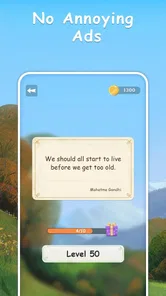
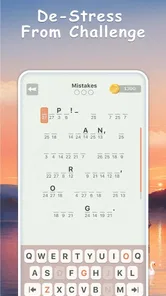

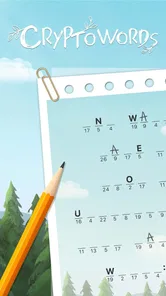
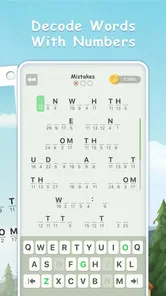
Analysis by Reviewed
My first impression of Cryptoscapes - Brain Word Game is that it aims for a calmer kind of word challenge: the pleasure comes from spotting a pattern and turning a string of symbols into a word, not from racing through a busy screen. That makes it an appealing choice when I want a puzzle I can approach at my own pace. It is a free word game from developer Rankhamb Venkatesh, rated for Everyone, and its nature-inspired setting gives the decoding task a softer frame than a bare grid of letters.
A gentle first impression, with a clear audience
The game’s core appeal is easy to explain to a friend: if you enjoy looking at a coded word and testing possible letter patterns, it gives you a quiet place to do that. If you would rather swipe quickly, match colors, or compete against a timer, this is probably not the word game I would suggest first. Its rewards come from thinking through a puzzle, not from speed or spectacle.
That distinction matters when choosing a game for a particular moment. I would reach for it when I have a few minutes to concentrate without committing to a long story or a demanding session. Someone who likes cryptograms but finds a blank page too austere may appreciate the more inviting presentation. Someone who wants a stream of varied mini-games may find the central decoding idea too focused.
How the setting shapes the puzzle
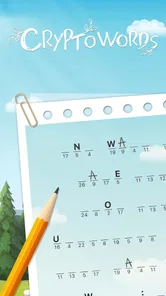
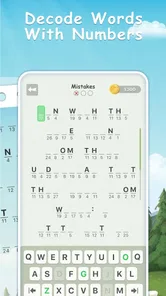
The central idea is easy to grasp: use numbers and word knowledge to decode answers, then move forward through the puzzles. That gives each solve a small detective-story feel, even though the real work is pattern recognition and vocabulary. The landscape theme matters because it supplies a consistent mood around an otherwise abstract code-breaking task. I find that combination more inviting than a plain list of word clues, especially when I want something focused but not intense.
Artwork, atmosphere, and sound
The visual direction is part of the appeal rather than mere decoration. Nature imagery makes the game feel like a quiet place to pause, while the coded-word mechanic keeps the screen mentally active. I would not choose it for elaborate storytelling or action; its setting works best as a backdrop that helps a short puzzle session feel contained and pleasant. The sound and scenery support that gentle pace, though players who want a loud, highly animated game may find the overall mood too restrained.
That quiet presentation also changes how I approach a difficult answer. Instead of treating a mistake as a failure in a race, I can slow down, look again at the symbols, and try a different interpretation. The landscape does not need to explain the code or carry a plot for it to have a purpose: it gives the act of puzzling a softer atmosphere. If you usually play with sound muted, the visual setting still frames the experience; if sound is part of what makes a mobile game enjoyable for you, the understated mood is a better fit than a dramatic, high-energy soundtrack.
Gameplay and Features
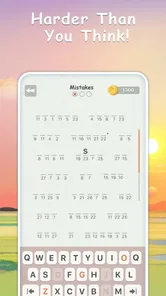
So, what makes this game stand out? First off, the design is sleek and intuitive, which makes navigating through the puzzles a breeze. You're greeted with a series of cryptograms, each more challenging than the last. The objective is simple: solve the cryptograms to progress. But don't be fooled by its simplicity; the puzzles can be quite the brain workout!
More From Our News Desk

 Gmail
GmailGmail in a Busy Inbox: Who Benefits Most?
From first account to crowded workday, Gmail earns its place through dependable search and flexible sorting—but its best fit depends on how much inbox maintenance you can tolerate.

 Prime Video
Switching to Prime Video: What Changes in Your Viewing Routine
Prime Video can make a compelling second home for streaming, but switching means learning a different catalog, rental layer, and route from browsing to playback.

 Universal TV Remote Control
Universal TV Remote Control Works Best as a Reliable Backup
A phone remote earns its place through quick setup and reliable habits. Here is how to get more from Universal TV Remote Control—and where its limits show.

 Weather - By Xiaomi
Weather by Xiaomi Review: Clear at a Glance, Less Clear Up Close
Xiaomi’s weather app makes everyday forecasts quick to scan, but its calm surface can leave useful details and recovery paths harder to find than they should be.

 X
XX Under Pressure: Can It Recover When Posting Goes Wrong?
A resilience-focused review of X, examining setup, mistaken posts, interruptions, weak connections, and the gaps that matter when recovery needs to be dependable.

 Clash of Clans
Clash of Clans Is Won Between the Battles
Its raids are quick; its community is a long-term project of coordination, teaching, rivalry, and shared responsibility—with all the friction that entails.
Latest News



The game offers various levels of difficulty, catering to both beginners and seasoned wordsmiths. Whether you’re in the mood for a quick brain teaser or a more complex challenge, Cryptoscapes has got you covered. Plus, there’s a hint system for those tricky moments when you’re absolutely stumped.
How to get more from a decoding session
A useful way to tackle a cryptogram is to avoid guessing whole words too early. I start by looking for repeated symbols and short patterns, then compare likely letter choices across the other words on the screen. A guess that seems plausible in one place becomes much more convincing when it also creates sensible patterns elsewhere. That approach makes the number-to-word relationship feel like a deduction rather than a string of lucky guesses.
Hints are best treated as a nudge, not a shortcut. I would first test the patterns I can already see and use a hint only after those clues stop narrowing the possibilities. This is especially helpful when a session is meant to be relaxing: struggling forever can make a gentle puzzle feel irritating, but asking for help immediately can remove the most satisfying part. Finding a middle ground preserves the reasoning while keeping a tricky moment from taking over the break.
The challenge also depends on the kind of vocabulary you bring to it. A familiar word pattern may fall into place quickly, while an unusual answer can make the same code feel much harder. If I reach a dead end, I find it more productive to revisit confirmed letters and reconsider one uncertain assumption than to cycle through random possibilities. That habit is useful beyond this game, and it is a good reason to play attentively rather than tapping through while distracted.
When it fits into a day
I can see this working well during a quiet coffee break or while waiting for an appointment: solve a puzzle, put the phone away, and come back later without needing to prepare for a long session. A practical way to use hints is to give a code a fair try first, then ask for help only when you have run out of useful letter patterns. That keeps the satisfying deduction at the center instead of turning hints into the default route. If you mainly enjoy quick visual matching or word searches, though, this number-based decoding may feel slower than you want.
For a realistic everyday use, imagine having a short wait before a meeting and wanting something more absorbing than scrolling but less involved than starting a long game. I would open a puzzle, focus on the repeated symbols, and stop when it is time to put the phone away. The appeal is that the task is self-contained: I can give it my attention for a little while without needing to remember a plot or coordinate with another player. It works best when the surroundings let me concentrate; a noisy commute or a conversation-heavy setting can make careful deduction less enjoyable.
It can also suit a small daily routine for someone who wants a modest mental warm-up. I would use it before reading or during a break, not as a substitute for a full word-game collection. If I am tired, I may prefer an easy puzzle and a relaxed pace; if I have more focus, I can spend longer examining a stubborn code. That flexibility comes from the basic format, rather than from needing to arrange a session or meet a deadline.
Compared with familiar crossword apps, the emphasis here is less on interpreting a clue and more on uncovering the substitution behind a word. That makes it a useful change of pace for people who already know the usual crossword rhythm, but it is not a replacement for a broad collection of clue types. And unlike a competitive word scramble, the pleasure is in patient deduction rather than speed. I would pick it when I want a focused solo puzzle, not when I am looking for a head-to-head challenge or a large variety of distinct game modes.
There is a trade-off in that focus. A crossword can offer different clue styles and a wider sense of discovery across a grid, while a word-search game lets the eyes do more of the work. A scramble tends to reward quick rearrangement, and multiplayer word games bring social pressure or rivalry into the mix. This game sits apart by asking me to infer a code. That is a good change when I want one clear mental task, but it will not satisfy someone who expects every session to introduce a different kind of puzzle.
Who is likely to enjoy it—and who may not
I would recommend it to people who like cryptograms, vocabulary puzzles, and quiet solo play. It can also be a reasonable starting point for someone curious about code-based word challenges, because the basic goal is understandable without a long explanation. The different difficulty levels give players room to find a more comfortable challenge, though personal vocabulary and puzzle-solving habits will still affect how approachable any particular answer feels.
I would steer away from it if your main reason for opening a mobile game is to compete, collect a variety of modes, or get immediate action. It is not the choice I would make for a group waiting together when everyone wants to play at once, nor for a player who finds letter deduction more tiring than enjoyable. If you prefer crosswords with clue variety, fast anagram rounds, or visual word searches, those alternatives are better matched to those preferences.
Why It's Worth Your Time
One of the things I absolutely love about Cryptoscapes is its educational aspect. It’s a fantastic way to expand your vocabulary while having fun. The game is designed to make you think outside the box, which is perfect for anyone looking to sharpen their cognitive skills.
I would keep that benefit in perspective: a word game can encourage attention to spelling and patterns, but I would not treat it as a formal vocabulary course. Its strongest learning value is incidental. You meet words while trying to solve codes, and the act of comparing patterns can make you more alert to how letters behave. That is satisfying for a curious player, but anyone seeking structured lessons or a particular subject should choose a tool built for that purpose.
Another highlight is the community aspect. You can connect with other players, share your progress, and even challenge friends to see who can solve puzzles faster. It's a nice social touch that adds to the overall experience.
For me, the social element is best understood as an extra rather than the main reason to install it. The central activity still makes sense as a solo puzzle, so I would not depend on friends being available to enjoy it. If friendly comparison motivates you, sharing progress or challenging someone can add a reason to return; if you prefer private play, the decoding itself remains the point. The result is more flexible than a game that only works when other people are online, but less socially driven than a dedicated competitive word app.
For someone deciding whether to try it, the broad reception is encouraging: it holds a 4.5 average from around 6.5 thousand ratings, with over 500 thousand installs. It is free to start, although optional in-app purchases range from $0.99 to $49.99 per item, so I would check purchase prompts carefully if I prefer to keep a game entirely free. Version 1.22.0 supports Android 5.0 and later. Its steady, word-focused format should suit casual puzzlers and people who enjoy decoding, while anyone seeking a fast reflex game, rich narrative, or constant social competition should look elsewhere.
Practical expectations before installing
The game is free to download, but that does not mean every possible purchase is free. Optional in-app items range in price, so I would pause at any purchase screen and decide whether I actually want what is offered rather than treating it as part of the puzzle. A player who intends to spend nothing can still approach the game as a free word challenge, while anyone who is uncomfortable with in-app purchase prompts should be attentive when navigating them.
It is rated for Everyone and supports Android 5.0 and later, which gives it a broad age and device range on Android. The game was released on June 28, 2024, and the current version is 1.22.0. Those details are useful for checking whether it suits your device and expectations, but the more important decision is whether you enjoy the central mechanic: patiently turning numbered clues into words. Its 854 written reviews offer another source of player impressions, alongside its average rating and install count.
A common question is whether it is better for a beginner or an experienced puzzle fan. I think either can enjoy it, provided the beginner is comfortable learning by trying patterns and the experienced player is happy with a focused format rather than a sprawling collection. The difficulty choices help with that balance, but they do not change the essential activity. Another practical question is whether it can replace a crossword habit. I would treat it as a companion for a different style of word reasoning, not a full substitute for clue-based grids.
Players may also wonder whether they need to use hints whenever a code stalls. I would not. First, check repeated symbols and any letter choices that already fit more than one word; then use a hint if continued guessing stops being useful. That keeps the puzzle engaging without turning a brief leisure session into a test of patience. And if a person wants a game to play with friends in real time, the better choice is a word game built around direct multiplayer competition, rather than relying on the lighter social options here.
Final Thoughts
In a world where mobile games can often feel repetitive, Cryptoscapes - Brain Word Game offers a refreshing change of pace. It’s engaging, challenging, and a whole lot of fun. Whether you’re a word game veteran or just looking for something new to keep your mind sharp, this app is definitely worth a try. So go ahead, give it a download, and let’s get cracking on those cryptograms!
Happy puzzling!
Cryptoscapes - Brain Word Game Frequently Asked Questions
What kind of game is Cryptoscapes, and who developed it?
Cryptoscapes - Brain Word Game is a word game built around decoding words with numbers and nature-themed scenery. Its central appeal is combining language puzzles with a code-breaking idea, so it may suit players who enjoy looking for patterns as well as solving word challenges. It is developed by Rankhamb Venkatesh.
What is Cryptoscapes - Brain Word Game about?
Cryptoscapes - Brain Word Game is a unique puzzle game that combines elements of word puzzles and cryptography. It challenges players to decode words using various clues and hints, making it both a fun and educational app. The game is designed to stimulate cognitive functions and enhance vocabulary skills.
How does the game mechanics of Cryptoscapes work?
In Cryptoscapes, players are tasked with solving word puzzles that are presented in a cryptographic format. Each level presents a new puzzle where users must decipher and rearrange letters to form correct words. The game provides hints and clues to assist players in solving the puzzles, making it accessible for different skill levels.
Is Cryptoscapes suitable for all age groups?
Yes, Cryptoscapes - Brain Word Game is designed to be suitable for all age groups. Its puzzles range from easy to challenging, allowing both younger audiences and adults to enjoy the game. The educational aspect of the game also makes it a great tool for learning and improving language skills across various age ranges. It has an Everyone content rating.
Does Cryptoscapes offer in-app purchases?
Cryptoscapes does offer in-app purchases. While the game is free to download and play, players have the option to purchase additional clues or hints to help them progress through more challenging levels. These purchases are entirely optional and not necessary to enjoy the full experience of the game. Individual purchase prices range from $0.99 to $49.99.
Pros
- Engages users with challenging puzzles.
- Enhances vocabulary and spelling skills.
- Visually appealing graphics and design.
- Regular updates with new levels.
- User-friendly interface and navigation.
Cons
- Limited free hints available.
- In-app purchases can be costly.
- Requires internet for some features.
- Ads between levels can be intrusive.
- Some puzzles may be too difficult.











