Crossword Unlimited
- 13.00
- 4.3
- Installs
- 1.00K
- Price
- $6.49
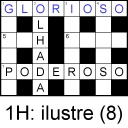
Screenshots
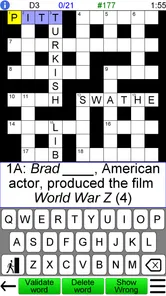
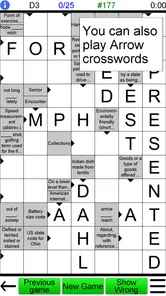
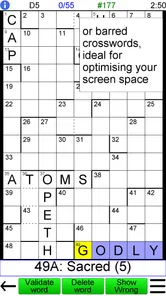
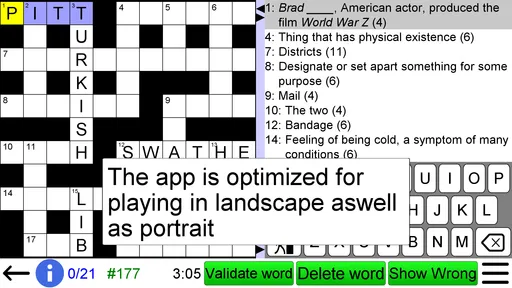
Analysis by Reviewed
Before I decide whether a crossword game is worth paying for, I ask a simple question: will I reach for it often enough to make the purchase feel sensible? Crossword Unlimited is listed at $6.49, making it a paid game rather than a free download with an ongoing cost model. I’d expect to pay that amount to get the game, not assume there is a free version or a subscription. For someone who regularly solves crosswords, a one-time purchase can make sense if the puzzles suit their habits; for a casual solver, it is worth deciding whether they’ll return to it often enough.
What the price needs to earn
The appeal is being able to shape puzzles around your own level instead of working through a fixed sequence that may quickly become too easy or too demanding. Havos Word Games, a developer focused on word games, makes this title. It has a 4.3 average from around 180 ratings, alongside 13 written reviews. Those figures suggest some players have found it worthwhile, but they can’t tell you whether its style will suit you personally.
A practical way to assess the purchase is to think about when you solve. If you already reach for a newspaper crossword with breakfast or like a short word challenge during a commute, an adaptable puzzle game may fit naturally into that routine. If you only play word games occasionally, a free alternative may be the safer choice until you know you want a dedicated crossword app. With over 1,000 installs, it is a smaller, more specialized option than the biggest word-game titles.
A World of Words Awaits
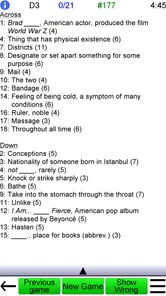
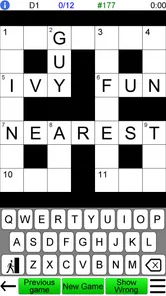
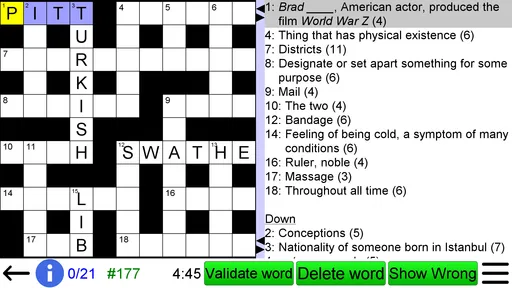
First off, let me tell you, the variety in Crossword Unlimited is nothing short of impressive. As someone who's always on the lookout for a fresh challenge, I was thrilled to find puzzles ranging from easy-peasy to downright head-scratching. The beauty of it is that you can jump into any difficulty level, making it perfect whether you're a crossword newbie or a seasoned pro.
Interface and Usability
Now, I know what you're thinking: "Are these puzzles hard to navigate?" Fear not! This app has one of the most intuitive interfaces I've come across. The clean, straightforward design means you spend less time fiddling with settings and more time solving puzzles. Plus, the hints feature is a lifesaver for those moments when you just can't figure out that one elusive word.
Customization Galore
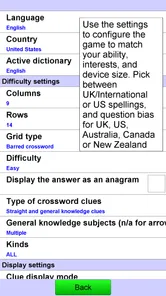
One of the standout features of this app is the customization. You can tweak the settings to make your crossword experience as personalized as possible. Want a specific grid size? You got it! Prefer a particular theme? No problem. It's all about making the experience yours, which is something I truly appreciated.
In everyday use, that flexibility changes how I’d approach a session. On a quiet evening I might choose a harder puzzle and work steadily; during a brief break, I’d pick an easier level and treat it as a quick reset. If a clue stalls me, I’d use a hint only after trying a crossing answer or two: that keeps the puzzle challenging without turning one stubborn word into a reason to quit. Adjusting the grid and theme before starting can also help match the session to the time and mood I actually have, rather than abandoning a puzzle that feels wrong halfway through.
More From Our News Desk

 Gmail
Gmail in a Busy Inbox: Who Benefits Most?
From first account to crowded workday, Gmail earns its place through dependable search and flexible sorting—but its best fit depends on how much inbox maintenance you can tolerate.

 Prime Video
Switching to Prime Video: What Changes in Your Viewing Routine
Prime Video can make a compelling second home for streaming, but switching means learning a different catalog, rental layer, and route from browsing to playback.

 Universal TV Remote Control
 Works Best as a Reliable Backup
A phone remote earns its place through quick setup and reliable habits. Here is how to get more from Universal TV Remote Control—and where its limits show.

 Weather - By Xiaomi
Weather by Xiaomi Review: Clear at a Glance, Less Clear Up Close
Xiaomi’s weather app makes everyday forecasts quick to scan, but its calm surface can leave useful details and recovery paths harder to find than they should be.

 X
X Under Pressure: Can It Recover When Posting Goes Wrong?
A resilience-focused review of X, examining setup, mistaken posts, interruptions, weak connections, and the gaps that matter when recovery needs to be dependable.

 Clash of Clans
 Is Won Between the Battles
Its raids are quick; its community is a long-term project of coordination, teaching, rivalry, and shared responsibility—with all the friction that entails.
Latest News



Challenge Your Friends
What’s more fun than solving a crossword? Solving it with friends, of course! The app allows you to challenge your buddies to beat your time or work together on a particularly tough puzzle. It's a great way to connect, especially when you're miles apart. Trust me, the competitive spirit can get pretty intense!
How it fits among word games
Compared with a daily newspaper crossword, this is better suited to someone who wants to choose a level and adjust the puzzle experience, rather than follow one published puzzle at a time. Compared with broad word-game collections, it keeps the focus on crossword solving instead of switching between unrelated formats. That focus is a strength for enthusiasts, but it also means it is not the best buy if you want variety beyond crosswords or prefer a guided campaign with a clear sequence of goals.
The game is rated Everyone, runs on Android 4.4 or later, and its current version is 4.2.4. It was released on Dec 22, 2013, so it has been around long enough to be an established, focused option, though the release date alone does not tell me how actively its puzzle content changes. I’d treat it as a flexible crossword tool, not assume it offers a constantly refreshed daily feed. If you need that specific routine, check whether its available puzzle options match what you expect before paying.
Who is likely to get their money’s worth?
I’d recommend it most to people who already enjoy crosswords and want control over difficulty, grid size, and theme in one place. It may also work well for a beginner who prefers easing into harder clues at their own pace. A realistic use is keeping it ready for a lunch break: choose a manageable puzzle, solve what you can, and return to the remaining clues later rather than needing a long uninterrupted session.
I’d skip it if you mainly want a free game, social word battles as the central activity, or a stream of short, unrelated challenges. The friend-play idea may add a social angle, but I wouldn’t buy it solely for multiplayer; its core appeal is still making and solving crosswords. Likewise, if you find hints spoil the satisfaction of solving unaided, you can simply reserve them for a last resort—or choose a crossword format without assistance.
Making a session work for you
A small practical habit can make the customizable approach more useful: decide what you want from a session before picking a puzzle. If you have only a few minutes, prioritize a manageable difficulty and a grid you can comfortably scan. If you have a longer stretch, choose a tougher challenge and let yourself pause when you get stuck. This avoids treating every unfinished puzzle as a failure and turns the game into something you can fit around the day.
I’d also be deliberate about hints. They can help you get past a dead end, but using one too early may take away the satisfying moment of spotting an answer through its crossings. My preference would be to fill in the clues I know first, then revisit the uncertain entries with the crossing letters in place. Only after that would I reach for help. That workflow preserves the reasoning part of a crossword while still giving you an escape hatch when one clue blocks the whole grid.
When flexibility is a benefit—and when it is friction
Choosing puzzle difficulty and grid size can be a real advantage, but it puts more responsibility on you than a newspaper or a curated daily puzzle does. There may be no editor choosing one balanced challenge for today; you need to decide what suits your mood. If you enjoy that control, it helps you avoid puzzles that feel either trivial or punishing. If you would rather open an app and be handed one clear, ready-made challenge, a daily crossword service may be a better fit.
The same trade-off applies to themes. Personalizing a puzzle can make the experience feel more your own, but customization is only valuable if you want to spend a moment setting things up. I’d avoid overthinking every option: choose a familiar format for a quick session, and experiment with settings when you have time to see what you actually enjoy. The game is aimed at solving, yet the ability to tailor the setup means a little preference-testing can be part of getting comfortable with it.
Questions worth settling before paying
Will I need a constant stream of new daily puzzles? I would not assume so; the safer expectation is a flexible crossword experience rather than a newspaper-style daily feed. Is it suitable for someone new to crosswords? Its selectable difficulty makes it approachable, though a beginner who wants step-by-step teaching may prefer a game built around lessons. Can I play with friends? The game includes a way to challenge friends or work together, but I’d see that as an extra rather than the main reason to buy.
Another practical question is whether it fits your device. The game requires Android 4.4 or later, and its content rating is Everyone. That makes the age classification broad, while the operating-system requirement is the part to check before purchasing on an older Android device. The current version is 4.2.4. I’d also consider whether you want a focused crossword app or a larger collection of word formats; the former is where this title makes the clearest case for itself.
My buy-or-skip verdict
In conclusion, if you're on the hunt for a game that's both fun and mentally stimulating, it is a strong choice for the right kind of solver. It's got a user-friendly interface, a wealth of puzzles, and plenty of customization options to keep things fresh. Whether you're unwinding after a long day or just filling in some downtime, it is worth considering. The key is that you want crosswords specifically, not merely any word game.
My more measured advice is to buy it if adjustable crossword sessions are something you’ll use repeatedly, and to skip it if the upfront price feels hard to justify for occasional play. The 4.3 average rating is encouraging, but I’d give more weight to whether you enjoy choosing your own challenge than to the score alone. For me, the strongest reason to choose it is that the puzzle can be tailored to the solver; the clearest reason to look elsewhere is wanting free access or a different kind of word-game experience.
Crossword Unlimited Frequently Asked Questions
What does the Everyone age rating mean for Crossword Unlimited?
Crossword Unlimited is rated Everyone, making it suitable for a broad audience, including younger players and adults who enjoy word games. Its crossword format focuses on solving clues and filling in answers, so it can be a calm choice for individual play. Parents can still review the app themselves to decide whether its style is right for their family.
What kind of puzzles can I expect from Crossword Unlimited?
Crossword Unlimited is a word game centered on tailor-made crossword puzzles, with options intended for different levels of play. That makes it appealing whether you are looking for a more approachable puzzle or a tougher challenge. Because the game is built around generating crosswords, it offers an ongoing supply of puzzles rather than relying on a short, fixed set to work through.
What is Crossword Unlimited and how does it work?
Crossword Unlimited is an app designed for crossword enthusiasts. It allows users to generate and solve an unlimited number of crosswords on their mobile devices. The app provides puzzles of varying difficulty levels, ensuring both beginners and seasoned players can enjoy it. Once downloaded, users can play offline, making it perfect for on-the-go entertainment without needing an internet connection.
Is Crossword Unlimited available for both Android and iOS devices?
Yes, Crossword Unlimited is available for both Android and iOS platforms. Users can download the app from Google Play Store for Android devices and the Apple App Store for iOS devices. It ensures a wide range of compatibility, allowing crossword lovers to enjoy the app on their preferred mobile operating system.
Does Crossword Unlimited require an internet connection to function?
No, Crossword Unlimited does not require an internet connection for its core functionality. Once downloaded, users can enjoy solving crosswords offline. However, an internet connection might be needed for certain features, such as downloading new puzzles or app updates. This offline capability makes it ideal for users who travel or have limited internet access.
Pros
- Unlimited puzzles for endless fun
- Varied difficulty levels for all users
- Supports multiple languages
- Offline mode available
- Customizable grid size
Cons
- Ads can be intrusive
- Limited free hints
- Occasional app crashes
- Some puzzles too repetitive
- Not all languages fully supported