

Crossword Challenge
- 570.00
- 4.6
- Installs
- 500.00K
- Price
- Free
Screenshots
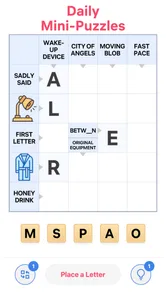
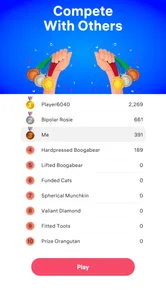
Analysis by Reviewed
I approached Crossword Challenge as a small daily word game rather than something meant to replace a full newspaper crossword. That distinction matters. Its appeal is the simple promise of opening a puzzle, settling into a quiet few minutes, and giving your memory and vocabulary some exercise without turning the session into a stressful competition. After spending time with it, I found the experience easiest to appreciate when I treated each puzzle as a short mental reset instead of a serious test of expertise.
It is a free word game from NOCTURNAL, rated for Everyone, and it runs on Android devices using version 8.0 or later. The game has reached over 500 thousand installs and holds an average rating of 4.6 from around 11 thousand ratings, which suggests that its straightforward format has found a sizeable audience. There are optional in-app purchases ranging from $0.99 to $99.99 per item, so I would still check the purchase flow carefully if a child is using the device.
Where the experience can become confusing
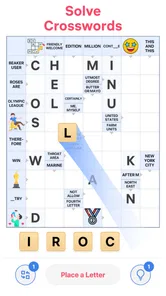
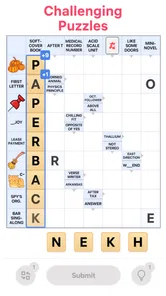
The first thing I noticed is that a crossword game can feel obvious in theory but less obvious in practice. You see a grid, clues, and empty spaces, yet the right first move is not always clear. A new player may begin with a difficult clue, get stuck immediately, and assume the whole puzzle is beyond reach. I had better results by scanning for the shortest, most familiar clues first and using those answers to create crossing letters.
That approach is more important here than trying to solve the grid in a strict top-to-bottom order. A crossword is a network of clues, so one confident answer can make several uncertain clues easier. When I reached a word that seemed to fit but did not help the surrounding entries, I treated that as a warning rather than forcing it. A plausible answer is not necessarily the correct one, especially when a clue allows more than one everyday interpretation.
Another common point of friction is the difference between knowing an answer and entering it correctly. A missed letter, an extra tap, or a partially completed word can make later clues appear impossible. Before abandoning a puzzle, I found it useful to reread the clue and inspect the crossing entries. The mistake is often local, not evidence that the entire grid is wrong.
Players who expect a large collection of specialized crossword tools may also need to adjust their expectations. This is best approached as an accessible mobile word game. It suits people who want a relaxed puzzle in short sessions, while dedicated crossword fans may prefer a publication-based app with a recognizable editorial style, larger themed puzzles, or deeper solving controls.
Small habits that make the first session smoother
I recommend beginning with a calm, low-distraction session rather than testing the game while multitasking. Crossword solving depends on holding several possible answers in your head. If you are switching between messages, music controls, and the puzzle, an ordinary clue can feel harder than it really is.
More From Our News Desk

 Gmail
GmailGmail in a Busy Inbox: Who Benefits Most?
From first account to crowded workday, Gmail earns its place through dependable search and flexible sorting—but its best fit depends on how much inbox maintenance you can tolerate.

 Prime Video
Switching to Prime Video: What Changes in Your Viewing Routine
Prime Video can make a compelling second home for streaming, but switching means learning a different catalog, rental layer, and route from browsing to playback.

 Universal TV Remote Control
Universal TV Remote Control Works Best as a Reliable Backup
A phone remote earns its place through quick setup and reliable habits. Here is how to get more from Universal TV Remote Control—and where its limits show.

 Weather - By Xiaomi
Weather by Xiaomi Review: Clear at a Glance, Less Clear Up Close
Xiaomi’s weather app makes everyday forecasts quick to scan, but its calm surface can leave useful details and recovery paths harder to find than they should be.

 X
XX Under Pressure: Can It Recover When Posting Goes Wrong?
A resilience-focused review of X, examining setup, mistaken posts, interruptions, weak connections, and the gaps that matter when recovery needs to be dependable.

 Clash of Clans
Clash of Clans Is Won Between the Battles
Its raids are quick; its community is a long-term project of coordination, teaching, rivalry, and shared responsibility—with all the friction that entails.
Latest News



A useful routine is to make one pass for certainty, one pass for possibilities, and one pass for correction. On the first pass, fill only answers you can defend immediately. On the second, use the letters already in place to narrow down harder clues. On the third, revisit entries that create awkward crossings. This prevents a single guess from controlling the whole puzzle.
The most effective beginner tactic is to use crossings as evidence, not decoration. If an answer works by itself but produces strange letter combinations around it, pause before accepting it. That habit saves time and also turns the game into a more satisfying vocabulary exercise.
Setup checks before blaming the puzzle
Because Crossword Challenge is free to install, the basic decision is easy: it costs nothing to try, but the presence of optional purchases means I would take a moment to understand what is being offered on the device before handing it to someone else. This is especially sensible for family use, even though the content rating is Everyone.
The technical starting point is equally simple. The game requires Android 8.0 or later, and its current version is 330. If installation or updating becomes difficult, I would first check the phone's Android version and available storage, then confirm that the device is using the official app store account intended for the download. Those are ordinary checks, but they resolve many apparent app problems before more complicated troubleshooting is needed.
After installing, I would open the game once while connected to a stable network and let the initial screen finish loading. I would also avoid immediately switching apps, locking the screen, or pressing several controls at once. A first launch that has not completed can leave a user unsure whether a tap worked, especially on an older phone.
If the game opens but a puzzle does not respond, I would close it normally and reopen it before changing anything else. On Android, a temporary background conflict can make an otherwise functioning app appear frozen. Restarting the device is a reasonable next step if the problem continues across other apps as well.
It is also worth separating installation trouble from gameplay trouble. If the game cannot be downloaded, the issue may involve the store account, network, device compatibility, or storage. If it installs but only one screen behaves strangely, the cause is more likely to be a temporary app state. Keeping those situations separate makes troubleshooting faster and avoids unnecessary changes.
What I would check before a longer solving session
Confirm that the phone meets the Android 8.0 minimum and has enough free storage for an update.
Open the game on a reliable connection before starting a puzzle that you expect to resume later.
Make sure the screen responds normally in another app, which helps distinguish a device issue from a game issue.
Review purchase controls if the device is shared with children or other family members.
These checks are deliberately ordinary. I would not install unofficial tools, alter system settings, or follow aggressive “fixes” just to solve a minor loading delay. For a lightweight word game, simple steps are usually the sensible first response.
Recovering a session without losing your rhythm
One of the most frustrating crossword moments is returning to a puzzle and no longer feeling oriented. Even when the grid is intact, you may forget which clues were uncertain and which answers were solid. I found it helpful to leave a mental marker before stopping: remember the last clue being considered, note the suspicious entry, and identify one easy place to restart.
If the game closes unexpectedly, I would reopen it and look for the same puzzle before attempting anything drastic. Avoid repeatedly tapping the grid while the screen is loading. If the puzzle returns, check a few previously solved crossings before continuing. That confirms whether the visible state is consistent and gives you a reliable starting point.
If progress appears missing, I would first check whether I opened the same game state and account context as before. Shared devices can make this surprisingly confusing. I would also avoid uninstalling immediately, because removing an app can affect locally stored progress. A better sequence is to restart the app, restart the phone, and only then consider more advanced support options available through the normal store or developer channels.
There is a solving lesson here too: do not build an entire puzzle around one uncertain word. When I had doubts, I left the surrounding clues open and worked elsewhere. That made recovery easier because one questionable answer did not contaminate every crossing. It also reduced the temptation to use a hint or purchase simply because the grid had become tangled.
For longer sessions, I prefer solving in stages. I fill the obvious entries, stop when concentration drops, and return later with fresh eyes. A short break often reveals that a clue was being interpreted too narrowly. This is one of the game's better everyday uses: it can occupy a short pause without demanding that I finish everything in one sitting.
When a wrong answer looks like a technical fault
Crossword clues often rely on grammar, tense, singular and plural forms, or a particular meaning of a familiar word. If an answer seems rejected, I first check whether the clue expects a different form rather than assuming the input is broken. I also inspect the number of spaces and the crossing letters. A word that feels right may simply be too long, too short, or grammatically mismatched.
Typing or tapping errors are another possibility. On a small screen, it is easy to select the wrong square or enter a letter in a neighboring position. I slow down and verify the active cell before making a correction. This sounds basic, but it prevents a great deal of unnecessary frustration.
When several unrelated parts of the game stop responding, I treat that differently from one stubborn clue. I close and reopen the app, test the phone's touch response elsewhere, and check whether the device itself is under unusual strain. If other apps show the same behavior, the crossword is probably not the cause.
When the app is not the cause
A mobile game can be blamed for problems that actually come from the phone, connection, or store environment. If other applications are also slow, the device may need a restart or may be low on free space. If only downloads fail, I would look at the network and store account before changing the game itself.
Connection quality can matter during opening or updating even though the core activity is a crossword. A weak signal may make a screen appear stalled, particularly when the app is trying to complete a background step. I would move to a more stable connection, wait briefly, and try again rather than repeatedly pressing the same button.
Battery-saving restrictions can also interrupt apps on some phones. I would not change those settings automatically, but if the game closes whenever the screen is locked or the device becomes idle, checking the phone's general battery behavior may be worthwhile. The important point is to change one thing at a time so you know what actually helped.
Storage is another overlooked cause. An app may already be installed yet fail to update cleanly when the phone is nearly full. Removing unused downloads or clearing ordinary space can be safer than deleting the game and risking local progress. I would make sure I understand what will be removed before clearing any app data.
Finally, purchase prompts should not be confused with a technical error. Since the game is free but includes optional items, a player may encounter an offer during normal use. If you do not want to buy anything, stop at that screen and review the device's purchase protections. The safest approach is to decide in advance whether spending is allowed, rather than making that decision while stuck on a difficult clue.
Who gets the most from this word game
I think Crossword Challenge is a good fit for casual players, families looking for an accessible word activity, and anyone who enjoys short bursts of concentration. Its Everyone rating makes it approachable, while the crossword format gives the session more substance than a purely reflex-based game. It can work well during a coffee break, on a quiet commute, or at the end of the day when I want something engaging but not loud.
It is also useful for players who like gradual improvement. Instead of measuring success only by speed, I can pay attention to clue patterns, spelling, and how quickly crossings reveal an answer. That makes each session a small vocabulary workout. The game is particularly comfortable for someone who finds large, newspaper-style crosswords intimidating.
I would be more cautious about recommending it to expert solvers who specifically want advanced editorial construction, elaborate themes, competitive leaderboards, or a strong publication identity. Those players may get more value from a specialized crossword service built around larger puzzles and detailed statistics. I would also skip it if your main goal is a story-driven game, visual action, or a social multiplayer experience; this is a focused solo word activity.
How it compares with familiar crossword alternatives
Compared with a printed crossword, the mobile format is more convenient because the puzzle is always close at hand and mistakes do not require an eraser. The trade-off is that a phone screen can feel cramped, especially on smaller devices, and the tactile satisfaction of paper is missing. I prefer the app for spontaneous sessions and paper when I want a slower, more deliberate weekend solve.
Compared with broad brain-training collections, this game has a narrower identity. That focus is a strength if you genuinely want crosswords rather than a rotating set of number, memory, and reaction exercises. The weakness is variety: someone who wants several puzzle types in one application may find a general brain-training app more flexible.
Compared with premium crossword subscriptions, the free entry point is attractive for casual use. A subscription-based alternative may offer more carefully curated puzzles, archives, creator variety, or detailed solving records, depending on the service. Crossword Challenge makes more sense when you want an uncomplicated place to start without committing to a recurring plan, while a serious daily solver may prefer the depth of a paid crossword library.
The optional purchases are part of that comparison. I would not judge the game solely by having them, but I would pay attention to how often they appear in my own routine and whether they improve the experience enough to justify spending. For me, the best value comes from solving patiently and treating help as a last resort, not as the default way to finish a grid.
My practical verdict after using it
Crossword Challenge succeeds because it keeps the central activity easy to understand: read a clue, enter a word, and use crossings to move forward. The developer, NOCTURNAL, has positioned it as a free, accessible word game rather than an intimidating specialist tool, and that is where I think it works best. The strong average rating and substantial install base also make it feel like a well-established choice for this kind of casual play.
My main advice is to start slowly, verify the basics on your device, and distinguish a genuinely frozen screen from a clue that simply needs another interpretation. Use easy entries to build a framework, revisit doubtful words, and take breaks instead of forcing a solution. Those habits make the game more relaxing and reduce the temptation to react to every obstacle as if it were a software problem.
I would recommend it to a friend who wants a free crossword experience for short, quiet sessions and does not need a large professional puzzle archive. I would not present it as the best option for advanced solvers seeking deep customization or publication-level variety. Its real strength is approachable, low-pressure word practice, provided you are comfortable with the limits of a focused mobile game and remain mindful of optional purchases.
For me, that makes it worth trying on a compatible Android phone. Give it a few sessions rather than judging it after one difficult grid. If the clue style suits you, it can become a pleasant daily habit; if you want broader puzzle choices or a more serious crossword ecosystem, the usual premium alternatives will probably be a better long-term match.
Crossword Challenge Frequently Asked Questions
How much storage space does Crossword Challenge need?
Crossword Challenge is a word game, so its core appeal is solving clues rather than managing a large collection of media or complex controls. The amount of storage required can vary with the installed version and updates. Before downloading, check the space shown by your device’s app store and make sure there is room for the installation and future updates.
Which devices can run Crossword Challenge?
Crossword Challenge is available for Android devices running Android 8.0 or later. Checking your device’s operating-system version before downloading is a simple way to avoid compatibility problems. The game is a crossword-style word puzzle, so it is best suited to a device on which you can comfortably read clues and enter answers.
What is Crossword Challenge, and how does the game work?
Crossword Challenge is a word puzzle game centered on solving crossword-style grids by entering answers based on provided clues. After installing it, players can usually begin with simpler puzzles and progress toward more demanding challenges. The game is designed for short sessions or longer relaxing play, making it suitable for users who enjoy vocabulary, spelling, and general-knowledge puzzles.
Is Crossword Challenge free to download and play?
Crossword Challenge is free to download, although optional in-app purchases are available, with prices ranging from $0.99 to $99.99 per item. The game’s free download makes it easy to try, but players should review purchase options before confirming any transaction, especially if children use the device. The game may suit users who want a no-cost start while keeping optional spending in mind.
Does Crossword Challenge require an internet connection?
An internet connection may be needed for the first download, advertisements, account-related functions, updates, or synchronization. However, many crossword puzzles can often be played offline once they have been loaded on the device. Offline availability can vary between versions, so users who want to play while traveling should test the game without Wi-Fi or mobile data before relying on it.
Pros
- Large variety of puzzles keeps the game fresh over time.
- Simple controls make it easy to play on phones and tablets.
- Helpful hints can assist when you get stuck on difficult clues.
- Suitable for short sessions during commutes or breaks.
- Improves vocabulary while providing relaxing entertainment.
Cons
- Some puzzles may feel repetitive for experienced crossword players.
- Hints or extra features may be limited without in-app purchases.
- Difficulty can vary noticeably between different crossword sets.
- Requires careful reading
- which may feel slow for casual players.
- Ads may interrupt gameplay
- depending on the version installed.











