Cribbage Classic - Card Game
- 304.00
- 4.8
- Installs
- 100.00K
- Price
- Free
Screenshots


Analysis by Reviewed
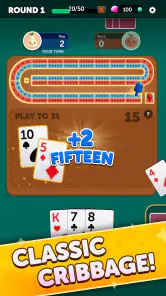
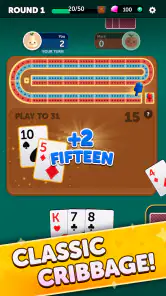
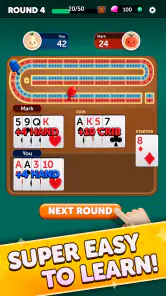
I picked up Cribbage Classic expecting a straightforward card game, and that is exactly where its appeal lies. It focuses on the traditional cribbage experience rather than trying to turn a familiar tabletop game into something overloaded with extra systems. After spending time with it, I see it as a convenient choice for players who already know the basics, people learning the scoring structure, and anyone who wants a short card-game session without preparing a physical board.
The game comes from FunCraft Games and sits in the card category. It is free to install, with optional in-app purchases ranging from $0.49 to $49.99 per item. Its Everyone age rating makes it suitable for a broad audience, although younger players may still need help understanding cribbage scoring. The store shows a 4.8 average from around 5.6 thousand ratings, along with more than 100 thousand installs, so it has clearly found an audience among people looking for a digital version of this classic.
Getting started without the usual cribbage confusion
The first obstacle is not really the app itself; it is cribbage. If you have never played, the combination of pegging, counting hands, and scoring the crib can feel much less intuitive than the card play suggests. A new player may understand that cards are being played in sequence, yet still wonder why a hand earns points for one combination while another apparently similar hand does not.
I recommend treating the first few games as practice rather than trying to play perfectly from the beginning. Keep a physical note nearby, or use a simple cribbage scoring reference while you learn. The most useful early habit is to separate the game into its stages in your head: choosing cards for the crib, playing cards during pegging, and counting the hands afterward. Confusing those stages is more likely to make the game feel difficult than the app’s interface itself.
Before settling into a longer session, I would also check that the game is compatible with your device. The listed minimum operating system is Android 7.0, and the current version is 1.2.25987. If the game does not install or behaves strangely during setup, checking the operating-system requirement and making sure there is enough free storage are sensible first steps. Those checks are simple, but they prevent a surprising amount of wasted troubleshooting.
Because the game is free, it is easy to try without committing money at the outset. That makes it a reasonable option for someone deciding whether digital cribbage suits them. Still, I would pay attention to any purchase prompt and keep the free starting experience separate from optional spending. The presence of in-app purchases does not make the game unsuitable, but it is worth remembering if you are installing it for a child or on a shared device.
What feels natural once a game is underway
The strongest part of the experience is the basic rhythm of cribbage. You make a decision with the cards in your hand, play through the pegging phase, and then evaluate the resulting hands. That rhythm gives even a short session a satisfying sense of progress. I like that the game does not need a large time commitment: it works when I have enough attention for a complete match, but not enough time for a lengthy strategy game.
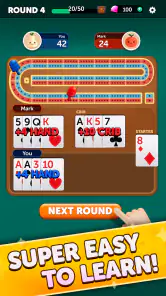
The digital format also removes the fiddly parts of a physical game. There is no need to keep track of a peg, recalculate a hand repeatedly, or wonder whether a scoring combination was counted correctly. For experienced players, that makes the game convenient. For beginners, it can be helpful because the app handles the arithmetic while the player concentrates on learning why points are awarded.
That convenience has a trade-off. When a physical player moves pegs and counts cards by hand, the scoring process gradually becomes familiar. A digital game can make it tempting to accept the result without understanding it. My advice is to pause after an unfamiliar score and work out the combination yourself. Even if the app gives you the answer, learning the reasoning is what turns a few casual rounds into real cribbage skill.
One particularly useful workflow is to decide on a personal goal before starting. I might focus on improving my card choices for the crib in one session, then pay attention to pegging decisions in the next. Without a goal, it is easy to play several games while repeating the same mistakes. With one, the app becomes a small practice tool rather than just a way to pass time.
Where players may get stuck during play
The most common point of friction is likely to be interpretation. Cribbage rewards decisions that are not always obvious from the cards in front of you. A hand with a high immediate score may be less attractive if the cards you discard give the crib too much potential value. Likewise, a pegging move that gains points now may create a better opportunity for the other side later.
New players can also become frustrated when a result seems different from what they expected. In that situation, I would first retrace the stage of play rather than assuming something went wrong. Was the combination part of the hand count, the crib, or the pegging sequence? Were all cards included in the count? Did a run or pair form in the order required during play? These questions often explain the result faster than restarting the game.
If a card does not appear to respond, I would try the least disruptive checks first: tap again carefully, confirm that the intended card is selected, and make sure the game has not been interrupted by another system window. Closing and reopening the app is a reasonable next step if the screen remains unresponsive. I would avoid repeatedly tapping in frustration, since that can make it harder to tell whether the problem is a delayed response or an accidental selection.
Another practical issue is attention. Cribbage is simple to operate, but it is not completely passive. If you are interrupted while choosing discards or during pegging, you may return without remembering which stage you were in. For that reason, it is better suited to a quiet break than to a situation where you expect constant interruptions. A physical deck has the same limitation, but a digital game may move along more quickly and leave less room to reconstruct what happened.
Setup checks that are worth doing before blaming the game
If installation fails, I would begin with the basics: confirm that the device meets Android 7.0 or later, check the available storage, and make sure the app-store account is functioning normally. If the download pauses, switching between a reliable Wi-Fi connection and mobile data can help identify whether the issue is connectivity rather than the game. I would also avoid starting several downloads at once while trying to install it.
If the app opens but behaves poorly, restarting the device is still a useful first check. It clears temporary system pressure without changing the game itself. If the problem continues, checking whether the app has an available update is sensible, especially because the current version is identified as 1.2.25987. I would make changes one at a time so that it remains clear which step helped.
For a shared family tablet, I would also check who is using the device and whether another person has left the game open in the background. A card game can appear frozen when the real issue is that the device is busy, the screen has been locked, or another app is covering part of the display. These are ordinary device conditions, but they can look like an app failure at first glance.
Purchase-related friction deserves separate attention. Since the game is free but offers optional items priced from $0.49 to $49.99, I would review the device’s purchase controls before handing it to a child. If a payment prompt appears unexpectedly, cancel it and check the account settings rather than assuming that continuing is required to play. Keeping that boundary clear makes the free-to-try model much easier to manage.
Recovering a session when something goes wrong
When a game is interrupted, I would first reopen it normally and see whether the current session returns to a usable state. If the screen is still stuck, force-closing and relaunching the app is a reasonable recovery step. I would not immediately uninstall it, because that is a more disruptive action and may remove local progress depending on how the device handles app data.
If the problem appears only once, I would treat it as a temporary interruption and continue cautiously. If it happens repeatedly at the same point, note what was happening: selecting a card, moving through pegging, counting a hand, or responding to a purchase screen. That description is far more useful when seeking technical help than simply saying that the game does not work.
A useful recovery habit is to slow down after relaunching. Do not rapidly repeat the taps that seemed to cause the problem. Wait for the screen to settle, then make one deliberate selection. This is especially helpful on older devices, where a delayed visual response can make a player think the first tap failed and accidentally issue several commands.
If you are using the game as a learning aid, keep your own brief record of the hand that caused confusion. Write down the cards and the stage of play, then reconstruct the score away from the app. That approach helps distinguish a misunderstanding of cribbage rules from a genuine interface problem, and it gradually reduces dependence on automatic scoring.
When the app is not the real cause of the trouble
Not every disappointing session points to a technical defect. A weak internet connection may affect downloading or updates, but frustration during ordinary card play may simply come from an unlucky hand or a difficult decision. Cribbage contains enough chance that a sound choice will not always produce a satisfying result. I try to judge the game over several sessions rather than by one unfortunate deal.
Device performance can also shape the experience. If other apps are slow, the battery is extremely low, or the device is handling many tasks, Cribbage Classic may feel less responsive even though the underlying issue is broader. Testing the game after closing demanding apps and restarting the device gives a fairer picture.
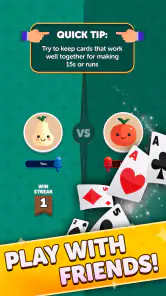
There is also a difference between wanting a digital scorekeeper and wanting a full social card table. This game is a good fit if your priority is a convenient solo cribbage session. It may be the wrong choice if your main goal is chatting with friends around a shared virtual table, teaching through face-to-face discussion, or handling your own deck and pegs. A physical board remains better for that social atmosphere, while a multiplayer-focused card app may be more appropriate for remote play.
Players who dislike automated scoring may also prefer a traditional deck. The app removes mistakes in arithmetic, but that is precisely what some enthusiasts enjoy doing themselves. On the other hand, anyone who finds manual counting tiring will probably see the automation as the main reason to use a digital version.
Who will get the most from this card game
I would recommend it to an experienced cribbage player who wants a quick game without carrying a board. It is also a sensible starting point for a curious beginner who is comfortable learning gradually and checking unfamiliar scoring patterns. The broad age rating makes it appropriate for family use, provided younger players receive some explanation of the rules and purchase controls are handled responsibly.
A realistic everyday use case is a quiet lunch break or a short evening pause. I can start a game, concentrate on a few decisions, and stop when the break ends without setting up cards across a table. Another good use is practice before playing with family: I can work on recognizing valuable combinations and thinking about discards, then bring that understanding to a physical game.
I would skip it if you want a deep campaign, a constantly changing collection system, or a highly social online experience. The appeal here is the card game itself. People who need extensive tutorials, accessibility options, or a particular multiplayer format should inspect the app on their device before making it their main cribbage platform. The free price lowers the risk of trying it, but it does not guarantee that its style will match every player.
My practical verdict after using it
The best reason to install Cribbage Classic is its focused, low-commitment approach to a traditional card game. It gives experienced players a convenient alternative to a physical board and gives beginners a manageable place to learn the flow of cribbage. The automatic handling of scoring is useful, especially when I want to play rather than calculate every detail manually.
My main caution is to avoid treating the app as a substitute for understanding the rules. If a score surprises you, investigate it. If a session feels unresponsive, check the device and the current app state before assuming the game is at fault. Those small habits make the experience smoother and turn the app into a more effective practice companion.
With its free entry point, Everyone rating, and support for devices running Android 7.0 or later, it is easy to see why Cribbage Classic appeals to a wide range of card players. FunCraft Games has kept the central idea clear: sit down, make the best decisions you can, and let the digital format handle the board work. I would recommend giving it a try if you want classic cribbage in a convenient form, while choosing a physical deck or a more social alternative if the shared table experience matters more than quick solo play.
Pros
- Clear scoring system helps newcomers learn cribbage quickly.
- Playable offline
- making it useful during travel or without internet.
- Adjustable difficulty offers a challenge for different skill levels.
- Quick matches fit well into short breaks or casual sessions.
- Automatic scoring reduces calculation mistakes during play.
Cons
- The interface feels dated compared with newer card-game apps.
- Limited visual customization may make long sessions feel repetitive.
- Ads can interrupt the experience unless removed through a purchase.
- Advanced players may find the AI predictable at higher familiarity.
- No strong social features for chatting or building a player community.
- Category
- Card
- Version
- 1.2.25987