Courtyard Zen: Quest
- 118.00
- 4.8
- Installs
- 10.00K
- Price
- Free

Screenshots

Analysis by Reviewed
Courtyard Zen: Quest is an unusual little puzzle game because it does more than offer a mahjong-style matching activity. It also works as a launcher with app search, giving the experience a practical side that most puzzle games simply do not have. I found that combination interesting: it is aimed at people who want a calm way to pause, but who may also appreciate reaching another app without leaving the same general environment.
My first impression was that this is best understood as a quiet utility with a game attached, rather than a large, feature-heavy puzzle adventure. The focus is on a relaxing rhythm, simple matching decisions, and an interface that can help you find apps. That makes it a very specific choice. If you want competitive leaderboards, a deep story, or a huge collection of game modes, this will probably feel too modest. If you prefer something gentle that can fill short breaks, its idea makes much more sense.
How the current experience feels in everyday use
The core appeal is the contrast between convenience and concentration. A launcher normally exists to get you somewhere else quickly, while a matching game asks you to slow down and look carefully. Courtyard Zen: Quest brings those two purposes together. I can imagine opening it when I want to tidy up my next action on the phone, then spending a few minutes on the mahjong-style activity instead of immediately jumping into a noisy social feed.
That dual role also changes how I judge it. I am not looking at it only as a traditional puzzle game. The app search element matters because it gives the product a reason to remain useful between sessions. At the same time, the game needs to be pleasant enough that it does not feel like decoration added to a launcher. In my experience, the concept works best when you treat the puzzle as a small mental reset rather than a full evening game.
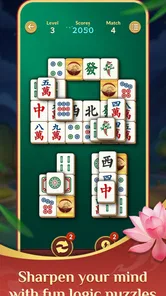
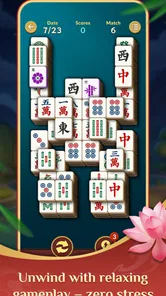
The matching activity uses the familiar visual language of mahjong-style puzzles: examine the arrangement, identify suitable matches, and think about the order in which you remove pieces. That structure is easy to understand even if you have never played a similar title. The real interest comes from avoiding careless moves. A pair that looks immediately available may not be the best choice if it leaves the remaining layout harder to read.
One useful habit is to pause before taking the first obvious match. I look for pairs that open more of the arrangement or reduce visual clutter, rather than simply removing whatever catches my eye. This is a small strategy, but it makes the activity feel more deliberate and helps prevent the game from becoming a repetitive tapping exercise.
The launcher side is particularly useful for someone who keeps many apps installed but does not enjoy searching through several home-screen pages. Instead of organizing every icon into folders, you can use the app-search function as a direct route. That does not replace a full system launcher for everyone, but it can be a lighter alternative for people who want their phone to feel less crowded.
More From Our News Desk

 Gmail
GmailGmail in a Busy Inbox: Who Benefits Most?
From first account to crowded workday, Gmail earns its place through dependable search and flexible sorting—but its best fit depends on how much inbox maintenance you can tolerate.

 Prime Video
Switching to Prime Video: What Changes in Your Viewing Routine
Prime Video can make a compelling second home for streaming, but switching means learning a different catalog, rental layer, and route from browsing to playback.

 Universal TV Remote Control
Universal TV Remote Control Works Best as a Reliable Backup
A phone remote earns its place through quick setup and reliable habits. Here is how to get more from Universal TV Remote Control—and where its limits show.

 Weather - By Xiaomi
Weather by Xiaomi Review: Clear at a Glance, Less Clear Up Close
Xiaomi’s weather app makes everyday forecasts quick to scan, but its calm surface can leave useful details and recovery paths harder to find than they should be.

 X
XX Under Pressure: Can It Recover When Posting Goes Wrong?
A resilience-focused review of X, examining setup, mistaken posts, interruptions, weak connections, and the gaps that matter when recovery needs to be dependable.

 Clash of Clans
Clash of Clans Is Won Between the Battles
Its raids are quick; its community is a long-term project of coordination, teaching, rivalry, and shared responsibility—with all the friction that entails.
Latest News



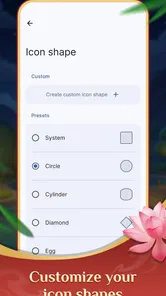
I would be careful about expecting a complete replacement for the default home experience. A dedicated launcher usually offers broader control over layouts, widgets, shortcuts, and visual customization. Courtyard Zen: Quest is more appealing when you want search and a calming activity in one place, not when you are trying to redesign every part of your phone.
A practical routine for short breaks
A realistic use case is a ten-minute pause between tasks. I might open the app after finishing a message, search for the next tool I need, and then stay for one puzzle session before returning to work. The important detail is that the game does not demand the same commitment as a long-form strategy title. Its appeal is strongest when you want a contained activity that can help separate one part of the day from another.
It could also suit someone who reaches for a phone automatically whenever there is a spare moment. The puzzle gives that habit a quieter direction than endlessly refreshing feeds. I would not call it a complete solution for screen-time management, but the slower matching format can encourage more intentional use than apps built around constant updates.
For a family tablet or a shared device, the launcher concept may also be convenient. App search can make it easier to find a particular tool without remembering where an icon was placed. However, the content rating is Teen, so I would not assume it is designed as a children’s game or treat that rating as a recommendation for younger users.
What the current version tells me about the product’s direction
The current version is 1.1.0, which suggests that the product has already moved beyond its earliest release build. I see that as a positive sign for a young concept: the developer, HomeTech & Data Solutions, LLC, has made at least one version step rather than leaving the initial package untouched. Still, a version number by itself does not prove how extensive the changes were, so I judge the present experience by what is actually useful now rather than by assuming a large transformation.
The game was released on Jul 24, 2026, and its current identity is already clear: it is not trying to compete solely with conventional mahjong games or solely with utility launchers. The combination is the main product decision. That makes future development especially important, because improvements need to support both sides without allowing one to overwhelm the other.
For someone installing it today, the practical benefit of the newer build is that the app represents an updated stage of the product rather than its first public shape. Existing users may notice a more settled experience when moving to the current version, but I would not expect the update alone to turn a compact puzzle into a deep progression game. The foundation remains intentionally simple.
The Android requirement is also approachable: the game runs on Android 8.0 and later. That makes it relevant to people using older compatible phones who do not want to replace a device merely to try a small puzzle. On a newer phone, I would still keep expectations realistic. Compatibility tells you whether the app can run; it does not guarantee that every device will make the launcher feel equally comfortable.
Because the game is free, it is easy to test without making a financial commitment. That matters here because the hybrid design will not appeal to everyone. I would install it, try the search flow, and play several sessions before deciding whether it deserves a regular place in my routine. The low entry barrier makes that decision straightforward.
How it compares with ordinary alternatives
Compared with a standard mahjong-style matching game, Courtyard Zen: Quest has a more practical reason to open it. You are not limited to puzzle time; the app-search function gives it a utility role. The trade-off is focus. A dedicated puzzle title may offer a richer sense of progression, more elaborate presentation, or a broader selection of modes, while this game’s identity is divided between relaxation and access.
Compared with a normal Android launcher, it offers something that most launchers do not: a built-in way to spend a quiet moment. The trade-off goes in the other direction. A conventional launcher is usually the better choice if your priority is detailed customization, fast access to system controls, or a carefully arranged home screen. I would choose Courtyard Zen: Quest for a calmer, simpler workflow, not for advanced phone management.
It also differs from quick arcade games. Arcade titles often reward speed, reflexes, or repeated attempts, whereas the mahjong-style format asks for observation and planning. That makes this a better fit for winding down than for raising your adrenaline. Players who need constant novelty may find the pace too restrained, while people who enjoy visual sorting and small decisions may appreciate the lack of pressure.
Small strategies that make the puzzle better
My first tip is to scan the whole arrangement before matching anything. The strongest move is not always the pair that is easiest to see. Look for pieces whose removal exposes several areas, because opening the board can be more valuable than clearing a convenient pair.
My second tip is to use the launcher element as part of a routine rather than treating it as a separate feature. For example, search for the app you need first, complete the task, and then return for a short puzzle break. This gives the product a natural beginning and ending instead of leaving the game open as an aimless time filler.
A third insight is that the hybrid design can reduce app-switching, but it may also create a small mental interruption. If you only want to launch another app as quickly as possible, any puzzle-oriented screen can feel like an unnecessary stop. I would therefore use it when I value a calmer transition, not when I am already late or need instant access.
Finally, pay attention to whether you enjoy the board-reading itself. The game’s appeal depends less on complex controls and more on the satisfaction of spotting relationships among pieces. If that visual process feels rewarding, the simple format can remain pleasant. If you need elaborate objectives to stay engaged, the same simplicity may become its main weakness.
Where the experience still feels limited
The clearest limitation is the narrow scope implied by the concept. A launcher and a relaxing matching activity can be charming, but neither side automatically provides the depth of a specialist alternative. Players looking for a substantial campaign, intense competition, or a large strategic system should look elsewhere.
The search function may also be less valuable to people who already have a carefully organized home screen. If every important app is one tap away, Courtyard Zen: Quest’s utility advantage becomes smaller. In that situation, the puzzle must carry the experience by itself, and some users may decide that a dedicated matching game offers more reason to return.
There is also a trade-off between calm design and urgency. The relaxed approach is welcome when I want to decompress, but it is not ideal when I want a fast challenge. This is not a flaw in execution so much as a question of fit. The app succeeds when its slower pace matches my mood and disappoints when I expect constant stimulation.
I would also avoid judging it by the standards of a full productivity tool. App search can make access easier, but it does not turn the game into a task manager, file organizer, or complete replacement for the phone’s built-in navigation. Its usefulness is focused and modest, which is precisely why it can feel approachable.
Who should try it, and who should skip it
I recommend it to casual puzzle players who like mahjong-style matching but want a slightly different setting. It is also worth trying if you want a free, low-pressure activity for breaks and would appreciate app search in the same environment. People with older compatible Android devices may find the Android 8.0 requirement convenient as well.
I would skip it if your main goal is a deep puzzle system with extensive progression, competitive features, or a large variety of challenges. I would also choose a conventional launcher instead if phone customization and speed matter more to you than a relaxing side activity. The product is most convincing for users who genuinely want both functions, even if neither is as extensive as a specialist alternative.
The audience response is encouraging: it holds a 4.8 average from around 453 ratings, with more than 100 written reviews and over 10K installs. Those figures suggest that the idea has found a receptive early audience, although they should be read as a snapshot of a relatively compact product rather than proof that it will suit every puzzle fan.
What I would watch as it evolves
The next stage should preserve the calm identity while making the two halves feel more connected. I would watch for improvements that make app search faster without distracting from the puzzle, as well as puzzle refinements that add interest without turning the experience into a noisy arcade product.
I would also pay attention to how the developer handles returning players. A simple matching activity can remain enjoyable for short sessions, but long-term appeal depends on whether there is enough variety in the layouts or enough freshness in the experience. I am not assuming particular additions; I simply think continued value will be the key test for future versions.
For existing users, the current build is best approached as a polished snapshot of a focused idea, not as a promise of a much larger game. For new users, the free price makes experimentation sensible. Install it when you want a gentle puzzle and a convenient search point, then decide based on your own routine rather than expecting it to replace every app in either category.
My final view is positive but specific. The strongest reason to choose Courtyard Zen: Quest is its peaceful combination of app access and thoughtful matching. I like that it gives a short break some structure without demanding a major commitment. Its limitations are equally clear: it is not the right tool for advanced launcher control or deep puzzle progression. If your ideal phone experience includes a quiet courtyard-like pause between everyday tasks, this free puzzle game is easy to recommend. If you want specialization and depth, a dedicated alternative will serve you better.
Courtyard Zen: Quest Frequently Asked Questions
What kind of game is Courtyard Zen: Quest?
Courtyard Zen: Quest is a puzzle game presented as a launcher with app search and a relaxing mahjong-style matching activity. That combination may appeal if you want a casual matching game alongside a way to find apps. Before downloading, consider whether you are comfortable with an app that brings these two functions together rather than offering only a standalone puzzle experience.
What is Courtyard Zen: Quest, and how does the gameplay work?
Courtyard Zen: Quest is a relaxing puzzle game centered on restoring and decorating peaceful courtyard environments. During my time with the game, progress mainly involved completing short challenges, solving matching or logic-based puzzles, and using earned rewards to improve the surroundings. The experience combines casual gameplay with a calm visual style, making it suitable for players who prefer gentle progression rather than fast action or competitive battles.
Is Courtyard Zen: Quest free to download and play?
Courtyard Zen: Quest is free to download. The published price is free, but players should check the app’s purchase controls before handing a device to a child. The game is approachable without spending money, although waiting periods or limited energy systems may encourage purchases. Before downloading, it is worth checking the store listing and your device’s purchase settings, especially if children may use the device.
Does Courtyard Zen: Quest require an internet connection?
An internet connection may be needed for features such as downloading updates, synchronizing progress, displaying advertisements, processing purchases, or accessing online events. Some basic gameplay may work temporarily while offline, but the full experience can depend on connectivity and may not save progress correctly until the game reconnects. If you plan to play while traveling, test the title in offline mode first rather than assuming every feature will remain available.
Is Courtyard Zen: Quest suitable for children and casual players?
The calm presentation and straightforward puzzle structure make Courtyard Zen: Quest accessible to many casual players, including those who enjoy low-pressure games. It is rated Teen, so parents should consider that age guidance before allowing children to play. Parents should review the store information and enable purchase restrictions. Some later challenges or resource systems may also require patience, even though the controls are easy to understand.
Pros
- Relaxing puzzles create a calm
- low-pressure gaming experience.
- Short levels make it easy to play during quick breaks.
- Simple controls are accessible for casual players.
- Zen-inspired visuals provide a pleasant
- uncluttered presentation.
- Gradual challenges help beginners learn the game comfortably.
Cons
- Some puzzles may feel repetitive after extended play sessions.
- Progress can seem slow for players seeking constant action.
- Limited gameplay variety may reduce long-term replay value.
- Certain solutions require patience rather than strategic depth.
- The tranquil pace may not appeal to fans of fast-paced games.