

Classic Words Plus
- 1.43K
- 4.5
- Installs
- 100.00K
- Price
- $9.90
Screenshots
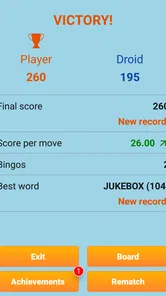
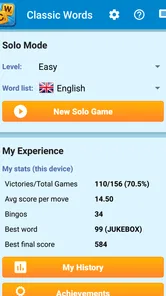


Analysis by Reviewed
My first impression of Classic Words Plus is that it knows exactly what it wants to be: a quiet, turn-based word game built around letters, a board, and the next decision. I like that it does not try to pull my attention toward a story or a stream of side activities. The experience is closer to sitting down with a familiar tabletop game than stepping into a new fictional world, and that simplicity can be a real relief on a phone.
A focused game for small pockets of time
The format makes sense when I have a few minutes to spare but still want something that asks me to think. I can start a game during a quiet break, consider a move without rushing, and return to the board when I have the attention for it. It is less convenient when I only have a moment between tasks: a meaningful turn takes more thought than tapping through a quick matching puzzle.
That distinction is useful when deciding what to install. A daily word challenge is often better if I want one compact puzzle with a clear endpoint. A word search is better when I want to scan and relax without planning several moves ahead. This game suits me when I want the letter placement and tactical choices to be the activity, not just a short warm-up.
The appeal of a plain setting
There is no elaborate world to learn or visual theme that changes the meaning of the board. The setting is essentially the game table itself. I find that coherence appealing: the presentation leaves room for me to focus on the words and the changing shape of the play area, rather than asking me to follow decorative action that has little to do with the choices I am making.
That restraint is not automatically a virtue for every player. If I am looking for characters, a sense of place, or visual surprises, the spare approach can feel impersonal. Here, the mood comes from concentration and the familiar tension of deciding whether a word is worth playing now. The game is at its best when that is enough to hold my interest.
Sound and the feel of each turn
The experience is not built around a soundtrack or dramatic audio cues; its rhythm comes from taking turns and thinking through the board. That keeps the session easy to approach in a quiet room or during a calm break, without making sound the main event. I would not choose it for audio spectacle, but I do appreciate a word game that lets the mental challenge remain in the foreground.
Because the turns invite deliberation, I find it helps to give myself a simple limit: look for a sensible play, check whether the letters might be more useful later, and then commit. Without that small discipline, a turn can become an extended search for the perfect move. The game’s thoughtful pace is satisfying when I want to puzzle things out, but it can feel slow when I am tired or hoping for a fast burst of stimulation.
More From Our News Desk

 Gmail
GmailGmail in a Busy Inbox: Who Benefits Most?
From first account to crowded workday, Gmail earns its place through dependable search and flexible sorting—but its best fit depends on how much inbox maintenance you can tolerate.

 Prime Video
Switching to Prime Video: What Changes in Your Viewing Routine
Prime Video can make a compelling second home for streaming, but switching means learning a different catalog, rental layer, and route from browsing to playback.

 Universal TV Remote Control
Universal TV Remote Control Works Best as a Reliable Backup
A phone remote earns its place through quick setup and reliable habits. Here is how to get more from Universal TV Remote Control—and where its limits show.

 Weather - By Xiaomi
Weather by Xiaomi Review: Clear at a Glance, Less Clear Up Close
Xiaomi’s weather app makes everyday forecasts quick to scan, but its calm surface can leave useful details and recovery paths harder to find than they should be.

 X
XX Under Pressure: Can It Recover When Posting Goes Wrong?
A resilience-focused review of X, examining setup, mistaken posts, interruptions, weak connections, and the gaps that matter when recovery needs to be dependable.

 Clash of Clans
Clash of Clans Is Won Between the Battles
Its raids are quick; its community is a long-term project of coordination, teaching, rivalry, and shared responsibility—with all the friction that entails.
Latest News



How the Board Rewards Attention
What makes this particular style of word game hold together is the link between vocabulary and placement. Knowing a word is only part of the decision; I also have to consider where it fits and what the move may leave open. That combination gives a familiar letter game a little more texture than simply spotting words on a screen, while keeping the basic rules easy to grasp.
A familiar board, a different kind of session
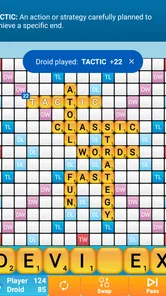
The gameplay is delightfully reminiscent of those endless Scrabble sessions with friends and family. The app allows you to play against the computer at varying difficulty levels, which is perfect for both beginners and seasoned wordsmiths. I started on the moderate level, and let me tell you, it was no walk in the park! The AI is smart and keeps you on your toes, making every win feel like a genuine triumph.
That solo format makes this a useful choice when nobody else is around for a game. I can picture opening it during a quiet wait or over a cup of tea, playing a few turns without needing to arrange a match. If you usually want live competition, though, a multiplayer-focused word game may suit you better; the appeal here is having a computer opponent ready when you are.
Making the dictionary work for you
One feature that I found particularly useful is the built-in dictionary. It's a handy tool for expanding your vocabulary and ensuring that you're not just making up words on the fly. Plus, the app keeps track of your progress, so you can see how you're improving over time.
The dictionary is most helpful when I treat it as a learning aid rather than a shortcut: check an unfamiliar word after a move, then try to remember it for a later game. That small habit turns a close match into a low-pressure vocabulary exercise. It also helps explain why a move is worth considering, though looking up every possibility can interrupt the flow. I prefer to use it selectively, especially when a word feels plausible but I am unsure.
Small decisions that change the session
A useful way to get more from a game is to separate word knowledge from board judgment. When I spot a playable word, I try not to assume it is automatically the best move. I look at the available space, consider whether using those letters leaves a useful combination for the next turn, and weigh a modest score against the chance to open a better opportunity later. That is a practical habit for anyone who tends to play the first word they notice.
The computer opponent also makes the difficulty choice part of the experience rather than a one-time setup detail. A newer player can begin at a comfortable level and focus on learning how the board works; a more practiced player can choose a sterner contest. I would adjust the challenge based on what I want from that session: a relaxed vocabulary workout is different from a game where I want every move tested.
There is a trade-off in learning from the dictionary. Looking up words can broaden what I recognize, but using it constantly turns a game into a sequence of interruptions and can make the result feel less like my own word knowledge. I get more value by checking a few uncertain words and remembering them, rather than treating the reference as a way to inspect every possibility before acting.
Design, sound, and the pace of play
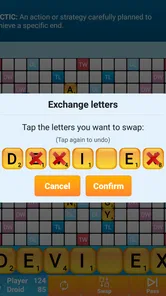
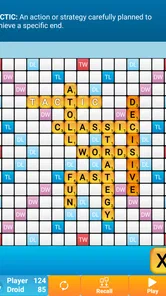
In terms of design, Classic Words Plus sticks to the basics. The layout is clean and user-friendly, making it easy to jump into a game without any fuss. The lack of flashy graphics might be a downside for those who prefer more visually stimulating experiences, but for purists, it’s a dream. The minimalist design ensures that the focus remains solely on your word-building skills.
That restrained presentation gives the game a quiet, tabletop-like mood: the board and letters do the talking, rather than a busy setting or dramatic visual effects. I find that fits a turn-based word puzzle, where the interesting moment is weighing a safe play against a riskier one. If you want a game built around vivid scenery, animated characters, or a strong narrative, this deliberately plain approach may feel too bare.
The rhythm is similarly suited to short, thoughtful sessions. I can pause between decisions, scan the letters I have, and consider whether to play for a modest score or hold out for a better opening. One practical tip is not to chase a clever word just because it is available: keeping useful letters for a later turn can be more satisfying than making the biggest-looking move immediately. The trade-off is that a careful game can feel slow if you prefer quick rounds and constant rewards.
Where it fits among word games
Its closest comparison is the familiar board-game format, not a word search or a clue-solving app. The computer opponent gives me a ready-made contest, while the dictionary offers a way to check unfamiliar vocabulary during play. Those elements make it more of a solo strategy routine than a social hangout or a collection of bite-sized puzzles.
That makes the choice fairly clear. I would pick this when I want a traditional board and room to think through a sequence of moves. I would choose a multiplayer word game when the people across the table—or on the other end of a match—are the main attraction. And if I want a quick challenge with a definite finish, a daily puzzle is the better fit. The advantage here is not that it replaces every kind of word game; it gives the classic format a convenient solo option.
Who will enjoy this kind of word game?
If you're anything like me, you'll find yourself coming back to this game for its addictive nature. There's something incredibly satisfying about seeing your vocabulary in action and outsmarting the AI. It’s a great way to kill time and keep your brain engaged, whether you're on your daily commute or relaxing at home.
It is a particularly good fit for players who enjoy spelling, strategy, and the familiar letter-board format, whether they are easing into word games or already comfortable planning a few turns ahead. For a realistic everyday use, I would open it during a train ride, play while seated, and use the dictionary only when a word genuinely stumps me. I would not recommend that routine while walking or when I need to pay attention to a conversation: the game rewards concentration, and checking each option can make a quick break stretch longer than expected.
Compared with word puzzles that ask you to find a hidden word or solve a daily clue, this asks for more ongoing decisions: which letters to use, when to take a smaller score, and how to respond to the computer. That gives it more of a board-game feel, but it is less suited to someone who wants a puzzle with one neat answer and a fast finish. The difficulty choices also make it approachable, although players who want human banter and the unpredictability of friends across the table should look for a social alternative.
What to consider before choosing it
For a beginner, the most approachable way in is to treat early games as practice with the board rather than as a test of vocabulary. I would start at a comfortable difficulty, make moves I understand, and use the dictionary when a word is genuinely unfamiliar. That creates a gentler learning curve than trying to optimize every turn immediately.
For a more experienced player, the AI offers a convenient opponent when arranging a human game is impractical. Still, a computer contest is not the same social experience as playing with friends. If conversation, bluffing, or the pleasure of a shared match is what keeps you engaged, the solo setup may not satisfy that particular need, even if the word and board decisions are appealing.
It is also worth being honest about attention. A match can fit into a quiet commute or a relaxed evening, but the game does not become a hands-free pastime just because it is on a phone. I would avoid opening it when I need to watch my surroundings or keep up with someone speaking; the thinking is the point, and it deserves a little focus.
A considered recommendation
So, if you're in the market for a word game that sticks to the basics but delivers on quality, Classic Words Plus might just be your next download. It's a refreshing throwback to a simpler time in mobile gaming, and I, for one, am here for it.
Lulo Apps has kept the idea focused, and the game’s 4.5 average from around 9,300 ratings suggests it has found an audience among people who like this style of play. It has passed 100,000 installs, carries an Everyone age rating, and costs $4.99. It was released on July 17, 2012, and version 2.9.2-Plus requires Android 6.0 or later. Those details make it worth checking that your device meets the requirement and that you actually want a paid, straightforward word game rather than a free alternative with a different format.
My main reservation is also the source of its charm: the presentation stays modest, and the appeal depends on enjoying the board-game routine itself. If you want elaborate visuals, a story, or social play at the center, I would choose something else. But if your ideal word game is a calm solo contest where vocabulary and decisions matter more than spectacle, this is an easy one to recommend.
The mood in the end
The game’s strongest atmosphere comes from what it leaves out. With no elaborate setting competing for attention, I can settle into the board and let the pressure build from the letters and the next move. That is a coherent mood for this format: quiet, thoughtful, and a little competitive without needing spectacle.
I would recommend it to someone who wants a dependable solo word contest, likes learning vocabulary in context, and is happy to spend a little time weighing choices. I would steer away anyone who needs fast action, rich audiovisual presentation, or human opponents as the main draw. For me, its modest style works because the mechanics carry the session; if that kind of concentration sounds pleasant, the game earns a place on the phone.
Classic Words Plus Frequently Asked Questions
Is Classic Words Plus suitable for a quick game or longer sessions?
It works well for either style of play. Since Classic Words Plus is a solo word game, you can focus on a round whenever you have time, without needing to coordinate with another player. Its word-building and scoring make it engaging for longer sessions too, especially if you enjoy thinking through possible moves and improving your vocabulary as you play.
What devices can run Classic Words Plus?
Classic Words Plus is available for Android and iOS. On Android, the minimum operating system requirement is Android 6.0, so check your device’s software version before downloading. The game is a paid app, priced at $4.99, and is rated Everyone, making it suitable for a broad range of players looking for a word game.
What is Classic Words Plus?
Classic Words Plus is a word puzzle game available on Android and iOS that allows players to challenge themselves with word-building gameplay. It is designed for solo play, making it a perfect companion for those who enjoy word games like Scrabble. The game offers various levels of difficulty, catering to both beginners and experienced word game enthusiasts.
Is Classic Words Plus available offline?
Yes, Classic Words Plus can be played offline. This feature makes it convenient for users who do not have constant access to the internet or prefer to play without interruptions. You can enjoy building your vocabulary and strategizing your moves without needing to worry about an internet connection.
Are there any in-app purchases in Classic Words Plus?
Classic Words Plus is a paid app with a one-time purchase, which unlocks the full game without any additional in-app purchases. This is appealing for users who prefer a complete game experience without the pressure of microtransactions or ongoing costs.
Pros
- Challenging AI opponents improve skills.
- Offline mode available for no interruptions.
- Customizable difficulty for all levels.
- Extensive word database enhances learning.
- No ads for uninterrupted gameplay.
Cons
- Limited social interaction features.
- Occasional glitches with word recognition.
- Graphics are simple and outdated.
- No multiplayer online mode available.
- Requires purchase for full features.











