

Bookworm Classic - Word Hunt
- 2.63K
- 4.7
- Installs
- 500.00K
- Price
- Free
Screenshots
Analysis by Reviewed
I picked up Bookworm Classic during a quiet moment when I wanted a word game that felt more deliberate than a quick guessing challenge. Its basic idea is easy to understand: build words from letters on the board, score them, and keep looking for better combinations. What surprised me was how quickly a simple round can become a small exercise in planning. I may see an obvious short word, but using those letters immediately can leave an awkward board for the next turn.
This is a free word game from Layton, listed for everyone and available on Android devices running Android 7.0 or later. It has reached over 500 thousand installs, with a 4.7 average from around 8.6 thousand ratings. Those figures match my general impression: this is a familiar, approachable puzzle rather than an experimental game that demands a long tutorial or a particular gaming background.
How it works when several people share the device
The strongest household use case is informal pass-and-play. One person can take a turn, hand over the phone, and let somebody else search the same board with a different vocabulary and strategy. That makes it suitable for a short break at home, a waiting room, or a relaxed evening when people want something quieter than a competitive action game.
I would not treat it as a complete multiplayer experience, though. The appeal of sharing comes from the people around the device, not from a feature I would rely on for synchronized online play. If everyone in the household wants to play at the same time on separate phones, a dedicated multiplayer word game may be a better fit. Here, the natural rhythm is one player thinking while another watches, comments, or takes the next turn.
That shared format creates an interesting difference between playing alone and playing with others. Alone, I can pause mentally and test several possible words before committing. With another person beside me, the game becomes more conversational. We might notice different word shapes, debate whether a longer word is worth using, or spot an opportunity that neither of us saw at first. It is a small but useful way to make a solo puzzle feel social without turning it into a noisy party game.
For a household with children and adults, the board can also expose a difference in vocabulary rather than raw gaming skill. An adult may recognize obscure words, while a younger player may be better at scanning the available letters quickly. I like that this gives both players a reason to contribute. The main caution is that the game should remain a shared puzzle, not a vocabulary test where one person controls every move.
Why the word board rewards patience
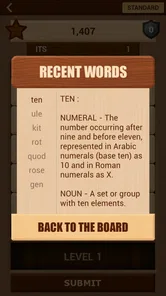
The store summary points to more than 347 thousand words being available, and that scale helps explain why the game can remain interesting after the basic rules become familiar. I do not need to memorize a dictionary to enjoy it, but I do notice that the best move is not always the word I recognize first. Looking across neighboring letters, considering the shape of the remaining board, and resisting the urge to spend useful letters immediately are the habits that make the game more satisfying.
More From Our News Desk

 Gmail
GmailGmail in a Busy Inbox: Who Benefits Most?
From first account to crowded workday, Gmail earns its place through dependable search and flexible sorting—but its best fit depends on how much inbox maintenance you can tolerate.

 Prime Video
Switching to Prime Video: What Changes in Your Viewing Routine
Prime Video can make a compelling second home for streaming, but switching means learning a different catalog, rental layer, and route from browsing to playback.

 Universal TV Remote Control
Universal TV Remote Control Works Best as a Reliable Backup
A phone remote earns its place through quick setup and reliable habits. Here is how to get more from Universal TV Remote Control—and where its limits show.

 Weather - By Xiaomi
Weather by Xiaomi Review: Clear at a Glance, Less Clear Up Close
Xiaomi’s weather app makes everyday forecasts quick to scan, but its calm surface can leave useful details and recovery paths harder to find than they should be.

 X
XX Under Pressure: Can It Recover When Posting Goes Wrong?
A resilience-focused review of X, examining setup, mistaken posts, interruptions, weak connections, and the gaps that matter when recovery needs to be dependable.

 Clash of Clans
Clash of Clans Is Won Between the Battles
Its raids are quick; its community is a long-term project of coordination, teaching, rivalry, and shared responsibility—with all the friction that entails.
Latest News



My practical tip is to scan in two passes. First, look for obvious short words so you understand the board. Then stop and search for longer paths or combinations that use less convenient letters. This prevents the first acceptable word from deciding the whole turn. It is especially helpful when sharing the device, because one player can perform the first scan and the next player can challenge it with a fresh perspective.
Another useful habit is to avoid judging a move only by its length. A longer word feels impressive, but it may not be the best choice if it consumes letters that could support several later words. In a household setting, explaining that trade-off to a child can turn a casual round into a gentle lesson in planning without making the activity feel like homework.
Setting expectations before handing over the phone
Because the game is free, it is easy to install and try without making it a major commitment. The current version is 9.1.2, and the age label is Everyone, which makes it broadly approachable for a shared family device. Still, an age label should not replace a parent’s own judgement. Word knowledge, reading ability, patience, and comfort with in-app purchase prompts vary considerably between children.
There are in-app purchases priced from $0.49 to $9.49 per item. That is the detail I would discuss before letting a child play on a phone connected to a payment method. I would make the boundary clear: the game itself can be tried for free, but optional purchases are a separate decision. On a shared device, this conversation matters more than the low starting price because a child may not understand that a tap can have a financial consequence.
I also recommend agreeing on whose turn it is before opening the game. That sounds obvious, but word puzzles invite back-seat playing. If one person is holding the phone while everyone else calls out suggestions, the most confident voice can take over. A simple rotation works better: one player chooses the move, another gets the next turn, and observers can offer ideas only when invited.
For younger players, I would begin with short sessions and let them explore without correcting every unfamiliar word. If the game accepts a word they do not know, that can become a good conversation point. If a move fails, it is better to treat it as part of learning the board than as a mistake worth dwelling on. The game works best when the household atmosphere stays curious rather than competitive.
For adults sharing a device, the boundary is different. The main issue is not age suitability but preserving separate expectations. If two people use the same phone, I would avoid assuming that one person’s progress or choices represent the other’s. The game is easier to enjoy when everyone agrees whether the session is cooperative, turn-based, or simply a chance to pass the time.
What the developer and version details mean in practice
Layton keeps the presentation focused on the word puzzle rather than surrounding it with a complicated game structure. That is useful for a shared device because a new player can understand the central activity quickly. I did not need a long explanation before handing the phone to someone else; the board itself communicates most of what matters.
At the same time, the straightforward presentation means this will not satisfy somebody looking for a large progression system, a story campaign, or a heavily social competition layer. Its value comes from the word-searching process. If you want a game that gives you a character to develop, a world to explore, or frequent dramatic rewards, this is probably too focused.
The Android requirement of 7.0 or later is convenient for households that keep an older spare phone available for casual use. I would still check that the device is comfortable to hold and that the screen is responsive, because word puzzles depend on accurate taps and easy reading. A technically compatible phone can still be frustrating if its display is cramped or its battery is unreliable.
One setup decision I find worthwhile is choosing a neutral place for the shared device. If the phone is passed around at the kitchen table, everyone can see the board and the current player can make the final choice. If the device is held close by one person, cooperation quickly turns into spectators trying to read from an angle. That is not a flaw in the game, but it changes how enjoyable the household session feels.
Coordinating turns without making the puzzle feel like work
Bookworm Classic is most enjoyable when the group agrees on the style of play before starting. A cooperative round can have everyone search for the strongest move together. A more competitive round can give each person an independent turn, with the score serving as a light comparison. I prefer the second approach when several adults are playing, but cooperation works better with mixed ages because it avoids making vocabulary gaps feel embarrassing.
A useful coordination trick is to give each player a specific role for one round. One person scans the left side of the board, another scans the right, and the player holding the device decides which suggestion to use. This prevents three people from shouting unrelated words at once. It also gives quieter players a clear opening to participate.
Another approach is to allow a short thinking pause before anyone offers help. In my experience, immediate suggestions remove much of the satisfaction from finding a word independently. A few silent seconds let the player search the board, while the group can still step in if the turn stalls. This small rule makes the game feel more like a shared puzzle than a demonstration by the fastest reader.
For children, I would coordinate around learning rather than score. Ask why a word was chosen, whether another route uses more letters, or what new word appeared on the board. For adults, the conversation can focus on risk: is it better to take a safe word now or preserve a useful letter pattern? The same game supports both styles, but the group needs to choose its emphasis.
There is also a practical reason to keep the session organized: word games can become surprisingly absorbing. A person who intended to play for a few minutes may keep searching for a better move long after the original break has ended. That is part of the appeal, but on a shared device it helps to agree on a stopping point. The next player should not have to wait indefinitely for someone to finish one more turn.
Where it differs from other word-game choices
Compared with a daily word guessing game, this offers a more continuous activity. You are not limited to one puzzle that resets on a schedule; the board invites repeated searching and gradual improvement in how you spot combinations. That makes it better for a commute or an unplanned wait, when I want to keep playing rather than save a single attempt for tomorrow.
Compared with a crossword, it asks for a different kind of knowledge. Crosswords usually provide clues that guide the answer, while this game puts more weight on recognizing possibilities from the letters in front of you. If you enjoy clue solving and carefully constructed themes, a crossword may feel richer. If you prefer visual scanning and flexible word formation, this is more immediate.
Compared with a competitive word duel, the experience feels less dependent on another person’s availability. That makes it easier to use alone or share casually at home. The trade-off is that players who thrive on live pressure, rankings, or direct head-to-head tension may find it too calm. I see it as a thoughtful board puzzle first, not an esports-style word contest.
It also differs from spelling practice apps aimed at children. The game can encourage vocabulary discussion, but I would not use it as a structured teaching tool with planned lessons or progress targets. Its strength is that learning can happen naturally while playing. For formal instruction, a purpose-built educational app will usually provide clearer guidance and feedback.
Age, trust, and sensible use on a family phone
The Everyone rating makes the game a reasonable candidate for a family library, especially because the core activity is based on forming words rather than combat or mature themes. Even so, trust on a shared device involves more than content. Adults should explain how purchases work, decide whether children may use the phone independently, and make sure everyone understands that a shared game does not automatically mean shared personal accounts or progress.
I would be particularly careful if the phone belongs to one adult but is regularly used by several people. A child might assume that every visible option is available to tap, while the owner may expect the device to remain untouched outside the game. Clear permission avoids that mismatch. The safest household routine is to open the game together at first, demonstrate the controls, and agree on what counts as an acceptable purchase or setting change.
Privacy expectations should also be realistic. A word puzzle can feel harmless, but a shared phone contains personal material beyond the game. I would not hand the device to a child with the assumption that the game creates a separate boundary around everything else on the phone. The household should manage that boundary directly through the device’s normal user arrangements and supervision habits.
For older adults, the game may be appealing because the basic goal is recognizable and does not require fast reflexes. The main question is readability and comfort. Someone who has difficulty seeing small letters may need a larger screen or a better-lit room. Someone who dislikes open-ended puzzles may prefer a clue-based word game with a more obvious answer path.
For a child who becomes upset by losing or by unfamiliar vocabulary, I would use cooperative play rather than independent scoring. The game can be a pleasant shared activity, but it is not automatically relaxing for everyone. Some players enjoy uncertainty; others want a clear answer and a predictable finish. Knowing which type of player is holding the phone matters more than the broad age label.
Small techniques that make household play better
My first technique is to separate discovery from decision-making. Let everyone search for possible words, but let the current player choose the final move. This preserves ownership while still benefiting from group thinking. It also prevents the person with the largest vocabulary from effectively playing every turn.
My second technique is to keep a “why this move?” conversation brief. One sentence is enough: perhaps the player wanted to use an awkward letter, preserve a useful cluster, or choose a safer option. This creates room for strategy without turning a casual session into analysis paralysis.
My third technique is to rotate the device holder even when the group is cooperating. The person physically controlling the phone naturally becomes the leader, and rotating that role gives everyone a chance to search at their own pace. With children, it also makes the activity feel fairer because participation is visible rather than limited to calling out answers.
My fourth technique is to use the game as a vocabulary prompt, not a test. When an unfamiliar word appears, ask whether anyone knows it and move on if the answer is no. That keeps the board moving and avoids making the player feel judged. The large word pool is most valuable when it creates curiosity, not pressure to know everything.
My household verdict after spending time with it
I see Bookworm Classic as a good choice for people who want a calm, flexible word puzzle that can work alone or become a simple shared activity. Its free entry point, Everyone rating, broad Android compatibility, and straightforward design make it easy to consider for a family phone or an older spare device. The 4.7 average and over 500 thousand installs also suggest that it has found a substantial audience, although popularity alone is not a reason to overlook its focused design.
I would recommend it to a household that enjoys taking turns, discussing possible words, and letting a puzzle unfold without constant time pressure. It is especially suitable when one person wants to play but others may occasionally join in. The board gives spectators something meaningful to do, and different levels of vocabulary can coexist if the group keeps the tone cooperative.
I would skip it if your main goal is structured language teaching, a daily challenge with a fixed endpoint, or live competition against friends. I would also look elsewhere if you want a story, character progression, or a deep account-based social system. This game does not need those things to be enjoyable, but it should not be judged as though it were trying to provide them.
The purchase range is the one household detail I would address before installation on a payment-enabled device. Keep the free trial separate from optional spending, decide who may play, and agree on how turns work. Once those boundaries are clear, the game is easy to share without much administration.
My final recommendation is simple: choose it when you want words, observation, and light strategy in a package that welcomes both solo play and a person sitting beside you. The best reason to install it is not the promise of a huge word collection, but the way a single board can support different kinds of thinking. In my experience, that makes it a pleasant household puzzle—provided everyone understands that the fun comes from searching together or taking fair turns, not from letting the quickest player take control.
Bookworm Classic - Word Hunt Frequently Asked Questions
What does the rating say about Bookworm Classic - Word Hunt?
Bookworm Classic - Word Hunt has an average rating of 4.7 from around 8,600 ratings, with about 2,600 written reviews. That gives prospective players a substantial set of opinions to browse before downloading. Ratings can reflect different expectations and versions, so it is worth reading a selection of recent reviews alongside the score to see what other players appreciate about this word game.
How much space or device support should I consider before downloading?
The game is listed for devices running Android 7.0 or later, which helps you check basic compatibility before installing. Make sure your device meets that minimum operating-system requirement and has enough available storage for the download and installation. If you use a different platform, check its app-store page for the compatible device requirements before proceeding.
What is Bookworm Classic - Word Hunt?
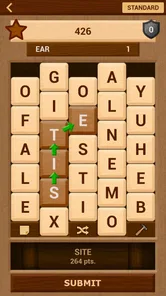
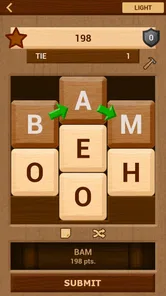
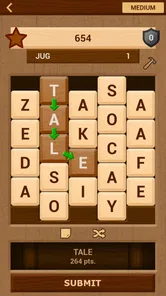
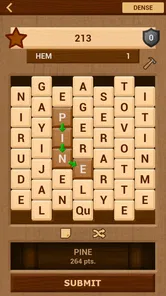
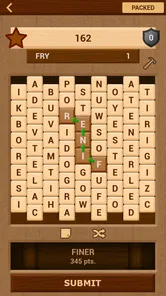
Bookworm Classic - Word Hunt is a word puzzle game centered on creating words from a board of letter tiles. You connect adjacent letters to form valid words, earn points, and clear tiles as you play. Its classic presentation and straightforward rules make it easy to understand, while longer or less common words generally provide more rewarding scores. The game offers more than 347,000 words to discover, giving word enthusiasts a broad range of possibilities.
How do you play Bookworm Classic - Word Hunt?
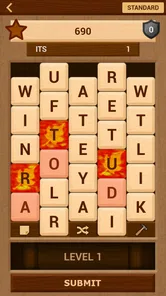
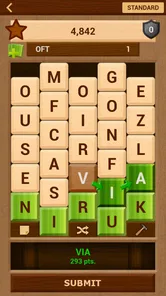
To play, look across the letter grid and select neighboring tiles in sequence to spell a word. Depending on the version and level, tiles may disappear, new letters may fall into place, or special tiles and hazards may affect your strategy. The main challenge is balancing quick, simple words with longer combinations that produce higher scores.
Is Bookworm Classic - Word Hunt suitable for beginners?
Yes, the game is generally suitable for beginners because its core mechanic is simple and does not require complicated controls. New players can start by identifying short familiar words and gradually improve their vocabulary and board awareness. However, later challenges may require more planning, faster recognition, and careful use of available letters to avoid difficult board situations. Its Everyone content rating also makes it suitable for a broad audience.
Pros
- Simple word-search gameplay that is easy to learn and play casually.
- Classic design feels familiar to fans of traditional word games.
- Short rounds make it convenient for quick breaks or commutes.
- Word discovery can help improve spelling and vocabulary recognition.
- Runs well on many older devices with modest hardware requirements.
Cons
- Limited visual variety may make extended sessions feel repetitive.
- Some words may feel obscure or difficult for casual players.
- Gameplay offers little beyond the core word-hunting experience.
- Small screens can make longer words harder to trace accurately.
- May feel less engaging for players seeking multiplayer competition.











