Art of Solitaire - Card Games
- 1.75K
- 4.0
- Installs
- 1.00M
- Price
- Free

Screenshots
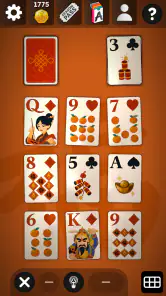
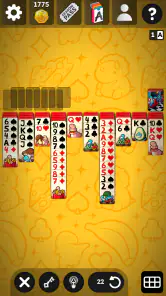
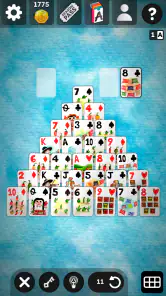
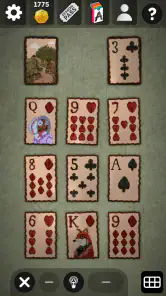
Analysis by Reviewed
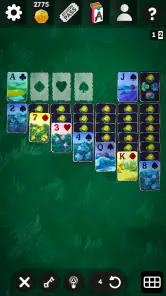
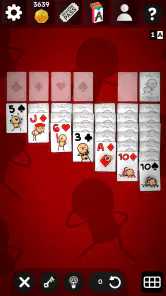
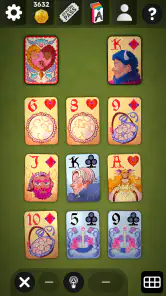
I tend to return to solitaire when I want something absorbing without the pressure of a timer, a competitive lobby, or a complicated rulebook. Art of Solitaire - Card Games fits that mood, but it is more than a single familiar layout. It brings together Klondike Solitaire, Spider, and Pyramid in one free card game, with an art-focused presentation that gives the traditional pastime a more distinctive personality.
After spending time with it, I see the game as a good choice for short breaks, quiet evenings, and players who enjoy switching between different kinds of solitaire without installing several separate apps. It is also an interesting option for people who appreciate unusual visual themes, especially because its store summary points to collaborations with Inscryption and Monument Valley. Those references suggest a more curated identity than the standard green-table solitaire app, although the core appeal still comes from the card puzzles themselves.
The game is made by Flick Games - Solitaire & Patience Card Games. It is free to install, rated for Everyone, and has reached more than a million installs. Its average rating is 4.0 from roughly sixteen thousand ratings, with about eighteen hundred written reviews, so it has a substantial player base while still leaving room for individual preferences to affect the overall impression.
How the layouts feel to read and navigate
The first thing I look for in a card game is whether I can understand the board immediately. Solitaire should be relaxing, not an exercise in hunting for tiny cards or guessing which pile can be moved. Here, the value of having three established formats in one place is that each mode gives the game a different rhythm. Klondike is the natural starting point for most people, Spider asks for more careful sequencing, and Pyramid changes the focus toward finding matching values.
That variety matters for navigation as much as for replay value. If I am tired, Klondike is the easiest place to settle in because its structure is familiar. When I want to think several moves ahead, Spider feels more appropriate. Pyramid works well when I want a quicker change of pace and do not want every session to feel like the same traditional deal. A player can choose the level of mental demand that suits the moment instead of forcing every break into one format.
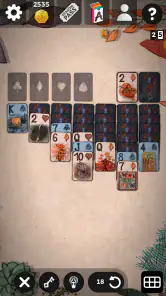
The art direction can be a strength for people who find plain card tables dull. It gives the game a sense of place and makes opening it feel less repetitive than launching a purely functional solitaire utility. At the same time, decorative presentation has to remain secondary to card recognition. If you prefer a very plain interface with minimal visual personality, this may feel less direct than a basic solitaire app built only around efficiency.
I would approach the game by learning one layout at a time rather than trying to master all three immediately. Start with Klondike until the movement of cards feels automatic, then use Spider to practise planning around blocked columns. Pyramid is useful as a mental reset because its matching logic is different. This sequence also helps reveal whether the visual style works for you before you commit to longer sessions.
A practical habit is to pause before making a move whenever several cards appear available. In solitaire, the obvious move is not always the useful one. I found that the game is more enjoyable when I treat each deal as a small planning problem rather than tapping rapidly through every possible action. That approach is especially helpful in Spider, where opening a column can be more valuable than immediately building another sequence.
Choosing a mode for different energy levels
One of the less obvious benefits of this collection is that it can match different kinds of attention. Klondike suits a coffee break when I want a familiar pattern and do not want to learn anything new. Spider is better when I have enough concentration to track several sequences. Pyramid is a reasonable choice when I want a compact puzzle that feels separate from classic tableau-building.
This makes the app more flexible than a single-mode solitaire download. It also means the game may be a better companion for irregular routines. Someone waiting for an appointment can choose a familiar layout, while someone winding down at home can spend longer experimenting with Spider. The useful distinction is not simply difficulty; it is how much visual tracking and forward planning I want to do at that moment.
Motor and sensory considerations in everyday play
Card games are often described as accessible because their rules are simple, but the physical act of playing still matters. A person may be comfortable with solitaire yet struggle with small targets, repeated dragging, visual clutter, or gestures that require precise timing. I would not assume that a simple ruleset automatically makes every part of the experience easy for every player.
For players with limited fine-motor control, the main question is how forgiving card movement feels on their particular phone or tablet. A larger screen may make the tableau easier to inspect and give the finger more room to select a card. On a smaller display, columns can feel crowded, especially in a layout with many visible stacks. Playing in a stable position, rather than while walking or standing on public transport, can make a noticeable difference.
There is also a cognitive advantage in having familiar rules. Klondike does not require learning a fictional world, managing an inventory, or remembering a long chain of objectives. That makes it suitable for players who want structured stimulation without a heavy narrative or a large number of controls. Spider changes the mental load, however, because its sequences can demand more working memory. I would not recommend beginning there if visual tracking is already tiring.
People sensitive to busy visuals should pay attention to how the artistic treatment affects their concentration. The collaboration references connected with Inscryption and Monument Valley point toward a game that values atmosphere, but atmosphere is not automatically helpful during a difficult deal. Some players will enjoy the extra character; others may find that a minimalist alternative keeps the cards easier to follow. The right choice depends on whether visual style motivates you or competes with the board.
For players who rely on strong contrast, enlarged text, screen magnification, or other device-level adjustments, the experience will depend heavily on the phone’s operating-system tools and the way those tools interact with the game. I would test the board in a short session rather than assuming that a general accessibility setting will solve every issue. If card ranks remain difficult to distinguish after adjustment, a simpler app may be more comfortable.
Sound and visual effects can also influence concentration, even when they are not central to the rules. I prefer to play a card game in a way that lets me control the surrounding environment: muted when I am in a waiting room, with headphones only when I specifically want an audio layer, and with screen brightness adjusted before a long session. These are small choices, but they help turn the game into a usable break rather than another source of fatigue.
Why the absence of pressure can help
For many players, solitaire is appealing precisely because it does not require fast reactions or social performance. I can stop to reconsider a move, put the phone down, and return later without having to explain myself to another player. That makes this collection suitable for quiet routines, including a few minutes before bed or a low-key break between tasks.
That slower pace does not eliminate every barrier. Dragging cards can still be awkward for someone with tremors or reduced reach, and a dense tableau may be hard to inspect for someone with low vision. The important point is that the game’s calm structure reduces one kind of demand—time pressure—while leaving other demands in place. I would describe it as potentially comfortable, not universally effortless.
Using it in different places and routines
A realistic use case is a delayed train or an appointment that runs late. I might open Klondike for a short session because it gives my attention something concrete to do without requiring a connection with other people. If the wait becomes longer, I can move to Spider and engage more deeply. This is where having multiple formats in one app feels more useful than having three identical copies of solitaire.
It also works as a transition activity after work. I can play a few deals while my mind moves away from emails and unfinished tasks. Pyramid is particularly suitable when I want a change from the usual tableau, while Klondike is better when I want the comfort of rules I already know. The game can therefore serve both as a quick distraction and as a deliberate wind-down tool.
For households sharing a device, the Everyone content rating makes the game broadly suitable from an age-classification perspective. That does not mean every member of a family will enjoy the same mode. Younger or inexperienced players may understand the basic idea quickly but still need time to learn why some moves are strategically better than others. Older players who already know solitaire may care more about presentation and variety than instruction.
The game is available for devices running Android 8.0 or later, so compatibility is not aimed at very old Android versions. On a supported device, I would still consider screen size and responsiveness before choosing it for someone who needs large, clearly separated card areas. A modern operating system alone does not tell me whether a particular handset will be comfortable for extended play.
Because the game is free to install, it is easy to try without making an immediate purchase decision. There are in-app purchases ranging from under a dollar to around thirty-five dollars per item, so I would check the purchase flow carefully before handing the phone to a child or someone unfamiliar with mobile stores. The free entry point is convenient, but the presence of optional spending means it is worth keeping normal device purchase protections in place.
Where it differs from ordinary solitaire alternatives
The usual alternative is a stripped-down solitaire app that focuses on one layout, quick deals, and a plain interface. That kind of app can be better if I want maximum clarity, minimal decoration, or a very narrow learning curve. Art of Solitaire takes the opposite route by combining several classic formats with a stronger artistic identity. Its advantage is variety and atmosphere; its possible disadvantage is that players seeking a purely utilitarian tool may find the presentation unnecessary.
Compared with a dedicated Spider Solitaire game, this collection may be more convenient for someone who likes switching modes, but a specialist app can feel more focused if Spider is the only format that matters. Compared with a social or competitive card game, this one is better suited to private, unhurried play. It is not the choice I would make for live opponents, chat, tournaments, or a strong sense of progression through competition.
The Inscryption and Monument Valley collaborations are also relevant to expectations. They make the game sound like a meeting point between classic patience games and recognisable artistic worlds. I would treat that as a reason to explore the presentation, not as a promise that the app replaces those games. The solitaire rules remain the centre of the experience, and anyone expecting a full adventure or a narrative puzzle game may be disappointed.
Remaining barriers before you decide
The biggest potential barrier is visual density. Several solitaire layouts naturally place many cards on screen, and that can become demanding on a compact phone. If you regularly enlarge text or use magnification, test whether the whole tableau remains usable rather than checking only whether the menu is readable. A tablet or larger phone may be the more sensible device for this particular style of play.
Another barrier is the difference between relaxed play and strategic play. The game is easy to start, but Spider can become mentally taxing when several sequences compete for the same move. Someone looking for a completely passive distraction may prefer a simpler one-touch puzzle. Conversely, a player who wants deep strategy in every session may eventually want a specialised solitaire title with more focused tools and systems.
Optional purchases are another point to consider. The game costs nothing to install, but the listed purchase range is broad enough that I would not describe the entire experience as financially neutral without checking what each item does on the device. I also would not make a purchase simply to solve a momentary frustration with a difficult deal. First decide whether the underlying layouts and visual style are genuinely enjoyable.
There is a subtler barrier for people who need consistent, highly predictable interfaces. Artistic changes can make a game feel more inviting, but they may also make it less familiar than the plain card table used by traditional solitaire software. If you are helping someone else choose an app, let that person try the board themselves. A design that feels charming to me may be distracting to another player with different visual or cognitive needs.
Finally, the game is best understood as a self-contained card pastime, not a universal solution for every kind of card-game fan. It does not suit someone whose priority is multiplayer interaction, a competitive ranking environment, or a large collection of unrelated games. Its strengths appear when the player values calm, private play and appreciates having Klondike, Spider, and Pyramid available in one place.
My inclusive verdict
I recommend Art of Solitaire - Card Games to players who want classic solitaire with more personality than a bare-bones utility. The three layouts give me useful control over how much concentration I want to spend, and the art-led approach makes the app feel considered rather than disposable. Its free installation also makes it easy to explore before deciding whether the presentation and optional purchases fit your habits.
From an inclusive point of view, its strongest quality is the lack of competitive pressure. I can play slowly, stop whenever I need to, and choose a mode that matches my energy. That makes it promising for quiet routines and for people who prefer private puzzles. Its weaker side is the physical and visual demand created by card-heavy boards, especially on smaller screens or for players who need unusually large, high-contrast targets.
My practical advice is to begin with Klondike on the device you will actually use, play a short session with your usual brightness and system adjustments, and then try Pyramid before moving to Spider. This reveals three different demands: familiar tableau reading, quick matching decisions, and longer sequence planning. If all three remain comfortable, the collection offers plenty of variety for casual play.
I would skip it in favour of a simpler solitaire app if your priority is an extremely plain interface or the clearest possible card presentation. I would also choose another category entirely if you want opponents, chat, or a story-driven experience. But for someone asking me for a flexible, atmospheric solitaire game that works for a few minutes or a longer quiet break, this is an easy recommendation—with the sensible reminder that visual comfort and purchase controls should be checked on the individual device.
Pros
- Simple rules make it easy for beginners to start playing.
- Quick rounds are convenient for short breaks or daily play.
- Classic solitaire format feels familiar to traditional card-game fans.
- Offline play can be useful when there is no internet connection.
- Smooth touch controls make moving cards comfortable on mobile devices.
Cons
- Gameplay may feel repetitive after extended sessions.
- Limited variety can reduce long-term appeal for experienced players.
- Some features or content may be restricted behind advertisements or purchases.
- Random deals can occasionally feel frustrating when a layout is unwinnable.
- Small cards or interface elements may be less comfortable on compact screens.

- Category
- Card
- Version
- 3.02.06