Arrow Crosswords
- 979.00
- 4.6
- Installs
- 100.00K
- Price
- Free
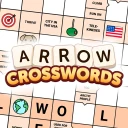
Screenshots


Analysis by Reviewed
I like Arrow Crosswords most when I want a puzzle that asks me to pay attention without demanding a long, uninterrupted session. Its arrow-based clues make the grid itself the place to read and solve, which gives the familiar crossword format a different rhythm. It is a focused solo word game from FunCraft Games, and the appeal is straightforward: follow the clue, work out the answer, and use crossing letters to check your thinking.
How the arrow layout changes a solving session
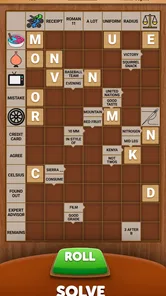
In a conventional crossword, I often move between a clue list and the grid, keeping track of where each answer belongs. Here, the clue is placed inside the grid and points toward its answer. That saves the separate clue-to-entry matching step, but it also changes where my attention goes: I scan the board, choose a clue that looks manageable, and follow its arrow before filling in the word.
That small shift is useful when I only have a few minutes. I can pick off an easy entry, let its letters help with nearby answers, and stop without feeling that I must complete the whole puzzle in one sitting. If a clue resists, I can leave it alone and work elsewhere instead of staring at the same blank space. The best practical habit is to treat a first guess as provisional until crossings support it; an answer that seems plausible in isolation may not fit once the surrounding words take shape.
The format may take a little adjustment if you are used to a standard across-and-down grid. I would give it a few clues before deciding whether it feels natural. The arrows make direction clear, but the board can ask you to shift your eyes between clue cells and answer spaces more often than a simple list does. For me, that is part of the appeal; for someone who wants the most familiar possible crossword interface, it may feel like an unnecessary change.
A quick fit for short breaks
I find the arrow-based format especially handy when I want a word puzzle that feels different without having to learn a complicated set of rules. A realistic use for it is a quiet stretch of a commute or a few minutes between tasks: open a puzzle, work through the clues that look approachable, and leave the harder crossings for later. Saving progress makes that stop-and-return routine practical rather than frustrating.
This style is best for people who enjoy fitting words together and using crossing answers to test a guess. If you prefer cryptic clues, a large newspaper-style grid, or a game built around competing with other players, a conventional crossword or another kind of word game may suit you better. Arrow Crosswords keeps its appeal in the puzzle itself, so I would choose it for focused solo solving rather than social play.
Getting Started with Arrow Crosswords
Upon downloading the app, you'll be greeted with a clean and intuitive interface. The app is designed to get you into solving puzzles quickly without any unnecessary frills. As someone who loves to dive right into the action, I appreciated how easy it was to start my first puzzle. Simply select a crossword, and you're off to the races!
More From Our News Desk

 Gmail
Gmail in a Busy Inbox: Who Benefits Most?
From first account to crowded workday, Gmail earns its place through dependable search and flexible sorting—but its best fit depends on how much inbox maintenance you can tolerate.

 Prime Video
Switching to Prime Video: What Changes in Your Viewing Routine
Prime Video can make a compelling second home for streaming, but switching means learning a different catalog, rental layer, and route from browsing to playback.

 Universal TV Remote Control
 Works Best as a Reliable Backup
A phone remote earns its place through quick setup and reliable habits. Here is how to get more from Universal TV Remote Control—and where its limits show.

 Weather - By Xiaomi
Weather by Xiaomi Review: Clear at a Glance, Less Clear Up Close
Xiaomi’s weather app makes everyday forecasts quick to scan, but its calm surface can leave useful details and recovery paths harder to find than they should be.

 X
X Under Pressure: Can It Recover When Posting Goes Wrong?
A resilience-focused review of X, examining setup, mistaken posts, interruptions, weak connections, and the gaps that matter when recovery needs to be dependable.

 Clash of Clans
 Is Won Between the Battles
Its raids are quick; its community is a long-term project of coordination, teaching, rivalry, and shared responsibility—with all the friction that entails.
Latest News



The Unique Twist
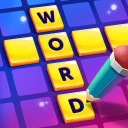
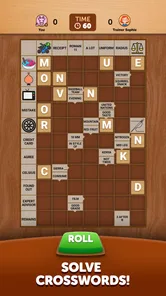
What sets Arrow Crosswords apart from other crossword apps is its unique layout. Instead of the usual list of clues, this app integrates them directly into the puzzle grid. Yes, you read that right! The clues point in the direction of the answers, making the puzzle-solving experience more fluid and engaging. This feature not only makes the game more fun but also helps improve your logical thinking as you deduce the answers.
That layout changes how I approach a difficult entry. Rather than scanning a separate clue list and then hunting for its matching space, I can read the clue where it sits and follow its direction into the grid. When I get stuck, I find it useful to move to a crossing answer instead of repeatedly guessing at the same word; a confirmed letter can narrow down what fits. The trade-off is that anyone who relies on a familiar across-and-down clue list may need a little time to adjust.
Using hints without giving away the puzzle
The hint option is most useful as a last nudge, not as my first move. Before using it, I try to solve a crossing clue, check whether the answer length and known letters support my guess, and then return to the difficult entry. That approach keeps the work of deduction in my hands while making help available when one unresolved word is blocking progress.
There is a genuine trade-off here. A hint can keep a casual session from ending in frustration, especially for someone still getting comfortable with word puzzles. But if you are looking for a strict test where every answer must come from your own knowledge, the option to ask for help can make the challenge feel softer. I would treat it as a way to get unstuck rather than a routine shortcut.
Features That Enhance the Experience
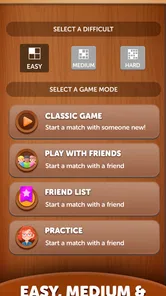
Let’s talk about some features that make this app a standout choice for crossword enthusiasts. First off, the difficulty levels are well-balanced, catering to both beginners and seasoned pros. You can choose from a variety of puzzles ranging from easy to challenging, ensuring there's something for everyone. Additionally, the app provides hints if you find yourself stuck, which, trust me, can be a lifesaver when you're facing a particularly tricky clue.
I’d use hints selectively: try the crossings first, then use help when a single stubborn answer is stopping the rest of the grid from making sense. That keeps the puzzle-solving satisfying while giving newer players a way past a dead end. If you want every clue to be a serious test with no assistance, though, hints may make the experience feel less demanding than you want.
Another feature I found particularly helpful is the ability to save your progress. Life happens, and sometimes you need to put down the puzzle and return to it later. With Arrow Crosswords, you can easily pick up right where you left off without missing a beat.
Who benefits most from the format
I would point a new solver toward this game if the main obstacle to starting crosswords is the feeling that a traditional grid looks intimidating. Having the clue beside the answer path makes the basic relationship visible, and the crossing letters offer a practical way to check guesses. It is also a sensible choice for someone who already knows crosswords but wants a different kind of board to work through during a short pause.
It is less compelling for players who want a newspaper-style experience with elaborate wordplay, cryptic clues, or a large grid to tackle over a long, quiet stretch. Nor would I choose it as a substitute for a competitive word game: the pleasure here comes from solving the puzzle at your own pace, not from racing another person or comparing results. Knowing that distinction before installing helps set the right expectations.
For a typical day, I could imagine opening a puzzle while waiting for an appointment, solving a few entries, then putting the phone away when my turn comes. Later, I can return to the saved board and use the letters I already have rather than starting from scratch. That stop-and-resume pattern is a better match for the game than trying to squeeze a complete session into every spare moment.
Who it suits, and what to expect
Arrow Crosswords is a free word game from FunCraft Games, rated for Everyone, and it has a 4.7 average from around 785 ratings, with over 10K installs. It was released on May 17, 2024, and its current version is 2.0.19697, so the version number gives existing players a concrete point of reference when checking for changes. I would not assume a particular new feature from that number alone; what matters in practice is whether the arrow clues and puzzle flow continue to suit the way you like to solve.
For someone already playing, a version number is useful context when deciding whether an update is available, but it does not tell me on its own what the update changes. I would judge the current experience by opening a puzzle and seeing whether the clue placement, saved progress, and overall solving flow still work for my habits. The release date gives a starting point for the game’s history, while the version identifies the build in use; neither is a reason to expect a specific addition without evidence.
The game is free to try, while optional in-app purchases range from $0.99 to $99.99 per item. I’d keep that in mind if you prefer games with no paid extras at all, and check purchase details before spending. It needs Android 7.0 or later. That makes the platform requirement worth checking before downloading, especially on an older device.
If you are cautious about spending, the sensible approach is to begin with the free experience and decide whether the puzzle routine is worth continuing before considering any purchase. The listed range is broad, so I would not assume that every item serves the same purpose or that buying something is necessary to enjoy solving. Check the in-app details carefully and avoid a purchase if you are not sure what it provides.
Compared with standard crossword apps that separate clues from the grid, this one makes clue direction part of the solving process. That is a meaningful difference, not just a new coat of paint, but it also means it will not replace every kind of crossword for every player. I’d recommend it to casual solvers, people new to crosswords, and experienced players who want a compact change of pace. I’d skip it if you mainly want competitive features, elaborate clue writing, or a traditional newspaper layout.
What to watch as you play
The most useful thing to watch is whether the arrow layout continues to help you think or starts to slow you down. If you find yourself repeatedly losing track of which clue leads to which answer, a conventional clue list may be more comfortable. If the board makes it easy to move from a clue to a likely entry and then verify it through crossings, the format is doing its job for you.
I would also pay attention to how often you reach for hints. Occasional help can make a tricky clue manageable, but relying on it for every uncertain entry removes much of the satisfaction of filling the grid through deduction. A good middle ground is to finish all the crossings you can, take a short pause, and then decide whether the remaining clue is worth a hint or simply worth leaving for later.
As the game evolves, I would look for clear, practical improvements rather than assuming that a higher version number means a particular change. For existing players, the important questions are whether progress remains easy to resume and whether the core arrow-and-grid relationship still feels readable. Those are the parts that shape everyday use more directly than an abstract promise of novelty.
Why It’s Worth a Download
If you’re a fan of word games, Arrow Crosswords is a must-try. Its unique approach to crosswords keeps the experience fresh and exciting, and the app's user-friendly design makes it accessible to everyone. Whether you’re looking to kill time on your daily commute or sharpen your mind with a mental workout, this app has got you covered.
In conclusion, Arrow Crosswords offers a fun and challenging twist on the classic crossword puzzle. With its unique arrow-style clues and a range of difficulty levels, it’s sure to keep you entertained for hours. So, why not give it a try? Happy puzzling!
Arrow Crosswords Frequently Asked Questions
Is Arrow Crosswords suitable for children and casual players?
Arrow Crosswords is a word game with an Everyone content rating, so its stated age classification is suitable for a broad audience. Its crossword format can appeal to casual players as well as people who already enjoy word puzzles, and the range of difficulty levels gives players options to match their experience. The game is free to download, making it easy to try before deciding whether it fits your routine.
Which devices and operating systems can run Arrow Crosswords?
Arrow Crosswords is available for Android and iOS devices. On Android, it requires version 7.0 or later, so it is worth checking your device’s software before downloading. The game is developed by FunCraft Games and is listed as a word game. If you use an iPhone or iPad, you can look for it in the Apple App Store; Android users can find it through Google Play.
What is Arrow Crosswords and how does it work?
Arrow Crosswords is a mobile application designed for crossword puzzle enthusiasts. The app offers a unique twist on traditional crosswords by integrating arrows within the grid to indicate where the answers should go. This innovative format challenges players to think differently and enhances the overall puzzle-solving experience. Users can choose from various difficulty levels, making it suitable for both beginners and experienced solvers.
Is Arrow Crosswords available for both Android and iOS devices?
Yes, Arrow Crosswords is available for download on both Android and iOS platforms. Users can easily find the app on Google Play Store for Android devices and the Apple App Store for iOS devices. This cross-platform availability ensures that a wide range of users can enjoy the app regardless of their preferred mobile operating system.
Does Arrow Crosswords offer in-app purchases or subscriptions?
Arrow Crosswords offers a freemium model, where the basic version of the app is free to download and play. However, it includes optional in-app purchases and subscriptions that unlock additional features, such as exclusive puzzles, ad-free experience, and hints. This allows users to enhance their puzzle-solving experience according to their preferences and needs. Optional purchases range from $0.99 to $99.99 per item, so check the purchase details before confirming anything.
Pros
- Intuitive interface design.
- Extensive puzzle variety.
- Offline play available.
- Hints for challenging puzzles.
- Regular updates with new puzzles.
Cons
- Limited free puzzles.
- Occasional ads interruptions.
- In-app purchases required.
- Some puzzles are difficult.
- No multiplayer mode.