Animal coloring pages
- 60.00
- 4.1
- Installs
- 10.00M
- Price
- Free
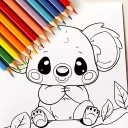
Screenshots
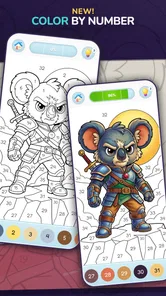

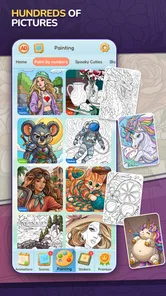



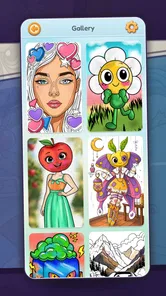
Analysis by Reviewed
On a shared phone or tablet, a coloring game can turn an awkward few minutes into a small activity everyone can join. I’d use Animal Coloring Pages for just that: picking an animal, choosing a few colors, and passing the screen around without needing to set up a craft table. It is a casual adventure game from Y-Group games, and its animal-focused pages make the idea easy to understand even for someone opening it for the first time.
A shared screen for a quiet moment
I can picture this game working best in an ordinary household pause: one person finishes a chore, a child wants something calm to do, and a phone or tablet is already within reach. Instead of setting up a complicated activity, you can open an animal picture and take turns choosing colors. That makes the appeal less about producing a polished drawing and more about having an easy, low-pressure activity to share.
For a shared device, I would keep the handoff simple: agree whose turn it is to choose the picture, and let each person add a few colors before passing it along. That small bit of coordination avoids the familiar “I was using that” moment. I would also avoid treating a saved or finished image as a private profile or a record of who made it; this is best approached as a casual coloring activity, not a family account system.
Discovering the Colorful World of Animals
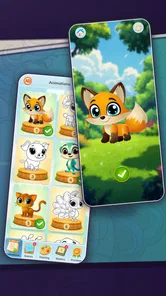
When I first opened Animal Coloring Pages, I was greeted by a user-friendly interface that instantly made me feel welcomed. The app offers a wide variety of animal illustrations, ranging from majestic lions to cute little penguins. Each page is intricately designed, providing both simplicity for beginners and detailed artwork for those who love a challenge.
The selection is quite impressive. I found myself scrolling through pages and pages of animals, each more enticing than the last. The app categorizes these into different groups, making it super easy to find your favorite animal. Feeling like coloring a jungle creature today? Or maybe you're in the mood for some underwater friends? It's all right there at your fingertips.
Choosing pages and sharing the controls
In a household setting, the range of animal subjects gives people a natural way to agree on what to do without needing a long explanation. A younger child can pick an animal they recognize, while an older sibling or adult can choose a picture that looks more involved. I find that useful when attention spans differ: the group can share the same activity without everyone needing to make the same kind of drawing.
There is a small trade-off in browsing. When several people are deciding together, scrolling through choices can become the activity instead of coloring. I would set a quick rule—choose the first animal everyone likes, or let the person holding the device pick—to keep the session moving. This is also a practical way to make a short wait feel occupied, though anyone looking for a structured game with goals or competition should choose a different kind of app.
More From Our News Desk

Weather by Xiaomi Review: Clear at a Glance, Less Clear Up Close

X Under Pressure: Can It Recover When Posting Goes Wrong?

Clash of Clans Is Won Between the Battles

Android Auto Makes the Case for Quieter Car Software

MobiOffice: Transforming Mobile Productivity with Seamless Integration

EA SPORTS FC™ Mobile Soccer: Redefining Mobile Sports Gaming
Easy and Intuitive Controls
One thing I genuinely appreciate about this app is how intuitive it is. You don't need to be a tech wizard to navigate through it. The color palette is extensive and easy to use, allowing for a seamless coloring experience. You can choose from a variety of shades and even customize your own colors. Fancy that perfect shade of blue for your whale? No problem!
Another cool feature is the zoom-in function, which lets you focus on those tiny details without straining your eyes. I mean, who would have thought coloring on a small screen could be so smooth and satisfying?
Small-screen habits that make coloring easier
On a phone, I would start with a picture that has larger areas before trying a detailed illustration. That gives a younger user room to get comfortable with the controls, and it makes the zoom option feel useful rather than necessary from the first tap. For finer spaces, zoom in before coloring and work a small section at a time; on a shared device, that also makes it easier to hand over the screen without losing track of the area being filled.
The palette’s customization is handy when someone has a particular idea in mind, but it can slow down a quick session if everyone spends time debating shades. I’d keep the first pass simple, then customize only when a color really matters to the picture. Compared with paper coloring, this is tidier and easier to redo, but it won’t offer the feel of pencils or the keepsake of a physical page. If the goal is hands-on crafts, paper remains the better choice.
Making a short session feel complete
A useful way to fit coloring into a busy day is to decide on a stopping point before opening a page: one picture, a few turns, or the time until a meal is ready. That keeps the activity from stretching simply because there are more images to browse. If a child wants to return later, I’d agree on whether to finish the same picture or start fresh next time rather than assume the app will serve as a household scrapbook.
For a mixed-age group, the person who is least comfortable with touch controls can choose the subject while someone more confident handles zooming and color selection. That makes participation less dependent on fine motor control, while still leaving room for everyone to contribute ideas. It is a small adjustment, but it can make a shared session feel cooperative instead of turning into one person doing all the tapping.
The Therapeutic Benefits
As someone who often finds themselves stressed out by the hustle and bustle of daily life, I found Animal Coloring Pages to be incredibly therapeutic. There's something about picking colors and bringing a picture to life that just melts the stress away. It's like a mini-vacation for your mind, right in the palm of your hand.
It's also a fantastic way to bond with kids. I spent an afternoon coloring with my niece, and it was such a joy to share that creative space with her. Watching her pick her favorite colors and proudly display her masterpiece was heartwarming.
When digital coloring is the right alternative
Compared with a general drawing app, this game is easier to approach when the person using it already knows they want to color a picture rather than start with a blank canvas. That narrower purpose is a strength for a quick family activity, because nobody has to invent a subject or learn a more involved creative workflow. It is also less messy than paper and coloring tools, which matters in a waiting room or during a brief break away from home.
The trade-off is that an open-ended art app is a better fit for someone who wants to sketch, layer ideas, or develop an illustration from scratch. Paper is better when the point is tactile play, practicing with physical tools, or keeping a drawing on the fridge. This game sits between those options: convenient and focused, but not a replacement for either a full art workspace or a hands-on craft activity.
Age, expectations, and a sensible fit
The game is free to start and rated Everyone, which makes it an approachable option to consider for a broad age range. Y-Group games is the developer, and the current version is 2.7.0, with Android 7.0 as the minimum operating system. I’d still make the first session a shared one with a young child: sit nearby, help them find an image, and see whether the coloring style suits them. An age rating is useful context, but it is not a substitute for a parent deciding what works for their own child.
For adults, this is better as a brief unwind than as a serious drawing tool. The animal focus and simple coloring format are its strengths, but someone who wants layered illustration tools, a blank canvas, or a more elaborate creative workflow will likely be happier with a dedicated art app. The same goes for a child who gets frustrated by screen-based coloring or wants a finished paper picture to display.
Keeping the first use comfortable
If you are choosing it for a child, I’d treat the first session as a chance to check both interest and ease of use, rather than assuming that a broad age rating means it suits every child equally. Let them choose a familiar animal and see whether they enjoy filling areas on a screen. If they keep tapping outside the spaces, lose patience with a detailed page, or would rather draw their own character, that is useful guidance: pick a simpler picture, share the controls, or switch to paper.
For a shared household device, it also helps to set expectations about whose turn it is and what counts as “finished.” People can have different ideas about whether to fill every area or leave a picture partly colored. Agreeing that each person can add a few touches avoids one user taking over, and there is no need to turn a relaxed activity into a test of neatness.
Cost and household expectations
Although the game costs nothing to download, it includes in-app purchases ranging from $2.49 to $24.99 per item. In a shared household, I would make sure the device owner understands that purchases are separate from the basic free experience, and agree in advance who can make them. That conversation is more useful than letting a child explore purchase options unsupervised, especially when several people use the same device.
Its reach is substantial, with more than 10 million installs, and its average rating is 4.1 from around 9,500 ratings, alongside 60 written reviews. I take those figures as context, not a promise that every child or adult will enjoy it. The game was released on September 15, 2017, so it has been around for years; for me, the practical test is still whether its pictures and controls suit the person holding the screen.
What I would check before handing over a device
Because more than one person may use the same phone or tablet, I’d keep account and purchase decisions with the device owner instead of treating coloring as a separate child profile. A quick check of the device’s own purchase settings and a clear rule about asking before buying are sensible household habits. They do not change how the coloring works, but they help prevent a casual activity from creating an unexpected expense.
Storage and screen comfort are also practical considerations for a shared device. I would try the app during a calm moment, when there is time to see whether its controls suit the child, rather than introducing it when everyone is already impatient. If the screen is small, use a simpler-looking picture first; if the user keeps reaching for paper, that preference is a good reason not to push the digital version.
Final Thoughts
In conclusion, Animal Coloring Pages is not just an app; it's a delightful journey into a world where creativity knows no bounds. Whether you're young or just young at heart, this app offers a wonderful opportunity to explore your artistic side. With its easy navigation, wide selection of images, and therapeutic benefits, it's a must-have for anyone looking to add a splash of color to their life.
So, if you haven't tried it yet, what are you waiting for? Dive into the colorful world of animals and let your creativity run wild!
My household verdict
I’d recommend it for families who want a simple animal-coloring activity to share in short bursts, and for anyone who enjoys filling in pictures without learning a complex art app. Before handing over a shared device, decide who is choosing the picture and who handles purchases; then try a less detailed page first and see whether the controls feel comfortable. If you want deeper drawing tools, paper materials, or a game built around challenges, I’d skip this one. For a calm, easy-to-start coloring session, though, it earns a place on the device.
Animal coloring pages Frequently Asked Questions
Is Animal Coloring Pages easy for beginners to use?
Yes, the game is intended to make drawing and coloring approachable, so beginners can start without needing prior art experience. Its focus is on coloring illustrations rather than mastering complicated techniques, making it a comfortable choice for a first digital coloring activity. The adventure-game category and animal-themed pages give users a simple, creative way to explore the app at their own pace.
What kinds of pictures can I color in Animal Coloring Pages?
Animal illustrations are at the heart of the app, while its store summary also mentions anime, dragons, cars, and monsters. This mix gives users more than one subject to explore when they want a change from animal pictures. The short description highlights animal coloring pages, so the app is especially suited to people looking for a playful collection of coloring subjects.
What is the main purpose of the Animal Coloring Pages app?
The Animal Coloring Pages app is designed to offer a fun and educational experience for users of all ages by allowing them to color various animal illustrations. It serves as a creative outlet that helps improve fine motor skills, enhances concentration, and promotes relaxation. Whether you are a child or an adult, this app provides an engaging way to explore your artistic abilities.
Is there a cost associated with downloading and using the Animal Coloring Pages app?
The Animal Coloring Pages app is free to download and use, but it may offer in-app purchases. These purchases can include additional coloring pages, advanced tools, or an ad-free experience. While the basic version offers plenty of features to enjoy, users can choose to enhance their experience through these optional purchases. Individual in-app items range from $2.49 to $24.99.
What age group is the Animal Coloring Pages app suitable for?
The Animal Coloring Pages app is suitable for users of all ages, from young children to adults. It features a wide variety of animal illustrations that cater to different skill levels. Parents will find it a great tool for keeping children entertained while learning about animals, and adults can use it as a relaxing pastime to unwind after a long day. Its Everyone content rating reflects its broad audience.
Pros
- Wide variety of animal templates.
- User-friendly interface for all ages.
- Encourages creativity and relaxation.
- Offline mode available.
- Regular updates with new templates.
Cons
- Limited color palette options.
- Ads can be disruptive.
- Requires in-app purchases for premium features.
- No option to customize templates.
- Occasional app crashes reported.