Airplane Game Flight Simulator
- 1.14K
- 4.3
- Installs
- 10.00M
- Price
- Free
Screenshots
Analysis by Reviewed
I tend to enjoy mobile flight games most when they give me a clear reason to take the controls, then let me learn from what happens. That is the appeal of Airplane Game Flight Simulator: it frames flying as a quick, hands-on adventure rather than a technical lesson. It is a free game from Arcadian Lab, rated for Everyone, and its simple premise makes it easy to understand before you even begin. I would approach it as an accessible way to spend a short break, not as a substitute for a detailed aviation simulator.
What a short session can look like
For a realistic everyday use, imagine having a few minutes to spare while waiting for a ride or taking a break between tasks. You can open the game, choose a flight challenge, and focus on getting through the immediate task. The useful part is that a flight gives you a small goal to concentrate on; the trade-off is that the appeal depends on enjoying repeated attempts at flying and landing, rather than expecting a long story or a carefully modeled real-world cockpit.
The game suits casual players who like planes, straightforward challenges, and a little trial and error. If you want to learn authentic procedures, compare aircraft systems, or build a serious simulation routine, I would look for a more technical alternative. This one is better for approachable, game-like flying than for instruction.
Who will enjoy the flying loop
I would recommend it most to someone who likes the idea of piloting a plane but does not want to spend their break studying complicated cockpit controls. The attraction is the direct link between action and outcome: steer through a flight, respond to what is happening, then find out whether your approach works. That makes it easy to pick up casually, while still leaving room to improve through attention and patience.
It is also a reasonable choice for players who prefer a clear task over wandering around a large map. If your favorite part of an adventure game is exploring at your own pace, meeting characters, or following a long plot, this focused flight format may feel narrow. I would choose it when I want an aviation-themed challenge, not when I am looking for a broad adventure to occupy an entire evening.
Taking Off: First Impressions
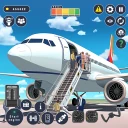
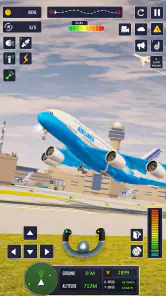
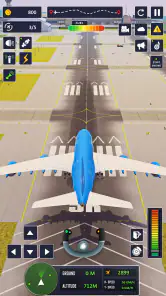
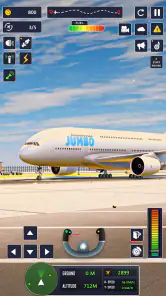
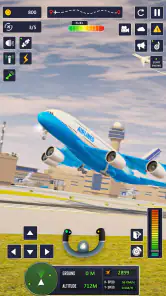
The moment I launched Airplane Game Flight Simulator, I was greeted with a user-friendly interface that made me feel like a pilot in training. The graphics are surprisingly detailed for a mobile game; every plane model is intricately designed, capturing the essence of what it means to fly. I couldn’t help but admire the stunning landscapes, which range from bustling cities to serene mountains.
Flight Controls: Smooth as Silk
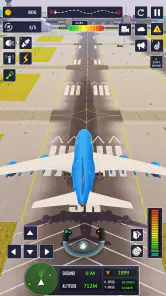
Now, let’s talk about the controls. They’re intuitive, allowing even the most novice players to grasp the basics without feeling overwhelmed. The game offers both tilt and touch controls, so you can choose what suits your style best. I personally found the tilt controls to be incredibly immersive; it felt like I was actually steering the plane through the skies.
More From Our News Desk

Weather by Xiaomi Review: Clear at a Glance, Less Clear Up Close

X Under Pressure: Can It Recover When Posting Goes Wrong?

Clash of Clans Is Won Between the Battles

Android Auto Makes the Case for Quieter Car Software

MobiOffice: Transforming Mobile Productivity with Seamless Integration

EA SPORTS FC™ Mobile Soccer: Redefining Mobile Sports Gaming
A practical tip: if tilt steering feels twitchy at first, try touch controls before deciding the game is too difficult. The two options give you a useful way to match the handling to where you are playing. Tilt can feel more involving when you have room to hold your device steadily, while touch is the sensible choice in a crowded waiting area or whenever you want to keep your hands still. That small adjustment can make a retry feel like practice rather than frustration.
Making each control attempt count
I find it helpful to change only one thing after a rough flight. If I switch control styles, alter how aggressively I steer, and rush the next approach all at once, I cannot tell what actually helped. Keeping one variable steady turns a retry into a small experiment: I can pay attention to whether a gentler correction or a different control method makes the landing feel more manageable.
That approach is especially useful on a phone, where the way you hold the device can change from one setting to another. A steady seated session is a better time to test tilt; on a moving ride, touch controls are easier to keep consistent. I would not treat a bumpy attempt on public transport as a fair verdict on the game’s handling, because the device itself is harder to keep still.
Mission Variety: Keeping It Interesting
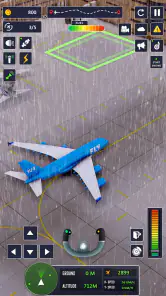
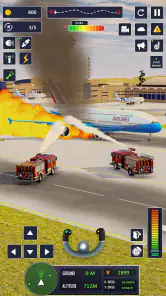
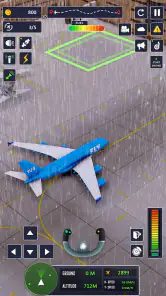
What keeps me coming back to this game is the wide range of missions. Whether it's a cargo delivery, a rescue operation, or an emergency landing, each mission is crafted to provide a unique challenge. The sense of accomplishment I felt after successfully landing a plane on a stormy night was unmatched. Plus, the game throws in random weather changes, making every flight unpredictable and exciting.
The action-feedback-reward rhythm is the strongest reason to start another flight: take on a task, react to the conditions, then enjoy the satisfaction of completing a difficult landing. When a run goes wrong, I can treat it as a chance to adjust how I handle the approach rather than expecting every attempt to be identical. Weather variation adds tension, but it also means a familiar task may not feel fully routine. I would play with patience instead of trying to rush through a landing just to finish quickly.
Reading a flight before trying again
A useful way to handle a challenging mission is to decide what you are trying to improve before you launch into another attempt. I might focus on keeping the plane steadier, or on making a more measured approach to the landing, rather than simply trying to move faster. The game is most satisfying when a failed run gives me something concrete to think about, even if that lesson is simply that I need to be less impatient.
Weather variation makes that kind of deliberate retry more important. A flight that feels different from the last one is not necessarily evidence that your controls suddenly stopped working; the conditions may be part of the challenge. I would avoid judging the whole game by one awkward landing and instead give myself a few attempts to see whether I enjoy adapting. If repeating a task feels like needless friction to you, this loop may not be your preferred kind of mobile game.
Sound Design: The Perfect Companion
Let’s not forget the sound design. The engine roars, the wind whistles, and the subtle background music all work together to create an immersive experience. I found myself getting lost in the game, with the sound effects making each flight feel incredibly realistic.
Sound helps sell the sensation of being in the air, but it is not essential to every session. If you are playing somewhere quiet or need to keep your phone muted, the visual challenge can still be the focus. I like the audio best when I can give it my attention; in a noisy commute, I would prioritize the controls and the landing rather than expect the soundtrack to carry the experience.
Choosing the right moment to play
This is the sort of game I would open when I can give a flight a little attention, rather than while trying to multitask. A brief session can fit a wait or a quiet pause, but the landing challenge rewards focus more than half-hearted tapping. If I am likely to be interrupted, I would choose a moment when stopping between attempts is comfortable, instead of beginning a run when I need to leave immediately.
For a younger player, the Everyone rating makes the audience broad, but I would still consider whether they enjoy learning through retries and whether in-app purchasing needs supervision. The game’s straightforward premise may be approachable, while the challenge of steering and landing can still take practice. I would show a child the controls first and make clear that optional purchases are not necessary just to try the basic experience.
Progress, cost, and what to expect
The game is free to download, though optional in-app purchases are available, with listed items ranging from $2.99 to $74.99. I would start without spending and see whether the flight loop holds your interest first. The game has a 4.3 average from around 49,000 ratings, and more than 10 million installs; those figures suggest a broad audience, but they do not tell you whether its style will suit you personally. It was released on June 10, 2021, and version 25.5.2 requires Android 10 or later.
For comparison, many mobile games in the adventure category lean on exploration, characters, or a longer narrative. Here, the hook is more immediate: take control of a plane, respond to a flight challenge, and try to land successfully. That focus is a plus if you want a compact aviation-flavored game, but it can feel limited if you expect a sprawling world or a realistic pilot career. I would also keep the purchase range in mind if you are careful about in-app spending, and check purchase settings before handing a device to a child.
Free to try, with a sensible spending boundary
Because the download is free, I would treat the first sessions as a test of whether the central flying loop is enjoyable before considering any optional purchase. The listed purchase range is wide enough that I would not tap through a payment prompt casually, especially on a shared device. A useful household habit is to agree that a child should ask before any purchase and to use the device’s purchase protections where appropriate. That keeps the decision separate from the excitement of trying to complete a difficult flight.
The audience figures show that the game has reached many players, but popularity is not a substitute for checking whether its style suits you. Its average rating is 4.3 from around 49,000 ratings, and it has more than 10 million installs. I take that as evidence of broad interest in this kind of accessible flying game, not a promise that it will satisfy people who want realistic procedures or a large-scale aviation career.
How it differs from other flight games
Compared with a technical flight simulator, this is the more approachable option: I would choose it for quick, mission-led flying rather than for practicing real procedures or learning detailed aircraft systems. Compared with an open-world adventure, it offers a much narrower reason to play, but that narrowness can be a strength when I want a focused challenge instead of a long campaign. The right alternative depends on what you want from the word “flight”: a light game built around handling and landing, or a more involved simulation.
There is a similar trade-off with arcade-style flying games. If you mainly want fast action with little concern for a careful landing, another arcade title may suit you better. Here, I find the satisfaction comes from managing the flight task and bringing it to a successful close. That makes the experience less about constant spectacle and more about whether I enjoy the moment-to-moment challenge of controlling a plane.
Landing: Final Thoughts
In conclusion, Airplane Game Flight Simulator is a must-try for anyone with a penchant for aviation or simulation games. It’s not just about flying from point A to point B; it’s about the journey, the challenges, and the sheer joy of flying. If you’re looking for a game that lets you escape the mundane and explore the skies, this is it. So, buckle up, and prepare for takeoff! Trust me, you won’t regret it.
My recommendation comes with one qualification: go in for accessible mission-based flying, not a deep simulator. With an average session, the loop is easy to understand, and a tricky landing gives you a reason to try again; when you want realism, extended progression, or more control over every aviation detail, a different kind of flight game will be a better fit. If that distinction matches what you want, this is an enjoyable way to turn a spare few minutes into a focused little flight.
My verdict on the repeat-flight appeal
The best reason to return is the chance to turn a difficult approach into a cleaner one, not an elaborate story that keeps unfolding. A completed flight gives a satisfying endpoint, while a failed attempt naturally invites another go if you think you can respond better. That action, feedback, and reset pattern works well in short bursts, but it can also become repetitive if you need every session to introduce a new kind of activity.
I would pick it for a relaxed break when I am in the mood to steer, react, and try again. I would skip it if I wanted a serious training tool, a deep aircraft-management experience, or a sprawling adventure with lots to explore outside the flight itself. For the right player, its modest promise is also its appeal: a compact aviation challenge with enough variation to make a landing feel earned.
Airplane Game Flight Simulator Frequently Asked Questions
What is Airplane Game Flight Simulator about?
Airplane Game Flight Simulator is an adventure game built around flying and the appeal of piloting aircraft. Its short description presents it as an airplane game, while its store summary frames it as a city pilot flight simulator. That makes it a natural option for players looking for an aviation-themed game, though the experience is best judged by whether its flying focus appeals to you.
Who makes Airplane Game Flight Simulator, and when was it released?
Airplane Game Flight Simulator was developed by Arcadian Lab and released on June 10, 2021. Knowing the developer and release date can help you place the game among your options, but the date alone does not tell you how it will run on your particular device. Check that your operating system meets the game's requirement before downloading.
Is Airplane Game Flight Simulator free to download, and are there optional purchases?
Airplane Game Flight Simulator is free to download, so you can try its airplane-focused adventure without paying upfront. The game also offers optional in-app purchases, with items priced from $2.99 to $74.99. These purchases can include additional aircraft, special missions, and cosmetic upgrades. You can choose whether to spend, and the game can be enjoyed without making a purchase.
What age group is Airplane Game Flight Simulator intended for?
Airplane Game Flight Simulator has an Everyone content rating, making it suitable for a broad audience. Its aviation theme and flight challenges may appeal to players who enjoy piloting games, whether they are trying the genre for the first time or already like flight simulators. As with any game, parents can review its features and purchase options to decide whether it is a good fit for their household.
What are the main features of Airplane Game Flight Simulator?
Airplane Game Flight Simulator offers a realistic flying experience with its advanced graphics and physics engine. Players can choose from a variety of aircraft, including commercial jets and military planes, each with unique handling characteristics. The game features multiple missions and challenges, as well as a free-flight mode for those who prefer exploring. Additionally, users can enjoy dynamic weather conditions and day-night cycles that add to the realism.
Pros
- Realistic flight physics enhance gameplay.
- Wide variety of aircraft to choose from.
- Intuitive controls for smooth flying.
- Challenging missions test pilot skills.
- Stunning graphics and detailed environments.
Cons
- In-app purchases can get expensive.
- Occasional bugs disrupt gameplay.
- Requires a lot of storage space.
- Limited offline functionality.
- Long loading times frustrate players.
- Category
- Adventure
- Version
- 25.5.2