Gotham Sports
- 1.02K
- 1.9
- Installs
- 100.00K
- Price
- Free

Screenshots
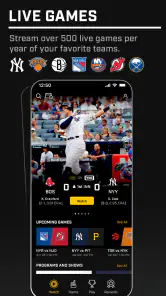
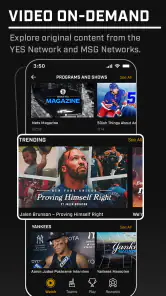
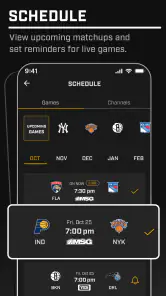
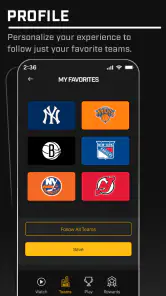
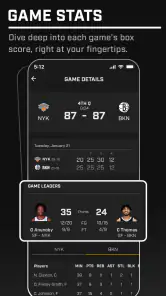
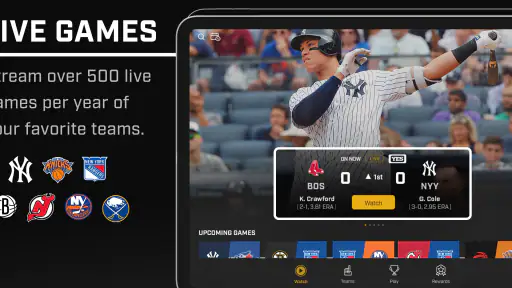
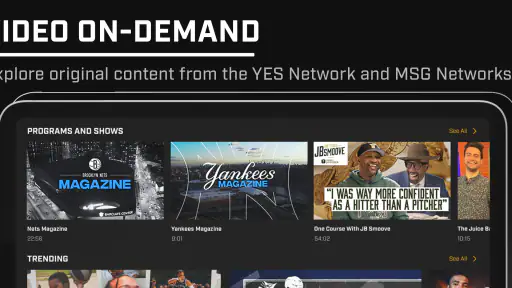
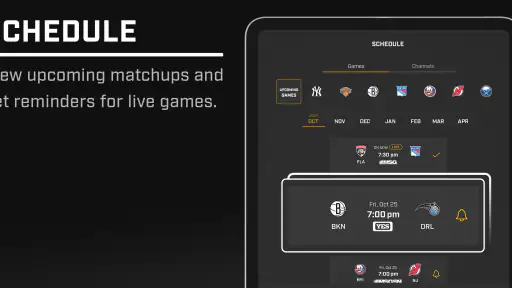
Analysis by Reviewed
I installed Gotham Sports to see whether it can genuinely simplify following New York sports, rather than just placing several team feeds behind one icon. It is a free sports app from Gotham Advanced Media and Entertainment, LLC, aimed at people who want a single place for New York coverage. That basic idea is appealing, especially if you follow more than one local team, but the experience is not as effortless as the store summary suggests.
The app’s central promise is convenience: instead of moving between separate team apps, league services, news sites, and social feeds, you can begin with one sports-focused destination. In my testing, that makes the app most interesting as a daily starting point. It is less convincing as the only sports tool on a phone, particularly for users who expect a polished, highly personalized experience from the first launch.
How Gotham Sports fits into a New York sports routine
Gotham Sports belongs to the sports category, with an Everyone content rating, so it is positioned as a broadly accessible app rather than a specialist product for a narrow audience. It was released on October 3, 2024, and the current version is 10.15.0. The minimum operating-system requirement is Android 9, which keeps it available to many older Android phones.
That compatibility matters in a practical way. A sports app is often checked during a commute, at work, or while a game is already in progress, so requiring a recent phone would undermine its usefulness. On a compatible device, the app is easy to treat as a quick check-in tool. I could imagine opening it before leaving home, checking what is happening around New York teams, and then returning later for another update.
The free entry point is one of its clearest advantages. You can install the app without paying an upfront purchase price, which makes it reasonable to try before deciding whether it deserves a permanent place on your phone. That distinction is important, though: free to install is not the same as unlimited paid value. The app includes in-app purchases ranging from $9.99 to $309.99 per item, so anyone considering a purchase should look carefully at what a particular offer unlocks and whether it matches the way they follow sports.
I would not treat the presence of those purchases as proof that the basic app is unusable without paying. It simply means the free experience and the paid experience should be judged separately. If you only want a central place to browse local sports information, the no-cost starting point may be enough. If you are expecting premium access, exclusive material, or other paid benefits, the price range makes it especially important to understand the specific offer before spending.
The first useful habit: use it as a hub, not as your entire sports setup
The most sensible workflow is to make Gotham Sports your local overview and keep a specialist source for anything that requires deeper detail. A general sports hub is good at reducing the number of places you need to check. A dedicated league or team service may still be better for highly focused information, long-term statistics, specialized alerts, or a particular competition’s complete coverage.
More From Our News Desk

Clash of Clans Is Won Between the Battles

Android Auto Makes the Case for Quieter Car Software

MobiOffice: Transforming Mobile Productivity with Seamless Integration

EA SPORTS FC™ Mobile Soccer: Redefining Mobile Sports Gaming

How Microsoft OneDrive Became a Mobile Productivity Giant

How Google Translate Breaks Language Barriers Effortlessly
This is a subtle but important trade-off. The app’s appeal comes from breadth across New York sports, while dedicated alternatives usually win through depth. If you follow one team obsessively and rarely care about the rest of the local scene, a single-team app or league-focused service may feel more direct. If you follow several teams, the wider approach becomes much more useful because it reduces the need to remember which separate app contains each update.
I also found that a hub works best when I decide in advance what I am checking. A quick scan for today’s local sports story is a good use. Wandering through every available section can feel less efficient, especially when I only want one score or one piece of team news. My practical tip is to open it with a small purpose: check the day’s schedule, catch up on the teams you follow, or look for the main local story. That keeps the app from becoming another endless feed.
What the free starting point is worth
The free price gives Gotham Sports a low-risk role. You do not have to commit to a subscription-style routine or make a purchase simply to discover whether the layout suits you. For casual fans, that can be enough value on its own: one app to browse occasionally instead of maintaining several separate installations.
Its value increases for households or friend groups that follow different New York teams. One person may care about baseball, another about basketball, and another about football or hockey. A shared local sports destination makes casual conversations easier because everyone can begin from the same place. It is not a replacement for every specialized source, but it can reduce the friction of keeping up with a crowded local scene.
There is also value in avoiding app clutter. Separate team apps can each request attention, occupy storage, and create a fragmented routine. Gotham Sports offers a more compact approach. The trade-off is that a combined app may never feel as perfectly tailored as a dedicated one. I would rather have one broad app for discovery and one focused source for my main team than install a separate app for every interest.
The purchase range changes the value calculation for committed users. A low-cost purchase might be reasonable if it provides something I would use regularly, but the highest listed price is a serious decision rather than an impulse add-on. I would compare any paid option with the cost and coverage of the usual alternatives before buying. The right question is not whether the app has a premium option; it is whether that particular option gives me something I cannot get more conveniently elsewhere.
Everyday use: a realistic game-day example
Imagine I am leaving work and want to know what matters in New York sports that evening. I can open Gotham Sports for a broad scan instead of checking multiple team accounts one by one. If a game is underway, I can use the app as a quick orientation point, then decide whether I need a deeper source for detailed play-by-play or specialist analysis.
That workflow shows both the strength and the limit of the app. It saves time at the discovery stage, but it may not be the final destination for every question. If I only need to know which local teams are active or whether there is a major story to catch up on, the hub is convenient. If I want a complete historical comparison, advanced team-specific information, or a highly focused live experience, I would move to a more specialized service.
Another useful scenario is the morning commute. I can use the app to catch up on local sports without deciding in advance which team deserves attention. That is where a broad New York focus feels more natural than a single-team application. It supports browsing and discovery, not just deliberate searches.
Where the experience creates friction
The biggest concern is trust. The app has an average rating of 1.9 from around 2.1 thousand ratings, alongside about 1 thousand written reviews. I would not ignore that signal. Ratings do not explain every individual complaint, but an average at that level suggests that many users have encountered problems serious enough to affect their overall impression.
That does not automatically make the app worthless. It does mean I would install it with realistic expectations and test the parts I actually need before relying on it during an important game. A sports app can be perfectly useful for browsing while still disappointing users who expect flawless alerts, a highly refined interface, or a seamless premium experience. The low average makes that distinction especially important.
The combined focus can also create a navigation trade-off. Bringing several New York sports interests together is convenient when I want a broad overview, but it can add visual noise when I want one precise item. I recommend taking a moment to identify the sections or teams that matter most to you rather than treating every part of the app as equally relevant.
Notifications deserve the same practical caution. I would not enable every alert immediately. A local sports hub can become distracting if every team, story, or game generates attention. Starting with only the teams and events I genuinely follow would make the app more useful and less intrusive. If the notification experience feels excessive, the app loses some of the convenience it was meant to provide.
Another limitation is the uncertainty around paid value from a user’s perspective. The listed in-app purchase range is wide, from $9.99 to $309.99 per item. That does not tell me that every user needs to pay, nor does it establish that the most expensive option is worthwhile. It tells me to slow down before purchasing. I would read the exact purchase description, check whether it is a one-time benefit or part of a continuing commitment, and compare it with services I already use.
Who should install it
Gotham Sports is a reasonable fit for a New York sports fan who follows multiple teams and wants a free place to begin the daily catch-up. It is also useful for casual fans who do not want a separate app for every league or team. The broad local focus is more valuable when your interests cross team boundaries.
I can also recommend trying it for someone who frequently asks, “What is happening in New York sports today?” That person does not necessarily need the deepest possible statistics. They need an efficient overview and a way to decide which story or game deserves more attention. The app’s role as a first stop makes sense in that situation.
It is less suitable for someone who follows only one team and expects every screen to revolve around that team. A dedicated team or league app is likely to feel more focused. I would also hesitate to recommend it as the sole source for a fan who depends on detailed live coverage, specialized data, or carefully controlled alerts. The low average rating is another reason those users should test the free experience thoroughly before paying for anything.
Parents and younger users may appreciate the Everyone rating, but that label should not be confused with a guarantee that every sports discussion or news item will suit every family. It indicates broad content access rather than a promise about the tone of every piece of coverage. For ordinary sports browsing, the rating makes the app approachable across a household.
How it compares with familiar alternatives
Compared with separate team apps, Gotham Sports wins on consolidation. I do not need to switch between as many team-specific destinations just to discover what is happening locally. The cost of that convenience is focus: a dedicated app usually makes one team’s schedule, news, and identity easier to reach.
Compared with league-focused services, Gotham Sports is more local and cross-team in spirit. A league service may be better when I care about the entire competition, not just New York’s teams. Gotham Sports makes more sense when geography is the organizing principle of my sports interests.
Compared with social media, the app offers a more intentional place to check sports rather than relying on an algorithmic timeline. Social feeds can be faster for reactions and conversation, but they can also be noisy and inconsistent. Gotham Sports is better suited to a deliberate check-in, while social media remains stronger for immediate fan discussion.
Compared with a general news app, it should be more relevant to a sports-first routine. A general news service may cover wider local events more effectively, but it can bury sports among unrelated headlines. The choice depends on whether I want a complete New York news overview or a destination centered on local sports.
My purchase test before spending
I would use a simple three-step test before buying anything. First, I would use the free version long enough to see whether it fits my normal routine. Second, I would identify the exact problem the purchase solves, such as reducing repeated searches or giving access to a feature I would use consistently. Third, I would compare that benefit with the alternatives already on my phone.
This matters because a premium purchase cannot repair a poor fit. If I rarely open the app, even a relatively modest purchase is weak value. If I use it every day and the paid option clearly improves a routine I already enjoy, the calculation is different. The top end of the purchase range demands especially careful consideration; I would not spend that amount merely because I am curious about an additional option.
I would also avoid buying during the excitement of a major game or breaking story. That is when it is easiest to confuse urgency with lasting value. A better test is whether I would still want the purchase during an ordinary week when there is no major event demanding attention.
My verdict for everyday New York sports fans
Gotham Sports has a sensible idea and a useful free entry point: bring New York sports interests together so I can start with one local overview. In my experience, that makes it worth trying for multi-team fans and casual followers who want less app-hopping. The developer, Gotham Advanced Media and Entertainment, LLC, has built something that is easy to understand at a glance, even if the execution does not fully overcome the compromises of a broad sports hub.
My recommendation is cautious rather than enthusiastic. Install it if you value local breadth, keep your expectations measured, and judge the free experience on the teams and routines that matter to you. Do not assume that a paid option is automatically good value, especially with purchases ranging from $9.99 to $309.99 per item. Test first, compare second, and pay only when the benefit is clear and recurring.
With over 100 thousand installs, the app has reached a meaningful audience, but its 1.9 average rating is a strong reason to remain selective. I would keep a specialist alternative available for deep team coverage and avoid depending on Gotham Sports alone until it proves reliable for my own game-day needs. My final call: worth a free trial for multi-team New York fans, but a skip for anyone seeking a flawless, single-team or premium-first sports experience.
Gotham Sports Frequently Asked Questions
Who publishes Gotham Sports, and what kind of app is it?
Gotham Sports is a sports app published by Gotham Advanced Media and Entertainment, LLC. Its focus is New York sports, with the short promise of bringing the best of NY sports together in one place. The app is free to download, and it is rated for Everyone. If you are choosing an app for a particular team or event, check that the coverage you want is available in your area.
What is Gotham Sports, and what can I watch with it?
Gotham Sports is a sports streaming app focused on delivering live and on-demand coverage for teams and events available in its supported regional market. After installing it, users can typically browse schedules, live games, replays, highlights, news, and team-related content. The exact lineup depends on your location, broadcasting rights, and the current season, so check the official listing before subscribing.
Is Gotham Sports free to download and use?
The Gotham Sports app may be free to download, but access to live games and premium programming can require a paid subscription, an eligible television-provider login, or another supported access plan. Some content may be available without payment, while other features remain locked until you sign in. Review the pricing, trial terms, renewal conditions, and cancellation policy before completing registration.
Which devices and platforms support Gotham Sports?
Gotham Sports is designed for mobile viewing, with availability depending on the official Android or iOS release and your country or region. Compatibility can vary according to operating-system version, device model, and app updates. If you want to watch on a television or another screen, check whether the current version supports casting, AirPlay, or a compatible connected-TV platform before downloading.
Do I need an account or location access to watch content?
An account is generally required for personalized features, subscriptions, and access to restricted live content. Gotham Sports may also use location information to confirm whether programming is available in your area, since sports streaming rights are often limited by region. If location services are disabled, or you are traveling outside the supported market, certain games or videos may not play.
Pros
- Live coverage of major New York-area teams and sporting events.
- Personalized alerts help you follow scores
- news
- and game updates.
- Video content and analysis add value beyond basic scores.
- Clean interface makes schedules and team pages easy to browse.
- Useful companion for fans already subscribed to participating services.
Cons
- Some content may require a paid subscription or TV-provider login.
- Availability and coverage can vary by location and broadcast rights.
- Streaming quality depends heavily on your internet connection.
- The app may use significant data when streaming live video.
- Older devices may experience slower performance or compatibility issues.
- Category
- Sports
- Version
- 10.15.0





