Solitaire Zen - Cards Master
- 47.00
- 4.8
- Installs
- 10.00K
- Price
- Free
Screenshots
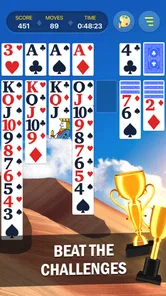
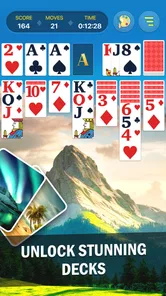
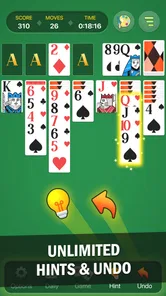
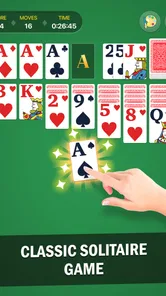
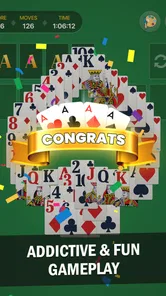
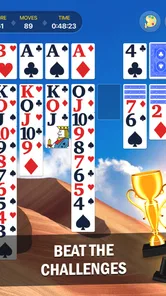
Analysis by Reviewed
I spent time with Solitaire Zen - Cards Master as a quiet, familiar card game rather than as a feature-heavy gaming platform. Its main appeal is easy to understand: it gives you a straightforward way to play solitaire when you want a short mental break, a little concentration, or something gentle to do without committing to a long session. The game comes from FelicityGames and is free to start, with optional in-app purchases ranging from $0.49 to $99.99 per item.
That simple purpose matters. Solitaire is often used in situations where attention is limited: during a short break, while waiting, or at the end of the day when a more demanding game feels like work. In my experience, this title fits that role best when you want cards and light decision-making without the pressure of competition. Its store positioning focuses on training the brain and relaxing, and that combination describes the experience more accurately than calling it an intense strategy game.
The game is listed for Everyone, which makes it approachable for a broad audience, and it has an average rating of 4.8 from around 637 ratings. It has passed 10K+ installs, so it is not an obscure experiment with no visible audience. Still, those figures should be read alongside the actual style of play: this is a calm solitaire option, not a replacement for a large collection of card games or a socially connected multiplayer title.
How the layout supports calm, readable play
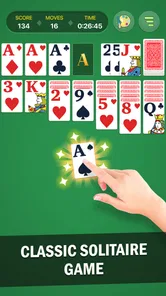
The first thing I look for in a solitaire game is whether I can understand the board without stopping to decode the interface. A good layout should let me identify the tableau, follow the card order, and recognize available moves with minimal visual searching. Solitaire Zen - Cards Master benefits from the fact that solitaire itself is familiar. Even if you have not played this exact version before, the card-based structure gives you a useful starting point.
That familiarity is especially helpful for people who do not want to learn a complicated control scheme. You are not dealing with a large collection of menus, character abilities, or layered objectives. The central task remains moving cards thoughtfully and deciding whether to reveal a hidden card, build a sequence, or preserve an option for later. For me, that makes the game easier to pick up than many modern casual games that surround a simple activity with several secondary systems.
The strongest accessibility advantage here is cognitive simplicity. The game asks me to focus on one compact puzzle at a time. That can be valuable for players who find busy interfaces tiring or who prefer a predictable routine. It also makes the title suitable for a short session in which I do not want to remember a story, manage an inventory, or keep track of several currencies.
There is a practical difference between a game being simple and a game being universally easy to read. Card games still rely on visual recognition, including suit, rank, color, and position. Someone with reduced vision, color-vision differences, or difficulty distinguishing small symbols may need to judge whether the card presentation works for them on their own device. I would not treat the Everyone label as proof that every visual need has been addressed.
More From Our News Desk

 Gmail
GmailGmail in a Busy Inbox: Who Benefits Most?
From first account to crowded workday, Gmail earns its place through dependable search and flexible sorting—but its best fit depends on how much inbox maintenance you can tolerate.

 Prime Video
Switching to Prime Video: What Changes in Your Viewing Routine
Prime Video can make a compelling second home for streaming, but switching means learning a different catalog, rental layer, and route from browsing to playback.

 Universal TV Remote Control
Universal TV Remote Control Works Best as a Reliable Backup
A phone remote earns its place through quick setup and reliable habits. Here is how to get more from Universal TV Remote Control—and where its limits show.

 Weather - By Xiaomi
Weather by Xiaomi Review: Clear at a Glance, Less Clear Up Close
Xiaomi’s weather app makes everyday forecasts quick to scan, but its calm surface can leave useful details and recovery paths harder to find than they should be.

 X
XX Under Pressure: Can It Recover When Posting Goes Wrong?
A resilience-focused review of X, examining setup, mistaken posts, interruptions, weak connections, and the gaps that matter when recovery needs to be dependable.

 Clash of Clans
Clash of Clans Is Won Between the Battles
Its raids are quick; its community is a long-term project of coordination, teaching, rivalry, and shared responsibility—with all the friction that entails.
Latest News



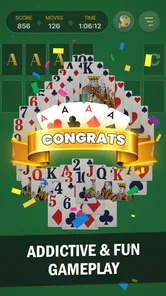
Device size can change the experience as well. On a larger screen, the tableau may feel less cramped because cards have more room to remain visually separate. On a smaller phone, the same board can require more careful attention, particularly when several piles are close together. I found that the best way to assess the fit is to play a few hands at the size and brightness you normally use, rather than assuming that a familiar card layout will feel equally comfortable everywhere.
Navigation that suits occasional players
For an occasional player, the most important navigation question is not how many settings exist. It is whether returning to the game feels effortless. Solitaire Zen - Cards Master works best as a pick-up-and-play activity because its purpose is immediately clear. I can approach it without preparing for a campaign or learning a new ruleset before the first meaningful decision.
This also makes it a reasonable choice for someone introducing a relative or friend to mobile card games. The familiar subject reduces the amount of explanation needed. I would still sit with a new player for the first hand if they are unfamiliar with solitaire conventions, because knowing where cards generally belong is different from knowing the best move in a particular position.
One useful habit is to treat each hand as a small attention exercise rather than a test of speed. I prefer to pause before moving a card and check what the move exposes or blocks. That approach makes the game more comfortable for players who need extra time, and it also produces better decisions than tapping quickly just because the next move is visible.
The trade-off is that people looking for extensive customization may find the experience restrained. A highly configurable solitaire app may be better if you need to alter many visual or interaction details. Here, the appeal is the reduced mental load, but reduced complexity can also mean fewer ways to adapt the presentation to personal preferences.
Motor, sensory, and attention demands in real use
Card games on a touchscreen usually involve repeated tapping and dragging. That creates a different set of considerations from a turn-based game controlled entirely through large buttons. A player with limited dexterity, tremor, joint pain, or difficulty making precise gestures may find card placement more demanding than the rules themselves.
I recommend approaching the game with deliberate movements instead of rapid swipes. A slower rhythm gives you time to place a card accurately and reduces the chance of moving something by accident. It also matches the relaxing character of the title. If touch precision is a recurring problem for you, this is one area where a solitaire game with especially large controls or alternative input options could be a better match.
Short sessions are another practical strength. I can play one hand during a brief pause and stop without feeling that I have abandoned a larger objective. That helps people whose energy, concentration, or available time changes throughout the day. It is also useful for anyone who becomes uncomfortable with prolonged screen use: the game does not need to occupy an entire evening to feel worthwhile.
At the same time, a calm game can still become visually tiring if you stare at a dense card arrangement for too long. I would use the phone settings that already make other apps more comfortable, such as adjusting brightness or choosing a viewing position with less glare. Those are general device adjustments rather than special capabilities of this game, but they can make a noticeable difference during a longer hand.
Sound and sensory comfort deserve a cautious mention. Solitaire is naturally playable as a quiet activity because the essential information is on the cards, not in spoken dialogue or a constant stream of action. That makes it a sensible candidate for public places, shared rooms, or moments when you want to avoid noisy entertainment. I would still check the actual in-game presentation on your device before relying on it in a setting where sound or visual effects could be distracting.
For players who process information slowly, the absence of a race against another person is important. I can think through a move without worrying about an opponent waiting for me. That does not remove every pressure point—an unwinnable position or a poor earlier decision can still be frustrating—but it changes the emotional tone compared with competitive card games.
A useful routine for different energy levels
I found three practical ways to use the game. On a high-focus day, I can examine the board carefully and treat the hand as a small planning problem. On a tired day, I can play more casually and stop as soon as concentration starts to fade. On a waiting day, I can use one short session to fill a gap without opening a more demanding game that might be difficult to put down.
That flexibility is more meaningful than it may sound. Many games are designed around keeping the player engaged for as long as possible, while solitaire can be used in a more self-directed way. If you are trying to control screen time, I suggest deciding in advance whether you will play one hand or stop after a particular break. The game’s quiet structure supports that plan, although your own habits still determine whether it remains a brief activity.
It can also work for people who enjoy repeating a known routine. The rules do not require constant novelty, so the pleasure comes from examining a new arrangement and making a sequence of small choices. Players who need frequent surprises, social interaction, or a strong sense of progression may find that routine less satisfying.
Where the experience may still create barriers
The most obvious limitation is that a card layout is not equally comfortable for every player. A person who cannot reliably distinguish suits, colors, or ranks may need a different design approach, and the Everyone rating should not be mistaken for a detailed promise about visual accessibility. If cards are difficult for you to identify, no amount of strategic interest will make the experience pleasant.
Touch interaction is another potential barrier. Dragging cards can be less forgiving than selecting an item from a large, clearly separated button. Players with motor limitations should test whether they can pick up and place cards consistently. I would not recommend buying any optional item until that basic interaction feels comfortable, especially because the game includes individual in-app purchases priced from $0.49 to $99.99.
The purchase range is worth considering even though the game itself is free. Free access makes it easy to try, but optional spending can change how comfortable the overall experience feels for someone who prefers a completely predictable cost. My advice is simple: play enough to understand the core loop first, and decide whether the free version already meets your needs before considering anything extra.
There is also a difference between relaxing solitaire and therapeutic software. I enjoy the concentration involved, and the game can provide a pleasant mental pause, but I would not use its brain-training language as a medical claim or as evidence that it improves a particular condition. It is best understood as a casual activity that exercises attention through card decisions, not as a substitute for professional support.
Players who expect a broad card library should look elsewhere. A traditional solitaire specialist with several variants may offer more long-term variety. A multiplayer card platform will be more suitable if your main goal is conversation, competition, or playing with friends. A minimalist offline-style card game may also appeal more to someone who wants the fewest possible extras. Solitaire Zen - Cards Master is most convincing when its focused, low-pressure identity is exactly what you want.
Version 3.13.4 is the current version, and the game requires at least OS 10. That makes checking your phone or tablet’s operating system a sensible step before installing. Compatibility is especially important for people using an older device, because a game that looks suitable on paper is not useful if the device cannot run it comfortably.
The release date is Sep 12, 2025, so I would judge it as a relatively recent entry rather than as a long-established classic. That is not automatically good or bad. Newer software can feel more current, while older solitaire products sometimes have a longer history of refinement and a wider selection of modes. The rating and install count suggest that people are finding it, but neither replaces trying the interface yourself.
Who should choose it and who should pass
I would recommend this game to someone who wants a free solitaire experience with a calm pace and a familiar mental structure. It is a good fit for short breaks, quiet evenings, and moments when you want to concentrate on something small without entering a competitive environment. It also suits players who prefer learning through recognition and repetition instead of mastering a large set of systems.
I would be more cautious recommending it to someone who needs extensive accessibility controls, highly enlarged card presentation, or alternative input methods. In that situation, a solitaire app built specifically around configurable visuals and controls may be safer. I would also point competitive players toward a multiplayer option and variety seekers toward a collection that offers several card formats.
For a family member who is new to mobile games, I would introduce it slowly: explain the basic goal, let them make moves without rushing, and adjust the device display if the cards are hard to see. The lack of a social opponent can make the first experience less intimidating. For a commuter or office worker, I would suggest using it during a defined break rather than opening it whenever concentration is already low.
One of the less obvious strengths is that the game can support different levels of involvement without changing its identity. You can inspect every move and treat the hand as a planning exercise, or play lightly as a way to occupy your hands. That makes it more adaptable than a game whose enjoyment depends on fast reactions. The corresponding weakness is that the same modest scope may feel repetitive once the basic solitaire routine stops being rewarding.
FelicityGames has kept the central idea easy to understand, and the strong 4.8 average from roughly 637 ratings indicates a positive response from the people who have rated it. I would not use that figure as a guarantee that it will suit every ability or device, but it does make the game worth a fair trial if solitaire already appeals to you.
My final view is favorable but specific: this is a sensible choice for calm, accessible-in-spirit solitaire, not a universal answer to every card-game need. I like it most when I want a quiet hand, a familiar set of decisions, and the freedom to stop after a short session. Before installing, I would check the OS 10 requirement, consider whether touchscreen card movement is comfortable, and remember that the free download includes optional purchases. If those points fit your situation, Solitaire Zen - Cards Master is an easy game to recommend to a friend who wants a gentle card break rather than a demanding gaming commitment.
Solitaire Zen - Cards Master Frequently Asked Questions
Who developed Solitaire Zen - Cards Master, and what kind of game is it?
Solitaire Zen - Cards Master is a card game developed by FelicityGames. Its focus is familiar solitaire-style play, presented as a way to train your brain and relax. If you enjoy arranging cards and thinking through each move at your own pace, its straightforward premise may suit you. The game is rated for Everyone.
What is Solitaire Zen - Cards Master?
Solitaire Zen - Cards Master is a relaxing mobile card game centered on classic solitaire-style gameplay. It is designed for short sessions as well as longer play, combining familiar card arrangements with a calm presentation. The app is suitable for players who enjoy traditional solitaire and want a simple way to unwind without learning complicated controls or rules.
How do you play Solitaire Zen - Cards Master?
The main objective is to arrange cards according to the selected solitaire rules, usually by building sequences in the tableau and moving cards to foundation piles in the correct order and suit. You tap or drag cards to make moves, while available hints can help when you are unsure what to do. The exact options may vary depending on the game mode or version.
Can Solitaire Zen - Cards Master be played offline?
Solitaire Zen - Cards Master may support offline play for its core solitaire sessions, which makes it convenient when traveling or when an internet connection is unavailable. However, features such as advertisements, cloud synchronization, online events, updates, leaderboards, or purchases may require connectivity. It is best to launch the game online at least once and check which functions remain available without internet access.
Is Solitaire Zen - Cards Master free to download and play?
The game is free to download, so you can begin without paying an upfront purchase price. It also offers optional in-app purchases, with individual items ranging from $0.49 to $99.99. Check the purchase settings before handing the device to a child or anyone who might make accidental purchases. Its free entry makes it easy to try, while optional spending is worth considering if you prefer to avoid add-on costs.
Pros
- Simple rules make it easy for beginners to start playing.
- Relaxing presentation suits short
- low-pressure gaming sessions.
- Quick rounds work well for commutes or brief breaks.
- Offline play can be convenient when an internet connection is unavailable.
- Familiar solitaire gameplay requires little time to learn.
Cons
- Repetitive gameplay may lose its appeal after extended sessions.
- Some features or rewards may encourage frequent ad viewing.
- Limited variety can feel underwhelming for experienced card players.
- Progression may offer little depth beyond completing more games.
- Small card details can be harder to read on compact screens.