Solitaire - Relax Card Game
- 7.00
- 4.7
- Installs
- 10.00K
- Price
- Free
Screenshots
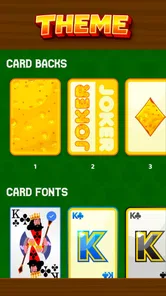
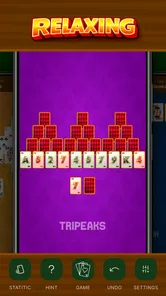
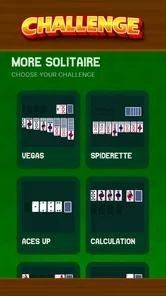
Analysis by Reviewed
I downloaded Solitaire - Relax Card Game expecting the familiar patience format I use when I want something quiet rather than competitive. That expectation is important here: this is a free card game from Izanagi Production, built around classic solitaire instead of trying to turn a simple pastime into a large social or adventure experience. After spending time with it, I found its strongest quality is its low resistance. I can open it, begin a hand, and settle into a short break without learning a complicated system first.
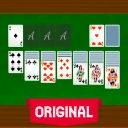
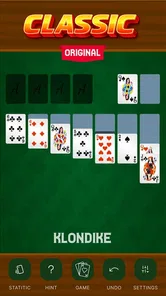
The first impression is helped by the presentation. The card themes give the table a more personal look than a completely plain solitaire board, while the movement feels smooth enough to keep the attention on the hand instead of on the controls. That combination makes it easy to understand why the game has attracted a 4.7 average from around 279 ratings and more than 10K installs. Those figures suggest a small but clearly satisfied audience, although they should not be mistaken for proof that every player will find enough variety for months.
What keeps the first week enjoyable
During the first few sessions, the appeal comes from how quickly the game gets out of the way. I do not need to set up a physical deck, remember where I left a game, or make room on a table. The basic solitaire rhythm is immediately recognizable: reveal cards, build sequences, and look for the next useful move. For someone who already knows the format, this is a particularly comfortable entry point. For a newcomer, the uncluttered idea is less intimidating than a card game filled with special abilities, timers, or competitive rankings.
The themes matter more than they might seem at first. A card table that looks pleasant is easier to return to than one that feels harsh or unfinished, especially when the game is being used as a small daily pause. I would not call the visual customization a reason to buy or install the game by itself, but it gives the familiar format a little identity. Changing the appearance can also make repeated sessions feel less visually stale, even though the underlying activity remains the same.
The smooth handling is another practical strength. Solitaire depends on repeated small actions, so awkward card movement would become irritating very quickly. Here, the presentation supports the calm mood the title promises. That does not make every deal winnable or every decision interesting, but it reduces the kind of friction that makes a simple game feel like work. In a waiting room, during a commute, or while taking a few minutes away from a larger task, that distinction is valuable.
One useful way to approach the game is to treat each hand as a defined break rather than an endless feed. I often prefer to start with a simple intention: play one hand, stop after the result, and decide whether I actually want another. This prevents a quiet game from becoming background tapping. It also makes the experience easier to fit around daily routines. The game works well when I want a contained activity, not when I need a deep hobby that will occupy an entire evening.
The age rating of Everyone also matches the accessible nature of the experience. The rules are familiar, the tone is gentle, and there is no need to understand a complicated fictional setting before playing. That makes it suitable for a broad range of casual players. However, accessibility should not be confused with depth. Someone looking for a demanding strategic card game will probably find the traditional structure too limited, particularly after the first wave of familiarity has passed.
More From Our News Desk

 Gmail
GmailGmail in a Busy Inbox: Who Benefits Most?
From first account to crowded workday, Gmail earns its place through dependable search and flexible sorting—but its best fit depends on how much inbox maintenance you can tolerate.

 Prime Video
Switching to Prime Video: What Changes in Your Viewing Routine
Prime Video can make a compelling second home for streaming, but switching means learning a different catalog, rental layer, and route from browsing to playback.

 Universal TV Remote Control
Universal TV Remote Control Works Best as a Reliable Backup
A phone remote earns its place through quick setup and reliable habits. Here is how to get more from Universal TV Remote Control—and where its limits show.

 Weather - By Xiaomi
Weather by Xiaomi Review: Clear at a Glance, Less Clear Up Close
Xiaomi’s weather app makes everyday forecasts quick to scan, but its calm surface can leave useful details and recovery paths harder to find than they should be.

 X
XX Under Pressure: Can It Recover When Posting Goes Wrong?
A resilience-focused review of X, examining setup, mistaken posts, interruptions, weak connections, and the gaps that matter when recovery needs to be dependable.

 Clash of Clans
Clash of Clans Is Won Between the Battles
Its raids are quick; its community is a long-term project of coordination, teaching, rivalry, and shared responsibility—with all the friction that entails.
Latest News



Small habits that make the format last longer
The best way I found to avoid playing on autopilot was to change the purpose of each session. Sometimes I focused on making the most informative move rather than the fastest one, using the visible layout to think about which card should be exposed first. At other times, I used a hand as a short reset between tasks and stopped as soon as the break had done its job. These are not hidden modes or special systems; they are ways of getting more value from the existing structure.
I also recommend paying attention to the card theme you actually enjoy looking at instead of changing it constantly. The visual choice works best when it supports a personal routine. If the table is easy to read and pleasant to revisit, it becomes part of the habit. If the theme feels distracting, the novelty disappears quickly. This is a small trade-off, but it is one of the few ways a straightforward solitaire game can feel more individually suited to the player.
A realistic everyday use case is a short pause after finishing a message-heavy task. Rather than opening a social app and getting pulled into unrelated updates, I can play a hand with a clear beginning and end. The game is also a reasonable companion for a quiet morning coffee or a few minutes before sleep, provided the player is comfortable with screen time during that period. Its value is not in filling every spare hour; it is in making a small empty space feel intentional.
Whether it earns a place after the novelty fades
The harder question is what happens after the first month. The initial pleasure of a new card theme and a clean interface naturally weakens. Classic solitaire has a narrow central loop, and no amount of attractive presentation changes that. For me, the game remains useful when I want exactly that loop: a familiar, low-pressure activity with no need to coordinate with other people. It becomes less compelling when I am hoping for constant discovery, a campaign, or a sense of long-term progression.
This is where the game compares favorably with physical cards but less decisively with richer digital alternatives. A physical deck offers tactile satisfaction and does not depend on a screen, yet it takes longer to prepare and is less convenient when I am away from home. A general-purpose solitaire app may offer more variants, statistics, challenges, or personalization, which can create stronger reasons to return. On the other hand, those additions can also make the experience feel busier. Solitaire - Relax Card Game is better suited to someone who wants the traditional activity without a large layer of extra systems.
Its free price lowers the commitment considerably. I can try it without deciding that it must replace every other card game on my phone. That makes the app particularly easy to recommend to a casual player who wants a straightforward option. The sensible expectation is not an endlessly expanding game, but a dependable tool for short sessions. If that sounds modest, it is because the product’s appeal depends on being modest rather than pretending to be something larger.
The current version is 1.0.6, and that is worth keeping in mind when judging its long-term role. The version number identifies the build available to players, but it does not by itself promise a particular update schedule or a growing stream of content. I would install it for the experience it provides now, not because I expect future additions to solve the limitations of the classic format. That mindset makes the decision clearer and avoids relying on imagined improvements.
Maintenance is light, but personal maintenance matters
From a player’s point of view, this is a low-maintenance game. There is no complicated deck to collect, no character roster to manage, and no elaborate routine that demands daily attention. I can leave it alone for a week and return without needing to relearn anything. That is a genuine advantage over games whose value declines when the player misses a login streak or falls behind other users.
The trade-off is that the game also gives me fewer external reasons to return. A more feature-heavy alternative may provide goals, records, or rotating activities that create a stronger habit. Here, the habit has to come from the player’s own use case. I return because a short solitaire hand fits a particular moment, not because the app is constantly asking me to maintain an account or chase a reward. For some people that is relaxing; for others it may feel sparse.
There is also a practical maintenance question around device space and attention. A simple card game is easy to keep installed because it does not demand much mental preparation, but its place on my home screen still has to be earned. I would keep it visible if I regularly want a quiet break. If I only play once every few months, a browser-based alternative or a physical deck might be more sensible. The game’s convenience is meaningful only when I use it often enough to justify having another app available.
One of my more useful routines was to separate “relaxation” from “solving.” If I played while distracted, I sometimes made careless moves and blamed the game for feeling repetitive. When I gave the hand a little attention, the familiar pattern became more satisfying. This is a subtle limitation of the genre: the same simplicity that makes it accessible means the player’s state of mind has a large effect on the experience. It is not a replacement for a meditation app, nor is it a serious mental training program. It is a focused card pastime.
Where fatigue begins
The main source of fatigue is repetition. Once the basic visual appeal has become familiar, the player is left with the decisions and pacing of classic solitaire. That can be enough for people who enjoy the ritual, but it will not satisfy everyone. I would skip this game if I wanted a broad selection of card formats, a competitive ladder, multiplayer interaction, or a strong progression system. The absence of those expectations is not a flaw in itself; it simply defines the audience more narrowly.
Another possible weakness is that smooth gameplay can make the sessions blur together. When controls are easy and the table looks polished, it is tempting to continue dealing hands without noticing how little the experience is changing. My solution was to use a stopping rule, such as ending after a completed hand or after a short break. Without that boundary, the game can become passive rather than restorative. Players who need clear goals may prefer a solitaire alternative that records more milestones or adds structured challenges.
The card themes help delay visual fatigue, but they cannot fully remove it. They are a presentation feature, not a substitute for new mechanics. I found them useful for keeping the table inviting, especially when I selected one that made the cards easy to distinguish. Still, anyone installing the game mainly for customization may quickly reach the limits of that appeal. The core reason to stay should be the feel of playing solitaire, not the expectation of a constantly changing visual collection.
There is also a difference between “relaxing” and “easy.” Some hands can require careful choices, and a player who wants a completely passive experience may find that the game still asks for attention. Conversely, a player seeking intense challenge may find the familiar rules too predictable. The sweet spot is someone who enjoys light concentration: enough decision-making to occupy the mind, but not enough complexity to create pressure.
Who should install it and who should look elsewhere
I would recommend it to someone who wants a clean, free solitaire option for brief, repeatable sessions. It is especially suitable for players who value a pleasant card table, straightforward handling, and the ability to return after a break without any learning curve. The Everyone rating reinforces that broad accessibility, while the positive response from its existing audience gives the app a reassuring first impression.
I would be more cautious about recommending it to a dedicated solitaire enthusiast who has already exhausted the classic format and wants constant variation. That player may be happier with an app centered on multiple variants, detailed personal statistics, challenges, or competitive features. I would also point a social player toward a multiplayer card game instead. This title’s strength is private, self-paced play, so it is not the right answer for someone who needs conversation or direct competition to stay engaged.
Compared with playing solitaire on a computer, the phone format is more convenient for small gaps in the day. Compared with a physical deck, it is faster to start and easier to carry. Compared with a feature-heavy mobile card collection, it is calmer but less ambitious. Those trade-offs are the real decision. The game does not win by offering the most content; it wins when the player values an uncluttered version of a familiar activity.
I also appreciate that the developer, Izanagi Production, has kept the identity of the product focused. The name and presentation set an expectation of a relaxed card session rather than a sprawling game. That clarity helps me decide when to use it. I do not open it expecting a new story chapter or a competitive event, and the experience feels more successful because it is judged on the right terms.
My long-term verdict
After the novelty fades, Solitaire - Relax Card Game earns lasting space only if classic solitaire already has a place in your routine. For me, it works as a dependable five-minute activity: easy to start, pleasant to look at, and simple to leave without consequences. The free price makes trying it straightforward, and the smooth presentation gives the traditional format enough polish to feel comfortable on a modern phone.
Its limits are equally clear. The game does not transform solitaire into a deep long-term hobby, and the card themes cannot prevent repetition forever. Players who need frequent new goals, social play, or a wide range of variants should choose another option. I would not install this expecting a constantly expanding experience. I would install it because I want a focused, familiar card game that does not demand much from me.
My final recommendation is therefore specific: keep it if you enjoy using solitaire as a small daily reset, and remove it if you find yourself opening it only out of habit and finishing hands without interest. Its lasting value comes from fitting real moments in your day, not from overwhelming you with content. For the right player, that restraint is the reason it remains useful after the first week; for everyone else, it will probably feel pleasant but temporary.
Solitaire - Relax Card Game Frequently Asked Questions
Who developed Solitaire - Relax Card Game, and which devices can run it?
Solitaire - Relax Card Game is a card game from Izanagi Production. It runs on Android devices using Android 9 or later, so it is worth checking your device’s operating system before downloading. The game’s straightforward solitaire format makes it easy to pick up, whether you want a brief break or a longer session. Its current version is 1.0.6.
What does Solitaire - Relax Card Game look and feel like to play?
The game is presented as classic solitaire with beautiful card themes and smooth gameplay. Its focus is a familiar card-game experience, with a relaxed pace that suits casual sessions. Card themes add a visual touch while the classic format keeps the main activity easy to recognize. If you enjoy traditional solitaire rather than a more elaborate card game, this straightforward style may appeal to you.
What is Solitaire - Relax Card Game?
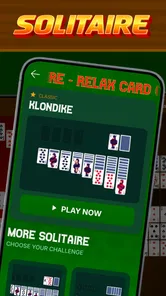
Solitaire - Relax Card Game is a digital version of the classic Klondike solitaire card game, designed for casual play and stress-free entertainment. It generally lets you play at your own pace, move cards by tapping or dragging, and restart deals when needed. The app may also include daily challenges, scoring, hints, undo options, customizable card designs, and relaxing backgrounds, depending on the version installed.
Can I play Solitaire - Relax Card Game offline?
In most cases, the core solitaire gameplay can be enjoyed without a continuous internet connection, which makes it convenient for travel, commuting, or relaxing away from home. However, certain features may require online access, including advertisements, cloud synchronization, daily challenges, leaderboards, special events, or downloading additional content. It is best to open the app once while connected before relying on offline play.
Is Solitaire - Relax Card Game free to download and play?
Solitaire - Relax Card Game is free to download, allowing users to start playing without an upfront purchase. Like many free card games, it may be supported by advertisements and could offer optional in-app purchases. These purchases may remove ads, unlock visual themes, provide extra hints, or add premium features. Review the store listing and purchase settings carefully before downloading.
Pros
- Playable offline
- making it convenient for travel or low-connectivity situations.
- Simple controls are easy to learn for both beginners and casual card players.
- Short rounds fit well into quick breaks or relaxed evening sessions.
- Daily challenges add variety beyond standard Solitaire games.
- Adjustable card designs and backgrounds improve visual personalization.
Cons
- Frequent ads may interrupt play
- especially between completed rounds.
- Some features and cosmetic options may require in-app purchases.
- Random deals can occasionally feel repetitive during longer sessions.
- Small cards may be difficult to read on compact phone screens.
- Battery use can increase during extended play sessions.