Solitaire Master - Card Game
- 2.13K
- 4.5
- Installs
- 1.00M
- Price
- Free
Screenshots
Analysis by Reviewed
I tend to judge a solitaire app less by the first few satisfying wins than by whether it still feels worth opening once the novelty wears off. Solitaire Master - Card Game makes a friendly first impression: it is a free card game from intense dev, and its familiar format is easy to settle into without a long learning curve. Its broad appeal is reflected in a 4.6 average from around 34,000 ratings, but what matters more to me is whether the everyday play holds up.
Why the first sessions feel easy
The basic appeal is immediate: solitaire gives you a small puzzle you can start and stop on your own terms. That makes this a natural fit for a quiet coffee break, a short wait, or a few minutes when I want to focus on something simple rather than scroll. The game is rated for Everyone, and its accessible card-game premise makes sense for casual players as well as people who already know the genre.
For a practical habit, I would keep sessions short and treat each deal as a self-contained diversion rather than a task to finish. That helps preserve the relaxing quality. If you are new to solitaire, start with the variant whose rules you already understand; if you know several, switching between them can make a familiar routine feel less repetitive.
Getting past the novelty
During the first week, the most useful question is not how many deals I can complete, but whether opening the game feels like a choice rather than a reflex. I would try it in two different settings: once when I have a few unhurried minutes, and once during a genuine pause in the day. If it works in both, its simple format is doing something practical. If I only open it because a challenge is waiting, the reward loop may be doing more work than the card play.
One small routine that helps is to decide before starting whether I want a quick game or a more thoughtful one. That makes it easier to stop without feeling pulled into “just one more” deal. Solitaire is particularly good at filling gaps, but a gap can become longer than expected when I begin another round automatically. I would keep the app available for downtime, while avoiding it during moments when I need to return promptly to a task.
Gameplay Experience
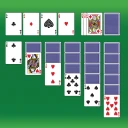
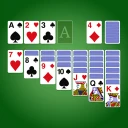
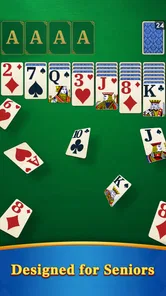
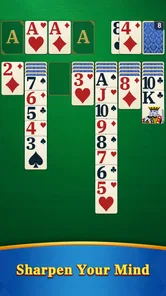
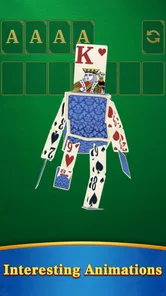
The first thing you notice when you open Solitaire Master - Card Game is the sleek and intuitive interface. It’s like the developers knew exactly what we needed and delivered just that. The cards are easy to read, and the animations are smooth, adding a layer of polish that enhances the overall experience.
There’s a gratifying sense of satisfaction when you complete a game. It’s perfect for those moments when you need a break but still want to engage your brain. The app offers multiple versions of Solitaire, which keeps things fresh and exciting. Whether you’re a fan of Klondike, Spider, or FreeCell, there’s something for everyone.
More From Our News Desk

 Gmail
Gmail in a Busy Inbox: Who Benefits Most?
From first account to crowded workday, Gmail earns its place through dependable search and flexible sorting—but its best fit depends on how much inbox maintenance you can tolerate.

 Prime Video
Switching to Prime Video: What Changes in Your Viewing Routine
Prime Video can make a compelling second home for streaming, but switching means learning a different catalog, rental layer, and route from browsing to playback.

 Universal TV Remote Control
 Works Best as a Reliable Backup
A phone remote earns its place through quick setup and reliable habits. Here is how to get more from Universal TV Remote Control—and where its limits show.

 Weather - By Xiaomi
Weather by Xiaomi Review: Clear at a Glance, Less Clear Up Close
Xiaomi’s weather app makes everyday forecasts quick to scan, but its calm surface can leave useful details and recovery paths harder to find than they should be.

 X
X Under Pressure: Can It Recover When Posting Goes Wrong?
A resilience-focused review of X, examining setup, mistaken posts, interruptions, weak connections, and the gaps that matter when recovery needs to be dependable.

 Clash of Clans
 Is Won Between the Battles
Its raids are quick; its community is a long-term project of coordination, teaching, rivalry, and shared responsibility—with all the friction that entails.
Latest News



Choosing the right kind of session
The variants are useful for more than simply adding names to a menu. When I want a recognizable rhythm, I would choose the format I already know; when I have enough attention to plan a little further ahead, changing variants can make the session feel less automatic. The practical trade-off is that variety helps most when you already enjoy card puzzles. It cannot make a deal feel compelling if what you want is a story, a rival, or a very different objective.
For someone learning solitaire, I would resist switching modes every few minutes. Spend a few sessions with one set of rules first, so a loss or a stuck board does not get confused with unfamiliar mechanics. Once the basic decisions feel natural, trying another variant is a better test of whether the game can become a lasting habit. Experienced players can do the reverse: use a different mode when their usual choice starts to feel like muscle memory.
Keeping it in the rotation
The question after the first week is whether the variety gives you a reason to return. Moving among Klondike, Spider, and FreeCell can change the kind of attention a session asks for, so I would choose based on my mood: a familiar deal when I want a quick reset, or a more deliberate puzzle when I have time to think. The daily challenges and completion rewards described below can add a small routine, but they are best treated as optional nudges, not obligations.
Compared with a single-variant solitaire app, this one has a broader menu for players who like to alternate. Compared with a more elaborate mobile game, it asks less commitment and is easier to put down between moves. That simplicity is also the trade-off: someone looking for a deep campaign, social competition, or a constantly changing set of systems may find ordinary card play too modest.
What recurring value looks like
Over a month, I would judge the game by whether it remains a useful option for particular moments, not by whether every session feels new. A short lunchtime pause, a wait before an appointment, or a quiet stretch at home each calls for a different level of attention. The appeal here is being able to choose a familiar puzzle without first catching up on a plot or remembering a complicated plan. That is a modest kind of value, but it can be dependable.
A realistic routine might be to play one deal while waiting for a takeaway order, then close the game as soon as the order is ready. The point is not to turn every spare minute into play; it is to have an activity that can fit neatly into one. If I notice that I keep extending those pauses to finish another game, I would set a personal stopping point before opening it. That keeps the app serving the day instead of quietly taking over more of it.
Features Worth Noting
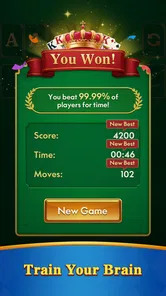
One of the standout features has to be the daily challenges. These are not just your run-of-the-mill games; they’re designed to test your skills and give you a sense of achievement when you complete them. The app rewards you with points and badges, which is a nice touch for all the completionists out there. I would use them as a light prompt on days when choosing a deal feels like effort, while avoiding turning a relaxing game into a streak to maintain.
Another feature I find particularly useful is the hint system. We’ve all been there—stuck on a game, unsure of the next move. The hint option doesn’t just give you the answer but rather nudges you in the right direction, which keeps the challenge intact. Also, the undo feature is a lifesaver for those accidental taps! A useful habit is to pause before asking for a hint: scan the tableau and available moves first, then use the nudge if you are genuinely stuck. Undo is better for correcting a mis-tap than repeatedly reversing choices until the deal stops feeling like your own puzzle.
Using help without flattening the puzzle
Hints and undo can make a casual card game more forgiving, but I would use them for different reasons. Undo is most valuable when a touch did not match what I intended; it saves a session from being decided by a clumsy tap. A hint is more useful when I have looked over the available cards and still cannot see a productive move. If I reach for either tool after every uncertain choice, the game risks becoming a sequence of instructions rather than a puzzle I am solving.
That distinction matters most for newer players. A hint can teach you to notice a move you missed, while pausing to inspect the layout helps build your own judgement. I would use the hint as a prompt to look again, not as a reason to stop thinking. Experienced players may prefer to leave it unused on a deal they want to solve unaided, then rely on undo only for input mistakes. The tools support different play styles, but they do not remove the need to decide how much assistance makes a session satisfying.
Visuals and Sound
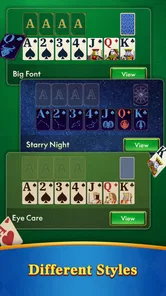
The visuals are crisp and vibrant, making it easy to distinguish between the different suits and values. The background themes are customizable, which is a nice touch for those who like a bit of personalization in their gaming experience. As for the sound, it’s pleasantly subtle. There’s nothing jarring, just the occasional shuffle sound that adds to the ambiance.
That readable presentation matters in small, ordinary moments: a quick session is less relaxing if you have to work to identify a card or keep adjusting your attention. I would pick a background that keeps the cards easy to scan rather than changing themes for novelty alone. Players who prefer silent play can also keep the experience low-key by simply choosing not to rely on the audio atmosphere.
Maintenance and device fit
For a game intended to fill brief pauses, setup and ongoing upkeep matter less than in a title built around a long campaign. Solitaire does not ask me to remember a sequence of story events or maintain a complex build between sessions, so returning after a few days away feels straightforward. That makes it a low-effort option to keep around, especially if I already reach for card games when I want a quiet distraction.
The game is free, has reached over one million installs, and its current version is 1.0.11; it requires Android 7.0 or later. Those basics make it approachable for many Android users, though the version and operating-system requirement are worth checking against your device before installing. It is also worth thinking about the kind of phone use you want: this is a screen-based pastime, so it is not a substitute for a physical deck if you want to play with someone sitting beside you.
What may wear thin
Solitaire’s central loop is deliberately repetitive: sort cards, uncover options, and decide what to move next. Multiple variants, challenges, hints, and undo soften that repetition, but they cannot turn a traditional card puzzle into a different kind of game. If you need a strong narrative, multiplayer interaction, or frequent new goals to stay engaged, another genre will probably suit you better.
There is also a small self-management trade-off with any challenge-and-reward loop. Points and badges can make a completed session feel satisfying, yet chasing every marker may undermine the easygoing break that brought you to the game. I would skip a challenge when I am tired or short on time rather than force a longer session just to check it off. The app is most useful when it fits around your day, not when it starts dictating the pace of it.
Who should choose something else
I would recommend this to someone who likes familiar card puzzles, wants options beyond a single solitaire format, and values being able to stop after a short session. It can also suit a returning player who remembers the basic rules but does not want to commit to a large game. The Everyone age rating makes its general audience clear, though the best fit still depends on whether the player enjoys quiet, solo problem-solving.
I would skip it if I were looking for live competition, a social card table, a narrative to follow, or mechanics that change dramatically from one session to the next. A physical deck is a better choice when the point is playing with another person, while a more expansive mobile game makes more sense when I want progression and a stronger sense of discovery. Against a bare-bones solitaire alternative, this game’s selection of variants and supporting tools is appealing; against a deep puzzle game, its strength is convenience rather than complexity.
Long-term value
I judge its long-term value by whether the game remains an easy, satisfying choice without turning daily challenges or rewards into chores. The useful test is simple: after a week away, can I open it, enjoy a deal, and leave when I planned? That balance between a dependable habit and a genuinely optional pastime is what ultimately shapes my verdict.
Final Thoughts
In a digital world filled with complex games, sometimes all you need is a classic card game to unwind. Solitaire Master - Card Game delivers just that with its polished interface, multiple features, and engaging gameplay. It’s suited to both quick sessions and longer playthroughs, provided you enjoy the steady rhythm of solitaire rather than expecting a constant stream of surprises.
If you’re a fan of card games, or just someone looking for a way to relax and pass the time, give this app a try. It’s free to download, so there’s really nothing to lose, and potentially hours of entertainment to gain. I would keep it installed for convenient, low-pressure play, but not recommend it to someone who already finds solitaire repetitive. Its lasting value comes from being easy to return to, not from continually reinventing the card game.
Solitaire Master - Card Game Frequently Asked Questions
How much storage space does Solitaire Master - Card Game need?
Before downloading Solitaire Master - Card Game, it is sensible to make sure your device has enough free storage for the installation and any routine app updates. The game is free, but a free download still needs room on your device. If storage is tight, you can check the available space in your device settings and remove files or apps you no longer use before installing.
Who makes Solitaire Master, and when was it released?
Solitaire Master - Card Game is made by intense dev and was released on November 14, 2024. Knowing the developer and release timing can help you identify the game when looking through card-game options. Its current version is 1.0.11, so you can also compare the version shown on your device with the version offered before downloading or updating.
What devices can run Solitaire Master - Card Game?
Solitaire Master - Card Game is a card game for Android, and its minimum operating system requirement is Android 7.0. If you are considering installing it, check that your device meets this requirement first. The game is free to download, so compatibility is the main practical point to consider before getting started.
What is Solitaire Master - Card Game all about?
Solitaire Master - Card Game is a digital version of the classic card game Solitaire, designed for both Android and iOS devices. This app offers a modern take on the traditional game, featuring multiple game modes, beautiful graphics, and intuitive controls. Whether you’re a seasoned Solitaire player or a newcomer, this app provides an engaging and entertaining card-playing experience right at your fingertips.
Is Solitaire Master - Card Game free to download and play?
Yes, Solitaire Master - Card Game is free to download and play on both Android and iOS platforms. However, the app may offer in-app purchases and advertisements that can enhance the gaming experience by unlocking additional features, modes, or removing ads. Users can enjoy the basic gameplay without spending any money, but optional purchases are available for those looking to expand their gaming options.
Pros
- User-friendly interface
- Offline play available
- Engaging daily challenges
- Multiple game modes
- Free to download
Cons
- Contains ads
- Limited customization options
- Requires in-app purchases
- No multiplayer mode
- Occasional lag issues