Solitaire Home Design
- 9.28K
- 4.3
- Installs
- 5.00M
- Price
- Free

Screenshots



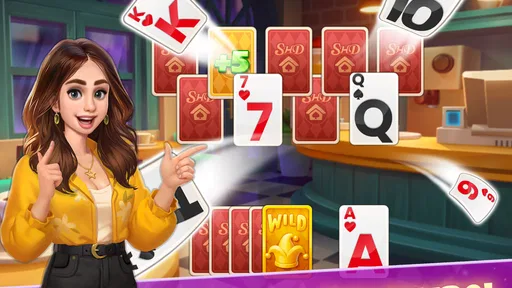
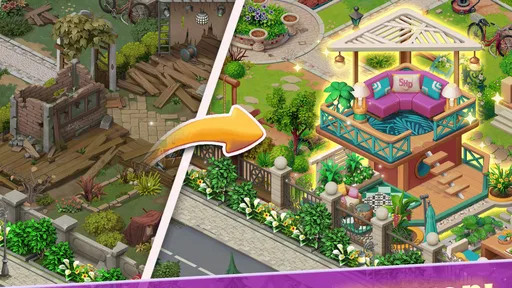
Analysis by Reviewed
I found Solitaire Home Design most interesting as a quiet, shared-device game rather than as a traditional solitaire replacement. It combines familiar card puzzles with a home-improvement theme, so each short session has a visible sense of progress beyond simply clearing a deck. I could imagine leaving it on a household tablet for different people to use at separate times, although that arrangement needs a little common sense because the game’s progress and purchases should be treated as belonging to the person using the device and account.
Developed by BETTA GAMES, this free card game is aimed at Everyone and runs on Android 9 or later. It has reached over 5 million installs, with a 4.3 average from around 130 thousand ratings and about 9.3 thousand written reviews. Those numbers suggest that the basic combination of solitaire and decorating has found a substantial audience, but they do not change the central question: do you want a relaxed card game with a renovation layer, or do you want a pure, distraction-free solitaire experience?
How the card puzzles fit into everyday play
The main appeal is the loop between solving solitaire puzzles and shaping a dream home. In practice, that gives ordinary card rounds a reason to feel connected. Instead of playing one hand and stopping with only a win or loss, I have a broader objective in mind: make enough progress to improve a space. That extra layer is useful when standard solitaire starts to feel repetitive.
I think it works especially well in small gaps during the day. A few rounds while waiting for an appointment, winding down after dinner, or taking a break from work can feel more satisfying when the result contributes to a larger visual project. It is not a game I would choose when I want an intense challenge or a long uninterrupted story. Its strength is the gentle rhythm of card decisions followed by home-design progress.
The home theme also changes how I judge a difficult hand. In a plain solitaire app, an unsuccessful round can feel disposable. Here, the surrounding design goal gives me a reason to try again. That does not make every puzzle easy, and it does not remove the frustration of an awkward deal, but it gives the repetition a clearer purpose.
One useful way to approach it is to treat the design tasks as a pacing tool rather than rushing through them. I would play a small number of hands, make one meaningful change to the home, then stop at a natural point. This keeps the game from becoming background tapping and makes the visual progress easier to notice.
What makes it different from ordinary solitaire apps
Traditional solitaire apps usually focus on speed, score, statistics, or a clean card-table presentation. That is better if you want to improve your efficiency, replay familiar layouts, or play without any extra theme. Solitaire Home Design takes the opposite route: the cards are the activity, but the home is the motivation.
More From Our News Desk

 Gmail
GmailGmail in a Busy Inbox: Who Benefits Most?
From first account to crowded workday, Gmail earns its place through dependable search and flexible sorting—but its best fit depends on how much inbox maintenance you can tolerate.

 Prime Video
Switching to Prime Video: What Changes in Your Viewing Routine
Prime Video can make a compelling second home for streaming, but switching means learning a different catalog, rental layer, and route from browsing to playback.

 Universal TV Remote Control
Universal TV Remote Control Works Best as a Reliable Backup
A phone remote earns its place through quick setup and reliable habits. Here is how to get more from Universal TV Remote Control—and where its limits show.

 Weather - By Xiaomi
Weather by Xiaomi Review: Clear at a Glance, Less Clear Up Close
Xiaomi’s weather app makes everyday forecasts quick to scan, but its calm surface can leave useful details and recovery paths harder to find than they should be.

 X
XX Under Pressure: Can It Recover When Posting Goes Wrong?
A resilience-focused review of X, examining setup, mistaken posts, interruptions, weak connections, and the gaps that matter when recovery needs to be dependable.

 Clash of Clans
Clash of Clans Is Won Between the Battles
Its raids are quick; its community is a long-term project of coordination, teaching, rivalry, and shared responsibility—with all the friction that entails.
Latest News



That difference matters for the type of player who gets bored by endless identical rounds. The decorating layer creates a softer sense of progression, which can make the game more approachable for someone who does not care about beating a personal time record. On the other hand, players who want precise control over every aspect of a solitaire session may find the surrounding design goals less appealing than a dedicated card app.
I would also compare it with broader home-design games. Those games often put more emphasis on decorating choices, characters, or a continuing narrative. Here, the card puzzle remains the center of attention. If you are choosing between this and a design-focused game, ask yourself which activity you would still enjoy when the novelty of the rooms fades. If the answer is arranging spaces, another genre may suit you better. If the answer is solitaire with a reason to continue, this is the more natural fit.
A realistic shared-device routine
For a household using one tablet, I would set a simple routine before anyone starts: one person plays at a time, and everyone checks which account is active before making a purchase. The game is free to download, but its in-app purchases range from $0.99 to $199.99 per item. That wide range makes casual sharing more important than it might be in a completely offline card app.
A practical evening setup could be this: one adult plays a few rounds after dinner, another household member uses the same device later, and a child is allowed to play only when an adult is nearby. The game’s Everyone rating makes it broadly suitable by age classification, but an age label is not a substitute for discussing spending or deciding who is allowed to use the device.
I would avoid handing the tablet over while a payment account is already ready for a one-tap purchase. Even without inventing any special family-control feature, ordinary device habits help: use the device’s existing purchase protections, keep payment details handled by the account owner, and do not assume that a shared screen means shared ownership of progress.
This is one of the less obvious trade-offs of a game designed for relaxed, repeat play. Its approachable presentation makes it easy to pass around, but the same convenience can blur boundaries. A household should agree on whether the game is personal, shared, or simply available on a common device. That decision is more important than the decorating theme itself.
Progress, accounts, and household boundaries
I would think of progress as account-specific unless the device and sign-in arrangement clearly establish otherwise. Different people may have different expectations about what counts as “their” room, their puzzle history, or their spending. If the game is installed on a family tablet, it is worth deciding in advance whether everyone is comfortable contributing to one shared run.
A shared run can be fun when people enjoy making design decisions together. One person might prefer calm colors, while another wants to spend progress on a more dramatic change. That can turn a solitary game into a small household activity. It can also become irritating if one player changes the home without telling the others, especially when the design choices feel personal.
For that reason, I would separate play from coordination. Let each person solve their own hands when they want quiet time, then discuss larger design decisions together. This avoids the feeling that someone has interrupted another player’s plan while still preserving the social part of the game.
If several people want completely independent progress, a shared-device arrangement may not be ideal. I would rather give each person a separate supported device or use a clearly separate account arrangement than pretend that one continuous game can serve several unrelated players without compromise. The right choice depends on the household’s habits, not on the game’s broad age rating.
Age context and trust
The Everyone classification makes the game easier to consider for a mixed-age household, and the card format is familiar enough that a younger player can understand the basic idea quickly. Still, I would introduce it differently to a child than to an adult. For a child, I would explain that the home progress is part of the game and that real-money purchases require permission. For an adult, I would focus more on whether the repeated puzzle loop is enjoyable enough to justify the time.
The important distinction is between content suitability and spending suitability. An Everyone rating speaks to the general age context, but it does not mean every household should allow unsupervised purchases. Since the game includes paid items, trust should be established before it becomes part of a child’s regular screen time.
I also would not use the game as an automatic reward system without setting clear limits. The design progression can make “just one more round” feel tempting, especially when a player is close to a home improvement. A simple time agreement works better than relying on the game to signal when someone should stop.
For older relatives or casual players, the familiar solitaire foundation may be the strongest reason to try it. They do not need to understand a complicated competitive system to begin. The home project provides context, while the cards remain recognizable. That said, anyone who dislikes decorative themes may prefer a straightforward solitaire app with fewer layers.
Small strategies that make the experience better
My first tip is to play with a stopping point in mind. Rather than opening the game whenever you are bored and continuing indefinitely, decide whether you are playing for a short break, a design decision, or a few attempts at a difficult puzzle. This makes the game feel more intentional and helps prevent the home-building layer from turning into an endless reason to continue.
My second tip is to avoid making purchase decisions during a frustrating streak. When a hand does not go your way, the desire to recover progress can make an optional item seem more attractive than it did at the start of the session. I would close the game or take a break, then decide later with a clear head. The free entry point is useful, but it should not be confused with a promise that every part of the progression will remain free.
My third tip is to treat household design choices as a coordination exercise. If the game is shared, agree on a simple rule such as alternating decisions or letting the person who earned the progress choose the next change. This is not a game feature; it is a practical way to prevent disagreements when several people are using one run.
A fourth useful approach is to compare the game with your actual reason for playing. If you want concentration practice, a pure solitaire app may offer a cleaner environment. If you want a visual project to return to, the home-design layer gives this game an advantage. Making that choice consciously will save you from judging it by the wrong standard.
Where the free model deserves attention
Because the game is free, it is easy to try without committing money at the beginning. That is a real advantage for households deciding whether the card-and-design combination suits them. I would spend time learning the rhythm of the puzzles before considering any optional purchase, because the central question is whether the basic loop remains enjoyable over repeated sessions.
The listed purchase range reaches from $0.99 to $199.99 per item, so I would not treat the game as automatically cost-free simply because installation costs nothing. The upper end is especially relevant on a shared device, where a child or guest might not understand the financial meaning of a button. The safest approach is to make the account owner responsible for every purchase decision and keep that boundary visible.
This pricing structure also affects my recommendation. For someone who wants a completely predictable, one-time card experience, a paid solitaire app without optional items may be a better fit. For someone who prefers to test a game first and decide later whether the extra progression is worthwhile, the free download is more convenient.
Technical fit and long-term appeal
The current version is 1.0.163, and the minimum operating-system requirement is Android 9. That makes the game relevant to many reasonably recent Android devices, although anyone using an older phone or tablet should check compatibility before planning a shared setup. I would also consider screen comfort: a larger tablet can make the home-design presentation easier to enjoy, while a phone is more convenient for short personal sessions.
The game was released on September 3, 2020, which gives it a longer presence than a brand-new card release. Its install count and rating show that it has had time to attract a sizeable audience, but my recommendation still depends on personal tolerance for repetition. A familiar game can be comforting, yet the same familiarity may feel stale if you need constant novelty.
I would expect the strongest long-term appeal from players who enjoy gentle progression and do not need every session to feel dramatically different. The weakest fit is someone who wants deep strategic variety, competitive rankings, or a minimalist card table. Those preferences are not flaws in the game; they simply point toward a different kind of solitaire experience.
Who should install it, and who should skip it
I would recommend it to casual card-game players who like having a visual project alongside their puzzles. It is also a reasonable choice for a shared household tablet when everyone understands that the game may involve optional spending and that one run can create disagreements about design decisions. The Everyone rating makes the age context broad, while the familiar card format lowers the learning barrier.
I would be more cautious recommending it to people who dislike in-app purchases on principle, even when they can choose not to buy. I would also point serious solitaire enthusiasts toward a more focused alternative if they care mainly about rules, speed, scoring, or a clean interface. Likewise, someone shopping specifically for a home-decorating game may find the card puzzles too central.
For a person who wants a relaxing evening ritual, the best test is simple: play without spending, notice whether the home progress adds motivation, and see whether the repeated hands remain pleasant after the first session. If the answer is yes, the game has probably found its audience. If the cards feel like an obstacle between decorating choices, it is better to move on rather than force the fit.
My household verdict
After looking at it as both a personal game and a shared-device option, I see Solitaire Home Design as a friendly middle ground between classic solitaire and light home-design entertainment. Its strongest idea is not the individual card hand; it is the connection between a familiar puzzle and a continuing visual goal. That connection gives casual players a reason to return without demanding the intensity of a competitive card game.
My main reservation is not the card format but the need for clear boundaries around progress and purchases. On a personal device, that is easy to manage. On a family tablet, I would establish who owns the run, who can make design choices, and who is allowed to approve spending before installing it for regular use.
My recommendation is to try it as a free, low-pressure card game with a decorating reward, not as a pure solitaire tool and not as an entirely cost-free household activity. If you enjoy short puzzle sessions, like seeing a home take shape, and can keep account and purchase responsibilities clear, it is a worthwhile download. If you want independent profiles, strict separation between players, or a focused card-table experience, a conventional solitaire alternative will likely serve you better.
In the right household, the game can become an easy shared ritual: one person solves a few hands, another suggests a design direction, and everyone knows where the boundaries are. That is where I think it works best—not as a demanding game that takes over your attention, but as a calm card pastime with just enough home-building progress to make the next round feel meaningful.
Solitaire Home Design Frequently Asked Questions
Does Solitaire Home Design have a story or progression beyond its card puzzles?
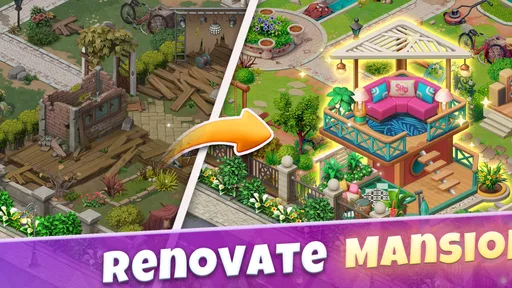
Yes. The card levels are connected to a home makeover experience, so completing puzzles lets you move forward with room renovations and decorating choices. This gives the game a sense of progress beyond simply finishing one solitaire layout after another. If you enjoy seeing spaces change as you play, the design activities add a casual goal alongside the card challenges.
Can I choose how rooms look in Solitaire Home Design?
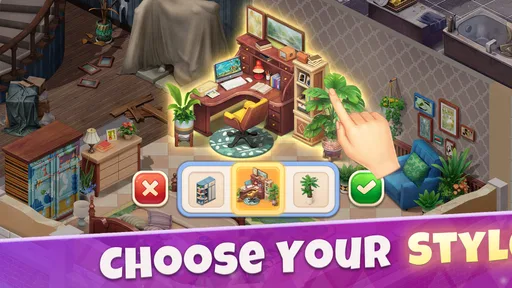
The game includes room-design decisions such as choosing furniture and decorative styles as you renovate. Those choices give you a role in shaping the spaces rather than making the experience only about clearing cards. The renovation activities are light and accessible, so players who want a relaxed mix of puzzles and visual makeovers may find that balance appealing.
Who developed Solitaire Home Design, and what kind of game is it?
Solitaire Home Design is a card game developed by BETTA GAMES. It brings together solitaire puzzles and home decoration, giving players a chance to alternate between clearing cards and making design choices. Its focus on both a familiar card format and room makeovers may appeal to players looking for a casual game with more than one activity.
What is Solitaire Home Design?
Solitaire Home Design is a casual mobile game that combines classic solitaire card puzzles with home renovation and interior decoration. As you complete solitaire levels, you earn rewards that can be used to renovate rooms, choose furniture, select decorative styles, and gradually improve different properties. It is designed for players who enjoy relaxing card gameplay alongside a light, story-driven makeover experience.
How does the solitaire gameplay work?
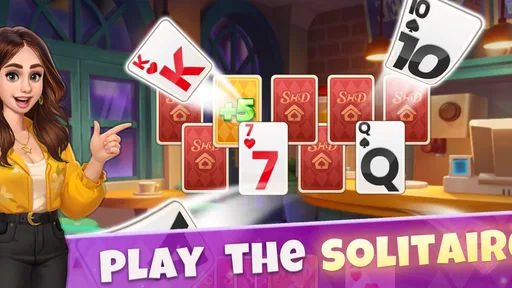
The main gameplay is based on a simple solitaire format in which you clear cards by selecting cards that are one number higher or lower than the active card. Completing longer sequences can help you progress through levels more efficiently, while special cards or boosters may assist with difficult layouts. The rules are easy to understand, although later stages can become more challenging and may require careful planning.
Pros
- Relaxing solitaire gameplay suitable for short or long sessions.
- Home renovation gives each level a clear sense of progress.
- Bright visuals and decorative themes make rooms enjoyable to customize.
- Simple controls are easy for casual players to learn.
- Regular events and challenges add variety beyond the main levels.
Cons
- Some renovation choices may require premium currency or extra resources.
- Difficulty can increase sharply when helpful cards are limited.
- Frequent ads may interrupt play
- especially between completed levels.
- Progress may feel slow without spending money on boosters or coins.
- The game usually requires an internet connection for full functionality.