Solitaire - Brain Training
- 72.00
- 4.8
- Installs
- 10.00K
- Price
- Free
Screenshots


Analysis by Reviewed
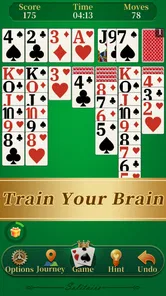
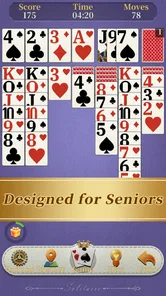
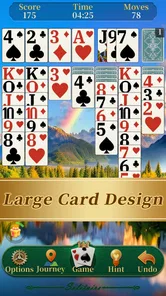
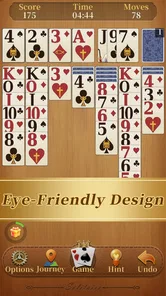
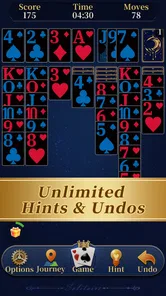
I picked up Solitaire - Brain Training expecting a straightforward way to play Klondike for a few quiet minutes, and that is exactly where it makes the most sense. It is a card game from KST GAMES, built around the familiar solitaire format rather than a large collection of unrelated modes. The presentation is aimed at comfortable reading, with big cards as a central part of the experience, so it feels especially suitable when a small screen or tired eyes make tiny card layouts frustrating.
What I like most is that the game does not ask me to learn a new ruleset before I can enjoy it. I can open it, recognize the layout, and begin making decisions immediately. That simplicity makes it a natural fit for a shared household device too. Someone can use it for a short break, hand the device to another person, and leave without creating the kind of complicated account or progress-management problem that comes with larger games.
A relaxed Klondike game for shared, short sessions
The core appeal is classic Klondike solitaire. For me, that means the game works best as a low-pressure activity between other tasks: after breakfast, while waiting for an appointment, or during a quiet evening when I want something interactive but not demanding. The familiar card movement gives each round enough decision-making to stay interesting, while the overall pace remains easy to control.
The big-card approach changes how the game feels in practice. I spend less time squinting at ranks and suits, and more time thinking about which column to open or which card to move. That matters on phones used at arm’s length, and it is even more useful when several people in a home share the same device but do not all have the same eyesight or comfort with small interfaces.
A realistic household scenario would be a tablet left in the living room. One person plays a round while waiting for tea to brew, then another family member uses it later without needing a tutorial. Because the game is based on a recognizable card format, the handoff is simple: the next player can understand what is happening by looking at the board. I would still avoid treating an unfinished round as communal property, since another player may accidentally alter the position or simply prefer to start fresh.
This is also a good example of where a simple game can be more practical than a feature-heavy alternative. A larger solitaire collection may offer several variants, challenges, or elaborate reward systems, but those extras can make a quick shared session feel less immediate. Here, the attraction is the narrow focus. If your household wants one familiar card game that can be opened without ceremony, that focus is a strength.
What the first few sessions feel like
My first sessions were easy to understand because the rules are already familiar. I could concentrate on planning rather than deciphering menus. The useful habit is to slow down before moving an exposed card: opening a hidden card is often more valuable than making the most visually obvious move. I also found it helpful to keep the empty tableau spaces in mind, because filling one too quickly can remove flexibility later in a round.
More From Our News Desk

 Gmail
GmailGmail in a Busy Inbox: Who Benefits Most?
From first account to crowded workday, Gmail earns its place through dependable search and flexible sorting—but its best fit depends on how much inbox maintenance you can tolerate.

 Prime Video
Switching to Prime Video: What Changes in Your Viewing Routine
Prime Video can make a compelling second home for streaming, but switching means learning a different catalog, rental layer, and route from browsing to playback.

 Universal TV Remote Control
Universal TV Remote Control Works Best as a Reliable Backup
A phone remote earns its place through quick setup and reliable habits. Here is how to get more from Universal TV Remote Control—and where its limits show.

 Weather - By Xiaomi
Weather by Xiaomi Review: Clear at a Glance, Less Clear Up Close
Xiaomi’s weather app makes everyday forecasts quick to scan, but its calm surface can leave useful details and recovery paths harder to find than they should be.

 X
XX Under Pressure: Can It Recover When Posting Goes Wrong?
A resilience-focused review of X, examining setup, mistaken posts, interruptions, weak connections, and the gaps that matter when recovery needs to be dependable.

 Clash of Clans
Clash of Clans Is Won Between the Battles
Its raids are quick; its community is a long-term project of coordination, teaching, rivalry, and shared responsibility—with all the friction that entails.
Latest News



That small pause is where the “brain training” angle has some practical meaning, although I would not treat the title as a medical or educational promise. The game encourages attention, sequencing, and short-term planning. It gives me a reason to look ahead by one or two moves instead of tapping randomly. The benefit is modest and recreational, but the mental engagement is real enough to distinguish it from simply watching something passively.
One non-obvious advantage of a familiar layout is that it can work as a gentle bridge for people who are not enthusiastic about games. I would be more comfortable suggesting this to a relative who dislikes complicated controls than recommending a strategy game with several screens of instructions. The card format provides an immediate reference point, and the large presentation reduces one common source of frustration.
Setting boundaries on a shared device
Because this is a free game rated for Everyone, it is easy to imagine it being available on a family phone or tablet. That does not mean every household should handle it casually. I recommend agreeing on a simple rule before sharing: either each person starts a new round, or the current player finishes before someone else takes over. That small boundary prevents arguments over an altered board and makes the game feel fair without requiring a complicated routine.
I would also keep expectations clear about what “shared use” means. A shared device is not the same as separate personal spaces. If several people use the same installation, I would not assume that every player has an independent history, preference set, or private area. For a household that cares about distinct records or carefully separated progress, a game with explicit user profiles would be a better match.
There is another practical boundary: decide who is responsible for changing the device’s general settings. Large cards help readability, but they do not replace the need for a comfortable screen brightness, appropriate text size elsewhere on the device, or a quiet place to play. I would let the person who needs the clearest view adjust the device before a session, then return it to the household’s usual setting afterward.
For children, I would present it as a simple card game rather than as a guaranteed learning tool. The Everyone rating makes it approachable from an age perspective, but age suitability is only one part of a family decision. Adults should still consider how long a child is spending on the device and whether the game is being used as a break, a distraction, or a replacement for other activities.
Coordinating turns without making the game feel like a chore
Coordination works best when it stays informal. In my experience, a short round is easier to share than a long competitive session because nobody has to wait very long for access. If the device is regularly passed around, I would suggest announcing whose turn it is and avoiding moves while another person is explaining a plan. Solitaire is usually individual, but shared commentary can make it pleasantly social.
There is a useful distinction between watching and taking control. A family member may want to suggest a move without actually touching the screen. That can turn a solitary activity into a small puzzle-solving conversation, while leaving the player responsible for the final decision. It also helps older relatives who may be comfortable with the rules but less confident with touch controls.
Another practical tip is to use a predictable stopping point. Finishing a round is ideal, but if the household is busy, pausing after a clear sequence of moves is better than handing over during a moment of uncertainty. The next player can then inspect the layout before deciding whether to continue. This is not a special feature; it is simply a better way to coordinate a game that does not appear designed around multiple personal turns.
I would not choose this title for a family looking for direct competition, live multiplayer, or a shared leaderboard experience. Its value is in taking turns around the same screen, not in creating a structured contest. If the goal is to compare results or maintain separate achievements, a more socially designed card app would likely serve that purpose better.
Age, trust, and the limits of a simple card game
The Everyone rating makes the game broadly approachable, and the traditional card format avoids the violence, complex themes, and intense pressure found in many other mobile games. That makes it easier to place on a household device used by different generations. I can see it working for an older adult who wants a recognizable pastime, a teenager looking for a quiet diversion, or an adult who wants a few minutes away from more demanding apps.
Still, I would not confuse a friendly age rating with a complete family-management solution. The game’s simplicity means I would make household decisions outside the game: when the device can be used, who may change settings, and whether a child should play independently. Those boundaries are especially important on a device that also contains personal messages, photos, or work information.
Trust matters in another way. A person who is not confident with mobile games may worry about making an irreversible move. I found that the best approach is to let them explore at their own pace rather than taking over the screen. Explain the basic aim, point out the visible options, and allow them to decide. The large cards help with recognition, but confidence comes from having control over the session.
The game is less suitable for someone who expects a deep training program, detailed performance analysis, or a broad curriculum of card variants. The “brain training” framing may attract players who want measurable improvement, but I would approach that expectation carefully. What I get here is a familiar planning exercise wrapped in a calm card game, not a substitute for structured cognitive practice.
Version, access, and everyday practicality
The current version is 1.8.3, and the game is free to install. It requires Android 8.0 or later, so it fits many still-serviceable Android phones and tablets, though an older device below that requirement will not be a candidate. That operating-system boundary is worth checking before planning to place it on a spare family handset.
Its store presence shows an average rating of 4.8 from around three hundred ratings, with over seventy written reviews and more than ten thousand installs. I read those figures as a sign of a focused game that has found an interested audience, not as proof that it will suit everyone. The important question is whether you want classic Klondike with readable cards, because that is the experience the game is built to provide.
I appreciate that the free price lowers the friction of trying it on a household device. I can install it to see whether the card size and pace work for a particular person without committing money first. At the same time, free does not automatically mean ideal for every shared environment. I would still test it on the actual screen where it will be used, especially if the intended player has difficulty reading small symbols or distinguishing suits.
The release date is Dec 22, 2025, which places it among relatively recent options for this specific review period. That may reassure someone who prefers not to install an old, abandoned-looking solitaire title, but I would judge the app primarily by how comfortably it plays on the target device. For a card game this traditional, day-to-day usability matters more to me than novelty.
Small techniques that improve the experience
My first practical tip is to treat every move as a choice between immediate progress and future access. Moving a card to a foundation can feel satisfying, but sometimes keeping it in the tableau preserves options for uncovering a hidden card. I try to scan the columns before committing, especially when a move would consume a useful alternating-color sequence.
Second, I would use the large-card presentation as a planning aid rather than merely a visual comfort feature. When the ranks and suits are easy to read, I can quickly inventory what is exposed and identify which column is blocking progress. That makes the game suitable for a short mental reset: I can make a deliberate plan in a minute instead of tapping through every possible move.
Third, shared play benefits from a spoken “pause before move” habit. If two people are looking at the same board, saying what you intend to move gives the other person a chance to notice a better option. This is particularly useful when an older relative understands the rules but needs a little more time to process the layout. It turns the game into cooperative observation without pretending that it has a built-in cooperative mode.
Finally, I would avoid using an unfinished round as a test of skill between family members. A board inherited from another player reflects that person’s choices, not a clean starting point. For fair comparisons, everyone should begin their own round under the same informal rules. Since the game is fundamentally a solo card experience, household fairness has to come from the way people use it rather than from a competitive system inside the game.
Who should choose it, and who should look elsewhere
I would recommend it to someone who wants a recognizable solitaire game, readable cards, and a calm pace. It is particularly appealing for people who dislike cluttered interfaces or who use an Android device that is shared among family members. The game can fill a short gap in the day without demanding a long commitment, a social account, or knowledge of a complicated fictional world.
I would also recommend it to households that want an easy handoff between generations. A parent, grandparent, or visitor can usually understand the objective quickly, and the big-card emphasis makes the board less intimidating. The best shared sessions will still involve a little coordination, because the game is not built as a multi-user family hub, but the basic format is naturally accessible.
I would skip it if I wanted several solitaire variants in one place, a strong competitive structure, or extensive customization and statistics. I would also look elsewhere if my main purpose were formal cognitive training. A more specialized app could provide exercises and progress tools that this focused Klondike experience does not appear intended to replace.
It may also be the wrong choice for a household that needs clearly separated profiles. I would not install it with the assumption that each family member will automatically receive a private, independently managed space. For simple turn-taking, that is not a problem. For personal records, strict boundaries, or multiple carefully separated users, it is an important limitation.
My household verdict
After using it as a quiet solo game and imagining it on a shared tablet, I see Solitaire - Brain Training as a deliberately uncomplicated choice. Its strongest qualities are the familiar Klondike structure, readable big cards, easy entry, and free access. Those qualities matter more than flashy extras when the intended use is a few relaxed minutes or an occasional pass between family members.
The trade-off is just as clear: the narrow focus leaves less for players who want variety, competition, or personal account separation. I would set expectations before installing it on a communal device, especially if several people care about preserving their own progress. With that boundary understood, it can become a pleasant shared pastime rather than a source of confusion.
My final recommendation is positive for the right audience. If you want a classic card game that is easy to read and easy to explain, this is a sensible free option for Android 8.0 or later. I would start with a short session on the device that will actually be shared, let each person try the controls, and decide from there. For me, its value comes from doing one familiar thing comfortably—and doing it well enough to earn a regular place in a quiet household routine.
Solitaire - Brain Training Frequently Asked Questions
Is Solitaire - Brain Training suitable for seniors or players who prefer larger cards?
The game’s store summary highlights seniors and big cards, making it a natural option for players who find larger card faces easier to see and follow. Its classic Klondike format should also feel familiar to anyone who has played solitaire before. If screen readability matters to you, check how the cards look on your device after installing and adjust any available display settings.
What devices and operating systems can run Solitaire - Brain Training?
Solitaire - Brain Training is available for Android devices running Android 8.0 or later. Before downloading, check your device’s operating-system version in its settings to make sure it meets that requirement. The game is a card title from KST GAMES, and its simple solitaire format is suited to playing on a phone or tablet when you have a little time to spare.
Is Solitaire - Brain Training appropriate for children?
The game has an Everyone content rating, so its content is considered suitable for a broad audience, including children. Solitaire can also offer a calm way to practise attention and planning, though younger players may need help learning the rules at first. If a child will use the device, it is still sensible to review any payment or device settings with them before they play.
What is Solitaire - Brain Training?
Solitaire - Brain Training is a mobile card game based on the classic Klondike solitaire format. It combines familiar solitaire rules with a clean interface and brain-training elements, allowing you to exercise concentration, planning, and problem-solving skills while playing. The app is designed for short sessions, making it suitable for casual play during breaks or whenever you want a relaxing mental challenge.
How do you play Solitaire - Brain Training?
The game generally follows traditional solitaire rules: arrange cards in descending order with alternating colors, build each suit from Ace to King, and reveal hidden cards on the tableau. Players can move cards between columns, draw from the stock, and use available spaces strategically. If you already know classic Klondike solitaire, the controls and objective should feel familiar, although some versions may offer different modes or difficulty settings.
Pros
- Classic solitaire rules are easy to learn and play at any age.
- Short rounds make it convenient for quick breaks or daily practice.
- Smooth card controls work well on both phones and tablets.
- Multiple difficulty options can keep experienced players engaged.
- Offline play is useful when traveling or without a stable connection.
Cons
- Frequent ads may interrupt games
- especially between rounds.
- Some features may require in-app purchases or a premium upgrade.
- Random deals can occasionally feel repetitive over extended sessions.
- Small card details may be difficult to read on compact screens.
- Gameplay may offer limited variety for players seeking more than solitaire.