Rolly Legs
- 3.69K
- 4.4
- Installs
- 10.00M
- Price
- Free

Screenshots
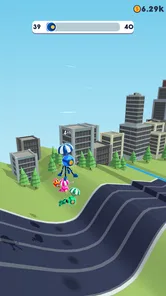
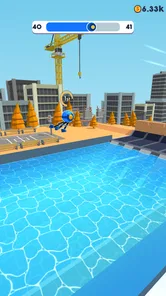
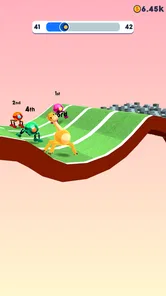
Analysis by Reviewed
I approached Rolly Legs expecting a quick arcade distraction, and that is exactly where it works best. It is a game about guiding a small robot through courses by rolling, walking, and climbing toward the finish. The idea is easy to understand within seconds, but the movement has enough awkwardness and timing pressure to make each attempt feel more involved than a simple tap-to-win game.
What makes it worth trying is the gap between understanding the objective and controlling the robot smoothly. I can see why this game has reached more than ten million installs and an average rating of 4.4 from roughly 124 thousand ratings. Those numbers suggest broad appeal, but they do not mean everyone will enjoy it equally. My experience was strongest when I wanted a short, hands-on arcade session rather than a deep game with a long-term story, complex strategy, or carefully explained progression.
Getting past the first points of friction
The main difficulty is not installing the game. It is learning how the robot responds. The controls are deliberately simple, yet the character’s movement can feel loose until I stop trying to force every action. A run often depends on choosing the right moment to roll, letting the robot climb when the surface allows it, and recovering after a slightly bad landing instead of immediately assuming the attempt is lost.
That distinction matters because a new player may interpret an awkward movement as a control failure. In practice, some of the challenge comes from the robot’s unusual way of moving. I had better results when I treated the course as a sequence of small adjustments rather than holding one direction and hoping the character would correct itself. Short, deliberate inputs are more useful than frantic tapping.
The game is especially easy to pick up in a spare minute. I can start a run, focus on the next obstacle, and stop without needing to remember a complicated plot or a large set of rules. That makes it suitable for a short break, a queue, or a commute when I want something interactive but not mentally exhausting. It is less suitable when I want a calm experience, because a missed jump or poorly timed movement can become irritating quickly.
The most useful early habit is to watch the robot’s movement before reacting. Instead of correcting every wobble, I found it better to identify whether the next surface rewards rolling, walking, or climbing. This small change makes the game feel less random and gives each attempt a clearer purpose.
What to check before blaming the game
Because this is a fast arcade title, basic setup problems can be mistaken for difficult gameplay. Rolly Legs is free, rated for Everyone, and supports devices running Android 8.0 or later. On a compatible phone, I would first make sure the game has finished installing properly and that the device is not struggling with several demanding apps at the same time.
More From Our News Desk

 Gmail
GmailGmail in a Busy Inbox: Who Benefits Most?
From first account to crowded workday, Gmail earns its place through dependable search and flexible sorting—but its best fit depends on how much inbox maintenance you can tolerate.

 Prime Video
Switching to Prime Video: What Changes in Your Viewing Routine
Prime Video can make a compelling second home for streaming, but switching means learning a different catalog, rental layer, and route from browsing to playback.

 Universal TV Remote Control
Universal TV Remote Control Works Best as a Reliable Backup
A phone remote earns its place through quick setup and reliable habits. Here is how to get more from Universal TV Remote Control—and where its limits show.

 Weather - By Xiaomi
Weather by Xiaomi Review: Clear at a Glance, Less Clear Up Close
Xiaomi’s weather app makes everyday forecasts quick to scan, but its calm surface can leave useful details and recovery paths harder to find than they should be.

 X
XX Under Pressure: Can It Recover When Posting Goes Wrong?
A resilience-focused review of X, examining setup, mistaken posts, interruptions, weak connections, and the gaps that matter when recovery needs to be dependable.

 Clash of Clans
Clash of Clans Is Won Between the Battles
Its raids are quick; its community is a long-term project of coordination, teaching, rivalry, and shared responsibility—with all the friction that entails.
Latest News



A quick restart is a sensible first step if the game opens slowly, stops responding, or behaves differently from one session to the next. I would also check that the phone has enough free storage for normal operation and that the operating system is not waiting for a pending update. These are ordinary checks, but they can prevent a player from judging the controls while the device itself is under strain.
The current version is 3.02, so keeping the installation current is also worthwhile when an update is available through the normal app store. I would avoid repeatedly reinstalling after a single poor run, since an unsuccessful attempt is usually part of the game rather than evidence that the installation is broken. Reinstalling can also be an unnecessary disruption if the problem is really a temporary device slowdown.
Touch response deserves its own check. A dirty screen, a thick screen protector, or fingers resting too close to the display edge can make a simple arcade control feel inconsistent. I had a more predictable experience when holding the phone securely, keeping the playing area clear, and using the same grip from one attempt to the next. That is particularly important in a game where a small timing difference can change the result.
Recovering a run instead of starting over too quickly
One of the more useful skills in Rolly Legs is learning when a run is still recoverable. If the robot lands awkwardly, my first instinct is often to make a large correction. That can create a second mistake. A better approach is to pause for a fraction of a second, read the next surface, and use the smallest movement that brings the robot back into a useful position.
This recovery mindset changes how I practice. Rather than measuring success only by reaching the end, I pay attention to which movement caused the failure. Was I rolling too early? Did I try to climb from a poor angle? Did I react to the previous obstacle and forget to prepare for the next one? Asking one specific question after a failed attempt is more productive than immediately repeating the same sequence.
For a short everyday session, I would play in groups of a few attempts and then take a brief pause. That sounds minor, but repeated failures can make the hands tense and encourage exaggerated inputs. A short reset helps me return with better timing. It also keeps the game in its strongest role: a compact arcade challenge rather than an unwanted source of frustration.
Another practical tip is to keep the phone at a comfortable viewing angle. If glare makes the course difficult to read, the problem may feel like poor control when it is really poor visibility. I found that seeing the upcoming surface clearly was more valuable than reacting faster. In a game built around movement changes, visual preparation is part of the control scheme.
How the workflow feels in normal use
Rolly Legs fits a simple repeatable routine: open the game, begin a run, experiment with the robot’s movement, and try again with one adjustment in mind. There is no need to prepare a loadout, study a large menu, or commit to a long play period. That simplicity is a genuine strength for casual players who want immediate action.
I would recommend it to someone who enjoys learning through trial and error. The game does not need a complicated explanation to become engaging; the challenge comes from gradually developing a feel for the robot. Players who like polished precision-platforming may find the movement less exact than they prefer, but those who enjoy slightly unpredictable physics may see that looseness as the personality of the game.
Compared with a traditional endless runner, the appeal here is less about reacting to a constant stream of obstacles and more about managing the robot’s changing movement. Compared with a conventional platform game, it is lighter and faster to start, but it does not offer the same sense of deliberate control or exploration. I would choose Rolly Legs for a quick experiment with unusual movement, while I would choose a more traditional platformer when I wanted dependable jumps and a stronger feeling of mastery over every action.
The game also differs from puzzle-focused arcade alternatives. There is no need for me to stop and plan a complex solution before acting. The decisions happen during movement, so the experience is more physical than analytical. That makes it accessible, but it also means players looking for deep puzzles or a substantial campaign may run out of reasons to continue sooner than expected.
When the phone, connection, or expectations are the real issue
Not every disappointing session points to a problem with the game. If the phone is hot, battery-saving behavior is active, or many apps are competing for memory, touch response and smoothness may feel worse. Closing unnecessary apps and restarting the device are reasonable general steps before deciding that Rolly Legs is malfunctioning.
It is also important to separate a control preference from a technical fault. The robot is meant to require timing and adjustment, so movement that feels unusual is not automatically a defect. I would suspect a genuine technical issue only if the same input behaves inconsistently across repeated attempts under otherwise normal conditions. If the entire phone is responding slowly, I would troubleshoot the device first.
Because the game is free, it is easy to try without an upfront purchase. It includes in-app purchases priced at $3.49 per item, so I would treat optional spending cautiously, especially if I am installing it for a child. The Everyone rating makes it broadly approachable, but an age rating does not replace ordinary family decisions about screen time or purchases. I would review the device’s purchase controls before handing the phone over.
Players should also set realistic expectations about the category. This is an arcade game from VOODOO, not a long-form adventure or a competitive simulation. Its value comes from quick attempts and the feel of improving at a compact movement challenge. If I wanted detailed customization, a large narrative, or a rich multiplayer structure, I would look elsewhere rather than expecting this small-format design to become something it is not.
Who should install it, and who should skip it
I think Rolly Legs is a good fit for players who enjoy short sessions, unusual physics, and games that are understandable immediately but take practice to handle well. It is also a sensible choice for someone who wants a free arcade title with an Everyone rating and minimal preparation. The developer’s focus on a straightforward concept helps the game remain approachable even when the movement becomes demanding.
I would be more cautious recommending it to players who dislike imprecise-feeling controls. If every unexpected wobble feels unfair, the central appeal may become the main annoyance. The same applies to anyone looking for a substantial progression system or a game that rewards long, uninterrupted sessions. Rolly Legs is at its best in small doses, where each attempt feels like a fresh test rather than a chore.
For a realistic daily example, I could play it while waiting for an appointment. I would use the first run to settle into the controls, the next few to focus on one troublesome transition, and then stop once my attention started slipping. That approach keeps the challenge enjoyable and avoids turning repeated retries into automatic tapping. It is a better match for the game than opening it during a long evening expecting hours of varied content.
My practical verdict
After spending time with it, I see Rolly Legs as a focused arcade game with a clear strength: it turns a very small control idea into a surprisingly tactile challenge. The robot’s rolling, walking, and climbing make movement feel distinctive, while the short-session structure makes it easy to fit into everyday gaps. I appreciate that I can understand the goal quickly without being buried in instructions.
Its limitations are just as clear. The movement may feel slippery to players who want exact platforming, repeated failures can become tiring, and the experience does not aim to provide the depth of a larger game. The free entry point is convenient, but the presence of $3.49 in-app items means I would still keep purchase settings in mind.
My recommendation is to try it with a patient approach: use small inputs, study the next surface, recover before restarting, and troubleshoot the phone only when the wider device shows signs of trouble. If that style of learning feels satisfying, this is a compact arcade game I would happily keep installed. If you prefer predictable controls, deep progression, or a story-driven reason to continue, a more traditional platformer will probably serve you better.
Overall, I would recommend Rolly Legs to casual arcade players who want a free, immediate challenge and do not mind mastering an unconventional robot. Its average rating of 4.4 and more than ten million installs reflect its broad accessibility, but my strongest recommendation is more personal: install it when you want a few focused attempts, not when you are searching for an all-night game.
Rolly Legs Frequently Asked Questions
What is Rolly Legs’ age rating, and should parents review it first?
Rolly Legs has an Everyone content rating, and its simple racing premise makes it approachable for a broad audience. Parents may still want to look over the game’s advertising and purchase settings before a child plays, and decide whether supervision is appropriate. Fast obstacles and repeated attempts can also make sessions run longer than expected, so setting limits can help keep play balanced.
How much storage space should I have available before downloading Rolly Legs?
It is sensible to make sure your device has some free storage before installing Rolly Legs, as with any mobile game. The amount available can vary by device and installation, so check the app’s store page on your phone or tablet for its current download details. Keeping extra space free can also help your device manage updates and other apps comfortably.
Can I play Rolly Legs on a tablet as well as a phone?
Rolly Legs is made for touchscreen play, so a compatible phone or tablet can provide the intended way to control the robot. Before downloading, check that your device meets the platform’s requirements and that the game is available in its app store. A larger screen may make the course easier to see, while the basic touch-based gameplay remains focused on guiding the robot.
Who developed Rolly Legs, and what kind of game is it?
Rolly Legs is an arcade game developed by VOODOO. It centers on guiding a rolling robot across a course, with the aim of reaching the finish while dealing with obstacles along the way. Its straightforward premise makes it easy to understand before playing, while controlling the robot’s movement and choosing when to roll, walk, or climb gives each run its challenge.
What devices can run Rolly Legs?
Rolly Legs is available for Android and iOS devices, and the Android version requires Android 8.0 or later. Before downloading, check that your device meets the operating-system requirement and has enough available storage for the installation. The game is designed around touchscreen controls, so a compatible phone or tablet offers the intended way to guide the robot through its courses.
Pros
- Simple one-touch controls are easy for beginners to understand.
- Short levels make it convenient for quick gaming sessions.
- The rolling and leg-stretching mechanic feels unusual and entertaining.
- Collectible items and upgrades add some extra motivation to replay levels.
- The colorful presentation is suitable for casual players of different ages.
Cons
- Gameplay can become repetitive after playing several similar levels.
- Frequent advertisements may interrupt the experience for free users.
- Some obstacles rely more on timing than strategy or meaningful progression.
- Later levels may feel frustrating when precise leg placement is required.
- The game offers limited depth for players seeking a long-term challenge.