Hidden Differences : Spot It
- 261.00
- 4.9
- Installs
- 500.00K
- Price
- Free

Screenshots
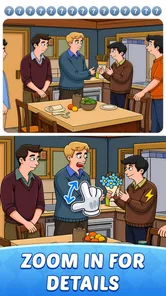
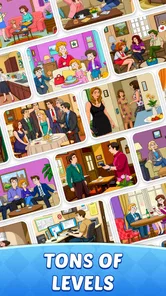
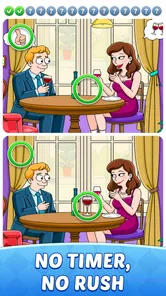
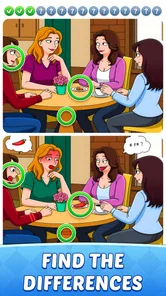
Analysis by Reviewed
I often reach for a picture puzzle when I want a small, focused break rather than a game that asks me to learn a long set of rules. Hidden Differences: Spot It is built around that simple appeal: compare two scenes, notice what changed, and tap the spot. Its calm, observation-first format makes it easy to start, though the enjoyment depends on whether you like scanning detailed images at your own pace.
A practical way to play a level
I get the most out of each scene by looking systematically instead of tapping at random. I scan one area at a time, moving across the picture in a steady pattern, then check the matching area in the other image. This helps me distinguish an actual change from a detail that simply looks different because my attention jumped elsewhere. It also makes the game feel less like a test of frantic reflexes and more like a visual puzzle.
For a quick session, I try to finish one image pair before switching tasks. If I’m interrupted, it is easier to return with a clear next step: resume scanning the part of the scene I had not checked yet. That habit is especially useful during a short wait, when a more complicated game would be hard to pick up and put down cleanly.
Engaging Gameplay That Captivates
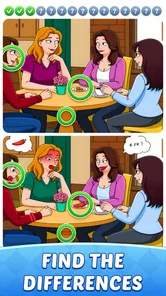
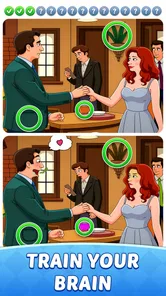
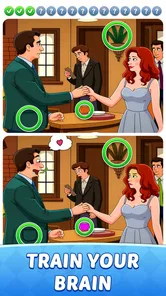
When I first stumbled upon Hidden Differences: Spot It, I was intrigued by its promise of finding differences in beautifully crafted images. The game is straightforward yet incredibly captivating. You’re presented with two side-by-side images, and your task is to spot the differences between them. Sounds simple, right? But as you progress, the game ramps up the challenge, requiring sharper eyes and quicker reflexes.
What I adore about this game is that it doesn’t rush you. You can take your time to soak in the details of each picture, making it perfect for those looking to unwind. Plus, the images are stunningly detailed, ranging from serene landscapes to bustling cityscapes. It’s almost like taking a mini-vacation every time you play.
Settings and habits that make a difference
I would check the available settings before settling into longer sessions, especially if small visual details are difficult to pick out on your device. A comfortable screen brightness and a little patience can matter more in a picture-search game than in a fast-action puzzle. Since this is designed around close visual comparison, I find it better to play somewhere I can focus than to try to inspect a scene while walking or juggling another task.
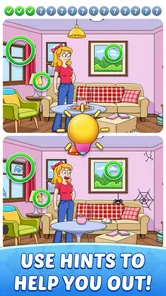
When I feel stuck, I avoid repeatedly tapping the same suspicious area. Instead, I compare shapes and edges: a line in the background, the outline of an object, or the spacing between nearby details. This is a useful way to narrow down what I’m looking for before deciding whether to use a hint. The hint option is there to keep a tricky moment from turning into a dead end, but saving it until I have made a deliberate scan keeps the discovery satisfying.
More From Our News Desk

Weather by Xiaomi Review: Clear at a Glance, Less Clear Up Close

X Under Pressure: Can It Recover When Posting Goes Wrong?

Clash of Clans Is Won Between the Battles

Android Auto Makes the Case for Quieter Car Software

MobiOffice: Transforming Mobile Productivity with Seamless Integration

EA SPORTS FC™ Mobile Soccer: Redefining Mobile Sports Gaming
Features That Stand Out
One of the standout features of this app is its user-friendly interface. The controls are intuitive, making it easy for anyone to pick up and play. Whether you’re a seasoned gamer or a newbie, you’ll find yourself at home with its simple tap mechanics.
Another highlight is the variety of themes and levels available. You’ll never get bored because there’s always a new challenge waiting around the corner. The game regularly updates with new content, keeping it fresh and exciting. And for those competitive spirits, there’s a leaderboard to show off your spot-finding prowess.
Moreover, the app offers hints for when you’re stuck, which is a lovely touch. It ensures that the game remains enjoyable and not frustrating, which I think is key to its appeal.
What kind of player will enjoy it?
This is a good fit for someone who likes calm, self-contained puzzles and wants to play in short stretches without mastering complicated controls. I can see it working well as a quiet wind-down after work, or as a shared activity with a child or friend: take turns scanning different parts of the same scene and explain what caught your eye. The Everyone age rating suits its approachable puzzle premise, though the best fit still depends on whether a player enjoys visual-search tasks.
Compared with familiar alternatives such as match-three puzzles or word games, this one asks for careful looking rather than planning combinations or recalling vocabulary. That makes it a refreshing change when I want to rest my mind without switching it off completely. On the other hand, players who prefer evolving strategy, narrative progression, or fast competition may find the repeated image-comparison loop too narrow. It is also less appealing if detailed pictures are tiring to inspect on a small screen.
How it fits into an everyday break
Imagine waiting for a coffee order or sitting in a quiet lobby with a few minutes to spare. I would open a level, settle on one section of the scene, and work methodically rather than racing through the picture. If the wait ends midway, I can stop without needing to remember a complicated plot or plan. That makes the game convenient for brief pauses, but I would avoid starting when I have only a moment and expect to be interrupted repeatedly; visual concentration is more enjoyable when I can give it a little attention.
For a more relaxed session, I treat speed as optional and focus on accuracy. For a personal challenge, I can make each scan more disciplined by checking the edges, then the central objects, then small background details. This gives me a repeatable routine without relying on features the game does not promise. It also helps me notice when I’m merely staring at a scene instead of actively comparing its parts.
Where the puzzle can feel limited
The format’s main strength is also its boundary: every round comes back to comparing images. A changing set of scenes can keep that loop pleasant, but it does not turn the game into a broad puzzle collection. If I want a different kind of mental task, I would choose a word, logic, or spatial puzzle instead. The leaderboard may appeal to players who enjoy comparing performance, but it is not essential to the calm, solo experience that makes the game attractive in the first place.
It is also worth keeping expectations grounded around difficulty. The basic interaction is easy to learn, while the later challenge comes from noticing subtler details and staying attentive. Anyone looking for deep mechanics or a substantial competitive system should probably choose another game; anyone who enjoys patient observation may find that simplicity exactly right.
Features That Stand Out
One of the standout features of this app is its user-friendly interface. The controls are intuitive, making it easy for anyone to pick up and play. Whether you’re a seasoned gamer or a newbie, you’ll find yourself at home with its simple tap mechanics.
Another highlight is the variety of themes and levels available. You’ll never get bored because there’s always a new challenge waiting around the corner. The game regularly updates with new content, keeping it fresh and exciting. And for those competitive spirits, there’s a leaderboard to show off your spot-finding prowess.
Moreover, the app offers hints for when you’re stuck, which is a lovely touch. It ensures that the game remains enjoyable and not frustrating, which I think is key to its appeal.
A few useful details before downloading
Hidden Differences: Spot It is a free puzzle game from CRAZYART TECHNOLOGY, with a 4.9 average from around 18,000 ratings and more than 500,000 installs. It was released on February 8, 2025, and version 1.0.9 requires Android 7.0 or later. Those details make it straightforward to judge whether it suits your device and whether you want to try it without paying upfront.
The game’s short description, “Hidden Differences,” captures the central activity, but I would decide based on the actual play style: it rewards attention, not quick swipes or elaborate planning. The rating is encouraging, yet a high average cannot tell me whether I will enjoy repeating this particular kind of visual search. I would use a first session to see whether the scenes are comfortable to inspect and whether the pace feels relaxing rather than effortful.
Why You’ll Love It
If you’re someone who enjoys a good puzzle and loves discovering hidden details, this game will be right up your alley. It’s not just about finding differences; it’s about immersing yourself in a world of intricate designs and letting your mind explore.
What’s more, it’s a great way to pass the time while also giving your brain a gentle workout. It’s perfect for those moments when you’re waiting for an appointment or just need a short break from the hustle and bustle of daily life.
Choosing the right moment and screen
One practical question is whether this works better as a phone game or on a larger display. I would start with the device I already have, but if I often struggle to distinguish tiny visual details, a larger screen may make the experience more comfortable. The trade-off is convenience: a phone is easier to pull out during a short pause, while a larger display can encourage a longer, more settled session. Either way, I would avoid turning brightness up so far that a relaxed puzzle becomes uncomfortable to look at.
It also suits different kinds of shared play better than a score-focused contest. With a friend or child, one person can inspect the left side while the other checks the right, then compare observations before tapping. That changes the activity into a quiet conversation and gives less experienced players a way to contribute. For a solo player, the same division of the picture is useful as a mental checklist; it stops the eye from circling the most obvious objects while leaving the borders untouched.
Small decisions that keep a search efficient
When I have been staring at a scene for too long, I find it helps to pause rather than increase the pace of tapping. I can briefly look away, then return to a section and compare its overall silhouette before examining small details. This reset is simple but useful: prolonged staring can make two images blur together, while a short break gives my attention a fresh starting point. It is also a reason not to treat every missed difference as a sign that I need to play faster.
I would make the hint decision according to the kind of session I want. If I am trying to relax, using help after a fair search can keep the level pleasant. If I am practising careful observation, I can leave it unused and treat a difficult spot as a reason to check my scan pattern. Neither approach is automatically better. The useful part is deciding whether the goal is a smooth casual round or the satisfaction of finding every change independently.
My verdict after settling into its rhythm
I would recommend it to friends who want an accessible, unhurried picture puzzle and are happy to focus on one core activity. Its strongest practical advantage is how quickly I can understand what to do, then choose whether to play casually or make each search more methodical. The most useful habit is simple: scan in sections, compare deliberately, and use a hint only after a genuine attempt. That keeps the game engaging without turning a small break into a frustrating hunt.
It is not my pick when I’m craving a fresh mechanic in every round, a story to follow, or a demanding strategy challenge. But when I want a quiet visual task that fits between everyday commitments, the straightforward design works in its favor. If that sounds like the kind of pause you enjoy, it is worth trying; if detailed image comparison feels like work, a different puzzle style will probably suit you better.
In conclusion, Hidden Differences: Spot It is more than just a game. It’s a relaxing journey that sharpens your mind while entertaining your senses. So why not give it a try? You might just find yourself getting lost in its charming world, one difference at a time.
Hidden Differences : Spot It Frequently Asked Questions
Is Hidden Differences: Spot It suitable for short play sessions?
Yes. Hidden Differences: Spot It is built around a straightforward puzzle idea: compare pictures and look for changes. That makes it easy to pick up when you have a little time, without needing to learn complicated rules first. You can focus on observing the scenes and spotting details at your own pace, making it a natural fit for casual play.
What kind of scenes can I expect in Hidden Differences: Spot It?
The game centers on picture-based puzzles, with scenes designed for players to compare and inspect for hidden changes. Its store summary describes the experience as spotting hidden changes in stunning scenes, so the appeal is visual observation rather than solving word or number problems. If you enjoy studying images and noticing small details, this is the core activity to expect.
Does Hidden Differences: Spot It work on iPhone or iPad?
Hidden Differences: Spot It is a puzzle game for Android devices running Android 7.0 or later. Before downloading, check that your device meets this minimum requirement so the game can install and run properly. It is available as a free game, and its simple picture-comparison premise makes it easy to understand once you start playing.
What devices can run Hidden Differences: Spot It?
Hidden Differences: Spot It is a puzzle game for Android devices running Android 7.0 or later. Before downloading, check that your device meets this minimum requirement so the game can install and run properly. It is available as a free game, and its simple picture-comparison premise makes it easy to understand once you start playing.
Who developed Hidden Differences: Spot It, and how popular is it?
The game is developed by CRAZYART TECHNOLOGY and has attracted a sizable audience among players who enjoy visual puzzles. It has over 500,000 installs and an average rating of 4.9 from around 18,000 ratings, alongside 261 written reviews. Those figures offer a quick sense of its reach and player feedback, though individual experiences can still vary.
Pros
- Engaging puzzle gameplay.
- High-quality graphics.
- Variety of levels.
- Challenging yet fun.
- Improves observation skills.
Cons
- In-app purchases required.
- Ads can be intrusive.
- Limited free levels.
- May drain battery quickly.
- Requires internet connection.