Fancy Color - Paint By Number
- 3.80K
- 4.8
- Installs
- 10.00M
- Price
- Free
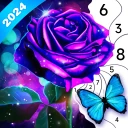
Screenshots


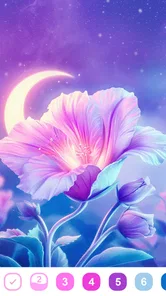

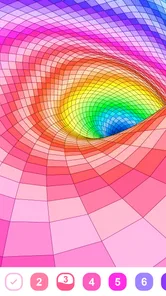



Analysis by Reviewed
I tried Fancy Color - Paint By Number as a low-pressure way to spend a few spare minutes, and its appeal is clear: it turns coloring into a small, guided routine rather than asking you to plan a picture from scratch. This is a free board game from Mint XX Games, rated for Everyone, and it suits the quiet end of mobile gaming far better than the competitive one. Its 4.8 average from around 32,000 ratings and over 10 million installs suggest a broad audience, but what matters in practice is whether this kind of careful tapping feels calming to you—or starts to feel like a chore.
Why the guided format makes a difference
The first thing I’d tell a friend is that this is a better fit for a specific mood than for every kind of downtime. When I want an activity with a clear next step, numbered coloring gives me somewhere to focus without asking me to invent the subject, choose a palette, or make a dozen artistic decisions. That makes it easy to start even when I feel tired or distracted. It is less suited to moments when I want a game with a changing challenge or a strong sense of surprise.
A practical way to try it is to open one picture and give it a short, uninterrupted session before deciding whether the format works for you. The first few minutes reveal whether matching numbers and tapping regions feels pleasantly absorbing or repetitive. If it is the latter, switching to a puzzle with more problem-solving or to an open drawing app will probably be more rewarding than expecting this one to become a different kind of game.
Choosing the right picture for the moment
Not every image will suit every break. I’d choose based on how much attention I can give: a design that appears to have broader spaces is easier to make progress on when I’m waiting somewhere, while a more detailed picture makes more sense when I can settle in and take my time. This is a useful trade-off to keep in mind because the subject may catch your eye, but the size and density of its spaces affect how comfortable the actual coloring feels.
If you’re unsure what to pick, I’d avoid treating the newest image as automatically the best one. Choose something that looks manageable at your phone’s screen size and return to it when you have another quiet moment. That approach makes the saved progress more useful and reduces the chance of spending a short break browsing instead of coloring.
Bringing Art to Your Fingertips
Fancy Color - Paint By Number is literally putting art in your hands. You don’t need to be a pro to create something beautiful. The app offers a wide range of images that you can color by following numbers. It’s like those coloring books we loved as kids, but modernized for the digital age.
A gentle entry into a familiar format
Getting started is as simple as pie. Once you download and open the app, you’re greeted with a library of images categorized for easy navigation. Whether you fancy coloring animals, landscapes, or intricate mandalas, there’s something for everyone. Just tap on an image, and the app will guide you step-by-step. Each number corresponds to a color, and it’s your job to fill in the blanks. It’s almost therapeutic!
More From Our News Desk

 Gmail
GmailGmail in a Busy Inbox: Who Benefits Most?
From first account to crowded workday, Gmail earns its place through dependable search and flexible sorting—but its best fit depends on how much inbox maintenance you can tolerate.

 Prime Video
Switching to Prime Video: What Changes in Your Viewing Routine
Prime Video can make a compelling second home for streaming, but switching means learning a different catalog, rental layer, and route from browsing to playback.

 Universal TV Remote Control
Universal TV Remote Control Works Best as a Reliable Backup
A phone remote earns its place through quick setup and reliable habits. Here is how to get more from Universal TV Remote Control—and where its limits show.

 Weather - By Xiaomi
Weather by Xiaomi Review: Clear at a Glance, Less Clear Up Close
Xiaomi’s weather app makes everyday forecasts quick to scan, but its calm surface can leave useful details and recovery paths harder to find than they should be.

 X
XX Under Pressure: Can It Recover When Posting Goes Wrong?
A resilience-focused review of X, examining setup, mistaken posts, interruptions, weak connections, and the gaps that matter when recovery needs to be dependable.

 Clash of Clans
Clash of Clans Is Won Between the Battles
Its raids are quick; its community is a long-term project of coordination, teaching, rivalry, and shared responsibility—with all the friction that entails.
Latest News



The numbered format is the main reason I’d suggest this to someone who wants a creative pause without the blank-page pressure. Unlike freehand drawing apps, it doesn’t ask you to choose a composition, manage brushes, or decide how colors should work together. You follow the picture’s own structure. That makes it approachable for a short break, though it also means this is not the right pick if you want to make an original illustration or experiment with your own palette.
Precision, progress, and small trade-offs
What’s really cool about this app is the Zoom Feature that allows you to color even the tiniest details with precision. Plus, there's a handy color palette that adjusts automatically as you progress, so you’re never left guessing which shade goes where. The app also saves your progress automatically, so you can stop and pick up where you left off anytime.
A useful way to keep detailed pictures from becoming fiddly is to zoom in only when the remaining spaces are too small to tap comfortably. I’d work through the larger visible areas first, then use zoom for the stubborn little gaps; constantly magnifying and moving around can interrupt the relaxed rhythm. Automatic progress saving also makes it easier to treat a picture as several short sessions rather than something you have to finish in one sitting.
Making short sessions feel complete
For a quick visit to the game, I’d set a small personal stopping point before I begin: finish one color, clear a visible patch, or simply stop when I notice that I’m hunting around more than I’m enjoying the picture. These aren’t built-in goals; they’re a way to make a casual coloring session feel deliberate without turning it into a race. The format rewards steady attention, so a modest target can be more satisfying than trying to complete a whole detailed image in one go.
That also helps when you’re interrupted. Since progress is saved automatically, you can put the phone away without needing to remember exactly where you were. When you return, it’s worth taking a moment to reorient yourself by checking the active color and the nearby unfinished areas instead of tapping quickly at random. A brief pause to find your place is less frustrating than making the session feel like a test of memory.
Another neat feature is the daily updates. Every day, there’s a fresh batch of images to choose from, keeping the experience exciting and new. You’ll never run out of artwork to color!
That steady supply is handy when you finish one image and want another without having to search elsewhere. Still, a new selection is not automatically a reason to switch pictures midstream. If you prefer a sense of completion, choosing one image and returning to it later can feel more satisfying than browsing every time you open the app.
Sound, setting, and the pace of play
The mood here comes chiefly from the act of filling a picture in gradually: the numbered spaces give each session a clear, quiet focus. It works well during a tea break, while waiting for an appointment, or at the end of a busy day when I want something more absorbing than scrolling but less demanding than a strategy game. I’d keep expectations modest if sound and animation are central to your idea of atmosphere; the lasting appeal is the coloring process itself, not a dramatic world or a deep game system.
For a more comfortable routine, I’d pick an image based on the time I actually have. A picture with lots of tiny cells may suit a longer, settled session, while a simpler-looking one is a better match for a brief pause. That small choice matters: the app stays relaxing when I can make visible progress, but precision work can feel slow if I’m trying to squeeze it into a minute or two.
When a different kind of game is a better fit
Compared with the usual mobile board and puzzle options, this is not about planning moves, competing for a result, or solving a changing layout. Its challenge is mainly careful selection and completion. I’d choose a logic puzzle when I want to test myself, a competitive board game when I want interaction, and a freehand art tool when I want creative control. The appeal here is deliberately narrower: it gives me an orderly, visual task without asking me to perform or make something from nothing.
That distinction matters if you are choosing an app for a particular setting. In a waiting room, I like that I can make a little progress and pause; during a social game night, I would reach for something that involves other people. It can also be a useful alternative to endless feed scrolling, but only if repetitive tapping feels restful to you. If you need frequent changes in mechanics to stay engaged, the consistent coloring loop may not hold your attention for long.
Who will enjoy it—and who may not
One of the things I adore about Fancy Color - Paint By Number is that it’s relaxing without being mindless. It’s an excellent way to unwind after a hectic day or just to kill some time creatively. The satisfaction of completing an image and seeing it come to life is immensely gratifying.
It is also a good fit for people who enjoy orderly, step-by-step activities, including families looking for a simple coloring format to share. I wouldn’t treat it as a substitute for learning to draw, though: the numbered guide makes decisions for you, which is exactly its comfort and its limitation. If you want open-ended creativity, a blank canvas or physical coloring book gives you more control; if you want a gentle task with a clear endpoint, this format is easier to pick up.
Sharing the activity without turning it into homework
For a family session, I’d let each person choose what to work on rather than asking a child to finish a complicated image. The simple matching idea is easy to explain, but small regions can demand patience and precise taps. Taking turns choosing colors or pointing out a section to complete can make it a relaxed shared activity, while insisting on a finished picture risks draining the fun out of it.
It can also suit an adult who wants a quiet screen break but doesn’t enjoy conventional games. The useful question is not whether you consider yourself artistic; the guide removes much of that pressure. It’s whether you like repetitive, visible progress. If you find that kind of repetition soothing, the pictures give the session a purpose. If it makes you impatient, the same structure will feel restrictive rather than calming.
Moreover, it’s a fantastic tool for kids and adults alike. Kids can develop their number recognition and fine motor skills, while adults can enjoy a break from the monotony of daily life.
For children, I’d use it as a shared activity rather than assume every child will want to work through detailed areas alone. Adults may find it especially useful as a screen-based alternative to paper coloring when they are away from home, while anyone who dislikes tapping small targets should be cautious about choosing intricate art. The app is free to start, with in-app purchases ranging from $0.99 to $69.99 per item, so it’s sensible to check purchase choices before handing a device to a child or making the game part of a regular routine.
Cost, device comfort, and getting started
The game is free to download, which makes it easy to see whether its central loop suits you before spending anything. Since individual in-app purchases are available, I’d treat them as optional decisions rather than part of the basic promise of a coloring game. If you’re setting it up for a child, review purchase controls on the device and agree on whether purchases are off limits; that simple step avoids turning a calm activity into an unexpected spending conversation.
The current version is 1.7.1.3, and Android users need 5.1 or later. The game is also available on iOS. I’d check the display comfort before choosing intricate pictures: a larger screen can make small areas easier to manage, while a compact phone is handy for brief sessions but may mean more zooming. The Everyone rating makes its intended broad audience clear, though young players can still benefit from an adult helping them navigate choices.
Version, access, and the atmosphere verdict
The current version is 1.7.1.3, and it runs on Android 5.1 or later. I’d consider that compatibility useful for people keeping an older device in service, while the Everyone rating makes its general audience clear. As with any phone-based coloring activity, screen size affects comfort: a larger display can make small regions easier to handle, whereas a compact phone is more convenient for quick sessions but may call for more zooming.
If you are deciding between this and a traditional coloring book, the choice is mostly about convenience and control. Paper offers tactile materials and free choice of color; this game supplies numbered guidance, a portable library, and saved progress. I’d choose it for a calm, guided break, not for the feel of real pencils or the freedom to redesign an image.
Final Thoughts
If you haven’t tried it yet, give Fancy Color - Paint By Number a go. It’s a simple, fun, and engaging app that brings out the artist in everyone. Whether you’re five or fifty, you’ll find joy in coloring without the hassle of traditional art supplies. So, grab your phone, download the app, and start painting your world in numbers!
Fancy Color - Paint By Number Frequently Asked Questions
Does Fancy Color - Paint By Number need much artistic experience?
No artistic experience is needed to get started. Fancy Color - Paint By Number uses a numbered guide, so you tap the area marked with a number and fill it with the matching color. This makes the activity approachable for beginners as well as people who already enjoy coloring. The guided approach keeps the focus on relaxing and completing an image rather than choosing colors or drawing from scratch.
What kind of game is Fancy Color - Paint By Number?
Fancy Color - Paint By Number is a board game centered on digital coloring. Its store summary describes it as a way to relax and color away stress, and the main activity is following numbered areas to complete designs. If you enjoy calm, casual activities more than fast-paced challenges, this format may suit you. The game is free to download, with optional in-app purchases.
What is Fancy Color - Paint By Number and how does it work?
Fancy Color - Paint By Number is a digital coloring game for Android and iOS devices, allowing users to paint designs by following a numbered guide. The app provides a relaxing and creative outlet, enabling users to de-stress while creating artwork. Users simply tap on the corresponding numbers to fill in colors, making it easy for anyone to produce visual pieces regardless of their artistic skill level.
Who develops Fancy Color - Paint By Number, and what devices can run it?
Fancy Color - Paint By Number is developed by Mint XX Games and is available for Android and iOS devices. On Android, it requires version 5.1 or later. Before downloading, check that your device meets the applicable system requirements so the game can run properly. The game is free to download, with optional in-app purchases available.
Is Fancy Color - Paint By Number free to download and use?
Yes, Fancy Color - Paint By Number is free to download and use. It offers coloring pages for users to enjoy. However, the game does include optional in-app purchases, with prices ranging from $0.99 to $69.99 per item. These purchases are optional, so users can try the free experience before deciding whether they want to spend money on additional content.
Pros
- Simple and intuitive interface
- Wide range of colors and designs
- Regular updates with new patterns
- Offline mode available
- Suitable for all age groups
Cons
- Ads can be intrusive at times
- Limited free content
- Premium subscription required for full access
- Occasional app crashes
- No option for custom designs