Christmas Color -Painting Book
- 182.00
- 4.9
- Installs
- 100.00K
- Price
- Free

Screenshots
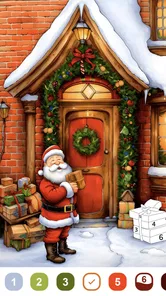

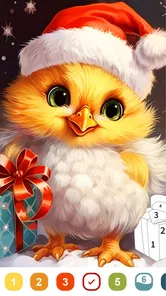


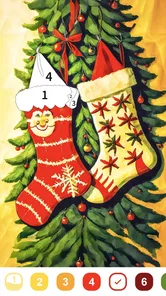
Analysis by Reviewed
When I want a quiet, low-effort break, a paint-by-number game is an appealing choice: it gives my hands something to do without asking me to plan a whole project. Christmas Color - Painting Book is built around that simple holiday pastime. I’d reach for it during a short pause, rather than expecting a deep game with a long learning curve or complicated goals.
What to expect from a quick session
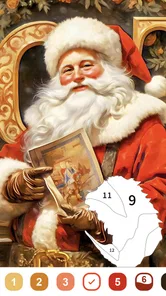
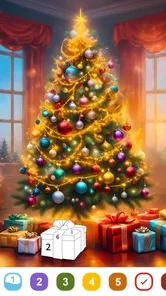
The basic idea is easy to understand: choose a festive picture and fill its numbered areas. That familiar structure makes it approachable for someone who wants to start coloring right away, and it also sets expectations. This is a gentle, guided activity, not a free-drawing tool or a strategy-heavy board game. If I had only a few minutes between errands, I could settle into one picture without needing to learn elaborate controls first.
The game is free, with optional in-app purchases ranging from $0.99 to $69.99 per item. I’d treat that as a reason to check purchase prompts carefully, particularly if a child is using the device. It is rated Everyone, and the simple coloring premise suits a broad audience, though that age rating doesn’t tell me how a particular child will respond to screen time or spending choices.
When coloring feels like a useful break
A realistic use for Christmas Color - Painting Book is winding down after a busy day: I could pick a seasonal image, work through a few numbered sections, and stop when I’m ready. The guided approach can be less demanding than starting a blank canvas, because the picture already provides the outline and the numbers direct the next step. That makes it a better fit for a tired mind than an art app that expects me to choose tools, compose a scene, and invent every detail.
There is a trade-off, though. Paint-by-number play offers a clear path, but less creative freedom than open-ended drawing or a physical coloring book. If I want to sketch my own Christmas card, experiment with brush techniques, or color outside a prescribed palette, I’d choose a drawing app or paper and pencils instead. This game is for relaxed completion, not for developing a full illustration workflow.
Who will enjoy the guided format
I think the strongest audience is someone who likes the small satisfaction of filling in a picture but doesn’t want to make artistic decisions at every step. It can also suit a parent looking for a simple activity to share with a child, provided the adult handles purchase settings and keeps the session appropriate for the child. The Everyone rating is reassuring as a broad content classification, but I would still supervise younger players around device use and any purchase prompts.
It is less compelling for people who want a puzzle with changing rules, a competitive goal, or a story to follow. Calling it a board game is accurate as a store category, but the experience is closer to guided digital coloring than to a traditional board game with turns and tactics. That distinction matters if you are choosing something for a game night: it is better as a quiet side activity than as the centerpiece of a group competition.
More From Our News Desk

 Gmail
GmailGmail in a Busy Inbox: Who Benefits Most?
From first account to crowded workday, Gmail earns its place through dependable search and flexible sorting—but its best fit depends on how much inbox maintenance you can tolerate.

 Prime Video
Switching to Prime Video: What Changes in Your Viewing Routine
Prime Video can make a compelling second home for streaming, but switching means learning a different catalog, rental layer, and route from browsing to playback.

 Universal TV Remote Control
Universal TV Remote Control Works Best as a Reliable Backup
A phone remote earns its place through quick setup and reliable habits. Here is how to get more from Universal TV Remote Control—and where its limits show.

 Weather - By Xiaomi
Weather by Xiaomi Review: Clear at a Glance, Less Clear Up Close
Xiaomi’s weather app makes everyday forecasts quick to scan, but its calm surface can leave useful details and recovery paths harder to find than they should be.

 X
XX Under Pressure: Can It Recover When Posting Goes Wrong?
A resilience-focused review of X, examining setup, mistaken posts, interruptions, weak connections, and the gaps that matter when recovery needs to be dependable.

 Clash of Clans
Clash of Clans Is Won Between the Battles
Its raids are quick; its community is a long-term project of coordination, teaching, rivalry, and shared responsibility—with all the friction that entails.
Latest News



Unwrapping the Features
Right off the bat, Christmas Color - Painting Book impresses with its delightful assortment of holiday-themed images. We're talking snowflakes, Santa, reindeer, and everything else that screams Christmas. The app is pretty intuitive, so you won't need a PhD to navigate through it. Just tap, pick your favorite image, and start coloring away!
Color Your World
The color palette is as vibrant as a Christmas tree in full bloom. You get a wide range of colors which are perfect for bringing those festive images to life. I found myself mixing and matching colors like a kid in a candy store, and it was just pure fun. Plus, the app’s user-friendly interface makes it easy to switch colors or undo mistakes with just a tap, ensuring that your masterpiece turns out just the way you want it.
Small choices that make a session smoother
For a more comfortable session, I’d start with a picture that looks manageable rather than choosing one only because it is the most detailed. On a phone, dense areas can mean more repeated tapping and a greater chance of losing patience; a larger screen can make those small regions easier to target. I’d also treat undo as a way to correct an accidental tap, not as a substitute for choosing colors deliberately. Those little habits help keep a relaxing activity from turning into fiddly work.
The game is from Mint XX Games, and its current version is 1.0.0.6. It requires Android 5.1 or later, so the device requirement is modest by current standards, but that alone doesn’t guarantee identical smoothness on every phone. A newer device may feel more responsive when handling detailed images, while an older or busy device can make taps feel less immediate. I’d close other demanding tasks if the game seems sluggish, then reopen it before assuming the coloring itself is the problem.
How to make detailed pictures less tiring
Paint-by-number can look effortless at first, but a crowded picture may ask for many small taps. I’d avoid starting a detailed image when I’m already impatient or trying to finish something in a hurry. Choosing a simpler-looking scene is a practical way to keep the activity relaxing, and it gives me a better sense of whether the tap-and-fill rhythm suits me before I settle into a longer session.
Another useful approach is to work in short stretches instead of trying to complete a picture in one sitting. I can color a few sections, pause, and return when I want another quiet moment. That is especially helpful on a phone, where holding the device in one position and repeatedly tapping a small screen can become uncomfortable. If I’m using a tablet, the larger display may make targeting easier, but I’d still take breaks rather than treating completion as a race.
Relax and Unwind
One of the best things about this app is how relaxing it is. Seriously, if you’re looking to unwind after a hectic day of Christmas shopping or just want to chill with a cup of cocoa, this app is your go-to. The background music is soothing, adding to the overall tranquil experience. It feels like a mini-vacation amidst the holiday hustle and bustle.
A realistic routine for everyday use
Picture a quiet evening after dinner: I have a few minutes before starting another task, but I’m not in the mood to read or watch something. I could open the game, choose a festive picture, and fill in a few areas while sitting comfortably. When I need to leave, I can stop instead of turning the moment into a commitment to finish the whole image. That makes the game more useful as a small break than as an activity that needs a dedicated hour.
It may also work as a low-pressure shared pastime when family members are nearby. One person can choose a picture and take turns deciding which areas to color, though the experience is still fundamentally individual rather than a structured multiplayer game. I would not count on it to keep a group engaged in the way a card or tabletop game might. Its value in that setting is the calm, casual conversation around a simple activity.
Reliability and heavier use
For an occasional coloring break, the straightforward format should be easy to return to: there is no complicated setup to remember before choosing a picture. I would still avoid assuming that every session will feel equally smooth, since performance depends partly on the device and what else is running. If an interruption happens, reopening the game is a sensible first step; I would avoid promising that unfinished work is always recovered in a particular way. For long stretches, I’d take breaks and keep the phone comfortable to hold, since repeated tapping can become tiring even when the game itself is calm.
Perceived speed matters more here than raw power. The central action is tapping numbered areas, so even a small delay can make coloring feel less satisfying if it happens repeatedly. I’d judge responsiveness during a short test session rather than assuming that a compatible device will feel perfect in every situation. If taps seem to lag, closing other resource-heavy apps and trying again is a reasonable troubleshooting step; if the phone remains strained, a simpler picture or a different device may be the more comfortable choice.
For heavier use, the main friction is likely to be human rather than strategic: eyes and fingers can tire from focusing on small sections for a long time. I’d use a comfortable brightness, hold the screen at a natural angle, and pause when the activity stops feeling restful. The game’s relaxed pace does not automatically make extended screen use relaxing. If I notice myself tapping quickly just to clear a picture, that is a cue to stop and come back later.
Choosing between this, paper, and other apps
Compared with broad coloring apps, the Christmas focus is both its clearest appeal and its limitation. It gives the experience a seasonal mood, which is great when I want festive imagery, but less useful if I’m looking for subjects to enjoy all year. A physical coloring book avoids screen use altogether, while a general art app offers more freedom but asks more of the user. Choosing between them comes down to whether I value guided holiday coloring, hands-on paper, or creative control.
There is also a difference between paint-by-number and free digital coloring. With numbered sections, I don’t have to decide which color belongs in every part of the picture, so it is easier to begin when I have low energy. The cost of that guidance is that I follow the image’s structure instead of shaping it myself. Someone who enjoys inventing palettes or drawing original details may soon want a more open art tool; someone who wants a clear, low-stakes task may prefer the guided format.
Paper is the better choice when I want to step away from screens, use physical pencils, or avoid digital distractions. A general-purpose coloring app may be better if I want varied subjects beyond Christmas. This game makes most sense when the holiday theme is precisely what I’m after and I want the convenience of coloring on a device. I would treat that seasonal identity as a deliberate niche, not as a weakness that the game needs to hide.
What to know before handing over the phone
Because the game is free to download but includes optional purchases, I’d check the device’s purchase controls before letting a child use it independently. The listed item prices span from $0.99 to $69.99, a wide enough range that I would not leave spending decisions to a young player. That does not make the coloring itself unsuitable for families; it simply means the adult should decide how purchases are handled before the game becomes part of a child’s routine.
If you are wondering whether it is suitable for a quick try, the free entry makes that straightforward, while purchase prompts deserve attention as you explore. If you are wondering whether it replaces a full drawing app, it does not: the numbered format is intentionally more guided. And if you want to know whether it is a good fit outside the holidays, I would be cautious. Its Christmas subject matter is the main reason to choose it, so people looking for evergreen variety may get more from a broader coloring collection.
Share the Joy
Finished your artwork and feeling proud? The app lets you share your creations with friends and family on social media. Trust me, there's nothing like spreading a little holiday cheer by showcasing your artistic prowess. It’s a fun way to connect with loved ones, especially if you’re all scattered across different places during the festive season.
Sharing is most appealing when I have made something I genuinely want to show, rather than treating every finished image as a post. It can turn a quiet solo activity into a small seasonal gesture: send a picture to a relative, or use it as a conversation starter with someone who also enjoys Christmas crafts. I’d still consider who will see the image and whether I want to post it publicly before sharing. The feature adds a social option, but it does not change the core experience into a collaborative game.
With a 4.9 average from around 1,300 ratings, over 100,000 installs, and 182 written reviews, the game has drawn a positive response from players. Those figures are useful context, but they don’t tell me whether its particular coloring style will suit you. I’d recommend trying it if you want a free, accessible holiday activity and are happy with numbered coloring; I’d skip it if you need year-round variety, freehand tools, or a screen-free pastime.
Its Android requirement begins at version 5.1, which makes it compatible with a range of older devices, though compatibility and comfort are different questions. A phone that can install a game may still have a small display or feel less responsive than a newer one. I’d make the first session a practical test: open a simple image, see whether the controls feel comfortable, and check that the device stays responsive. That is more useful than relying on the minimum requirement alone to predict how pleasant longer sessions will be.
Mint XX Games released it on October 24, 2024, and the current version is 1.0.0.6. For someone deciding whether to install it now, the key question is less about version history and more about the kind of experience they want: a seasonal, guided coloring activity that can fit into spare moments. If that description matches, the game is easy to understand and has a clear purpose. If you are expecting extensive creative tools or a demanding game loop, its simplicity will feel limiting rather than refreshing.
So, if you're looking to add a little color to your Christmas and enjoy some creative downtime, Christmas Color - Painting Book might just be the app for you. With its festive themes, engaging features, and relaxing vibes, it’s a delightful addition to your holiday toolkit. Grab your device and start coloring your Christmas memories today!
Christmas Color -Painting Book Frequently Asked Questions
Is Christmas Color - Painting Book free, and what should I know about optional purchases?
Christmas Color - Painting Book is free to download, so you can try its paint-by-number coloring experience without paying upfront. The game also offers optional in-app purchases, with prices ranging from $0.99 to $69.99 per item. Check the purchase options before confirming anything, especially if children may use the device, and use your device’s purchase controls if you want to prevent accidental spending.
What kind of game is Christmas Color - Painting Book?
Christmas Color - Painting Book is a board-category game centered on paint-by-number coloring. Its short description is simply “Christmas Color,” while its main appeal is using coloring exercises for stress relief. That makes it suited to players looking for a calm, creative activity rather than a fast-paced challenge. The developer is Mint XX Games, and the game is free to download.
What is Christmas Color - Painting Book?
Christmas Color - Painting Book is a festive-themed coloring app designed to bring holiday cheer and creativity to users of all ages. The app offers a wide variety of Christmas-themed coloring pages, including Santa Claus, Christmas trees, snowmen, and more. Users can enjoy a relaxing coloring experience with a diverse palette of colors and tools.
Is Christmas Color - Painting Book suitable for children?
Yes, Christmas Color - Painting Book is suitable for children. The app features a user-friendly interface and a wide range of coloring pages that are appropriate for kids. With simple controls and easy navigation, children can explore their creativity and enjoy hours of coloring fun in a safe and engaging environment. It carries an Everyone content rating, though parents may still want to review the optional purchases and manage purchase permissions on a shared device.
Does Christmas Color - Painting Book offer any in-app purchases?
Yes, while Christmas Color - Painting Book is free to download, it does offer in-app purchases. These purchases can include additional coloring pages, premium color palettes, and special tools that enhance the coloring experience. Users can enjoy the basic features for free, but some advanced options require payment. The listed purchase range is $0.99 to $69.99 per item, so it is sensible to check the price shown for any item before buying.
Pros
- Vast variety of Christmas-themed designs.
- Intuitive and user-friendly interface.
- Offline mode available for convenience.
- Frequent updates with new content.
- Suitable for all ages.
Cons
- Ads can be intrusive at times.
- Limited color palette without purchase.
- Some designs require in-app purchases.
- Performance issues on older devices.
- No social media sharing integration.