Fancade: 100+ Mini Games
- 1.84K
- 4.3
- Installs
- 10.00M
- Price
- Free

Screenshots

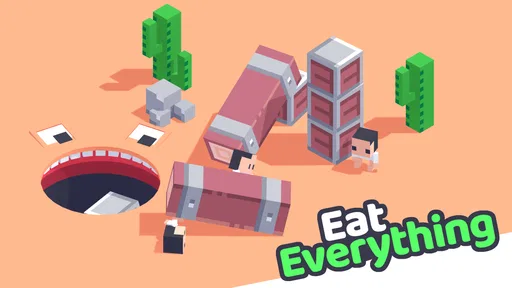




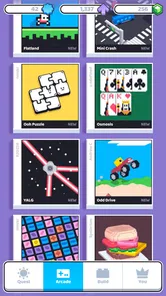

Analysis by Reviewed
I tend to judge a casual game by whether it fits naturally into an ordinary day, not by how long it can keep me glued to a screen. Fancade: Simple Games works best as a place to dip into short arcade-style challenges, then switch to something different when I feel like a change. Its more unusual draw is that it also invites players to make games, so it can appeal to both people who simply want a quick distraction and those curious about how small games are put together.
What free access means in practice
The game is free to download, with optional in-app purchases listed from $0.99 to $24.99 per item. That makes it easy to try before spending anything, but I would treat the purchase options as optional rather than assume they are necessary for enjoying the basic idea. If you prefer a one-time purchase with a clearly defined, entirely paid experience, this is a different arrangement; the listed price alone does not tell me what every purchase changes, so I would check the in-game details before buying.
For me, the useful distinction is between being able to try the game without paying and deciding whether an optional purchase improves my own experience. I would first spend time with the free access and notice whether I am returning for the mini-games, the creative side, or both. That gives a better basis for weighing a purchase than treating the upper end of the listed range as a required cost. If I were setting it up for a younger player, I would also agree on how purchase prompts should be handled before handing over the device.
A collection that suits short breaks
Fancade is an arcade game from developer Fancade, and its central appeal is variety in compact doses. Instead of committing to one lengthy campaign, I can sample a small challenge, decide whether its particular style suits me, and move on. That makes it useful while waiting for an appointment or taking a brief pause between tasks: I can play without having to set aside a full evening or remember a complicated story when I return.
That variety also creates a useful way to choose what to play. When I have little time, I’d browse for a challenge whose objective is immediately understandable rather than start something that seems to demand a longer learning curve. If one game’s controls or rhythm do not click, switching is part of the appeal, not a reason to force myself through it. The trade-off is that a collection can feel less focused than a single polished puzzle or platform game; people who want a sustained narrative or mastery of one deep system may prefer a dedicated title.
Who is likely to get the most from it?
I’d recommend giving it a look if you enjoy trying different arcade ideas, have small pockets of free time, or like the prospect of experimenting with a game-making tool. The creative angle gives curious players another reason to stay after sampling the games: instead of only asking whether a challenge is fun, you can start thinking about how its rules might be changed or rebuilt. That makes it a more interesting pick for someone who likes tinkering than a standard game collection would be.
It is less suited to anyone who wants a single, carefully paced adventure, a competitive experience built around one central mode, or a game that never presents optional spending. Parents may also want to look at the purchase prompts together with younger players, even though the age rating is Everyone. That rating makes the game broadly accessible, but it does not mean every family will have the same preferences about in-app purchases or screen time.
More From Our News Desk

 Gmail
GmailGmail in a Busy Inbox: Who Benefits Most?
From first account to crowded workday, Gmail earns its place through dependable search and flexible sorting—but its best fit depends on how much inbox maintenance you can tolerate.

 Prime Video
Switching to Prime Video: What Changes in Your Viewing Routine
Prime Video can make a compelling second home for streaming, but switching means learning a different catalog, rental layer, and route from browsing to playback.

 Universal TV Remote Control
Universal TV Remote Control Works Best as a Reliable Backup
A phone remote earns its place through quick setup and reliable habits. Here is how to get more from Universal TV Remote Control—and where its limits show.

 Weather - By Xiaomi
Weather by Xiaomi Review: Clear at a Glance, Less Clear Up Close
Xiaomi’s weather app makes everyday forecasts quick to scan, but its calm surface can leave useful details and recovery paths harder to find than they should be.

 X
XX Under Pressure: Can It Recover When Posting Goes Wrong?
A resilience-focused review of X, examining setup, mistaken posts, interruptions, weak connections, and the gaps that matter when recovery needs to be dependable.

 Clash of Clans
Clash of Clans Is Won Between the Battles
Its raids are quick; its community is a long-term project of coordination, teaching, rivalry, and shared responsibility—with all the friction that entails.
Latest News



First impressions
Fancade: Simple Games is a delightful mobile app that brings a collection of mini-games right to your fingertips. As someone who loves exploring new apps, I was excited to dive into this one and share my thoughts. So, let's get into it!
First Impressions
When I first opened Fancade: Simple Games, I was greeted by a clean and straightforward interface. The app is designed to give you quick access to a variety of games, and it doesn’t disappoint in terms of simplicity. The moment you launch it, you’re ready to play without any unnecessary frills or complicated menus. For those who appreciate a no-nonsense approach to gaming, this app is a breath of fresh air.
Dive into the Game Variety
One of the standout features of Fancade: Simple Games is the sheer number of games available. Whether you’re into puzzles, racing, or even platformers, there's something here to tickle your fancy. Each game is unique and offers its own set of challenges, which keeps things interesting. I found myself jumping from one game to another, always eager to see what the next one had in store.
The games are designed to be quick and engaging, perfect for those moments when you have a few minutes to kill. Whether you're waiting for your coffee to brew or just taking a short break, Fancade has a game for that.
User-Friendly and Fun
I have to say, the user experience in Fancade is top-notch. It's incredibly easy to navigate through the app, and you can tell a lot of thought has gone into making it as user-friendly as possible. The games load quickly, and I didn't encounter any glitches or crashes during my playtime. This is crucial for maintaining the flow and enjoyment of a game session.
Moreover, the graphics are charmingly minimalist, which is a perfect match for the app’s overall vibe. It’s not about flashy graphics or high-end visuals; it’s about having fun and enjoying a diverse set of games.
Endless Creativity with Game Building
One of the most intriguing aspects of Fancade is the ability to create your own games. Yes, you heard that right! The app includes a simple yet powerful game builder that lets you design and share your creations with the community. This feature adds a whole new layer of engagement for those who love to tinker and experiment with game design. It’s a fantastic way to unleash your creativity and see what you can come up with.
For a first experiment, I would keep the idea deliberately small: choose one action, make the goal easy to explain, and see whether a new player can understand what to do without a long introduction. That kind of test makes the building side feel approachable, while also revealing how much work sits behind a seemingly simple game. It is a better use of a short session than trying to plan a sprawling project before learning what the tools make comfortable.
The creator side changes the value of the app for people who like to ask “how does this work?” after playing. A mini-game can become a prompt to think about its rules, pacing, or presentation, rather than just another item to finish. I would still see it as playful experimentation, not a replacement for software intended for larger projects. If my goal were to learn a full development workflow, I would choose a more specialized tool; if I wanted to tinker casually on a phone, this is a more fitting starting point.
The Final Verdict
All in all, Fancade: Simple Games is a fantastic app for anyone who enjoys a bit of light gaming on their mobile device. It’s perfect for gamers of all ages, offering a delightful mix of simplicity, variety, and creativity. Whether you're a casual gamer or someone who loves to dive deep into game creation, Fancade has something to offer.
In a world filled with complex and often overwhelming mobile games, Fancade stands out as a beacon of simplicity and fun. If you haven't tried it yet, I highly recommend giving it a go. You just might find yourself hooked on its charming allure.
Small habits that make the collection easier to enjoy
A practical way to approach a library of mini-games is to treat each one as a trial rather than a commitment. I would give a new challenge a moment to explain its central action, then decide whether I want to learn its timing or move on. This avoids turning variety into a chore, especially when I only have a few minutes. It also helps me notice which styles I actually enjoy instead of assuming I should like every game in the collection.
The game-building option benefits from the same low-pressure mindset. I would start with one small idea—one clear goal or interaction—and test whether it feels understandable before trying to make something elaborate. A compact experiment is easier to judge and adjust than a project with too many moving parts. The feature is appealing for curiosity and playful learning, but I would not choose Fancade as a substitute for a dedicated development tool if I wanted a full production workflow or professional-level controls.
How it compares with other arcade choices
Compared with a typical single-purpose arcade game, Fancade’s strength is the option to change activities without switching apps, plus the creative dimension of making games. A focused alternative may do a better job if I want one finely tuned mechanic, a long progression path, or a consistent competitive loop. Here, breadth is the point, and that can mean some individual games feel like brief experiments rather than a deep experience worth returning to for hours.
For a realistic everyday use, I can see opening it during a short commute break or while waiting for food, sampling a challenge, and stopping when the interruption ends. I would not count on every session feeling equally rewarding: the next game may not match my mood, and deciding what to try can take a little of the time I meant to fill. If I want dependable depth from a particular genre, choosing a dedicated puzzle or racing game is the clearer option.
That is the main trade-off against familiar arcade downloads: a single-game alternative usually makes its purpose obvious, while this collection asks me to explore and accept that some experiments will suit me more than others. I would pick a focused game when I want to improve at one mechanic or return to a familiar challenge after a long day. I would reach for Fancade when I am in an exploratory mood and would rather sample different ideas than spend time choosing and installing separate titles.
When it fits—and when it does not
A useful everyday routine is to open the game during a genuine pause, choose one challenge with a clear objective, and stop when the pause is over. For example, if I have a few minutes before meeting someone, I can use a quick game to fill the gap without needing to remember a plot or make a long-term commitment. If I have only a moment, though, browsing itself can consume part of that time; a familiar single-mode game may be the better choice when I want to start playing immediately.
I would also separate two kinds of interest when deciding whether to keep it installed. If I mainly want quick entertainment, I should judge it by whether I enjoy returning to different challenges. If I am drawn to making games, I should approach that side as a way to explore simple ideas, not as a promise that every creative project will be effortless. Those expectations help avoid disappointment: the collection is broad by design, but breadth does not guarantee that every mini-game will match my tastes.
For younger players, the Everyone age rating is reassuring about broad accessibility, while purchase decisions still deserve a little family attention. I would talk through whether spending is allowed rather than assume the free download means there can never be a cost. For adults who prefer to avoid purchase prompts entirely, that distinction may be enough to make a fully paid alternative more comfortable.
Compatibility and the buying decision
The game is rated Everyone, runs on Android 6.0 or later, and its current version is 1.14.9. It has a 4.0 average from around 102,000 ratings, with over 10 million installs and about 1,700 written reviews. Those figures suggest that it has found a substantial audience, but they do not tell me whether its mix of quick games and creation tools will match an individual player’s taste.
My verdict is to try it if you want a free, varied arcade collection and are comfortable deciding for yourself whether any optional purchase is worthwhile. Skip it if you would rather pay for one focused game, avoid in-app purchase choices altogether, or need a deep, consistent experience every time you open an app. For me, the strongest reason to keep it around is that it offers two different kinds of curiosity: finding a small game I enjoy, and wondering how I might build one of my own.
Before deciding, I would check that the device meets the Android minimum and consider what I actually want from a mobile game: a quick change of pace, a single polished challenge, or a creative outlet. The free entry makes trying the first of those straightforward, but the right choice depends on personal taste rather than popularity alone. With a 4.0 average and a large audience, it is clearly familiar to many players; my recommendation is still conditional on enjoying variety and being comfortable with optional purchases.
Fancade: 100+ Mini Games Frequently Asked Questions
How much space should I leave on my device for Fancade?
It is sensible to leave enough free storage for the app and its data, especially if you plan to explore lots of mini-games or try making games of your own. Fancade brings multiple short game experiences together, so you can sample different kinds of play without installing a separate app for each one. Check your device’s available storage before downloading.
Does Fancade work offline?
If offline play is important to you, consider that Fancade brings together a collection of mini-games and game-making features, and some experiences may depend on connectivity. Your access can also vary depending on what you are trying to do in the app. It is a good idea to open the game while connected before relying on it for a trip or another time without internet access.
Is Fancade easy for beginners to use?
Fancade is designed around short mini-games, which makes it easy to try an activity and move on if it is not your style. The app also invites players to make their own games, so there is room to explore beyond simply playing. Beginners who are mainly interested in the games can start there, while creative users can take their time learning the creation side.
Can I play Fancade without making an account?
You can approach Fancade as a collection of mini-games without needing to begin by creating your own. Whether you want to play, explore the game-making side, or share creations, the exact options available may depend on the feature you choose. If you prefer to keep setup simple, start with the games and review any prompts shown when you use additional features.
What kind of game is Fancade, and what can I expect when I open it?
Fancade: Simple Games is an arcade game built around a collection of mini-games. Its store summary describes a world of mini-games to unlock, with the option to make your own. That mix makes it suited to players who want to jump between short game experiences as well as those who enjoy experimenting with game creation.
Pros
- Wide variety of mini-games to explore.
- Simple and intuitive user interface.
- Lightweight app with quick installation.
- No internet connection required to play.
- Perfect for short
- casual gaming sessions.
Cons
- Limited social interaction features.
- Some games may feel repetitive.
- Graphics are basic and minimalistic.
- Occasional ads can be distracting.
- No multiplayer mode available.